Mui-datatables: Warning: Failed prop type: Invalid prop `variant` of value `h6` supplied to `Typography`
I am trying the example here and it works fine but in the console I am getting a warning
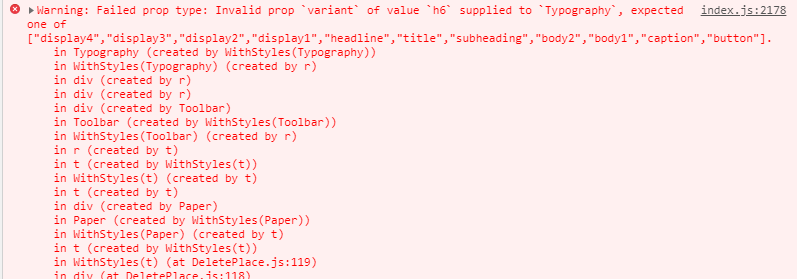
DeletePlace.js is file that I put the particular class. Those r,t etc are not created by me.
Your Environment
| Tech | Version |
|--------------|---------|
| Material-UI | 3.3.2 |
| MUI-datatables | 2.0.0-beta-37 |
| React | 16.6.0 |
| browser | Chrome Version 70.0.3538.77 (Official Build) (64-bit) |
 JayathmaChathurangani
All 7 comments
Hi, I have this same issue, but to be honest I'm not understanding the migration document. What is it that I need to do to get rid of this warning?
 zfrisch
on 3 Jan 2019
zfrisch
on 3 Jan 2019
@zfrisch I am having the same issue. I am a React newbie. My failed attempt was this. Nothing breaks, but warning persists:
import React from "react";
import { HashRouter, Route, Switch } from "react-router-dom";
import indexRoutes from "../routes/index.jsx";
import MuiThemeProvider from 'material-ui/styles/MuiThemeProvider';
import { createMuiTheme } from '@material-ui/core/styles';

const theme = createMuiTheme({
    typography: {
        useNextVariants: true,
    },
});

const App = () => {
    return (
        <MuiThemeProvider theme={theme}>
            <HashRouter>
                <Switch>
                    {indexRoutes.map((prop, key) => {
                        return <Route path={prop.path} component={prop.component} key={key} />;
                    })}
                </Switch>
            </HashRouter>
        </MuiThemeProvider>
    );
};

export default App;
 chanm003
on 3 Jan 2019
chanm003
on 3 Jan 2019
This problem persists as of a fresh download on Jan 31, 2019.
Nevermind - upgrading to material-ui/core (3.9.1) and material-ui/icons (3.0.2) fixed the issue.
 jfederer
on 31 Jan 2019
jfederer
on 31 Jan 2019
I have this issue as well. My current version is 1.0.0 which is quite outdated but right now I can't update to new version. I try this work-around from #313
import React from 'react';
import Typography from '@material-ui/core/Typography';
import Button from '@material-ui/core/Button';
import Link from 'redux-first-router-link';

import AppContainer from 'components/AppContainer';
import errorLoading from 'resources/images/error-loading.svg';
import styles from './styles.scss';
import { ROUTE_HOME } from '../../state/modules/routing';

window.__MUI_USE_NEXT_TYPOGRAPHY_VARIANTS__ = true;

export default class NotFound extends React.Component {
  render() {
    return (
      <AppContainer>
        <div className={styles.container}>
          <img src={errorLoading} className={styles.bigImage} />
          <Typography variant="headline" className={styles.headline}>
            Page Not Found
          </Typography>
          <Typography variant="subheading" color="textSecondary">
            {
              "The page you are looking for has been moved, deleted or doesn't exist."
            }
          </Typography>
          <Link to={{ type: ROUTE_HOME }}>
            <Button
              className={styles.actionButton}
              variant="raised"
              color="primary"
            >
              Home
            </Button>
          </Link>
        </div>
      </AppContainer>
    );
  }
}
but the issue persists. Do you guys have any suggestion? Thank you!
 seta-hungDang
on 22 May 2019
seta-hungDang
on 22 May 2019
The deprecation warnings for this can be silenced with window.__MUI_USE_NEXT_TYPOGRAPHY_VARIANTS__ = true;.
 gabrielliwerant
on 23 May 2019
gabrielliwerant
on 23 May 2019
@gabrielliwerant Yes I put it in the file that the error appears. I also tried the root component but it didn't work as well. Do you have any suggestion where to put it? Thanks!
seta-hungDang
on 24 May 2019
It works for me when I put it in the same file that imports MUIDataTable;
gabrielliwerant
on 24 May 2019
Related issues
 jkeruzec
·
26Comments
jkeruzec
·
26Comments
 rooby
·
32Comments
rooby
·
32Comments
 joaoaguiam
·
32Comments
joaoaguiam
·
32Comments
 RaySheikh
·
20Comments
jkeruzec
·
17Comments
RaySheikh
·
20Comments
jkeruzec
·
17Comments
Most helpful comment
This problem persists as of a fresh download on Jan 31, 2019.
Nevermind - upgrading to material-ui/core (3.9.1) and material-ui/icons (3.0.2) fixed the issue.