Mudlet: Allow drag and drop of images onto Mudlet
Brief summary of issue / Description of requested feature:
Dragging an image onto Mudlet should auto-create a Geyser label with the image at the spot where it's been dropped.
The image should be automatically moved to ~/.config/mudlet/profiles/<profile> as well for the users convenience: dropbox sync will then be able to sync their image UIs and they won't need to keep the pictures in a dedicated folder.
Steps to reproduce the issue / Reasons for adding feature:
This will allow for a lot easier iteration of UIs than the current setup where people have to copy/paste Geyser label code in and then fiddle with getting the path right.
 vadi2
vadi2
All 28 comments
🤔 What happens if the user is using Vyzor rather than Geyser as their UI manage? (I am operating under the assumption that they both do the same sort of thing - but then that area of the project is not my strong point!)
 SlySven
on 16 Nov 2017
SlySven
on 16 Nov 2017
Well it would still work, just not integrate into their UI as best as it could. @Oneymus thoughts?
vadi2
on 17 Nov 2017
Geyser labels can exist outside of Vyzor, yes. It just won't be part of Vyzor's layout hierarchy.
 Etomyutikos
on 17 Nov 2017
Etomyutikos
on 17 Nov 2017
How would these users then go on to move, modify or remove said images, if they never knew the commands involved? The request seems daunting but incomplete.
 Kebap
on 9 Aug 2018
Kebap
on 9 Aug 2018
I imagine it would generate the code that the users would then tweak.
vadi2
on 9 Aug 2018
This seems relevant:
Kebap
on 11 Aug 2018
I'm very strongly of the opinion that we need a UI editor built in. This feature(drag and drop label creation) would be very appropriate for helping place and move those.
 dicene
on 11 Aug 2018
dicene
on 11 Aug 2018
That would be cool, but a lot of work. Perhaps we'll get there piece by piece - better than getting burnt out on something big.
vadi2
on 15 Mar 2020
@Edru2 @Mudlet/lua-interface how do you think we can make persistence work here?
My initial thoughts on this is to auto-create a permanent script (so this would need to be from C++) that pastes in the Geyser code to show the image. The script could be in a 'Drag and drop' folder or something similar.
So it'll work out of the box, and from there people can... drag and drop the script into the right folder in their system to organise it.
What do you guys think of this design?
vadi2
on 19 Mar 2020
Use this PR https://github.com/Mudlet/Mudlet/pull/3567 to test it.
This is my first approach to it.
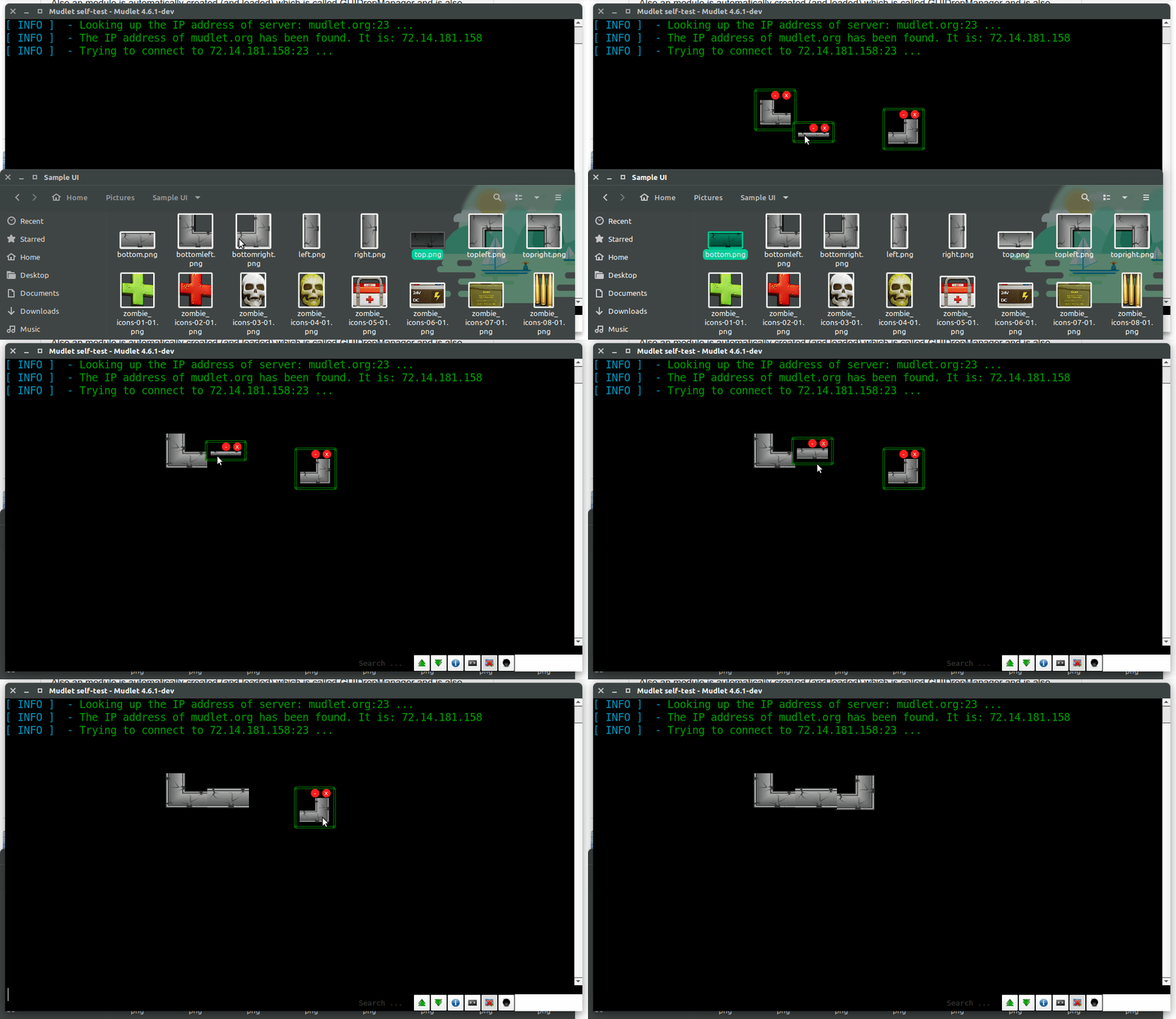
Dropping images automatically moves them to a directory called GUIDropImages in the profile directory.
Also a module is automatically created (and loaded) which is called GUIDropManager and is also located in the profile directory.
So the code created is visible and editable in that module (and persistent).
This is only a first approach and just there to show the possibilites.
It's still rather limited (adjustable container are not made for small elements), and I only tested it on Ubuntu have no idea if this also works on other OS.
Edit: Now it should also work on windows (testet it on windows10)
Edit (8 April 2020) : I updated the link. Some aren't there anymore.
 Edru2
on 20 Mar 2020
Edru2
on 20 Mar 2020
This is stunning! Great start.
- [ ] X'ing out an image will bring it back when you import another image
- [ ] you can't import duplicates of the same image
- [ ] very clever solution with creating/loading the dropscript, but I think it's hinting at a lack of functionality in Mudlet that we should do something about. I remember seeing the same trick necessary in mushclient and not a good sight
The fact that the image gets squished in editing mode makes it a bit hard to align borders, see:
vadi2
on 20 Mar 2020
vadi2
on 20 Mar 2020
can confirm same issues vadi mentioned above with the script, but the underlying drag'n'drop functionality seems good =)
 demonnic
on 20 Mar 2020
demonnic
on 20 Mar 2020
Thanks for the reviews! I agree with everything and know (maybe) already a solution for the issues (which are mostly Adjustable.Container limitations).
Only
you can't import duplicates of the same image
I cannot reproduce. For me it is possible to import duplicates.
Can you describe what happens if you do that and how I can reproduce it?
I'm using your sample images :wink:
Edru2
on 21 Mar 2020
I think it is clear that we'd like to have Adjustable Containers inside Mudlet, and since it's a prerequisitite for this, how about you make a separate PR including them? Then we'll review & merge them and can get back to this topic with a stronger foundation.
vadi2
on 21 Mar 2020
You're right - duplicates are working okay.
vadi2
on 21 Mar 2020
Do you want to make the PR for adjustable containers?
The drag and drop event is now development.
vadi2
on 24 Mar 2020
I still have to make some 'adjustments' for the adjustable containers.
I'm also not sure where in mudlet code to add them :wink:
Edru2
on 26 Mar 2020
Separate folder in https://github.com/Mudlet/Mudlet/tree/development/src/mudlet-lua/lua would be good, following the existing naming convention.
vadi2
on 26 Mar 2020
That or rebrand it under Geyser and name it GeyserAdjustableContainer.lua or whatnot
demonnic
on 26 Mar 2020
This is really cool. The new aesthetics are especially nice, well done :ok_hand:
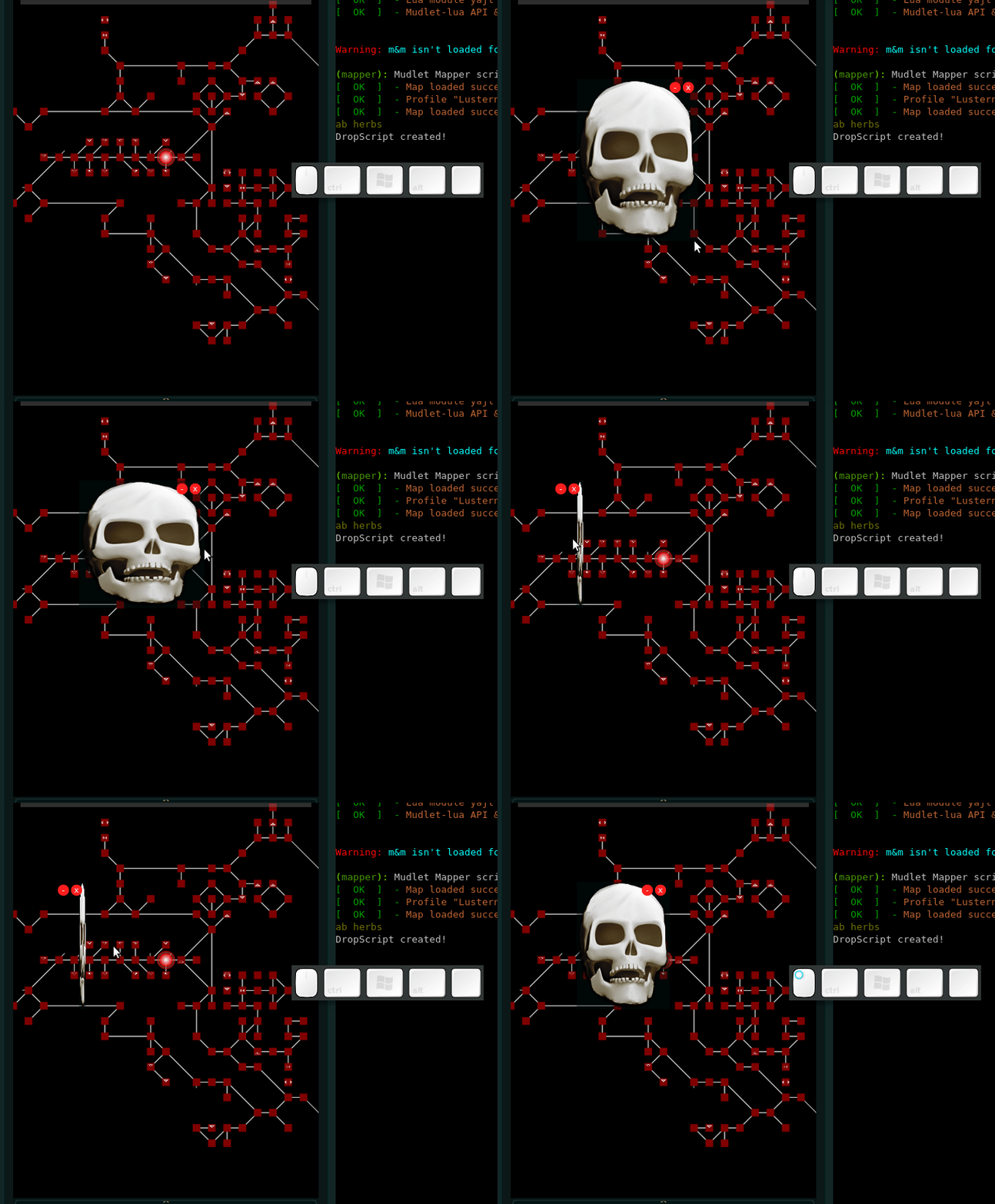
Using https://make.mudlet.org/snapshots/251499/Mudlet-4.6.2-testing-d6500cb-linux-x64.AppImage.tar and https://github.com/Mudlet/Mudlet/pull/3567#issuecomment-610988268, do you get the issue where resizing will still happen without clicking?
vadi2
on 15 Apr 2020
Oh, yes I'm aware of this issue. It has to do with the embedded mapper which somehow messes up the onReleaseEvent (and other similar setLabelCallback events).
It's the same with any adjustable container on an embedded mapper.
If not on the mapper it should be fine.
Edru2
on 15 Apr 2020
Maybe it's similar to https://github.com/Mudlet/Mudlet/issues/2499
Besides that, is there anything left on the drag and drop images from your side?
vadi2
on 16 Apr 2020
Maybe it's similar to #2499
Yes, it's exactly the same issue ( I have an Idea why it happens but I never confirmed it so I'm not sure)
Besides that, is there anything left on the drag and drop images from your side?
Let's say it's a very early version and everything should work for now, but there is much room left for improvement (the code is a bit a mess).
It's definitely not ready to be integrated directly into Mudlet.
This is one of the reasons I'm checking out the Mudlet package manager :wink:
I think about putting it into GitHub and making a forum post for it, to (hopefully) get some feedback.
Edru2
on 18 Apr 2020
Nice, that sounds like a great plan.
vadi2
on 18 Apr 2020
Very Cool :)
 xekon
on 22 Apr 2020
xekon
on 22 Apr 2020
Besides that, is there anything left on the drag and drop images from your side?
Let's say it's a very early version and everything should work for now, but there is much room left for improvement (the code is a bit a mess).
It's definitely not ready to be integrated directly into Mudlet.
Are there any more news?
Kebap
on 10 Feb 2021
Not really. I think https://github.com/Edru2/GUIDrop does everything what was mentioned in the first post. I planned to make a kind of GUI creation manager but not sure if or when I will start with that (life got a bit busier lately)
Edru2
on 11 Feb 2021
Related issues
 macjabeth
·
7Comments
Kebap
·
7Comments
xekon
·
10Comments
xekon
·
8Comments
macjabeth
·
7Comments
Kebap
·
7Comments
xekon
·
10Comments
xekon
·
8Comments
 Symple85
·
5Comments
Symple85
·
5Comments