Mu: Unintuitive behavior of "Run" in esp8266/esp32 mode
If you are reporting a bug, we would like to know:
What you were trying to do
I am teaching a class soon using the esp8266 as a platform for controlling small robots. We would like to use Mu as the editor for this use case, and are very excited by the new support in the beta!
What steps you took to make this happen
Create a file called "main.py", write some code in it, then click the "Run" button to send it to the esp8266. Unplug the microcontroller and restart it, to test on the actual robot.
What you expected to happen
Like (I believe) happens with the micro:bit, I expected the "Run" button to flash code in a permanent way, such that when I restart the microcontroller it executes immediately.
In the particular case of the esp8266, this probably involves replacing the "main.py" file with the currently open file, then restarting the microcontroller. It is unclear exactly how other files already loaded on the microcontroller or open in the editor should be handled.
What actually happened
When I click "run" the microcontroller stops what it is doing and runs my code. However, after a restart, the microcontroller goes back to executing whatever code it had before.
Why this difference is problematic (it may not be a bug!)
This behavior is different than what happens with the micro:bit, and means we will need to give significantly more complicated instructions to students. For our use case, they would need to:
- name their file
main.py, rather thanchallenge1.pyor whatever - use the "Run" button to test their code when plugged into the computer, so you can see the terminal output
- close the REPL tab
- open the "files" tab, then drag
main.pyto the board
- If you forget this step, the board will run the previous version of the code with no indication what is happening, creating a lot of confusion.
I think this is a pretty typical use case, and the current UX is just going to confuse students.
Technical details
master at f297c49d9a58fbed2d5b47d2056797f6910c469a, Linux with esp8266
 HALtheWise
All 9 comments
Hi @HALtheWise
Your suggestion was actually the original implementation of the Run-button (called Flash at the time), where it created a "main.py", with the motivation to make it similar to micro:bit mode.
However, after a discussion of the pull request here #676 (and also in the follow-up here #790) we decided against it for the following reasons:
- When the file/tab is called e.g. "challenge1.py", it is confusing that it then writes to "main.py"
- We shouldn't duplicate functionality (simplicity is core to Mu), and we have the File-manager to copy files over
- Students should learn about the filesystem, and structure projects in directories
- During development, it dramatically speeds up test/debug cycles
I originally argued against the change, but now I really like how it ended up. One big hurdle is that the "Files" pane does not support directories as it is, and if you have multiple projects (multiple main.py files), they need to be in each their own directory. I think that part - directory support should be part Mu when this leaves alpha.
Perhaps a better solution to the confusion is to alter the micro:bit mode (if possible) to follow same conventions? Does anyone know if this is possible?
 dybber
on 28 May 2019
dybber
on 28 May 2019
@HALtheWise thank you for the feedback. @dybber has answered pretty much as I would have done.
To answer your question @dybber (changing the micro:bit behaviour) - if you're happy to field all the unhappy emails from teachers, book writers, bloggers, and other folks who have invested time into creating educational resources which this change would break, then you're a braver man than I am. ;-)
Under the hood several complicated things happen depending on a state of affairs agreed with the micro:bit foundation as to what the "blessed" behaviour should be. In its simplified for these are:
- If there's no MicroPython on the device, flash MicroPython on the device and then copy over a main.py file.
- Do the same if the device has an OLD version of MicroPython (re-flash then copy).
- Otherwise, just copy over a new main.py
- Catch all failure is to re-flash the device in the old way (with the Python script embedded within the MicroPython hex).
(There are several gnarly edge cases too).
 ntoll
on 28 May 2019
ntoll
on 28 May 2019
I concur, changing the micro:bit mode is "too late". Thanks for the info on the micro:bit mode internals, didn't know it supported flashing new MicroPython firmware.
dybber
on 28 May 2019
That makes sense. I agree that it is really important to have some sort of project directory support so students can make a "project1/main.py" file.
For reference, the way that LEGO Mindstorms implements things (the system I am most familiar with) is to have two buttons: "Download" which copies all files/code to the system, and "Download and Run" which does that, then begins execution. I could imagine removing the current "Run" button entirely, and instead having a "Download All" that clears what is currently on the chip then copies all files in current directory to the chip. I want to find a way to prevent there being old code silently hanging around, because those issues can be incredibly frustrating to debug (particularly with multiple files if only one is old).
HALtheWise
on 29 May 2019
In my opinion, students should learn about managing libraries. When I teach I often use small libraries for sensors, that I make the students transfer themselves.
I don't think it would be nice if the button just wiped all the files everytime you pushed a button. Then students would have to have duplicates of all their libraries in each project directory, and if I make a new version (fixing a bug, adding a feature), they would have to make sure to update all of them.
However, what I'm missing is a quick way to overwrite the "main.py" file without having to go through:
- Copy your project "coolprojectname.py" to a file "main.py"
- Transfer "main.py"
- Delete the local "main.py" to make sure you
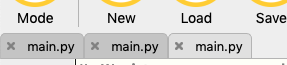
The alternative, where all projects are named "main.py", makes your Mu look like the following:
dybber
on 15 Feb 2020
I would like to solve this, but we need to agree on a solution. Would it be a problem to have both a "Run" and a "Write to main.py" button?
Alternatively, would be to hide the "Write to main.py" in a context menu (right click the Run button to make that appear), then it will not be confusing at first, but only show up when a teacher tells the students about it...
dybber
on 26 Feb 2020
I'e tried to do a minimal fix for this issue, with a right click menu option in the local file pane. Check it out in pull request #1018 and let me know what you think.
dybber
on 24 Mar 2020
The added right-click menu to write a main.py file is now merged with the master branch. I hope that is an okay solution for you @HALtheWise, I will close the issue, but you are welcome to open it again, if you think more needs to be done here.
dybber
on 29 Sep 2020
That works for me.
On Mon, Sep 28, 2020, 11:39 PM Martin Dybdal notifications@github.com
wrote:
The added right-click menu to write a main.py file is now merged with the
master branch. I hope that is an okay solution for you @HALtheWise
https://github.com/HALtheWise, I will close the issue, but you are
welcome to open it again, if you think more needs to be done here.—
You are receiving this because you were mentioned.
Reply to this email directly, view it on GitHub
https://github.com/mu-editor/mu/issues/806#issuecomment-700484441, or
unsubscribe
https://github.com/notifications/unsubscribe-auth/AAM6N6EURZQGISRJJLCQYYDSIF6LTANCNFSM4HCQHZXA
.
HALtheWise
on 29 Sep 2020
Related issues
 microbit-mark
·
8Comments
microbit-mark
·
8Comments
 dannystaple
·
5Comments
dannystaple
·
5Comments
 ladyada
·
4Comments
ladyada
·
4Comments
 mkarikom
·
5Comments
mkarikom
·
5Comments
 probonopd
·
5Comments
probonopd
·
5Comments