Mtasa-blue: Game does not show main menu with DXVK enabled
Describe the bug
Game does not show main menu with DXVK enabled.
To reproduce
- Install MTA via Lutris
- Open configuration for MTA
- Set Wine version to 5.3 in runner options
- Set DXVK with version 1.5.5 enabled in runner options
- Game freezes after intro and no main menu is shown
Expected behaviour
Main menu should show up as in GTA San Andreas with DXVK enabled.
Screenshots
Will provide screen recording if needed.
Version
MTA client: 1.5.7
OS: Manjaro Linux 19.0
Additional context
GTA San Andreas and SA:MP are fully functional with DXVK enabled.
 divadsn
All 20 comments
If you want to get MTA to work you can try installing Wine manually (or using Linuxbrew if you have that), and then following these instructions.
 qaisjp
on 5 Mar 2020
qaisjp
on 5 Mar 2020
Well MTA does work, but not with DXVK enabled, and GTA SA performance on wined3d is poor.
divadsn
on 6 Mar 2020
The FPS counter in the top left corner stops refreshing after the intro screen with on MTA.
divadsn
on 6 Mar 2020
I have the same problem on Arch Linux. It's a MTA problem it seems.
 CrossFire10100
on 15 Apr 2020
CrossFire10100
on 15 Apr 2020
OS: Ubuntu 20.04
GPU: NVIDIA GT 1050
Video driver: nvidia-440.82
Wine: wine-staging 5.6
GTA logo shows, but MTA menu does not starts. Some MTA forks works fine
Multi Theft Auto_d3d9.log:
```info: Game: Multi Theft Auto.exe
info: DXVK: d9vk-0.40.1-croakacola-zero
info: Built-in extension providers:
info: Win32 WSI
info: OpenVR
warn: OpenVR: Failed to locate module
info: Enabled instance extensions:
info: VK_KHR_get_physical_device_properties2
info: VK_KHR_get_surface_capabilities2
info: VK_KHR_surface
info: VK_KHR_win32_surface
warn: D3D9: VK_FORMAT_D16_UNORM_S8_UINT -> VK_FORMAT_D24_UNORM_S8_UINT
info: GeForce GTX 1050:
info: Driver: 440.82.0
info: Vulkan: 1.1.119
info: Memory Heap[0]:
info: Size: 4096 MiB
info: Flags: 0x1
info: Memory Type[7]: Property Flags = 0x1
info: Memory Type[8]: Property Flags = 0x1
info: Memory Heap[1]:
info: Size: 23982 MiB
info: Flags: 0x0
info: Memory Type[0]: Property Flags = 0x0
info: Memory Type[1]: Property Flags = 0x0
info: Memory Type[2]: Property Flags = 0x0
info: Memory Type[3]: Property Flags = 0x0
info: Memory Type[4]: Property Flags = 0x0
info: Memory Type[5]: Property Flags = 0x0
info: Memory Type[6]: Property Flags = 0x0
info: Memory Type[9]: Property Flags = 0x6
info: Memory Type[10]: Property Flags = 0xe
warn: D3D9: VK_FORMAT_D16_UNORM_S8_UINT -> VK_FORMAT_D24_UNORM_S8_UINT
info: Intel(R) UHD Graphics 630 (CFL GT2):
info: Driver: 20.0.4
info: Vulkan: 1.2.131
info: Memory Heap[0]:
info: Size: 23982 MiB
info: Flags: 0x1
info: Memory Type[0]: Property Flags = 0xf
info: Process set as DPI aware
 TheNormalnij
on 15 Apr 2020
TheNormalnij
on 15 Apr 2020
@TheNormalnij which MTA forks do work with DXVK, are these also 1.5.7 version based?
divadsn
on 15 Apr 2020
We'd need to know what commit they are based off, otherwise we will have trouble figuring out which commit breaks DXVK support. You can help by testing/bisecting older versions from https://nightly.mtasa.com to help us find that commit.
qaisjp
on 15 Apr 2020
mtasa-1.5.7-rc-18957 (oldest) does not work
mtasa-1.4.1-rc-7382 same issue
TheNormalnij
on 15 Apr 2020
mtasa-1.5.7-rc-20510 still not working, here is the output log:
https://del.dog/otumejagam.txt
Edit: Tried to auto-connect to a server to check if it works but now it doesn't launch at all.
divadsn
on 16 Apr 2020
On latest Wine 5.5 with fshack and DXVK 1.6L it seems to work, but still does not show the main menu.
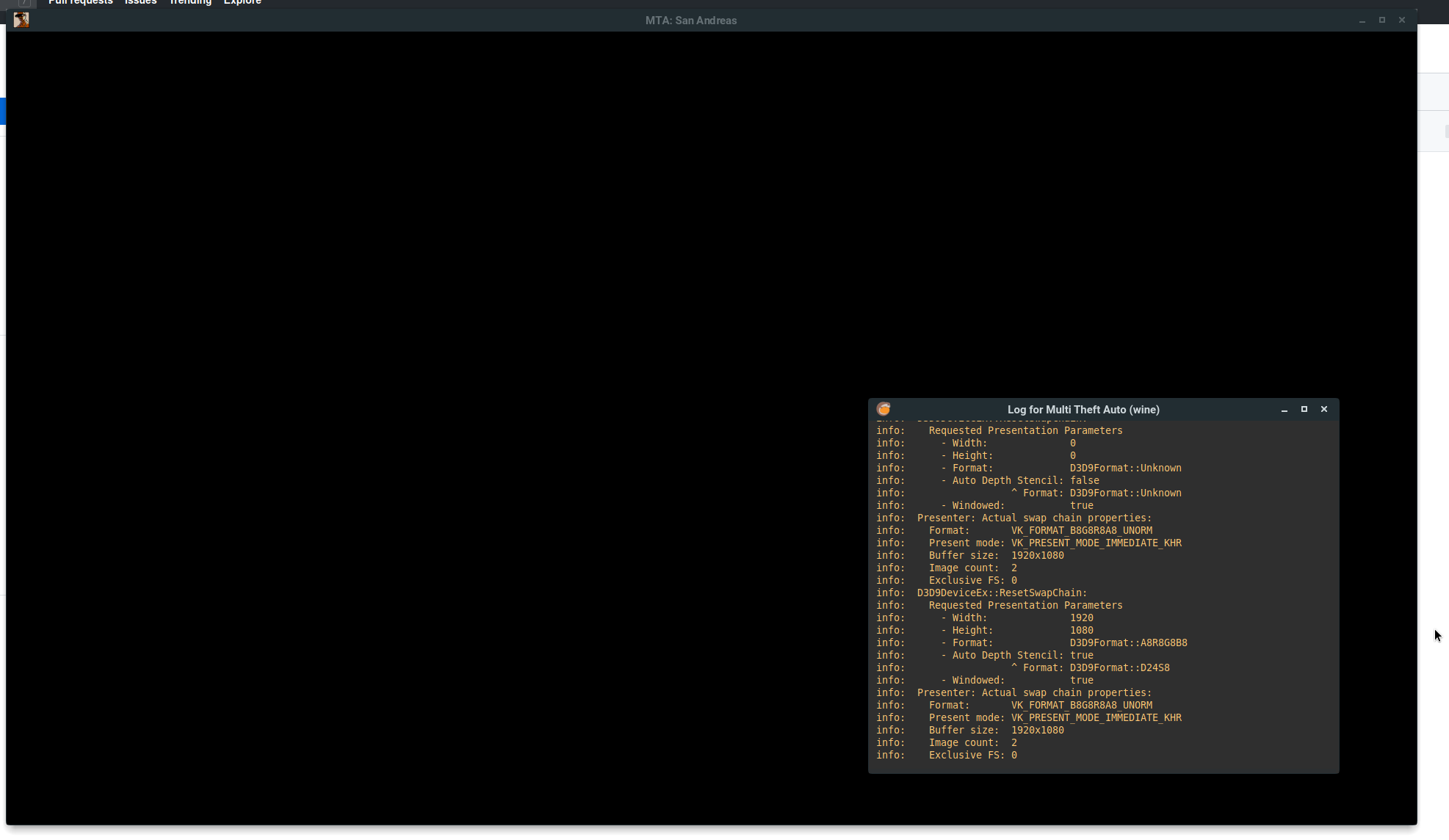
Another crash log: https://del.dog/ceghypucof.txt
divadsn
on 16 Apr 2020
What MTA;SA version is that?
CrossFire10100
on 16 Apr 2020
What MTA;SA version is that?
mtasa-1.5.7-rc-20510 from https://nightly.mtasa.com/
divadsn
on 16 Apr 2020
I have a question @divadsn
Is The MTASA used to run with DXVK on earlier versions?
I've migrated for Linux and I don't know if it used to run or not. Here MTASA is running with OKAY performance with "Gallium Nine".
For the Devs of MTA I constantly having this error message after the black screen:
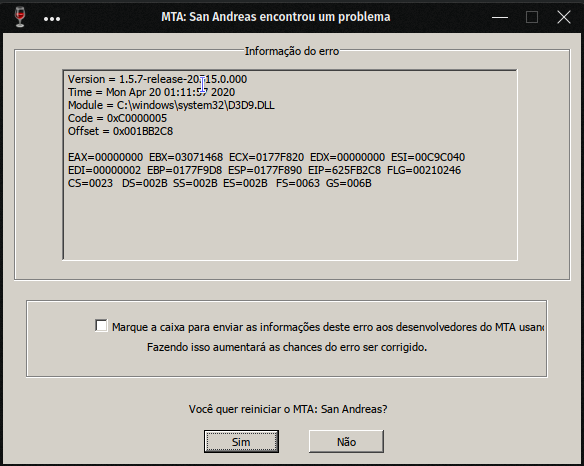
I don't know if this is somehow helpful, but as I could see no one provided any error message.
On my free time I will try other manners of debuggging.
 tiago4171
on 20 Apr 2020
tiago4171
on 20 Apr 2020
However, MTA with DXVK is _very_ unstable. I'm really don't recommend use DXVK.
TheNormalnij
on 22 Apr 2020
However, MTA with DXVK is _very_ unstable. I'm really don't recommend use DXVK.
Is there a way to start debugging it with DXVK enabled? Maybe it's not MTA fault
I've tested a lot of MTA versions, even the 1.4.1 ones and no sucess with DXVK enabled. I've tried to match the versions of the releases of both projects(DXVK and MTA) just to find out if a older version would work and again no sucess. I'm very worried about that and I want help to fix that issue
tiago4171
on 23 Apr 2020
However, MTA with DXVK is _very_ unstable. I'm really don't recommend use DXVK.
Is there a way to start debugging it with DXVK enabled? Maybe it's not MTA fault
I've tested a lot of MTA versions, even the 1.4.1 ones and no sucess with DXVK enabled. I've tried to match the versions of the releases of both projects(DXVK and MTA) just to find out if a older version would work and again no sucess. I'm very worried about that and I want help to fix that issue
Well, it wouldn't be an issue if the base game would not work with DXVK, but the alternative SA:MP and GTA SA alone work flawlessly with DXVK, giving huge performance benefits.
divadsn
on 23 Apr 2020
There is another issue. GTA SA logo does not fade out. You can connect to server if you use mtasa:// link and you can see the join message in the console log.
TheNormalnij
on 23 Apr 2020
You can connect to server if you use mtasa:// link and you can see the join message in the console log.
This is interesting. Does the rest of the game work? Might it be an issue with CEGUI?
qaisjp
on 23 Apr 2020
I can see only GTA logo but i can blindly login with console
TheNormalnij
on 23 Apr 2020
DXVK developers approach to debugging this kind of issues usually involves recording an apitrace of DirectX calls made by the affected process (in this case, MTA: SA). Maybe you could try capturing apitraces and replaying them with different DXVK versions, so you can check if it was a regression on DXVK's part, and in general gain insight on why it breaks.
 AlexTMjugador
on 25 Apr 2020
AlexTMjugador
on 25 Apr 2020
Related issues
 StrixG
·
3Comments
qaisjp
·
4Comments
StrixG
·
3Comments
qaisjp
·
4Comments
 umitemre
·
4Comments
umitemre
·
4Comments
 Cazomino05
·
3Comments
Cazomino05
·
3Comments
 StifflersMom
·
4Comments
StifflersMom
·
4Comments