Mtasa-blue: Console history (arrow up and arrow down) is not working
Console history (arrow up and arrow down) is not working
My MTA version :
https://pasteboard.co/IgKXIBJ.jpg
I delete console log files in MTA/logs as qaisjp said
But problem still exist
Please fix it
 bsa11b
All 15 comments
Please use the template to submit bugs. We need to know the following:
- What are the steps you are doing to reproduce the bug ?
- What behaviour you see ?
- What behaviour you expected ?
Without these informations, we can't tell if it is indeed a bug, or if this is the expected behaviour and you misunderstood the feature.
The template is used so that new issues already contains the maximum informations required to reproduce/understand the bug you are reporting and helps to prevent wasting time asking for more informations.
 Citizen01
on 28 May 2019
Citizen01
on 28 May 2019
Question 1 : What are the steps you are doing to reproduce the bug ?
Answer : type in console “F8” any commands , (then press enter on keyboard) and try to recover the commands by press arrow up and down
The result : i can’t recover my old commands by pressing arrow up and arrow down on keyboard
Question 2 : What behaviour you see ?
Answer : nothing
Question 3 : What behaviour you expected ?
I except that i can recover my old commands history in console but i can’t now
bsa11b
on 28 May 2019
Ok thanks for the quick update.
then delete it
What should I delete exactly ? Because if I submit a command in F8 console, then there is nothing to delete as the command has been sent.
Citizen01
on 28 May 2019
But in previous versions of MTA like 1.5 , 1.5.1 you can recover your old commands by pressing arrow up and arrow down on keyboard
Understand me ?
EDIT # 1 : i edit my previous comment , please read it again
Here what i’m edited :
Question 1 : What are the steps you are doing to reproduce the bug ?
Answer : type in console “F8” any commands , (then press enter on keyboard) and try to recover the commands by press arrow up and down
bsa11b
on 28 May 2019
Works fine for me:
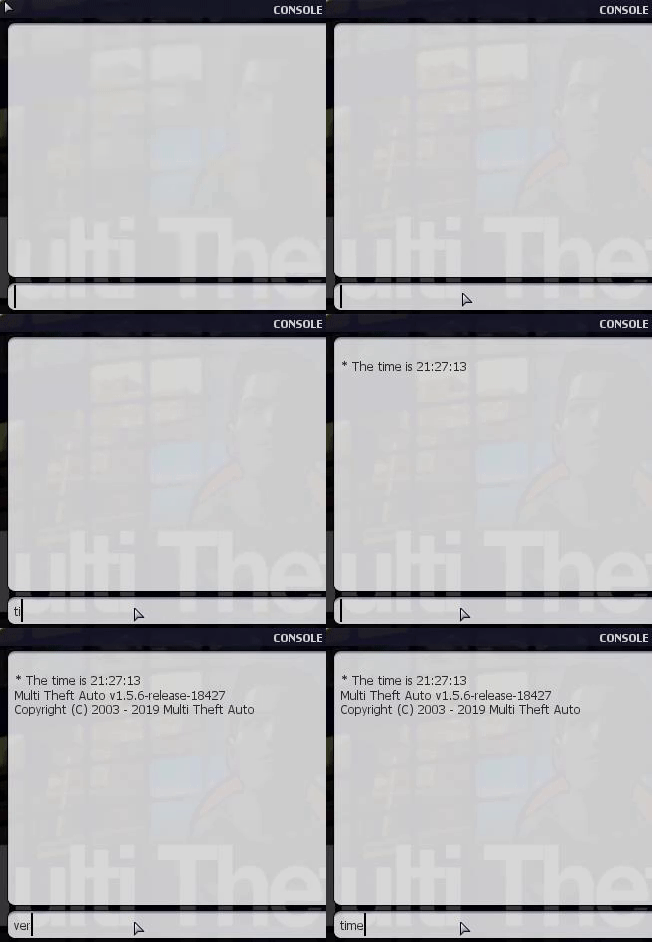
Where did you get the screenshot version from ? It doesn't look like mine or the server version console output 🤔
Citizen01
on 28 May 2019
For me don’t work
I don’t know
qaisjp tell me delete console log files in MTA/logs directory
I did it but problem still exist
The screenshot of my version is from Open game panel log viewer
bsa11b
on 28 May 2019
I don't understand what Open Game Panel has anything to do with the MTA Client which is what we are testing right ?
I checked on google and it is supposed to be used to manage game server instances when the user doesn't have a direct access to a shell.
You should show the MTA version of the client, not the server, using the ver command just like I did in my gif.
Also can you go into your MTA San Andreas 1.5\MTA\logs folder, open up a terminal console and give the output of icacls ./* command ?
Citizen01
on 28 May 2019
This from my server.log :
[19-05-28 16:07:04] CONNECT: WWW connected (IP: 129.208.215.85 Serial: E1CBD39B2E26AD82E169E6EF164B3BF4 Version: 1.5.6-9.18427.0)
This result same as “ver” command result
Doesn’t change between server.log and ver command.
Your comment :
Also can you go into your MTA San Andreas 1.5\MTA\logs folder, open up a terminal console and give the output of icacls ./* command ?
I don’t understand what your saying to me
bsa11b
on 28 May 2019
- Press Windows + R
- Type cmd
- Type
cd your MTA San Andreas 1.5 folder/MTA/logs - Type
icacls ./* - Give output to us
 FileEX
on 28 May 2019
FileEX
on 28 May 2019
Ok
bsa11b
on 28 May 2019
Also qaisjp probably meant to say console-input.log instead of console.log for the name of the file to delete in logs folder. Try that aswell.
Citizen01
on 29 May 2019
bsa11b
on 29 May 2019
The problem still exist for me , please fix it in 1.5.7 version.
bsa11b
on 15 Jun 2019
Try installing this version of MTA: https://nightly.mtasa.com/mtasa-1.5.6-rc-18668-20190614.exe
 ccw808
on 15 Jun 2019
ccw808
on 15 Jun 2019
Thanks , it working now
bsa11b
on 15 Jun 2019
Related issues
 patrikjuvonen
·
3Comments
patrikjuvonen
·
3Comments
 CrosRoad95
·
3Comments
CrosRoad95
·
3Comments
CrosRoad95
·
4Comments
CrosRoad95
·
3Comments
CrosRoad95
·
3Comments
CrosRoad95
·
4Comments
 umitemre
·
4Comments
umitemre
·
4Comments
Most helpful comment
Try installing this version of MTA: https://nightly.mtasa.com/mtasa-1.5.6-rc-18668-20190614.exe