Mtasa-blue: engineReplaceModel memory leak
Describe the bug
Can not recover the memory taken by engineLoadDFF/engineRestoreModel/engineReplaceModel
To Reproduce
MemoryLeak1 shows destroying the dff element created by engineLoadDFF can not recover the memory.
MemoryLeak2 gives a increasing memory usage and it takes more memory with engineRestoreModel than engineLoadDFF only
----------------------------Memory Leak 1
function MemoryLeak1()
    function reloadDFF()
        if isElement(DFF) then
            destroyElement(DFF)
        end
        DFF = engineLoadDFF("rectangle.dff")
    end

    for i=1,10000 do
        reloadDFF()
    end
end
----------------------------Memory Leak 2
function MemoryLeak2()
    function reloadDFF()
        if isElement(DFF) then
            destroyElement(DFF)
        end
        DFF = engineLoadDFF("rectangle.dff")
    end

    addEventHandler("onClientPreRender",root,function()
        engineRestoreModel(3458)
    end)

    addEventHandler("onClientHUDRender",root,function()
        for i=1,50 do
            reloadDFF()
            engineReplaceModel(DFF,3458)
        end
    end)
end
Hex code of the dff i used
1000000050020000FFFF0318010000000C000000FFFF03180100000000000000000000000E0000006C000000FFFF0318010000003C000000FFFF0318010000000000803F0000000000000000000000000000803F0000000000000000000000000000803F000000000000000000000000FFFFFFFF030002000300000018000000FFFF0318FEF253020C000000FFFF031852656374616E676C653030311A00000074010000FFFF03180100000004000000FFFF0318010000000F00000058010000FFFF03180100000098000000FFFF03187200000002000000040000000100000001000000000002000300020000000000000000000000000017B751383046E24001000000010000000000A0400000A040000000000000A0C00000A040000000000000A0C00000A0C0000000000000A0400000A0C00000000000000000000000000000803F00000000000000000000803F00000000000000000000803F00000000000000000000803F0800000054000000FFFF03180100000008000000FFFF031801000000FFFFFFFF0700000034000000FFFF0318010000001C000000FFFF0318000000000054FFFFDCA3FE00000000000000803F0000803F0000803F0300000000000000FFFF03180300000048000000FFFF03180E0500002C000000FFFF03180000000001000000060000000600000000000000000000000100000002000000020000000300000000000000FDF2530204000000FFFF0318000000001400000028000000FFFF03180100000010000000FFFF0318000000000000000005000000000000000300000000000000FFFF03180300000000000000FFFF0318
Expected behavior
engineRestoreModel will recover the memory
destroyElement will recover the memory taken by dff
MTA Client (please complete the following information):
- Version 1.5.5
- Running in Wine? No
 thisdp
All 11 comments
Can confirm. It's a huge problem if your server has nearly all vehicles replaced with high quality models.
We have a custom model streamer that eats memory in few hours of playing by loading/unloading models.
 alcoholiclobster
on 9 Jan 2019
alcoholiclobster
on 9 Jan 2019
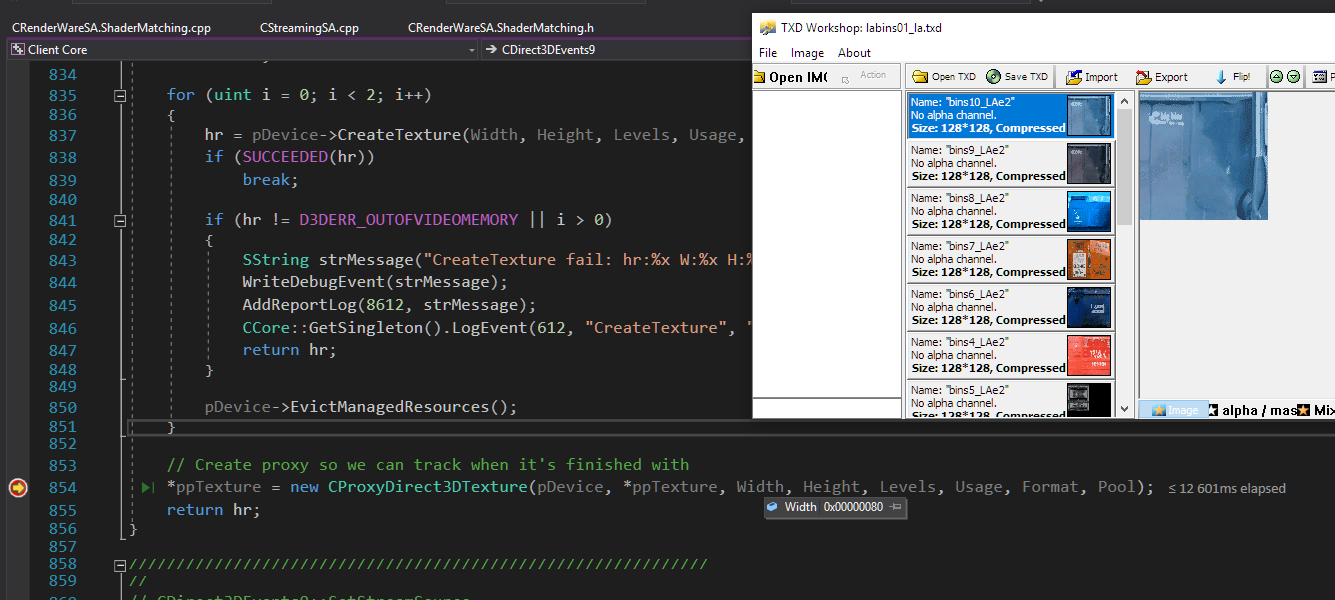
leak is caused by texture being created every time you replace model, and never become removed from memory, that's why your test resource crash faster with id 7427 than 1337
here's location of function that create this texture
 CrosRoad95
on 10 Aug 2019
CrosRoad95
on 10 Aug 2019
Can you fix this @CrosRoad95 ?
 qaisjp
on 10 Aug 2019
qaisjp
on 10 Aug 2019
i could try, but saml1er mantion something about it in his huge update
CrosRoad95
on 10 Aug 2019
i could try, but saml1er mantion something about it in his huge update
What about engineRestoreModel, does the same problem exist in this function?
thisdp
on 12 Aug 2019
I really think this needs some attention, from practise i have reasons to believe that this memory leak (involving models) is a huge contributing factor to the risk of crashing on servers that are filled with unoptimized/"bloated" mods. Because, due to their big size per file, they have the potential to leak significant amounts of memory..
I heard owners of a major server (yeah, you guessed it: russian, they are known to be heavily modded) say they ran into a hard limit of around 2000 model replaces per session, because after that the leak makes it inevitably crash, combined with other factors of inefficient/unoptimized practise in their gamemode. Having unoptimized stuff, and bloated models, is never a good thing.. but this leak can be the difference between having thousands of crashes less or more. It is what they call, the final straw..
@saml1er had plans to fix this particular memory leak in his project of lifting GTA limits, now those plans are cancelled i'd like to wonder if you still plan on pinpointing and fixing it?
 Dutchman101
on 26 Feb 2020
Dutchman101
on 26 Feb 2020
@saml1er had plans to fix this particular memory leak in his project of lifting GTA limits, now those plans are cancelled i'd like to wonder if you still plan on pinpointing and fixing it?
@Dutchman101 Yes.
```lua
----------------------------Memory Leak 1
function MemoryLeak1()
function reloadDFF()
if isElement(DFF) then
destroyElement(DFF)
end
DFF = engineLoadDFF("rectangle.dff")
endfor i=1,10000 do
reloadDFF()
end
end
@thisdp I'm unable to reproduce the memory leak from MemoryLeak1. The memory goes up by a few megabytes and then it goes back to normal. I modified the code you gave me and compiled a custom build to test this.
I took your code from MemoryLeak1 function and wrote this quick resource to reproduce the memory leak: memoryleak1.zip
Here's a screenshot to show you how I tested it:
logging code in CClientDFF
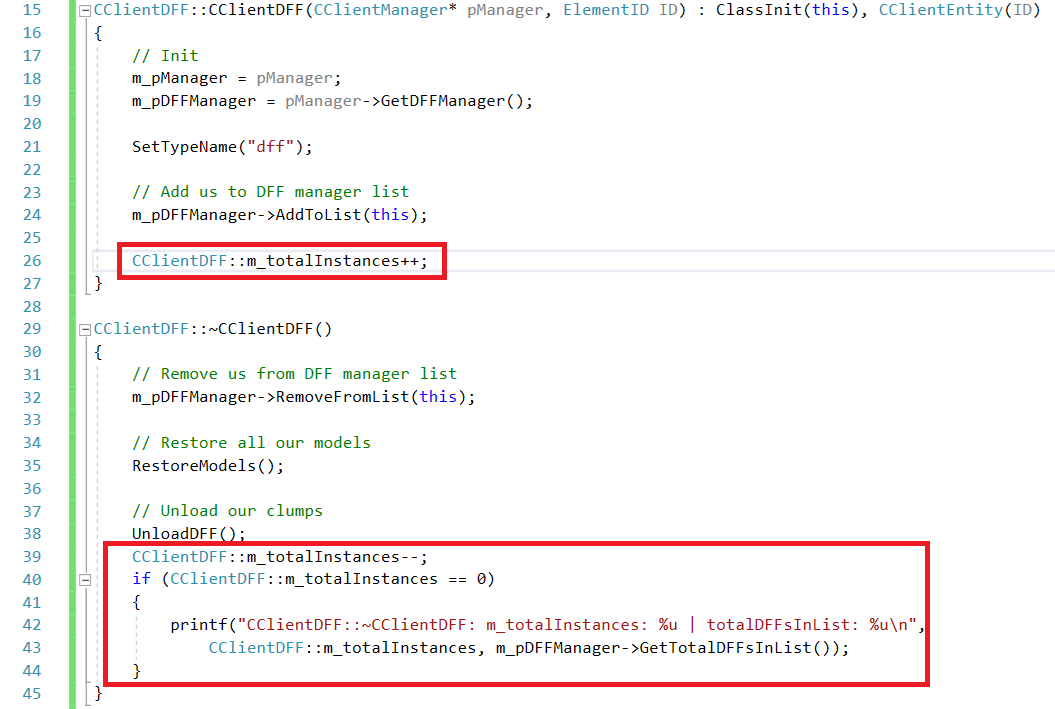
Output:
CClientDFF::~CClientDFF: m_totalInstances: 0 | totalDFFsInList: 0
CClientDFF::~CClientDFF: m_totalInstances: 0 | totalDFFsInList: 0
CClientDFF::~CClientDFF: m_totalInstances: 0 | totalDFFsInList: 0
CClientDFF::~CClientDFF: m_totalInstances: 0 | totalDFFsInList: 0
CClientDFF::~CClientDFF: m_totalInstances: 0 | totalDFFsInList: 0
CClientDFF::~CClientDFF: m_totalInstances: 0 | totalDFFsInList: 0
CClientDFF::~CClientDFF: m_totalInstances: 0 | totalDFFsInList: 0
CClientDFF::~CClientDFF: m_totalInstances: 0 | totalDFFsInList: 0
CClientDFF::~CClientDFF: m_totalInstances: 0 | totalDFFsInList: 0
CClientDFF::~CClientDFF: m_totalInstances: 0 | totalDFFsInList: 0
CClientDFF::~CClientDFF: m_totalInstances: 0 | totalDFFsInList: 0
CClientDFF::~CClientDFF: m_totalInstances: 0 | totalDFFsInList: 0
CClientDFF::~CClientDFF: m_totalInstances: 0 | totalDFFsInList: 0
Reproduction steps that I took:
- Start the local server.
- Stop all scripts and gamemodes, even play gamemode. It's okay to keep admin panel.
- Start
memoryleak1resource that I attached. bind command 8 leak1to make your life easy ;)- Look at memory and press
8a couple of times. Memory will go up and go back to normal. - Try reconnecting and memory usage will still stay the same.
I'm going to test MemoryLeak2 as well, and I think that MemoryLeak2 might be legit because you are replacing textures and that textures are not cleared properly by SA sometimes.
 saml1er
on 27 Feb 2020
saml1er
on 27 Feb 2020
----------------------------Memory Leak 2
function MemoryLeak2()
function reloadDFF()
if isElement(DFF) then
destroyElement(DFF)
end
DFF = engineLoadDFF("rectangle.dff")
endaddEventHandler("onClientPreRender",root,function()
engineRestoreModel(3458)
end)addEventHandler("onClientHUDRender",root,function()
for i=1,50 do
reloadDFF()
engineReplaceModel(DFF,3458)
end
end)
end
I can reproduce the second memory leak, and I think it happens because of textures. I'll try applying the fix from my atlases PR and see if that fixes it. I'm hopeful that fixing the texture leak should fix it.
saml1er
on 27 Feb 2020
The TXD memory leak might still be there. Unfortunately, I'm not able to reproduce it in MTA. If somebody can send me the code to reproduce the leak, I'll appreciate it.
The commit ad78737a6d415a75e5f0ebee335af91be6800b30 will only fix the atomic and geometry leak. The texture leak is a separate issue, so please help me find a way to reproduce it.
saml1er
on 29 Feb 2020
The memory leak was mainly coming from the DFF model of the vehicle. I found 3 memory leaks, and I fixed all of them.
Fixed in 46dbbe7dd2c4621d7564cf272e8a432cf9f57300.
saml1er
on 5 Mar 2020
great
thisdp
on 5 Mar 2020
Related issues
CrosRoad95
·
3Comments
qaisjp
·
3Comments
 StrixG
·
3Comments
CrosRoad95
·
3Comments
StrixG
·
3Comments
CrosRoad95
·
3Comments
 Cazomino05
·
3Comments
Cazomino05
·
3Comments
Most helpful comment
great