Msys2-packages: Console does not launch after upgrade. Launcher error: C. Reason T (0x2)
Describe the issue
The last update of mintty and other components caused an issue.
After launching mingw64.exe I get the "Error message C. Reason T (0x2)" message and the console window does not open.
Steps to Reproduce the Problem
- After upgrade
- Run mingw64.exe
- Error message C. Reason T (0x2)
- Error message T. Reason C (0x0)
Additional Context: Operating System, Screenshots
- OS: Windows 10 Pro 19042.870 x86_64
 askondro
All 8 comments
Same here. Running usr/bin/mintty.exe works to some extend.
 fabiangreffrath
on 25 Mar 2021
fabiangreffrath
on 25 Mar 2021
msys2_shell.cmd also works in a limited way. But is not usable for mingw64.
askondro
on 25 Mar 2021
There is a pull request to fix this issue. Meanwhile MINGW64 can be launched from Command Prompt with this command C:\msys64\msys2_shell.cmd -defterm -no-start -mingw64.
 Biswa96
on 25 Mar 2021
Biswa96
on 25 Mar 2021
Confirm. Windows 7 SP1 64bit.
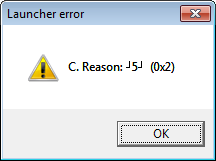
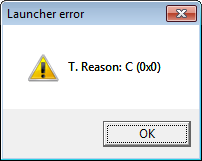
Quick fix - downgrade the msys2-launcer package. If a package was installed at an earlier stage, and the pacman cache was not cleaned, install an earlier version from /var/cache/pacman/pkg/. For example type in cmd:
C:\msys64\usr\bin\pacman.exe -U "C:\msys64\var\cache\pacman\pkg\msys2-launcher-1.0-1-x86_64.pkg.tar.zst"
Otherwrice, download http://repo.msys2.org/msys/x86_64/msys2-launcher-1.0-1-x86_64.pkg.tar.zst first.
 podsvirov
on 25 Mar 2021
podsvirov
on 25 Mar 2021
hm, I've downgraded it in the repo for now
 lazka
on 25 Mar 2021
lazka
on 25 Mar 2021
I pushed a new version. Does it work better?
lazka
on 25 Mar 2021
The consoles from the msys2-launcher-1.3-1 package are launched. Errors don't pop up.
podsvirov
on 25 Mar 2021
Thanks.
For some reason it worked fine with ucrt which I happened to build with when testing.
Sorry for the breakage.
lazka
on 25 Mar 2021
Related issues
 OortJacek
·
5Comments
OortJacek
·
5Comments
 hiroakit
·
5Comments
hiroakit
·
5Comments
 diffsetter
·
3Comments
diffsetter
·
3Comments
 neolib
·
7Comments
neolib
·
7Comments
 ffes
·
8Comments
ffes
·
8Comments
Most helpful comment
I pushed a new version. Does it work better?