Msys2-packages: unable to install MSYS2 64 with the error "Cannot open file " " for writing: no error"
I have tried several times of installing msys2 64 but every time it through the same error Can not open file " " for writing: no error

please help me guys :(:(:(
 th3G3nt13man
All 48 comments
Hey Everyone,
Anyone else getting the same error?
I am also not able to install due to same error.
I am using Windows 7.
 santoshyadavdev
on 4 Mar 2019
santoshyadavdev
on 4 Mar 2019
Hello, everyone.
Anyone solved the roblem?
Please help
 Chimge03
on 11 Mar 2019
Chimge03
on 11 Mar 2019
Hey Everyone,
Anyone else getting the same error?
I am also not able to install due to same error.I am using Windows 7.
Have you solved the problem??
th3G3nt13man
on 14 Mar 2019
I have never seen this problem. Are you getting the install file from msys2.org?
 mcjh
on 15 Mar 2019
mcjh
on 15 Mar 2019
Always use the latest from repo.msys2.org, and if you install it into the root of drive C: or into "Program Files" then you might need to run the setup as Administrator.
 StarWolf3000
on 16 Mar 2019
StarWolf3000
on 16 Mar 2019
Always use the latest from repo.msys2.org, and if you install it into the root of drive C: or into "Program Files" then you might need to run the setup as Administrator.
No luck tried installing with Admin, still no luck. In there is any dependency we need to install before installing this package.
santoshyadavdev
on 23 Apr 2019
Hey Everyone,
In case you are still getting this issue, follow the below steps:
Go to Uninstall Program and look for MSYS2 and remove all the instances, once done, run the setup again as Admin. Should resolve the issue worked for me.
santoshyadavdev
on 12 May 2019
I have the same issue. Running Windows 10.0.18362.239 (aka 1903) 64-bit; tried launching the installer as both admin and as normal user. In both cases it fails with the same error.
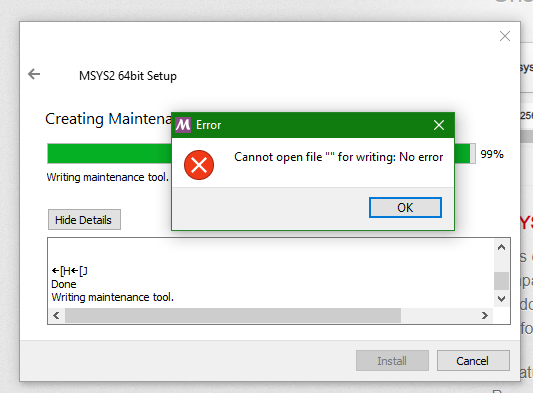
 fincs
on 13 Jul 2019
fincs
on 13 Jul 2019
Same issue for me. I too am using Windows 10 1903. Tried both the most recent installer (msys2-x86_64-20190524.exe) and an older version (msys2-x86_64-20180531.exe). According to InstallationLog.txt, the install crashes around the time maintenancetool.exe.new is to be created. Here is the relevant snippet from InstallationLog.txt.
'''
[74152] done\n--> Installing /usr/share/info/which.info.gz ... done\n
[74628] x1B[Hx1B[J\n\n###################################################################\n# #\n# #\n# C A U T I O N #\n# #\n# This is first start of MSYS2. #\n# You MUST restart shell to apply necessary actions. #\n# #\n# #\n###################################################################\n\n\nx1B[Hx1B[J
[74629] Done
[74634] Writing maintenance tool: "C:\msys64/maintenancetool.exe.new"
[74693] Created critical message box "installationError": "Error", "Cannot open file \"\" for writing: No error"
[78088] ROLLING BACK operations= 8
[78096] undo com.msys2.root.base operation: Execute
'''
 brianc015
on 17 Jul 2019
brianc015
on 17 Jul 2019
I am having the same issue as well, on Win 10 1903.
Having tried older versions of the installer, as well as launching the installer with administrator mode/compatibility settings seem to make no difference.
 denwi
on 22 Jul 2019
denwi
on 22 Jul 2019
I'm facing the same problem on Windows 10 LTSC 1809
 cy18
on 23 Jul 2019
cy18
on 23 Jul 2019
Sadly same problem here.. Anybody any luck yet?
I have no problem running the same setup on Intel+nVidia notebook but Ryzen+Radeon desktop simply refuses to install the damned thing...
 maelic13
on 24 Jul 2019
maelic13
on 24 Jul 2019
My workaround:
- Download the archive, not the installer. In my case, msys2-base-x86_64-20190524.tar.xz instead of msys2-x86_64-20190524.exe.
- Obtain a working version of tar. I installed git from git-scm.com and ran the git bash shell.
- Change directory to where you want the root of the installation.
- Optionally, test the extraction with tar tvf <path to archive>
- Extract with tar xvf <path to archive>
- Switch to a cmd prompt, change directory to the root of the extraction and run ./msys2_shell.cmd to initialize msys2.
- pacman -Syuu, from the msys2 shell (twice) to update.
This doesn't appear to register the install with Windows. I have not run into any other issues so far.
brianc015
on 24 Jul 2019
@maelic13 I'm using Ryzen 3700x + GTX 1060. Maybe it has something to do with this.
cy18
on 25 Jul 2019
Add me to the list of Ryzen users experiencing this problem. Specifically Zen2 + nVidia graphics.
brianc015
on 25 Jul 2019
So probably Qt Installer Framework (used to create the setup) has an issue with Ryzen CPUs?
Maybe consider switching to NSIS, WiX or InnoSetup, @Alexpux.
StarWolf3000
on 25 Jul 2019
All fine for me on Ryzen 1600 and Ryzen 2700X.
 mati865
on 25 Jul 2019
mati865
on 25 Jul 2019
Ryzen 7 3700X here. I doubt that has anything to do with the problem, though.
fincs
on 25 Jul 2019
Ryzen 3600 here. I got around this issue by using an older 2016 installer, then manually updating.
denwi
on 25 Jul 2019
Either Ryzen CPUs got insanely popular around developers or there is connection between this issue and Ryzens (like drivers or whatever).
FWIW I ran msys2-x86_64-20190524.exe without issues on Win 10 1903 with Hyper-V enabled, my motherboard is from Gigabyte but I downloaded all the drivers from AMD website.
mati865
on 26 Jul 2019
ok, I solved the issue for my application by simply downloading an archive from here:
https://sourceforge.net/projects/msys2/files/Base/x86_64/
I extracted into folder of my choosing and added links to PATH variable. Not sure if it works for everything but for what I needed it for it does. You might as well try.
maelic13
on 26 Jul 2019
Me on list.
Ryzen 3600 with Nvidia graphic card on Win10 1903 got the same error while installing.
 VirgiliaBeatrice
on 27 Jul 2019
VirgiliaBeatrice
on 27 Jul 2019
Add me too, Ryzen 3600 with RADEON graphics on Win10 build 18362. Gigabyte X570 motherboard.
 cobnashine
on 27 Jul 2019
cobnashine
on 27 Jul 2019
Dozens of posts like Ryzen X, Windows Y won't help.
Looks like it's related to Ryzen based platforms but the CPUs aren't the issue.
I suppose it has something to do with the drivers. Could you at least post you motherboard manufacturer?
mati865
on 27 Jul 2019
Either Ryzen CPUs got insanely popular around developers or there is connection between this issue and Ryzens (like drivers or whatever).
FWIW I ranmsys2-x86_64-20190524.exewithout issues on Win 10 1903 with Hyper-V enabled, my motherboard is from Gigabyte but I downloaded all the drivers from AMD website.
Mati685, would you mind sharing the link to the AMD drivers for your motherboard? I have Gigabyte motherboard, not sure where the drivers came from.
Downloaded AMD drivers for my Gigabyte motherboard, rebooted, still no luck.
cobnashine
on 27 Jul 2019
Mati685, would you mind sharing the link to the AMD drivers for your motherboard? I have Gigabyte motherboard, not sure where the drivers came from.
Fox X470 chipset: https://www.amd.com/en/support/chipsets/amd-socket-am4/x470
I do not use RAID or StoreMI.
mati865
on 27 Jul 2019
My mother board is ASUS TUF B450M-PLUS GAMING and I didn't install any driver other than the drivers from Windows Update.
By the way, I have also enabled Virtualization. May this be the reason?
cy18
on 27 Jul 2019
The common theme here is people having problems are running the Zen2 based Ryzen chips released on 7/7/2019. I have a Ryzen 7 3700X, but am using a motherboard with an X570 chipset. Apparently, we all decided to install msys2 once we had our new systems up and running. The older Ryzen chips (1600 and 2700X mentioned by Mati685) apparently do not have this issue. My motherboard is a Gigabyte X570 Aorus Elite running Windows 10 1903 with the latest (as of today) BIOS and chipset drivers from AMD.
Edit: per the comment by cy18, I have virtualization off, but still have the issue.
Edit 2: AMD purportedly submitted updates to gcc 9 to include settings for the new CPUs (e.g. -march=znver2). Testing these settings was my main reason for installing msys2.
brianc015
on 27 Jul 2019
I think the fact that we're using Zen 2 processors is just a red herring. Ryzen 3000 has just come out, so a flurry of people installing msys2 on systems with said processors is to be expected, as lots of us are building new dev machines or upgrading older ones (and that involves reinstalling the software we use). As a matter of fact, march=znver2 is basically the same as the older znver, they use the same instruction scheduling tables as a placeholder for when the processors are finally out and they can actually reveal their internal working.
fincs
on 27 Jul 2019
I think the fact that we're using Zen 2 processors is just a red herring. Ryzen 3000 has just come out, so a flurry of people installing msys2 on systems with said processors is to be expected, as lots of us are building new dev machines or upgrading older ones (and that involves reinstalling the software we use). As a matter of fact, march=znver2 is basically the same as the older znver, they use the same instruction scheduling tables as a placeholder for when the processors are finally out and they can actually reveal their internal working.
That makes sense. It is reasonable to assume that the majority of current fresh Windows installs are on Zen2 based systems. A Windows or installer related issue seems far more likely than a CPU architecture issue.
brianc015
on 27 Jul 2019
Finally got it running, Gigabyte x570, Ryzen 3600x. I used brianc015's
suggestion, downloaded the archive tar file. extracted it with WINRAR.
Took most of the day to get everything straightened out but now it works.
Even in Scilab, if I type "bOK= haveacompiler()" bOK returns TRUE, so it
must be working. Followed (sort of) the instructions in this website:
https://www.math.ucla.edu/~wotaoyin/windows_coding.html
Good luck. If only the installer wouldn't crash!
On Sat, Jul 27, 2019 at 4:49 PM brianc015 notifications@github.com wrote:
I think the fact that we're using Zen 2 processors is just a red herring.
Ryzen 3000 has just come out, so a flurry of people installing msys2 on
systems with said processors is to be expected, as lots of us are building
new dev machines or upgrading older ones (and that involves reinstalling
the software we use). As a matter of fact, march=znver2 is basically the
same as the older znver, they use the same instruction scheduling tables as
a placeholder for when the processors are finally out and they can actually
reveal their internal working.That makes sense. It is reasonable to assume that the majority of current
fresh Windows installs are on Zen2 based systems. A Windows or installer
related issue seems far more likely than a CPU architecture issue.—
You are receiving this because you commented.
Reply to this email directly, view it on GitHub
https://github.com/msys2/MSYS2-packages/issues/1532?email_source=notifications&email_token=AMXGMOZ3NDON7TZIYXYZXHDQBSYGDA5CNFSM4GMDFWLKYY3PNVWWK3TUL52HS4DFVREXG43VMVBW63LNMVXHJKTDN5WW2ZLOORPWSZGOD26SNGQ#issuecomment-515712666,
or mute the thread
https://github.com/notifications/unsubscribe-auth/AMXGMO3YLUEVZKJZQ7PEMHTQBSYGDANCNFSM4GMDFWLA
.
cobnashine
on 27 Jul 2019
Glad to hear that worked for you cobnashine. I too have not noticed any problems with my archive-based install, but it sounds like you have tested more thoroughly than I have.
brianc015
on 28 Jul 2019
So probably Qt Installer Framework (used to create the setup) has an issue with Ryzen CPUs?
Maybe consider switching to NSIS, WiX or InnoSetup, @Alexpux.
That's a really weird idea. How about investigating and fixing the bug instead?
SIS is awful software though. Trust me on that, I use it professionally and know a heck of a lot about it unfortunately.
I don't have a problem with wix except it's a bit heavyweight, but the core point remains, bugs need investigating and fixing, not ignoring. This is likely a bug in qt anyway.
 mingwandroid
on 29 Jul 2019
mingwandroid
on 29 Jul 2019
I agree that it is probably unrelated to the CPU architecture. I recently observed the very same error while installing MSYS2 on a two-year old Lenovo Thinkpad T470p (Core i7 from the Kaby Lake generation). The Windows 10 (x86_64) installation was up-to-date at that point.
 maehne
on 29 Jul 2019
maehne
on 29 Jul 2019
I came here from the other thread #1727 referenced by StarWolf3000 above. I read through the workarounds here and followed brianc015's cmd method outlined above. It appeared to work so thanks for writing that out! I am trying to install MSYS2 to run QMK for keyboard customization so hopefully this works.
 JosephCook
on 18 Aug 2019
JosephCook
on 18 Aug 2019
Same issue.
Windows 1903, Ryzen 3700x.
 tabarra
on 5 Sep 2019
tabarra
on 5 Sep 2019
Thanks @brianc015 that worked for me on Windows10 x64
 uaibo
on 16 Sep 2019
uaibo
on 16 Sep 2019
Ryzen 3700x the same issue
 iAdil
on 25 Sep 2019
iAdil
on 25 Sep 2019
Please stop posting the same all over, everyone knows already that this is a problem with recent generations of Ryzen.
StarWolf3000
on 25 Sep 2019
Posibly related to https://bugreports.qt.io/browse/QTBUG-77375
BIOS update helped. Sorry @StarWolf3000
 ttldtor
on 27 Sep 2019
ttldtor
on 27 Sep 2019
To the MSYS team, errors like that are not acceptable. You do the things right or you stop contributing!
 BadWinston
on 27 Oct 2019
BadWinston
on 27 Oct 2019
@BadWinston This is likely an introduced incompatibility problem between specific versions of Qt Installer Framework and recent Ryzen CPUs (and probably some BIOSes). It is not up to the MSYS2 team to fix this problem, as older setups seem to work, and sometimes a BIOS upgrade.
StarWolf3000
on 27 Oct 2019
Rdrand bug had been fixed by AMD back in August.
At least 1 person here confirmed it does help so instead of posting here you should update your bios.
mati865
on 27 Oct 2019
Using Ryzen 9 3900X. I can confirm that updating my BIOS (ASUS X570) to fix the RDRAND CPU bug solved the problem.
 libjared
on 4 Nov 2019
libjared
on 4 Nov 2019
@BadWinston would you like to apologise for being rude?
mingwandroid
on 9 Nov 2019
My workaround:
- Download the archive, not the installer. In my case, msys2-base-x86_64-20190524.tar.xz instead of msys2-x86_64-20190524.exe.
- Obtain a working version of tar. I installed git from git-scm.com and ran the git bash shell.
- Change directory to where you want the root of the installation.
- Optionally, test the extraction with tar tvf
- Extract with tar xvf
- Switch to a cmd prompt, change directory to the root of the extraction and run ./msys2_shell.cmd to initialize msys2.
- pacman -Syuu, from the msys2 shell (twice) to update.
This doesn't appear to register the install with Windows. I have not run into any other issues so far.
This worked for me.
 shumpherys
on 13 Nov 2019
shumpherys
on 13 Nov 2019
I was rude on purpose.
Seeing an error message "no error" at the end of an installation is not
acceptable.
We have widely used software now for more than 30 years and the quality
is not improving in general.
People in the street think of FOSS as amateurish software which is a bad
thing.
That is my point.
Best regards,
Hubert Vansteenhuyse.
On 2019-11-09 08:12, Ray Donnelly wrote:
@BadWinston [1] would you like to apologise for being rude?
--
You are receiving this because you were mentioned.
Reply to this email directly, view it on GitHub [2], or unsubscribe [3].
Links:
[1] https://github.com/BadWinston
[2]
https://github.com/msys2/MSYS2-packages/issues/1532?email_source=notifications&email_token=ANTISC36EGHVE7Q3AY44C33QSZPGVA5CNFSM4GMDFWLKYY3PNVWWK3TUL52HS4DFVREXG43VMVBW63LNMVXHJKTDN5WW2ZLOORPWSZGOEDT7UXI#issuecomment-552073821
[3]
https://github.com/notifications/unsubscribe-auth/ANTISC5DVBMCH72VUNZNHGLQSZPGVANCNFSM4GMDFWLA
BadWinston
on 14 Nov 2019
With two confirmations that a BIOS update helped I'm going to close this.
If this error persists despite your BIOS being updated please file a new issue.
 lazka
on 12 Jan 2020
lazka
on 12 Jan 2020
Related issues
 EdVanDance
·
6Comments
EdVanDance
·
6Comments
 borekb
·
4Comments
borekb
·
4Comments
 transtone
·
8Comments
StarWolf3000
·
5Comments
transtone
·
8Comments
StarWolf3000
·
5Comments
 diffsetter
·
3Comments
diffsetter
·
3Comments
Most helpful comment
My workaround:
This doesn't appear to register the install with Windows. I have not run into any other issues so far.