Msys2-packages: Pinning to Taskbar
This was discussed sometime back in the mailing list here: http://sourceforge.net/p/msys2/mailman/msys2-users/thread/CACmMjVnF_6sgVTnqCN_j3St4qGiUdcOo3ay4Xpa9C3xfPt32Xw@mail.gmail.com/
At that time the user was told it was a bug in Windows because you can't pin batch files to the taskbar. However, there is a way to make this work by avoiding batch files. Instead of the batch file, you can create a normal Windows shortcut to mintty.exe with the following target:
C:\msys64\usr\bin\mintty.exe /usr/bin/env MSYSTEM=MINGW64 /usr/bin/bash --login
The MSYSTEM variable can be changed to MSYS or MINGW32 as desired to start up the appropriate subsytem. The icon for the shortcut can also be changed to msys2.ico and it will continue to use that icon once it is pinned to the taskbar.
It would be nice if future versions of MSYS2 could be updated to use this type of shortcut in the start menu by default.
 jblang
All 10 comments
It's cool that you figured out how to do this without a batch script. But for what it's worth, I got my MSYS2 taskbar icons working a different way that does use a bash script. I wrote msys2_env.bat, installed it in MSYS2's root directory, made a shortcut to that with my favorite arguments, and pinned that shortcut to my taskbar. Then I used win7appid (which is a MINGW package provided by MSYS2) to set the AppId of that shortcut to "msys2". Now when I click on that shortcut, it starts msys2_env.bat, which starts MinTTY, and MinTTY uses that same AppId as the shortcut for its window, so the MinTTY window gets grouped with the shortcut in the taskbar.
You can make other shortcuts to it with different arguments, and all MinTTY shells launched by msys2_env.bat will have the same AppId and be grouped together in the taskbar. For example, I have a shortcut that uses a MINGW32 environment with the Cmd shell and starts Ruby's REPL (irb) via bash. The target of that shortcut is:
C:\msys64\msys2_env.bat MINGW32 "" "" "-c irb"
 DavidEGrayson
on 27 Oct 2015
DavidEGrayson
on 27 Oct 2015
Let me plug my thing. :) It's called msys2-launcher and it doesn't show any temporary black window when starting, can be pinned, sets correct environment (and allows its customization) and allows running arbitrary commands instead of starting a regular terminal.
Pre-built x64 binaries below. It currently depends on an unreleased feature of mintty, so you need to install a development build of mintty as well.
mintty-git-x86_64.pkg.tar.xz + .sig
msys2-launcher-x86_64.pkg.tar.xz + .sig.
 elieux
on 28 Oct 2015
elieux
on 28 Oct 2015
Just want to point out @jblang's method doesn't show a temporary black window and also has window grouping working for me.
I don't care which way this gets changed but it really should be! I found myself using other environments despite having MSYS2 installed just because they were pinned to my taskbar and MSYS2 wasn't... until now :)
 vith
on 18 Jan 2017
vith
on 18 Jan 2017
After reading @jblang's idea, I made myself a shortcut to:
C:\msys64\usr\bin\mintty.exe C:\msys64\msys2_shell.cmd -mingw32
for the version of MSYS2 that I have installed, and then I pinned it to the taskbar. It does show a temporary black window just like the default Start Menu shortcut, but it is OK for me.
Thank you!
 silviubogan
on 8 Aug 2017
silviubogan
on 8 Aug 2017
I use @elieux's msys2-launcher package these days. I think it comes with MSYS2, but you can also install it with "pacman -S msys2-launcher". I have a pinned shortcut to "D:\msys64\mingw64.exe" in my taskbar and it works fine. My msys2_env.bat script should still work too. There's really no need for a temporary black window.
DavidEGrayson
on 8 Aug 2017
@DavidEGrayson When I try to install msys2-launcher no new shortcut appears, and between the existing shortcuts there is none which I could pin to the taskbar in Windows 10:
hope@hope-PC MINGW32 ~
$ pacman -S msys2-launcher
warning: msys2-launcher-git-0.3.32.56c2ba7-2 is up to date -- reinstalling
resolving dependencies...
looking for conflicting packages...

Packages (1) msys2-launcher-git-0.3.32.56c2ba7-2

Total Download Size:   0.03 MiB
Total Installed Size:  0.15 MiB
Net Upgrade Size:      0.00 MiB

:: Proceed with installation? [Y/n] Y
:: Retrieving packages...
 msys2-launcher-git-...    29.0 KiB  14.1M/s 00:00 [#####################] 100%
(1/1) checking keys in keyring                     [#####################] 100%
(1/1) checking package integrity                   [#####################] 100%
(1/1) loading package files                        [#####################] 100%
(1/1) checking for file conflicts                  [#####################] 100%
(1/1) checking available disk space                [#####################] 100%
:: Processing package changes...
(1/1) reinstalling msys2-launcher-git              [#####################] 100%

hope@hope-PC MINGW32 ~
$
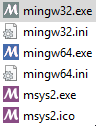
I could use "C:\msys64\mingw32.exe" but it has a gray icon background as a difference to mintty (which is started by the default MSYS2 MinGW 32-bit shortcut in the Start Menu) which has a purple background. I wonder if it has any meaning unknown to me that would make me encounter bugs in the future.
silviubogan
on 8 Aug 2017
no new shortcut appears
warning: msys2-launcher-git-0.3.32.56c2ba7-2 is up to date -- reinstalling
You already had it.
between the existing shortcuts there is none which I could pin to the taskbar in Windows 10
I could use "C:\msys64\mingw32.exe"
Yes! msys2-launcher provides mingw32.exe, mingw64.exe, and msys2.exe, which can be pinned to the taskbar, but only when from a running instance, not just from the file on disk (limitation of how pinning works).
it has a gray icon background
So you can distinguish them at glance.
elieux
on 9 Aug 2017
It's been almost two years since I filed this bug and it still isn't fixed. The solution I've given would be really easy to implement.
jblang
on 8 Sep 2017
Actually I it looks like elieux's launcher EXEs in the c:\msys64 directory but the start menu entries still use the batch files. I had just reinstalled MSYS2 after a reformat and had to redo my links.
jblang
on 8 Sep 2017
In my experience pinning msys2 to the taskbar is still a bit broken.
If you start msys2 shell with:
D:\msys64\mingw64_shell.bat or D:\msys64\msys2_shell.cmd
(sorry I don't know which is the 'better' one to use)
you will see:
maguire@mybox  ~
$ uname -a
MSYS_NT-6.3 mybox 2.7.0(0.306/5/3) 2017-02-14 08:57 x86_64 Msys
However, if you then pin this to your Windows taskbar, then click on that shortcut, instead of opening the correct shell, for some reason Windows creates a taskbar item which opens:
D:\msys64\usr\bin\mintty.exe in directory D:\msys64\usr\bin
which has a different, incorrect uname and doesn't appear to find some apps I know I have, such as unzip:
maguire@mybox  /usr/bin
$ uname -a
MINGW32_NT-6.2 MYBOX 1.0.17(0.48/3/2) 2011-04-24 23:39 i686 Msys

maguire@mybox    /usr/bin
$ which unzip
which: unzip: unknown command
Although you can correct that taskbar shortcut by manually opening:
%APPDATA%\Microsoft\Internet Explorer\Quick Launch\User Pinned\TaskBar
and right-clicking Properties on the Terminal entry and changing Target to D:\msys64\msys2_shell.cmd in directory D:\msys64\, this feels like it shouldn't be necessary.
 michaelmaguire
on 24 Jul 2018
michaelmaguire
on 24 Jul 2018
Related issues
 OortJacek
·
5Comments
OortJacek
·
5Comments
 urbster1
·
7Comments
urbster1
·
7Comments
 trapd00r
·
3Comments
trapd00r
·
3Comments
 jlinse
·
4Comments
jlinse
·
4Comments
 Arnold1
·
8Comments
Arnold1
·
8Comments
Most helpful comment
Let me plug my thing. :) It's called msys2-launcher and it doesn't show any temporary black window when starting, can be pinned, sets correct environment (and allows its customization) and allows running arbitrary commands instead of starting a regular terminal.
Pre-built x64 binaries below. It currently depends on an unreleased feature of mintty, so you need to install a development build of mintty as well.
mintty-git-x86_64.pkg.tar.xz + .sig
msys2-launcher-x86_64.pkg.tar.xz + .sig.