Describe the bug
I spent a lot of time to get why my url don't mock. The reason is empty URL.

im sending request to /dev/api/v1/auth/login but console.log(req.url) show in terminal empty URL {} object:

Environment
msw: 0.21.3nodejs: 14.14.0npm: 6.14.18
Please also provide your browser version.
Im using JEST tests. There is no browser running.
 olegKusov
All 20 comments
Hi @olegKusov thanks for reaching us :).
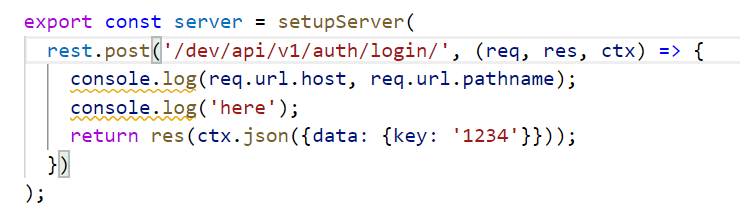
The req.url is an instance of URL. You can access the host with req.url.hostwhile the path with req.url.pathname. Let me know if this will solve your issue :)
 marcosvega91
on 23 Oct 2020
marcosvega91
on 23 Oct 2020
Hi @olegKusov thanks for reaching us :).
The
req.urlis an instance of URL. You can access the host withreq.url.hostwhile the path withreq.url.pathname. Let me know if this will solve your issue :)
yes.host is undefined and pathname right. But i don't understand why my pattern doesnt match. I pasted path from pathname
olegKusov
on 23 Oct 2020
Are you using MSW in a DOM-like environment ? If not it will not work, you should absolute url in this case
https://mswjs.io/docs/getting-started/integrate/node#direct-usage
marcosvega91
on 23 Oct 2020
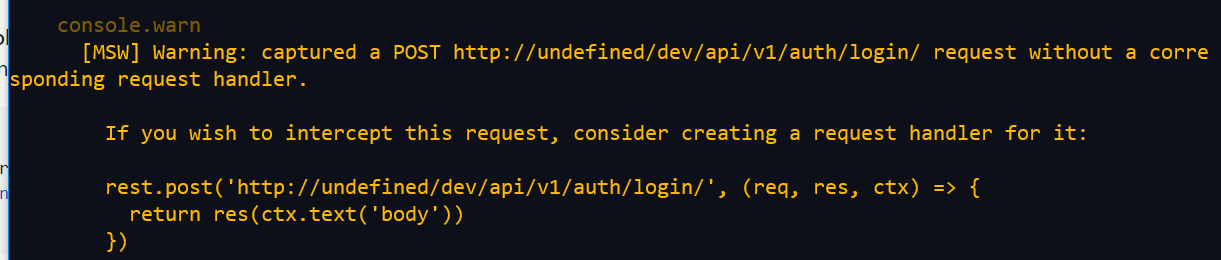
Hey, @olegKusov. Can you please try the onUnhandledRequest option of your server to see what is the actual request, and why they don't match?
const server = setupServer(...)
server.listen({
  onUnhandledRequest: 'warn'
})
 kettanaito
on 24 Oct 2020
kettanaito
on 24 Oct 2020
Could you also provide how do you perform an actual request?
Most of the mismatch cases are due to a typo, wrong method, or relative URL in a NodeJS environment.
kettanaito
on 24 Oct 2020
Hey, @olegKusov. Can you please try the
onUnhandledRequestoption of your server to see what is the actual request, and why they don't match?const server = setupServer(...) server.listen({ onUnhandledRequest: 'warn' })
olegKusov
on 25 Oct 2020
Are you using MSW in a DOM-like environment ? If not it will not work, you should absolute url in this case
https://mswjs.io/docs/getting-started/integrate/node#direct-usage
I'm using Jest
olegKusov
on 25 Oct 2020
Could you also provide how do you perform an actual request?
Most of the mismatch cases are due to a typo, wrong method, or relative URL in a NodeJS environment.
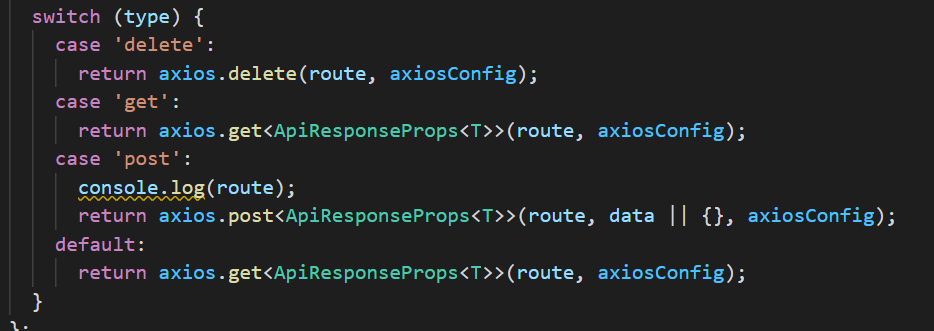
There is function for requests which wraps axios.
const res = await netPOST<{key: string}>('auth/login', {email, password});
olegKusov
on 25 Oct 2020
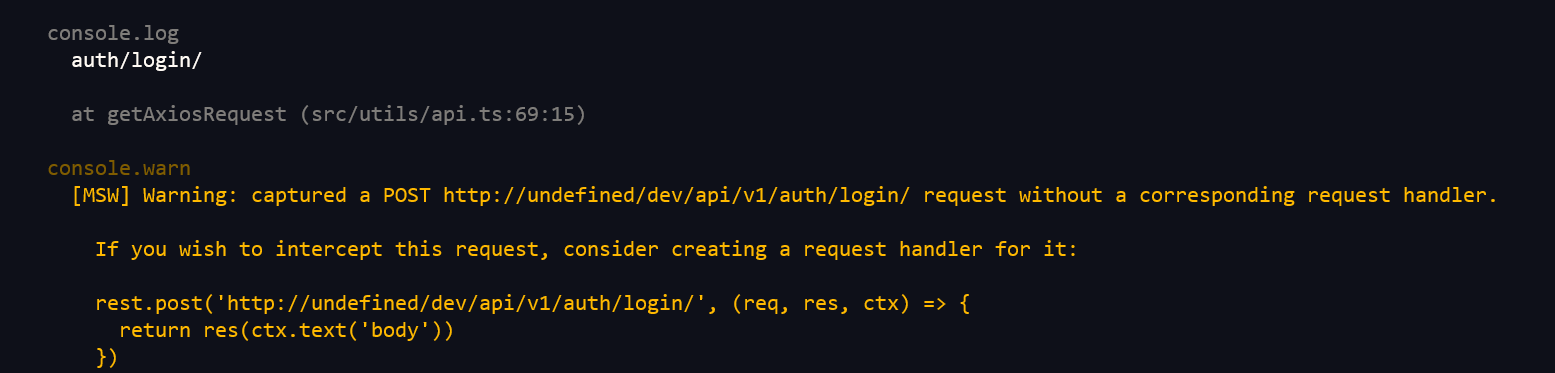
@olegKusov check the end URL you provide to axios. Looks like you compose it dynamically with one of its pieces resolving to undefined, thus you see a URL like http://undefined/ in the console warning. MSW doesn't create requests, only intercepts them, so the misconfigured URL must be coming from your app's logic.
Otherwise I'd have to see how that abstraction over axios looks like exactly (the axios call) to help more.
kettanaito
on 25 Oct 2020
One of the contributors has discovered an issue in node-request-interceptor, when we didn't inherit the default hostname in certain scenarios (https://github.com/mswjs/node-request-interceptor/pull/64). This would also cause a URL like http://undefined. Let's keep this in mind until we receive a confirmation from the author on the URL validity on his side.
kettanaito
on 25 Oct 2020
@olegKusov check the end URL you provide to axios. Looks like you compose it dynamically with one of its pieces resolving to
undefined, thus you see a URL likehttp://undefined/in the console warning. MSW doesn't create requests, only intercepts them, so the misconfigured URL must be coming from your app's logic.Otherwise I'd have to see how that abstraction over axios looks like exactly (the
axioscall) to help more.
I console.log axios.post route => it's auth/login/
olegKusov
on 25 Oct 2020
@olegKusov could you please show your axiosConfig ?
marcosvega91
on 26 Oct 2020
@olegKusov could you please show your
axiosConfig?
In this case it's empty object.
olegKusov
on 26 Oct 2020
I have recreated the issue using a node environment ( no jsdom). The issue will be solved with this PR https://github.com/mswjs/node-request-interceptor/pull/64
marcosvega91
on 26 Oct 2020
The update to node-request-interceptor has been released.
@olegKusov, could you please re-install your dependencies so it gets pulled in and let us know if the issue is gone?
kettanaito
on 26 Oct 2020
The update to
node-request-interceptorhas been released.@olegKusov, could you please re-install your dependencies so it gets pulled in and let us know if the issue is gone?
can you please update msw deps and after that i can update my local deps
olegKusov
on 26 Oct 2020
@olegKusov could you install the new version of node-request-interceptor by running one of the following command:
yarn add [email protected]
ornpm install [email protected]
marcosvega91
on 26 Oct 2020
You don't need MSW update: it specifies node-request-interceptor dependency version range permissive enough to pull in a patched version release:
https://github.com/mswjs/msw/blob/327b384938b1fdf44e77c5bd79e91b7fab0aaad4/package.json#L73
"^0.5.1" will install "0.5.1" as well as "0.5.3" ("0.5.x")
Neither you should install that 4th party dependency manually. Please reinstall your dependency and the new version of node-request-interceptor will be automatically installed. You can verify that by running the following command after the installation:
$ npm ls node-request-interceptor
You don't need MSW update: it specifies
node-request-interceptordependency version range permissive enough to pull in a patched version release:https://github.com/mswjs/msw/blob/327b384938b1fdf44e77c5bd79e91b7fab0aaad4/package.json#L73
"^0.5.1" will install "0.5.1" as well as "0.5.3" ("0.5.x")
Neither you should install that 4th party dependency manually. Please reinstall your dependency and the new version of
node-request-interceptorwill be automatically installed. You can verify that by running the following command after the installation:$ npm ls node-request-interceptor
It works! Thank you! I close issue.
olegKusov
on 26 Oct 2020
Glad to hear that! All props to @sean-hernon for an amazing bug fix 🎉
kettanaito
on 26 Oct 2020
Related issues
 tomalexhughes
·
3Comments
tomalexhughes
·
3Comments
 veronesecoms
·
3Comments
veronesecoms
·
3Comments
 otaciliolacerda
·
3Comments
otaciliolacerda
·
3Comments
 hauptrolle
·
4Comments
hauptrolle
·
4Comments
 derekr
·
3Comments
derekr
·
3Comments
Most helpful comment
It works! Thank you! I close issue.