Msw: Unable to load analytics from a third party domain
Environment
| Name | Version |
| ------- | ------- |
| msw | latest |
| browser | Chrome Canary |
| OS | macOS |
I'm using the rest-react example repository to create a working demo. My commit can be seen here
Current behavior
Following errors in the network and console tabs


Expected behavior
I expect the gtm.js request to be resolved and loaded successfully. Am I missing a way to make this happen? Thanks
 simonsmith
All 7 comments
Hey, @simonsmith. Thanks for reaching out.
Does the requested URL work if you access it manually in the browser (i.e. copy paste into a new browser tab)?
There seems to be an error somewhere in the MSW lifecycle, which results into an unexpected data being passed to .responseWith() in the Service Worker. We need to dive into your example repo and analyze what's wrong.
 kettanaito
on 11 Aug 2020
kettanaito
on 11 Aug 2020
Does the requested URL work if you access it manually in the browser (i.e. copy paste into a new browser tab)?
@kettanaito It does, although in the code snippet I've provided I replaced my actual GTM container ID with ZZZZZZ so you will see a 404. However the result in the network/console tabs is identical when using a real ID.
Thanks for taking a look!
simonsmith
on 11 Aug 2020
Hi guys if it will be not solved before I'll take a look next week 🙃
 marcosvega91
on 14 Aug 2020
marcosvega91
on 14 Aug 2020
@simonsmith keep in mind that if a request is not handled (and your GTM request should be not), it will be performed as-is. This means that its URL must be valid. Double check if you are providing a valid GTM script URL, and that file exists at that path.
@marcosvega91, thank you 🙏 That would be awesome.
kettanaito
on 14 Aug 2020
I took a quick peek at this. I was able to replicate this behavior, but the issue was not with msw. The only way I could force this to happen was by using a new GTM container that was unpublished. An unpublished container or a container in preview mode will return a 404. I would double-check that the container ID that you're using is published, live, and accessible via the browser, similar to this (https://www.googletagmanager.com/gtm.js?id=GTM-NWG7T3).
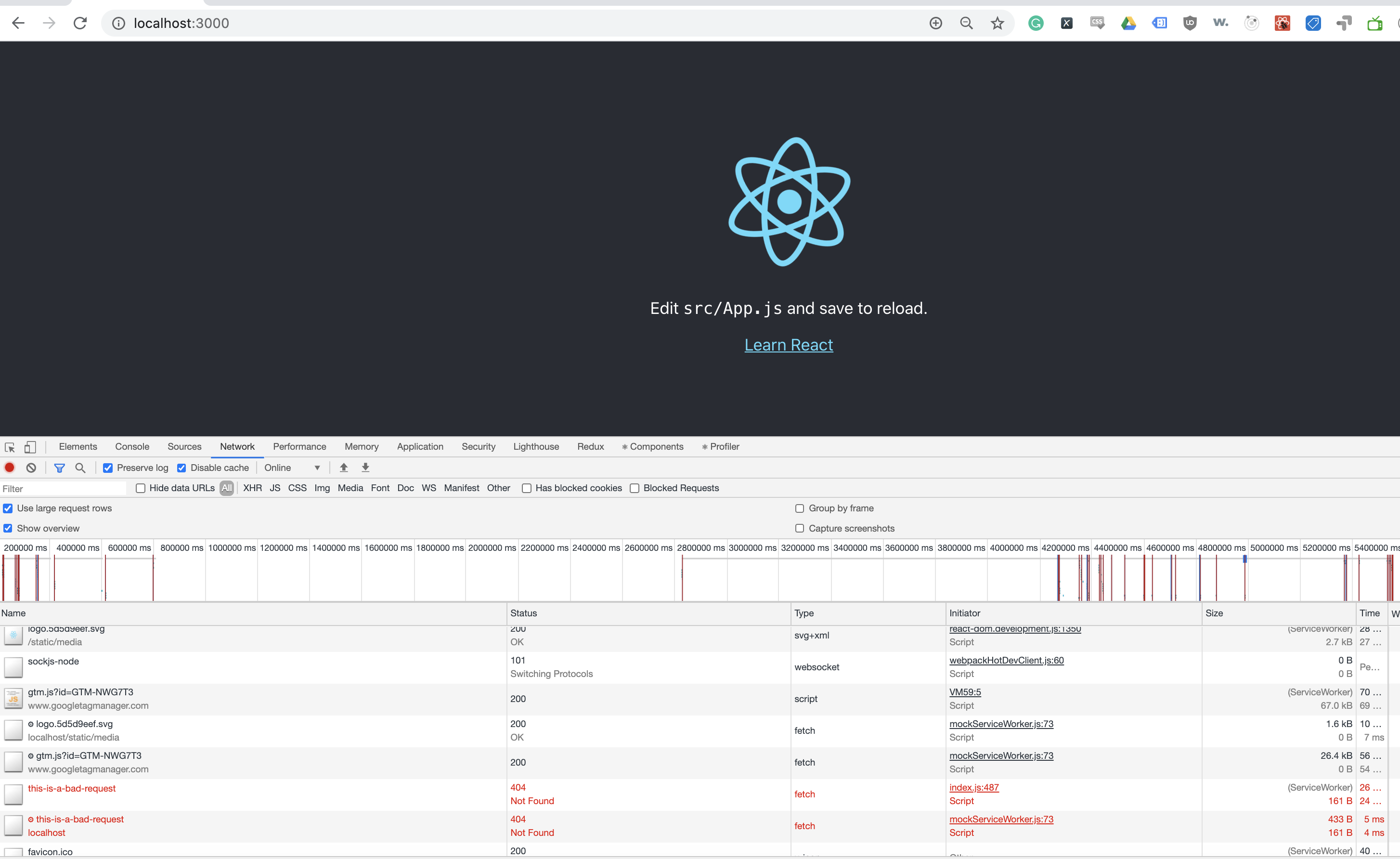
Here's what I checked:
- Loading it on localhost
- Loading it on a tunnel (like ngrok and localtunnel)
- Loading it with the tag assistant chrome extension both enabled and disabled
- Loading with uBlock on/off
Here's the exact code used to test. msw config is just the default generated worker in ./public and calling worker.start({ onUnhandledRequest: 'warn' }) in index.js
import React, { useEffect } from "react";
import logo from "./logo.svg";
import "./App.css";

const getGtmScript = (id) =>
  `
    (function(w,d,s,l,i){w[l]=w[l]||[];w[l].push({'gtm.start':
      new Date().getTime(),event:'gtm.js'});var f=d.getElementsByTagName(s)[0],
      j=d.createElement(s),dl=l!='dataLayer'?'&l='+l:'';j.async=true;j.src=
      'https://www.googletagmanager.com/gtm.js?id='+i+dl;f.parentNode.insertBefore(j,f);
    })(window,document,'script','dataLayer','${id}');
  `;

export const injectGtmLibrary = () => {
  const scriptContents = getGtmScript("GTM-NWG7T3");
  const scriptElement = document.createElement("script");
  scriptElement.innerHTML = scriptContents;
  const targetElement = document.getElementById("gtm-scripts");
  if (targetElement) {
    targetElement.after(scriptElement);
  }
};

function App() {
  useEffect(() => {

    injectGtmLibrary();

    fetch("/this-is-a-bad-request", {
      method: "POST",
      body: JSON.stringify({ data: "two" }),
    });
  }, []);

  return (
    <div className="App">
      <header className="App-header">
        <img src={logo} className="App-logo" alt="logo" />
        <p>
          Edit <code>src/App.js</code> and save to reload.
        </p>
        <a className="App-link" href="https://reactjs.org" target="_blank" rel="noopener noreferrer">
          Learn React
        </a>
      </header>
      <div id="gtm-scripts"></div>
    </div>
  );
}

export default App;
Log of expected behavior:
 msutkowski
on 16 Aug 2020
msutkowski
on 16 Aug 2020
After some more testing I can now see this working fine. It was an unfortunate issue of an ad-blocker being enabled without me realising which explains it working correctly when viewed directly.
Apologies for wasting anyone's time with this!
simonsmith
on 18 Aug 2020
Glad it got resolved! Thank you for posting what was the root cause.
kettanaito
on 18 Aug 2020
Related issues
kettanaito
·
3Comments
 PritamSangani
·
3Comments
PritamSangani
·
3Comments
 abrudin
·
3Comments
abrudin
·
3Comments
 veronesecoms
·
3Comments
veronesecoms
·
3Comments
 lukesmurray
·
3Comments
lukesmurray
·
3Comments
Most helpful comment
After some more testing I can now see this working fine. It was an unfortunate issue of an ad-blocker being enabled without me realising which explains it working correctly when viewed directly.
Apologies for wasting anyone's time with this!