Is your feature request related to a problem? Please describe.
Does React Native have the ability to support this?
Describe the solution you'd like
Some guide to do something similar with react native
Describe alternatives you've considered
Can something custom be set up with https://github.com/Blitz-Mobile-Apps/react-native-bg-thread#readme ?
Additional context
Add any other context or screenshots about the feature request here.
 hsavit1
All 89 comments
I wonder if using setupServer in React Native would be enough. I'd appreciate if somebody could do a proof of concept with that.
 kettanaito
on 13 Jun 2020
kettanaito
on 13 Jun 2020
do you think, for react native, that it could work for grahphql requests (via apollo client) as well?
hsavit1
on 14 Jun 2020
@hsavit1, I believe so. It's a matter of understanding a request flow in React Native. I assume React Native app runs on Node, so that's why I've suggested to check if using setupServer doesn't intercept its requests already (that's the API that powers API mocking in Node).
As of GraphQL, it's not much different than a regular REST request. In fact, it is a regular REST request, just compliant with the GraphQL specification (has a query, optional variables, and so on).
kettanaito
on 14 Jun 2020
I believe React Native has _some_ access to Node.js APIs via the node-js mobile library. See this for more.
Read more about the javascript core here: https://reactnative.dev/docs/0.60/javascript-environment
hsavit1
on 14 Jun 2020
Stumbled across this issue while trying to set up a react native app to use msw for integration tests. I would love to help get this working for react-native outside of tests if someone could point me in the right direction.
 donovanhiland
on 29 Jun 2020
donovanhiland
on 29 Jun 2020
Hey, @donovanhiland! We'd really appreciate your help, if you have a spare minute.
Could you please try using setupServer (regular integration with Node) in your React Native integration tests? Here's the documentation on the process. Since tests run in Node environment, that integration should work. But due to the difference of the platform, it may have some unexpected behavior.
Would love to hear how it goes from you.
kettanaito
on 30 Jun 2020
Absolutely! @kettanaito I was able to get setupServer working in my react-native apollo jest integration test environment. There was a small caveat for react-native tests where I had to set a global fetch implementation so msw could intercept. Otherwise fetch could not be found.
In trying to implement msw in the actual react native app it looks like it does not have access to core NodeJS modules without some extra work. I toyed with https://github.com/parshap/node-libs-react-native which got me past the missing module warnings, but am now running into:
Error: [MSW] Failed to execute `setupServer` in the environment that is not NodeJS (i.e. a browser). Consider using `setupWorker` instead.
There is no global process variable in the react-native environment
donovanhiland
on 30 Jun 2020
@donovanhiland @kettanaito is there a way to shim the node env using this?
hsavit1
on 30 Jun 2020
Thanks for trying that out so quickly. Excited to hear that you got it to the working state!
There was a small caveat for react-native tests where I had to set a global fetch implementation so msw could intercept.
I think this is the gotcha for any Node tests that rely on fetch. Fetch implementation needs to be polyfilled.
There is no global process variable in the react-native environment
This is an interesting detail. Looks like we need to adjust our isNodeProcess function that validates your API usage against the environment. The question is: should we consider React Native as Node? It should definitely error on attemtpint to use setupWorker in React Native (no Service Worker API).
@hsavit1, that's a nice find! I'm concerned about the amount of modules this single import pulls in. It may have a high cost, which may affect the tests' performance. Perhaps, if we could also check for React Native environment by some distinct flag, we may omit relying on global.
kettanaito
on 30 Jun 2020
@kettanaito this is a project that seems to be a bit more focused
hsavit1
on 30 Jun 2020
There was a small caveat for react-native tests where I had to set a global fetch implementation so msw could intercept
@donovanhiland How did you do this?
hsavit1
on 30 Jun 2020
I can confirm that I was able to get this working for my jest test suite using ApolloProvider and the cross-fetch library , but was not able to get it working for my application
hsavit1
on 30 Jun 2020
There was a small caveat for react-native tests where I had to set a global fetch implementation so msw could intercept
@donovanhiland How did you do this?
I set global.fetch = require('node-fetch') in a jest setup file
donovanhiland
on 1 Jul 2020
Thanks for trying that out so quickly. Excited to hear that you got it to the working state!
There was a small caveat for react-native tests where I had to set a global fetch implementation so msw could intercept.
I think this is the gotcha for any Node tests that rely on
fetch. Fetch implementation needs to be polyfilled.There is no global process variable in the react-native environment
This is an interesting detail. Looks like we need to adjust our
isNodeProcessfunction that validates your API usage against the environment. The question is: should we consider React Native as Node? It should definitely error on attemtpint to usesetupWorkerin React Native (no Service Worker API).@hsavit1, that's a nice find! I'm concerned about the amount of modules this single import pulls in. It may have a high cost, which may affect the tests' performance. Perhaps, if we could also check for React Native environment by some distinct flag, we may omit relying on
global.
does the PR https://github.com/mswjs/msw/pull/262 address these issues?
hsavit1
on 5 Jul 2020
strangely, when trying to run my tests on master, they now fail with error Cannot find module 'msw/node'
hsavit1
on 5 Jul 2020
Yes, #262 addresses proper environment check for React Native, so it's treated as any other NodeJS process by MSW. The changes are not published yet, however.
Looks like you have msw package missing. What does npm ls msw says?
kettanaito
on 5 Jul 2020
Yes, @262 addresses proper environment check for React Native, so it's treated as any other NodeJS process by MSW. The changes are not published yet, however.
Looks like you have
mswpackage missing. What doesnpm ls mswsays?
That's great news!
In my package.json, I have:
"msw": "github:mswjs/msw#master",
When I run npm ls I see
[email protected] (github:mswjs/msw#d6e1f0aea1ec5fbe09db574722247a5b16d3da54)
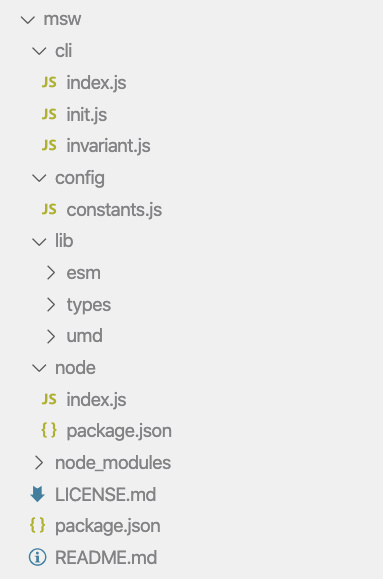
Even when I added a postinstall script it fails with the "cannot find config.rollup.ts" error. For some reason my directory tree looks like (?):

hsavit1
on 6 Jul 2020
It appears you are installing the library from its Git branch. While that would link the library to your dependencies, it won't build the library. Since build artifacts, such as lib/**, are not committed to VCS, you'd have to build the library manually:
$ cd node_modules/msw
$ yarn build
The screenshot above illustrates that the msw directory does not contain the built library (the lib directory).
kettanaito
on 7 Jul 2020
It appears you are installing the library from its Git branch. While that would link the library to your dependencies, it won't build the library. Since build artifacts, such as
lib/**, are not committed to VCS, you'd have to build the library manually:$ cd node_modules/msw $ yarn buildThe screenshot above illustrates that the
mswdirectory does not contain the built library (thelibdirectory).
the yarn build is what I added to the postinstall script. I tried doing it manually by running it in the directory, again it failed with the error
[!] Error: ENOENT: no such file or directory, lstat '/Users/xxx/yyy/zzz-app/node_modules/msw/rollup.config.ts'
Error: ENOENT: no such file or directory,
I was interested to see if it was possible to start msw's server at runtime in react native ( as is possible with the browser's worker ). I was glad to find that it's possible to make it work.
My finding:
I had to patch msw like this:
diff --git a/node_modules/msw/node/index.js b/node_modules/msw/node/index.js
index 0e16e2e..e06d680 100644
--- a/node_modules/msw/node/index.js
+++ b/node_modules/msw/node/index.js
@@ -4,7 +4,6 @@ Object.defineProperty(exports, '__esModule', { value: true });
function _interopDefault (ex) { return (ex && (typeof ex === 'object') && 'default' in ex) ? ex['default'] : ex; }
-var timers = _interopDefault(require('timers'));
var nodeRequestInterceptor = require('node-request-interceptor');
/*! *****************************************************************************
@@ -590,10 +589,6 @@ function resetHandlers(initialHandlers, ...nextHandlers) {
*/
const setupServer = (...requestHandlers) => {
const interceptor = new nodeRequestInterceptor.RequestInterceptor();
- // Error when attempting to run this function in a browser environment.
- if (!isNodeProcess()) {
- throw new Error('[MSW] Failed to execute `setupServer` in the environment that is not NodeJS (i.e. a browser). Consider using `setupWorker` instead.');
- }
// Store the list of request handlers for the current server instance,
// so it could be modified at a runtime.
let currentHandlers = [...requestHandlers];
@@ -632,7 +627,7 @@ const setupServer = (...requestHandlers) => {
var _a;
// using the timers module to ensure @sinon/fake-timers or jest fake timers
// don't affect this timeout.
- timers.setTimeout(() => {
+ setTimeout(() => {
resolve({
status: response.status,
statusText: response.statusText,
and node-request-interceptor like this:
diff --git a/node_modules/node-request-interceptor/lib/RequestInterceptor.js b/node_modules/node-request-interceptor/lib/RequestInterceptor.js
index e24d5df..abfb4cf 100644
--- a/node_modules/node-request-interceptor/lib/RequestInterceptor.js
+++ b/node_modules/node-request-interceptor/lib/RequestInterceptor.js
@@ -36,7 +36,6 @@ var __generator = (this && this.__generator) || function (thisArg, body) {
}
};
Object.defineProperty(exports, "__esModule", { value: true });
-var override_1 = require("./http/override");
var override_2 = require("./XMLHttpRequest/override");
var debug = require('debug')('interceptor');
var RequestInterceptor = /** @class */ (function () {
@@ -69,7 +68,7 @@ var RequestInterceptor = /** @class */ (function () {
}); };
this.middleware = [];
debug('created new RequestInterceptor');
- this.overrides = [override_1.overrideHttpModule, override_2.overrideXhrModule].map(function (override) {
+ this.overrides = [override_2.overrideXhrModule].map(function (override) {
return override(_this.applyMiddleware);
});
}
diff --git a/node_modules/node-request-interceptor/lib/XMLHttpRequest/XMLHttpRequest/createEvent.js b/node_modules/node-request-interceptor/lib/XMLHttpRequest/XMLHttpRequest/createEvent.js
index 8d9479a..81d2e69 100644
--- a/node_modules/node-request-interceptor/lib/XMLHttpRequest/XMLHttpRequest/createEvent.js
+++ b/node_modules/node-request-interceptor/lib/XMLHttpRequest/XMLHttpRequest/createEvent.js
@@ -1,6 +1,16 @@
"use strict";
Object.defineProperty(exports, "__esModule", { value: true });
var EventOverride_1 = require("./EventOverride");
+var ProgressEvent = function(type, eventInit) {
+ this.type = type
+ this.lengthComputable = eventInit.lengthComputable
+ this.loaded = eventInit.loaded
+ this.total = eventInit.total
+ }
+
+ //ProgressEvent.prototype = Object.create(Event.prototype)
+ ProgressEvent.prototype.constructor = ProgressEvent
+
exports.createEvent = function (options, target, type) {
var progressEvents = [
'error',
and include a polyfill, import 'react-native-url-polyfill/auto'.
That was enough to start using a local dev server in RN, at runtime.
 Federkun
on 8 Jul 2020
Federkun
on 8 Jul 2020
I was interested to see if it was possible to start msw's server at runtime in react native ( as is possible with the browser's worker ). I was glad to find that it's possible to make it work.
My finding:
I had to patch msw like this:
Nice work @Federkun - did you do this against master or against 0.19.5 ?
hsavit1
on 8 Jul 2020
Against 0.19.5 ( 7a72ff79bf10ee2decedf78a2452a779097fddf6 ), so it doesn't have those few useful last commits
Federkun
on 8 Jul 2020
Hey, @Federkun. Thank you for those insights!
-var timers = _interopDefault(require('timers'));
I suppose timers is not a built-in in React Native?
History:
timersare used because they are decoupled fromsetTimeout. When you mock timers in testing frameworks they stubsetTimeout, which results into mocked requests never resolving.
-if (!isNodeProcess()) {
Could you please share your findings on why this line was causing troubles?
I suppose it's because
0.19.5doesn't contain important improvements of theisNodeProcessutility that unexpectedly failed in React Native. Should be fixed in the next release by #255 and #262.
React Native should be treated as a NodeJS environment. This condition should never resolve in React Native.
-var override_1 = require("./http/override");
This is interesting. I'd expect http to be present in RN, while XHR to be not. Is it the opposite? I wonder if we have to check for http module availability in node-request-interceptor before patching it.
kettanaito
on 8 Jul 2020
Keep in mind that RN's js runtime is not the same as node, most of those core modules are missing there. That unfortunately includes timers and http.
About, isNodeProcess, I wouldn't worry about it. I did delete it because the latest released version (0.19.5) didn't include https://github.com/mswjs/msw/commit/32b7545a04106e8b5e494e7861ae6d009d8fcc97 , which I can confirm fix the issue
Federkun
on 8 Jul 2020
A check for the http/https modules existence before patching them should be trivial. This is how XMLHttpRequest patching works now (XHR is also not present in NodeJS by default, only through DOM-like environments like jsdom).
The timers point may be more critical, though. I wonder if one can use fake timers from Jest when testing React Native?
kettanaito
on 8 Jul 2020
If we can conditionally choosing to use global.setTimeout or timers.setTimeout at runtime, then we can use the first when navigator.product === 'ReactNative' (meaning the app is running on the JavascriptCore engine of RN). Nobody will really mock timers when running the application. While, when testing the application using jest, using timers.setTimeout is still valid, as we are running all the tests against node ( where the module exists, and navigator is undefined )
Federkun
on 8 Jul 2020
@Federkun, sounds sensible. I think you've mentioned that it's troublesome to determine that on runtime, since RN will reference timers anyway? Could you please share more insights on that, what approaches have you tried? Conditional require should still work in RN.
// CAUTION: Pseudo-code
export function setTimeout() {
if (isReactNative()) {
return setTimeout
}
return require('timers').setTimeout
}
It's one of the limitation of the metro bundler, https://github.com/facebook/metro/issues/52 https://github.com/react-native-community/discussions-and-proposals/issues/120
There's an optional allowOptionalDependencies transformer's option that was recently added to the metro ( https://github.com/facebook/metro/pull/511 ) which should have the same effect as https://github.com/satya164/babel-plugin-optional-require , but they are both opt-in features.
Currently, you cannot conditionally require a module within RN, nor try-catch them without a babel plugin to allow that, as all imports are static.
From version 0.63, which should be released soon, this may start working:
try {
timers = require('timers');
} catch (err) {}
Same can be done now with babel-plugin-optional-require, but require the user to install it on their side.
Federkun
on 9 Jul 2020
FWIW the react native documentation now has a full page that discusses timers
hsavit1
on 9 Jul 2020
Status update
With the amazing help from our contributors we have merged the build adjustments that now produce a separate msw/native build target. You will be able to use MSW in your React Native projects with the same API as setupServer, only imported from a different target:
import { setupServer } from 'msw/native'

setupServer(rest.get('/user', ...))
Technical roadmap
- #269 adds a separate build target.
- https://github.com/mswjs/node-request-interceptor/commit/689f1e8ccc54d3aeaefde7a9ca737843593ddfc6 conditionally lists native NodeJS modules to patch for NodeJS request interception.
What's left?
- Update
node-request-interceptorin themswpackage. - Wait for the next
0.20.0release.
kettanaito
on 21 Jul 2020
Just a reminder that, disappointedly, RN's URL is not spec-compliant. Including this polyfill is currently required: https://www.npmjs.com/package/react-native-url-polyfill
Federkun
on 21 Jul 2020
I am reporting that I am unable to get my apollo react native project to work outside of the test environment on msw 0.20.0, tested both0 with cross-fetch and with node-fetch
@Federkun do you have an example project by any chance?
hsavit1
on 30 Jul 2020
Is it necessary to run react native 63 @Federkun ?
hsavit1
on 31 Jul 2020
In the release notes, I see that you should be able to import setupServer from msw/native, but TS is complaining that it can't find that file
this is what I see when I look at my node modules
hsavit1
on 31 Jul 2020
I think that we have forgotten to add native folder to files in package.json
 marcosvega91
on 31 Jul 2020
marcosvega91
on 31 Jul 2020
@hsavit1 we have not included the native directory in the published files in package.json.
Thanks to @marcosvega91 that's been fixed and released in 0.20.1. Please update and let us know that you can use the msw/native in your React Native projects!
kettanaito
on 31 Jul 2020
Unfortunately, I have to report that things in the application development level are still not working for me. The import now works great, and my tests relying on msw still work (as they had in 0.19.5)
However, when I try to run server.listen() in my App.tsx, I consistently get the error, even after rebundling, rebuilding, etc
Could not get BatchedBridge, make sure your bundle is packaged correctly
Is a hard requirement to use RN 0.63? I am using 0.62.2 . Also, I tried installing https://www.npmjs.com/package/react-native-url-polyfill but that did not help either.
hsavit1
on 31 Jul 2020
Framing the question another way - does this setTimeout function come from RN ?
hsavit1
on 2 Aug 2020
@hsavit1 that should be a regular setTimeout present on the global scope of React Native's runtime.
We've moved the setTimeout resolution to the Rollup configuration, because in the regular non-RN project MSW should use timers.setTimeout in order for the response time to be isolated from any kind of fake timers you may use (i.e. in Jest).
Here you can see how Rollup decides to use require('timers').setTimeout for NodeJS bundle:
https://github.com/mswjs/msw/blob/c9cfd586801d8bf602c7e8b154e0e7a7104cc18c/rollup.config.ts#L97-L99
Also, I tried installing https://www.npmjs.com/package/react-native-url-polyfill but that did not help either.
Please have the mentioned polyfill installed, otherwise there is no guarantee the URL instance in React Native would be operable with the URL instance MSW expects (two are not fully compatible).
kettanaito
on 2 Aug 2020
Having the same problem as @hsavit1 :
Could not get BatchedBridge, make sure your bundle is packaged correctly
This is with RN 0.63.2
Edit: Seems the latest node-request-interceptor release doesn't have the RN patches yet
 Tommos0
on 7 Aug 2020
Tommos0
on 7 Aug 2020
I've tested against node-request-interceptor@master, and there is one more problem here:
ProgressEvent is not defined in RN (Event in general). If you patch it like:
export function createEvent(options: any, target: any, type: string) {
   return new EventOverride(type, {
        target,
        currentTarget: target,
      })
}
it seems to work fine! But maybe it's better to polyfill ProgressEvent as a fix? global.ProgressEvent = function () {}; seems to do the trick too (at least for my simple test GETting a simple URL).
Tommos0
on 7 Aug 2020
I think that the native override of the node-request-interceptor is not bundled. When the library is build only overrideModules.ts is added to bundle.
marcosvega91
on 7 Aug 2020
I think that the
nativeoverride of thenode-request-interceptoris not bundled. When the library is build onlyoverrideModules.tsis added to bundle.
It's bundled when I build it, and working too :). Just not released yet I guess. It just needs a fix for missing ProgressEvent and I think it's good to go.
Tommos0
on 7 Aug 2020
Ah yes, we should release another version with the native override.
marcosvega91
on 7 Aug 2020
I think that the
nativeoverride of thenode-request-interceptoris not bundled. When the library is build onlyoverrideModules.tsis added to bundle.It's bundled when I build it, and working too :). Just not released yet I guess. It just needs a fix for missing
ProgressEventand I think it's good to go.
Hi @Tommos0 about ProgressEvent I think is better to use react-native-url-polyfill, because also URL is missing.
Maybe we can add as node-request-interceptor dependency and import it in overrideModules.native.js. @kettanaito what do you think?
marcosvega91
on 8 Aug 2020
It's the end consumer (developer) who must choose a proper polyfill. I wouldn't specify a certain polyfill as a package's dependency, that's not a good practice. Since node-request-interceptor is used in other environments than RN, specifying such polyfill as a dependency is redundant for those other environments.
@marcosvega91, react-native-url-polyfill does not include any ProgressEvent polyfill, so I'm not sure I follow your suggestion... It looks like we need to lazily construct ProgressEvent, only if it exists.
@Tommos0, unfortunately, we cannot replace ProgressEvent with EventOverride, as that would kill the progress support for XHR. It's a React Native-specific behavior, so, perhaps, accessing that class lazily would be a solution.
kettanaito
on 9 Aug 2020
[email protected] has been published and now includes the optional inclusion of http module override for React Native. MSW version must be bumped and released as well, in order for the changes to take effect.
- See the Release notes.
kettanaito
on 9 Aug 2020
Please update to [email protected] and let us know if the interception functions in React Native. Thanks.
kettanaito
on 10 Aug 2020
:+1: It's working. Maybe some docs wrt ProgressEvent would be nice? I'm using the following Polyfill a.t.m., it seems to do the trick.
function ProgressEvent(type, options) {
  this.type = type;
  Object.assign(this, options);
}
global.ProgressEvent = ProgressEvent;
Actually, what about this ? (just return plain object if there's no ProgressEvent). This would make things work out of the box.
https://github.com/mswjs/node-request-interceptor/compare/master...Tommos0:patch-1
Tommos0
on 10 Aug 2020
@Tommos0, a plain object is not compatible with ProgressEvent (Event in general), as it missed things like target, currentTarget, preventDefault, etc. We'd have to polyfill ProgressEvent using the EventOverride class we already have.
kettanaito
on 10 Aug 2020
Could you please try https://github.com/mswjs/node-request-interceptor/pull/41 and tell me if this would work? Thanks.
kettanaito
on 10 Aug 2020
Actually in React Native the event objects are plain objects (see https://github.com/facebook/react-native/blob/73242b45a9f7f9ecce8f5124ac3d1665f575be74/Libraries/Network/XMLHttpRequest.js#L369-L373) :). But perhaps we shouldn't assume that not having ProgressEvent means that we're in a RN environment.
https://github.com/mswjs/node-request-interceptor/pull/41 works nicely too! The event has some extra properties & proto, but that probably won't break anything.
Tommos0
on 10 Aug 2020
@Tommos0 you can try the latest master of msw to see how it behaves in a React Native project. Let's release this state tomorrow, if there are no other issues found. Much thanks to you and all the other contributors actively involved in making React Native support a reality. You rock.
kettanaito
on 10 Aug 2020
It works for intercepted requests, but there is a problem with forwarded requests:
I think this should be this.async = typeof async === "undefined" ? true : async.
The default should be true. https://developer.mozilla.org/en-US/docs/Web/API/XMLHttpRequest/open (same for RN XHR). Non async-calls are not possible and will error in RN.
edit:
This also looks a but dangerous:
this.user = user || ''
this.password = password || ''
the empty string instead of undefined might result in a authentication headers being sent.
Tommos0
on 10 Aug 2020
Those are some great findings. Do you mind to issue a pull request regarding those changes?
kettanaito
on 10 Aug 2020
FYI my tests started breaking in release 0.20.2 and have not been fixed in release 0.20.5 . Tests are working fine in 0.20.1
hsavit1
on 11 Aug 2020
@kettanaito @marcosvega91 I've created a sample react native / apollo project that utilizes msw here - it mostly demonstrates some of the struggles that I was having.
I'd really appreciate any direction on the project and would love to publish it to the msw examples if we can get it working properly
hsavit1
on 13 Aug 2020
To avoid confusion, we have a few different situations:
- Mocking during unit tests - with the Node interpreter, (I think this is what @hsavit1 means).
- Mocking 'inside' a RN app (e.g. during development or running embedded tests) - using the RN Javascript interpreter, (this is what my patches are for).
- Mocking during integration/e2e tests with Appium / Detox - I don't think
mswis useful here, i think it's better to run actual (mocking) HTTP based services.
Tommos0
on 13 Aug 2020
To avoid confusion, we have a few different situations:
* Mocking during unit tests - with the Node interpreter, (I think this is what @hsavit1 means).

* Mocking 'inside' a RN app (e.g. during development or running embedded tests) - using the RN Javascript interpreter, (this is what my patches are for).
@Tommos0 I actually created the demo project to cover both of these use cases. Surprisingly, MSW is failing for both of them.
In my personal projects, MSW works great for the unit test case (up to v0.20.1) but fails in the development case (as of v0.20.5).
* Mocking during integration/e2e tests with Appium / Detox - I don't think `msw` is useful here, i think it's better to run actual (mocking) HTTP based services.
Shouldn't this work in the same way that it could work for local development?
hsavit1
on 13 Aug 2020
I had a look at your project, the problem is indeed a mixup of situation 1 and 2; the .native modules are loaded even though the environment is Node.
@kettanaito , i don't think the split with '*.native.js' in node-request-interceptor is working as intended, as the '.native.js' is also picked up when just running node (probably through the babel or jest preset)
Tommos0
on 13 Aug 2020
I had a look at your project, the problem is indeed a mixup of situation 1 and 2; the .native modules are loaded even though the environment is Node.
@kettanaito , i don't think the split with '*.native.js' in
node-request-interceptoris working as intended, as the '.native.js' is also picked up when just running node (probably through the babel or jest preset)
@Tommos0 I really appreciate you doing that 🙌 - I've updated the project with your suggestions. Unfortunately, same results as before. Can you confirm that the change that I made is in line with what you were thinking?
Also, please feel free to open a PR if you believe that you understand what needs to be done to improve it!
hsavit1
on 13 Aug 2020
So there is still the following problem:
- Files with
.native.jsare picked up in a RN bundle. - In a typical RN setup,
.native.jsis also picked up for tests running in node.
However both cases require different intercepts.
I think somewhere in RN's babel preset these extensions are picked up, but I can't the exact location so far.
I'm starting to think restructuring things a bit will be a lot easier than messing with babel overrides.
- Restructure
node-request-interceptorso that it exports multiple entry points (web/node/RN). - Each entry point intercepts the corresponding available APIs (fetch/http/XHR).
Then we as developers can just pick the right import (forwarded through msw, the api is already there, msw/native, msw/node. msw/web could also be added if a user doesn't want to use the service worker approach. Or just an exception for node, since that is the only one with require; XHR/fetch can be detected I suppose.
What are your thoughts @kettanaito ?
Tommos0
on 14 Aug 2020
I know that @Federkun was dealing with the same .native.js issue (https://github.com/mswjs/node-request-interceptor/issues/38), perhaps he has some insights to share?
Do I understand it correctly that the current issue is that RN doesn't have the http module, so its interception must be omitted in NRI. To solve that, we've added the .native.js module to NRI that should be picked up by RN. The problem is that it's being picked up in RN tests (run in Node), where http module should be intercepted. Right?
If it comes to making NRI configurable through interception modules, I'd imagine the usage as something like this:
// node-request-interceptor/lib/index.js
export { RequestInterceptor } from './RequestInterceptor'
export { interceptClientRequest } from './interceptors/ClientRequest'
export { interceptXMLHttpRequest } from './interceptors/XMLHttpRequest'
// msw/node/index.js
import { RequestInterceptor, interceptClientRequest, interceptXMLHttpRequest } from 'node-request-interceptor'

const interceptor = new RequestInterceptor([interceptClientRequest, interceptXMLHttpRequest])
interceptor.use(/* request middleware */)
// msw/native/index.js
import { RequestInterceptor, interceptXMLHttpRequest } from 'node-request-interceptor'

const interceptor = new RequestInterceptor([interceptXMLHttpRequest])
interceptor.use(/* request middleware */)
The more I think about this API, the more I fancy the conclusion to _call_ request intereceptors instead of passing their references. That way it would be possible to parametrize each interceptor, if necessary. The question is whether that doesn't add extra complexity to the NRI usage.
@Tommos0, does such restructuring looks similar to what you had in mind?
Advantages
- Granular low-level requests interception.
Disadvantages
- Potentially unnecessary granularity, because there can only be HTTP or XHR requests modules interception.
- Such API may be tempting to create targeted single-purpose interception overrides (i.e.
interceptReactNativeXHR), which I would strongly discourage.
msw/webcould also be added if a user doesn't want to use the service worker approach
Considering Service Worker utilization is the primary feature and the main benefit of MSW, I don't see it being opt-out. There is nothing good with patching request issuing modules, and the fact that we do that with NRI to provide NodeJS support is for the lack of the better approach in NodeJS.
kettanaito
on 17 Aug 2020
Yup, that API design seems perfect to me! That should get rid of the current issues.
Tommos0
on 17 Aug 2020
Good, @Tommos0, could you please address the review on https://github.com/mswjs/node-request-interceptor/pull/42#issuecomment-674727765, so we could merge it. I'd be glad to start with the aforementioned refactoring afterwards. I'd be thankful to count on your code review in that process, if possible.
kettanaito
on 17 Aug 2020
The fix regarding the forwarding of XMLHttpRequest open method was published in [email protected] (huge thanks to @Tommos0). Please re-install the msw package to get the latest dependency version.
Now we will focus on that refactoring to split request interceptions into separate modules, allowing granular import (see the comment above).
kettanaito
on 18 Aug 2020
[email protected] has been published and ships the support for granular request interception. MSW update should follow soon.
kettanaito
on 20 Aug 2020
We will update the NRI dependency in the next minor release of the library, approximately this/next week. Stay tuned and thank you for patience.
kettanaito
on 27 Aug 2020
I have been trying to use MSW with React Native (0.63.0) and haven't had any success. I have been using this PR. Is there a working example of MSW with RN?
 joe307bad
on 31 Aug 2020
joe307bad
on 31 Aug 2020
Hey, @joe307bad. We are currently working on the React Native support, as there were a few issues reported from the previous release. The conclusion of that work should be a usage example with React Native that you could reference.
Meanwhile, could you elaborate how exactly did you try this PR? You can verify that it builds properly by:
$ npm ls node-request-interceptor
v0.5.0
Thanks @kettanaito!
I basically pointed my package.json to that PR and added something like this to my React Native App.ts file:
import { setupServer } from 'msw/src/native';
import { rest } from 'msw/src/rest';

const server = setupServer(rest.post('/'));
server.listen({
  onUnhandledRequest: 'warn'
});
But it didn't seem like any of the requests were being intercepted.
joe307bad
on 31 Aug 2020
@joe307bad that code example has a couple of issues you need to resolve to make sure you're using the library correctly:
- Don't import from
src.
-'msw/src/native'
+'msw/native'

-'msw/src/rest'
+'msw'
- While you've created
rest.post('/')handler, you didn't provide any Response resolver (the second argument). Always provide how to handle a captured request. For example:
rest.post('/', (req, res, ctx) => res(ctx.status(200))
Note that this only mocks
POST /requests.
kettanaito
on 31 Aug 2020
@kettanaito I updated my demo project, see here
Still having difficulty getting this working
hsavit1
on 9 Sep 2020
@hsavit1, thank you for your patience. We've just published [email protected], which should address some issues with React Native support. Could you please update and let us know how it operates in your project? That would be awesome. Thanks!
kettanaito
on 10 Sep 2020
@kettanaito I have updated the demo again to 0.21.0 . This includes some minor refactoring to not use msw for development purposes, and only for testing purposes. At this point, I am just trying to get something to function properly.
I keep running into this error:
Error: request to https://localhost:3000/graphql failed, reason: connect ECONNREFUSED 127.0.0.1:3000
That's some fantastic work, thanks guys! I did replace it with my 0.19.5 patched version, and works for me
Federkun
on 11 Sep 2020
Can I please kindly ask somebody to put down a bare minimum React Native usage example with MSW as a pull request to the examples repository?
You can take a look at other examples for inspiration. I'd appreciate your help in this very much!
kettanaito
on 14 Sep 2020
@hsavit1 I'll try to check your project
marcosvega91
on 14 Sep 2020
@hsavit1 I have looked at your code.
To make it work with MSW you should use a URL polyfill library like https://github.com/charpeni/react-native-url-polyfill or make your own polyfill.
You have also forgotten to listen for request. After you have called server.listen() function MSW will start intercept your requests.
I have make this changes to your App.js.
diff --git a/App.js b/App.js
index c267857..73e0fbb 100644
--- a/App.js
+++ b/App.js
@@ -9,15 +9,13 @@ import {
   ActivityIndicator,
 } from 'react-native';


+import 'react-native-url-polyfill/auto';


-// import server from "./server.js" // comment this out
+import server from './server.js'; // comment this out
+server.listen();
I hope this could help you 😄
marcosvega91
on 15 Sep 2020
@marcosvega91 thank you so much for doing that. I've updated the repo
The mocked API now works for development purposes 🎉 I still need to figure out why it's not working for tests, but I'm confident that that can be worked out as I have been using it for testing purposes elsewhere
hsavit1
on 15 Sep 2020
Happy to hear that @hsavit1 , I think that we can consider this issue as resolved. Happy coding to everyone 🎉
marcosvega91
on 15 Sep 2020
hi @marcosvega91 @hsavit1 ,
1- I have tried the given example with Rest Api not Graphql. Tt works fine with react-native debugger if network inspect disabled. But when i enable network inspection, it gives 404.
2- When msw js enabled with running server.listen(), the service calls having no mocks in any handlers give network error
Do you have any idea about these situations?
 ilkerceng
on 26 Sep 2020
ilkerceng
on 26 Sep 2020
This is some great work, sadly like @hsavit1 I couldn't get msw running against my jest tests?
msw/native didn't seem to intercept the response in my jest testing. msw/node did manage to intercept (could log the query), but very strangely I couldn't return my res(ctx.data({ ... graphql response.
I get it now, msw/native for running live against app, msw/node for jest testing. In business now 👏 🙏
 brookemitchell
on 14 Oct 2020
brookemitchell
on 14 Oct 2020
Please try the onUnhandledRequest option if you're experiencing any issues. It will help you figure out if there's a mistake in your request handlers. For example, you can set it to "error" which will raise an exception when an unhandled request occurs.
server.listen({ onUnhandledRequest: 'error' })
@ilkerceng I am also trying to implement REST Api. But i get this following error
Error: While trying to resolve module `tty` from file `/Users/varunrayen/Development/tmsss/freshcatch-mobile-app/node_modules/msw/native/index.js`, the package `/Users/varunrayen/Development/tmsss/freshcatch-mobile-app/node_modules/tty/package.json` was successfully found. However, this package itself specifies a `main` module field that could not be resolved (`/Users/varunrayen/Development/tmsss/freshcatch-mobile-app/node_modules/tty/index.js`. Indeed, none of these files exist:
MSW Version: 0.24.1
 varunrayen
on 7 Dec 2020
varunrayen
on 7 Dec 2020
That's odd. We have tty marked as an external dependency:
https://github.com/mswjs/msw/blob/8a5f573aed97dadce448df7e4acfb0d23d8eb18c/rollup.config.ts#L113
This means the native.js module will try to resolve it against your project. In this case, it's a NodeJS dependency, so it should be installed globally in your system. What version of NodeJS do you have, @varunrayen?
kettanaito
on 7 Dec 2020
@kettanaito My Node version is v12.13.1
varunrayen
on 7 Dec 2020
Related issues
 tomalexhughes
·
3Comments
tomalexhughes
·
3Comments
 ff6347
·
3Comments
ff6347
·
3Comments
 dashed
·
3Comments
dashed
·
3Comments
 PritamSangani
·
3Comments
PritamSangani
·
3Comments
 otaciliolacerda
·
3Comments
otaciliolacerda
·
3Comments
Most helpful comment
Status update
With the amazing help from our contributors we have merged the build adjustments that now produce a separate
msw/nativebuild target. You will be able to use MSW in your React Native projects with the same API assetupServer, only imported from a different target:Technical roadmap
What's left?
node-request-interceptorin themswpackage.0.20.0release.