Msw: Mocks fail intermittently when multiple browser tabs are open
Describe the bug
The mocks fail intermittently when multiple browser tabs are open
Environment
msw: 0.15.5nodejs: 10.19.0react: 16.13.1react-scripts: 3.4.1// create-react-app
Please also provide your browser version.
Chrome 81.0.4044.113 (Official Build) (64-bit) Linux - Ubuntu
To Reproduce
- Have set up
update on reloadfor the service worker - Have multiple browser tabs open, eg:
http://localhots:3000/http://localhost:3000/episode/Fz9eb58992-1e0f-4b2a-ac69-37fce2e934df?section=Storylines
- Have MSW setup with following options:
const options = { serviceWorker: { url: '/mockServiceWorker.js' } }
- Have the following MSW rule:
export default [
    rest.get(
        `https://example.com/lists/characters/:rdfID`,
        (_req, res, { json }) => {
            return res(json(characters))
        },
    ),
]

const characters: Character[] = [
    {
        characterId: 'z9540c2f4-0970-de63-9973-ae9cb4ac31b8',
        characterName: 'Pinkie Pie',
    },
    {
        characterId: 'z67416fa2-6883-4c1f-2db9-012984486da6',
        characterName: "Rarity",
    },
]
- Refresh
http://localhost:3000/episode/Fz9eb58992-1e0f-4b2a-ac69-37fce2e934df?section=Storylines
Expected behavior
https://example.com/list/characters/Fz9eb58992-1e0f-4b2a-ac69-37fce2e934df Should be mocked, but randomly it's not.
Workaround
Close all browser tabs but one. This fixes the issue.
 VanTanev
All 15 comments
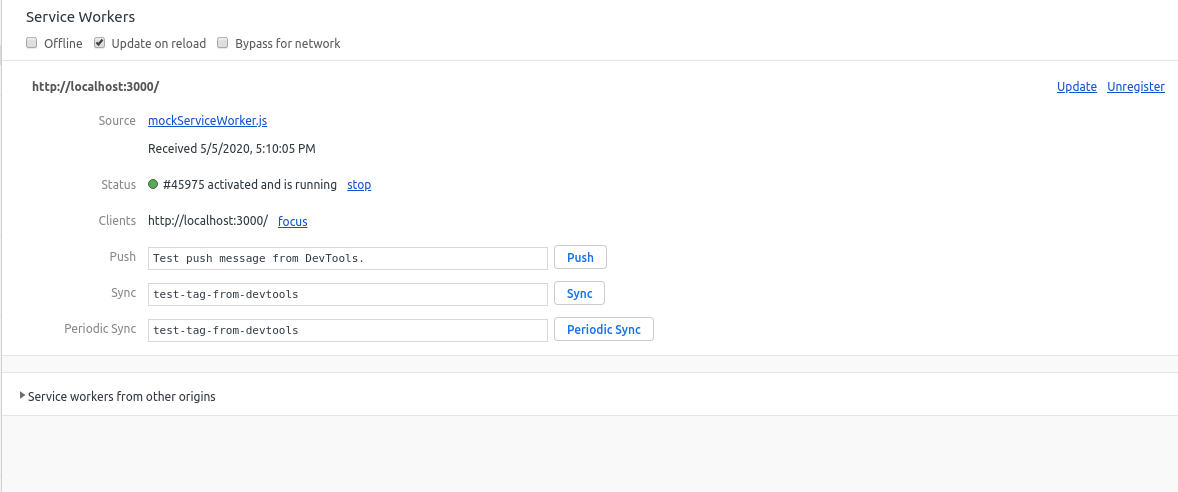
The current tab (http://localhost:3000/episode/Fz9eb58992-1e0f-4b2a-ac69-37fce2e934df?section=Storylines) disappears from clients after a few reloads.
This is even though in the console, it says it's enabled:

VanTanev
on 5 May 2020
Hey. Thanks for reporting this. I'll try to look into the cause and update here.
 kettanaito
on 5 May 2020
kettanaito
on 5 May 2020
I'll brainstorm here, if you don't mind.
Factors
There are several factors that may affect the mocking for specific tabs (or routes).
Scope
As Service Workers are registered in a specific scope on the website, they cannot access the "higher" scope. I don't think this is the case here, since I try to encourage users of Mock Service Worker to place the mockServiceWorker.js file in the root of their public directory. This is necessary, because the Service Worker then will have the root (/) scope, and will affect the entire website.
Client activity
During the design phase, I've decided that since the library establishes an API to stop the mocking (worker.stop()), it should be possible to have one tab with the mocking enabled, and another having it disabled (by calling stop()).
Technically, this is achieved by keeping a map of controlled clients internally in the worker file, adding or removing client IDs when those activate or are closed:
The nuance with a client (page) ID is that it's _unique on each page load_. When you refresh the page, this is what happens in regard to that internal map:
# closing
client -- beforeunload -> CLIENT_CLOSED --> delete clients[clientId]

# opening
client -- executes `mocks.js` runtime --> MOCK_ACTIVATE --> add clients[clientId]
This also serves a purpose to self-unregister the worker when the last client has been closed.
What raises my concern, is that when you inspect the worker in the DevTools, you can only see one client. Regardless of what MSW keeps internally, if the client has registered the worker successfully, it must appear in the "Clients" section of the Service Worker DevTools. This leads me to believe that the issue in this case lies in the registration itself. Most likely the worker fails to register for certain tabs.
kettanaito
on 6 May 2020
I am having this issue as well :)
 TransmissionsDev
on 8 May 2020
TransmissionsDev
on 8 May 2020
Could you check your mockServiceWorker.js file (see the screenshot below)? It should have the integrity variable equal to the exact value as on the image below.
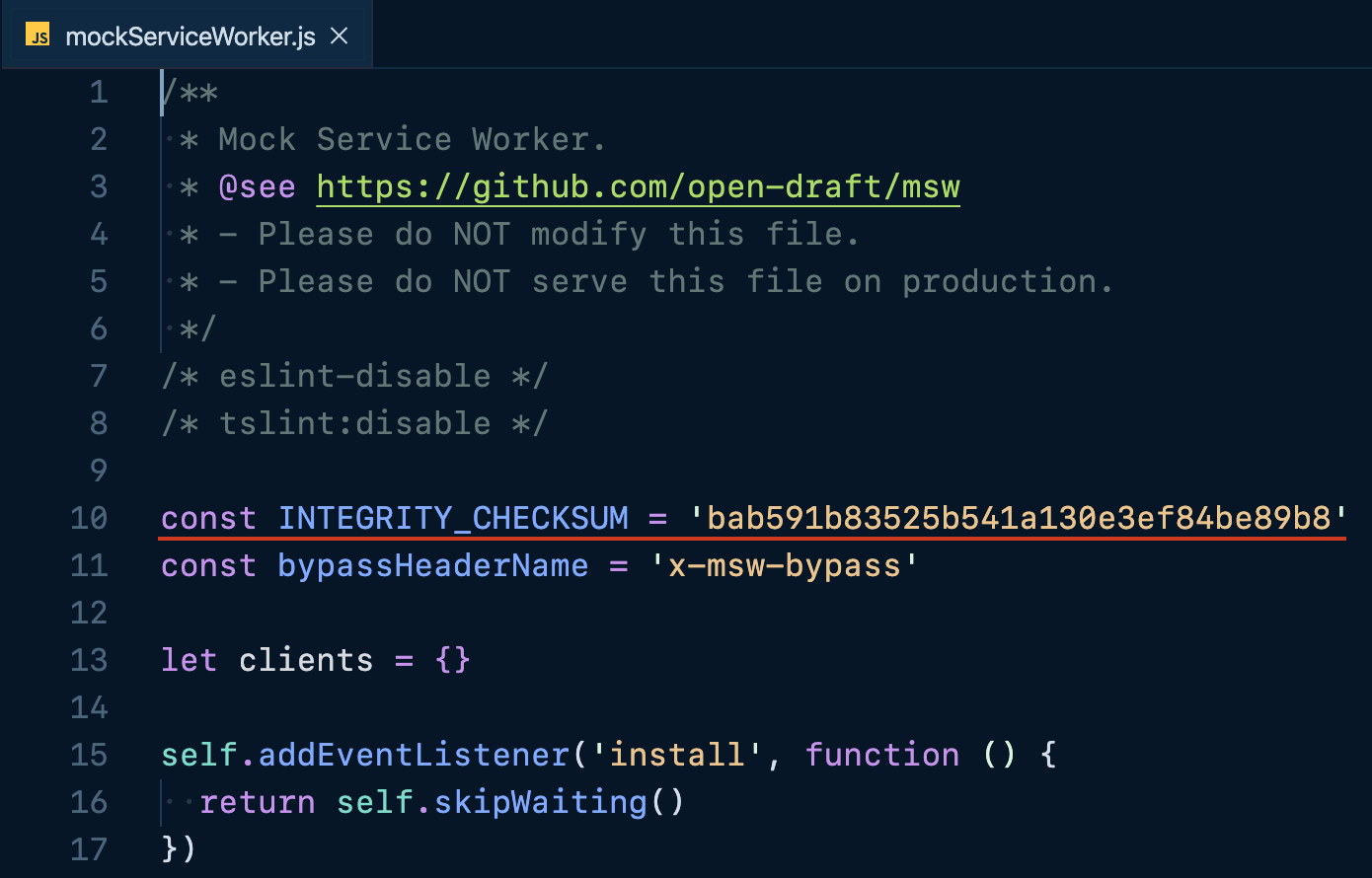
Let me know if it's equal. If not, I recommend you to run npx msw init <PUBLIC_DIR> once more, to make sure you're using the latest Service Worker file. Thanks.
kettanaito
on 11 May 2020
@VanTanev, I've set up a reproduction repository to investigate this issue. I've got a similar routing setup, and mocking an episode detail on initial render of EpisodeDetail.js component.
In the repository above I can have multiple tabs of the same website:
//episode/abc-123
The mocking is functional on both tabs without extra operations. Both are listed in the controlled clients under "Service Workers" in Chrome DevTools:
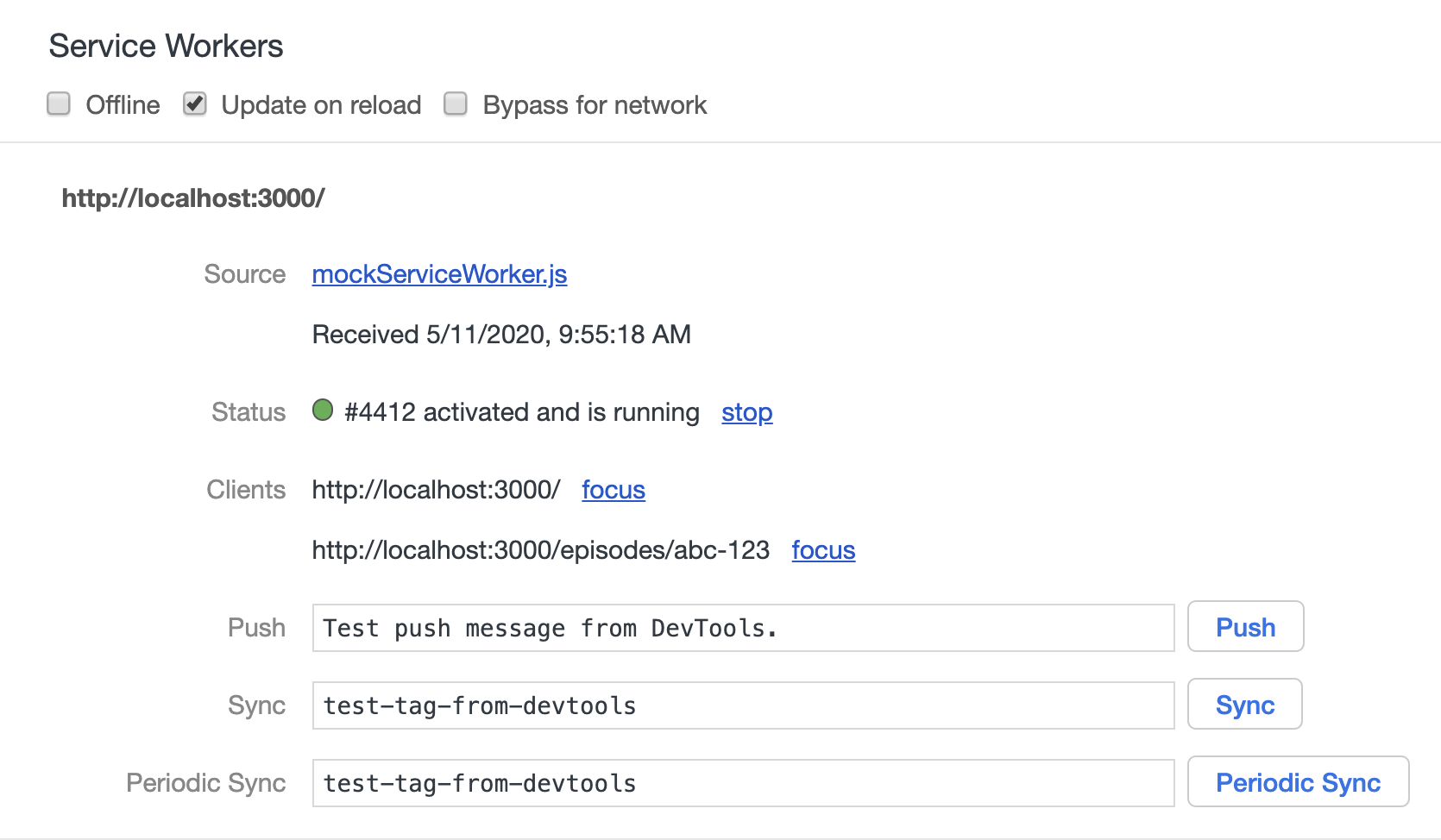
Notice how I defer the application's mount until the mocking is enabled:
If the
start()is not deferred, initial render ofEpisodeDetail.jscomponent issues a fetch call _before_ the Service Worker is ready. This may be perceived as the mocking fails, while you would still see the activation message in the console.
Could you please checkout that repository and see if something is different from what you have?
kettanaito
on 11 May 2020
@kettanaito Than you for you work here. I might not be able to delve into this today, but I'll try to do it tomorrow. I'll also see if I can instrument the service worker and see what's happening inside.
I do not think that I was seeing the fetch happening before service worker was ready, on the basis that:
1) It never happened when only one tab was running
2) I saw the client disappearing from the clients list of the SW
I am however not doing though is the application mount deferral, and that might have some other side-effect to SW client registration/deregistration.
VanTanev
on 11 May 2020
Deferred start helps against initial load requests, but I don't see how it can be an issue if it works in one tab, while fails in another, considering the identical nature of requests.
Yeah, try looking into the example I've put up, maybe it'll drop some light for us. Otherwise I'd kindly ask you for a reproduction repository, since I wasn't successful in reproducing the issue.
kettanaito
on 11 May 2020
@kettanaito My checksum does match the one you provided a screenshot of. 👍
TransmissionsDev
on 11 May 2020
@kettanaito The reproduction repo (https://github.com/kettanaito/msw-multiple-clients-test actually fails for me!!
Chrome: Version 81.0.4044.138 (Official Build) (64-bit) (running in Incognito)
OS: Ubuntu 16.04.6 LTS
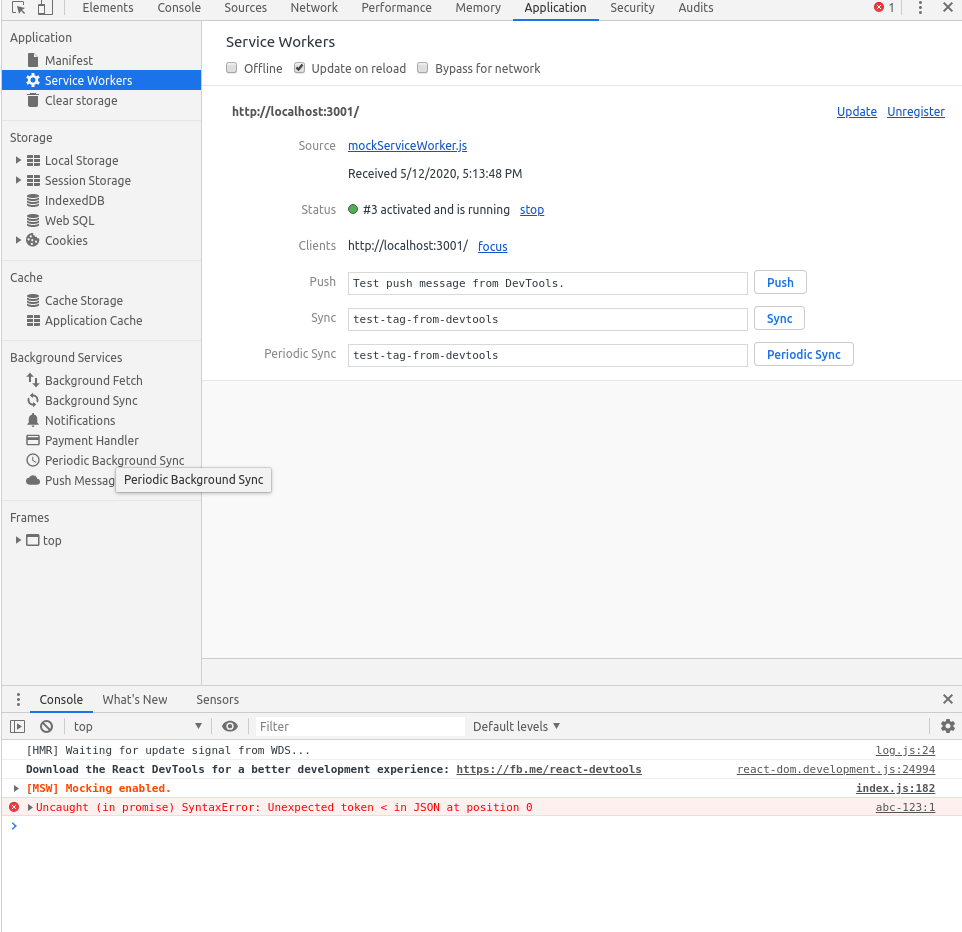
Exact same sort of failure, service worker gets unregistered on second reload and the fetch fails because we get invalid JSON.
I am investigating if I can why we get unregistered.
VanTanev
on 12 May 2020
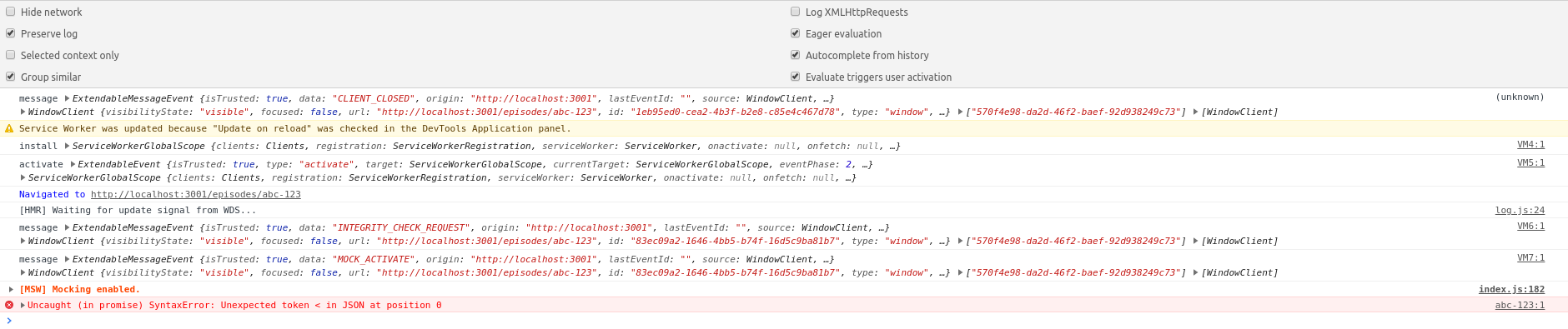
I added logpoints. As you can see:
// this client
const client = await event.currentTarget.clients.get(clientId)
// is not present in these clients
const allClients = await self.clients.matchAll()
In essence, there is some sort of race condition where the client gets removed between these two calls. I haven't worked enough with Service Workers to understand exactly how this happens.
function ensureKeys(keys, obj) {
  return Object.keys(obj).reduce((acc, key) => {
    if (keys.includes(key)) {
      acc[key] = obj[key]
    }

    return acc
  }, {})
}
Maybe this is connected somehow?
Edit
Removing this fixes the bug:
https://github.com/mswjs/msw/blob/6a1182d8847efa26a201fc6a37cf3e1f3ea593dc/src/mockServiceWorker.js#L59-L61
So, there is a race condition here. Writes to the clients shared variable can interweave, and a close event can happen at the same time as a registration event happens (eg, between those two lines above).
Is this unregistration really necessary?
VanTanev
on 12 May 2020
@VanTanev, wow, that's some profound debugging!
I see, so the race condition of closing the client resolves after the new client is being added, which results into the clients map not having it at all. This is fascinating, as each session creates a unique client ID (even for the same tab between refreshes), which I presumed acts as an immunity against such race conditions.
That unregistration logic is necessary to unregister the worker when there are no more controlled clients. This prevents the worker from staying active and affecting unrelated projects that run on the same host and port, since workers are bound to those.
When I was working on one of the examples, I've noticed that the
clientsmap gets empty (#105), yet I couldn't reproduce it. Now I came to believe that issue and this one are sufficient reason to review how the clients tracking is done, and a good opportunity to improve it.
I'm confused how that race condition comes to play. Since each refresh produces a new client ID, it should be impossible for the closing event and activation event to have the same client ID.
It's definitely a master effect, as I'm now able to reproduce the issue as well. Here's what solves it for me:
    case "CLIENT_CLOSED": {
      delete clients[clientId];

      const matchedClients = await self.clients.matchAll();
      const remainingClients = matchedClients.filter((client) => {
        return client.id !== clientId;
      });

      // Unregister itself when there are no more clients
      if (remainingClients.length === 0) {
        self.registration.unregister();
      }

      break;
    }
It seems that relying on the internal clients is not the way to go. Instead, the worker can get all the registrations before closing, and that list always represents the proper length. I'm yet unsure why exactly clients becomes empty, when there's another tab open. At the moment I'm revisiting if clients are necessary at all, if using clients.matchAll() looks like a much more reliable approach.
Edit: the clients map is also necessary to have a per-client mocking state (enabled/disabled). I think we can keep it for that purpose, but don't base the self-registration on that.
kettanaito
on 12 May 2020
I've shipped the fix in 0.15.9.
@VanTanev, could you please update to 0.15.9, update the Service Worker file, and let me know if this helps?
$ npm install msw@latewst
$ npx msw init <PUBLIC_DIR>
@kettanaito It seems to work, thank you for your work!
VanTanev
on 12 May 2020
@VanTanev, thanks for such a detailed debugging and great lead! Happy to hear it works.
kettanaito
on 12 May 2020
Related issues
 PritamSangani
·
3Comments
PritamSangani
·
3Comments
 Afsoon
·
3Comments
Afsoon
·
3Comments
 mainfraame
·
3Comments
kettanaito
·
3Comments
mainfraame
·
3Comments
kettanaito
·
3Comments
 ff6347
·
3Comments
ff6347
·
3Comments
Most helpful comment
@kettanaito It seems to work, thank you for your work!