Msteams-docs: Getting user email in message extension
When a user clicks message extension in a team where the bot is not installed, the bot service gets the user's aadObjectId. Is there a way to get the user's email address using Teams APIs (without calling any Graph API)?
Document Details
⚠ Do not edit this section. It is required for docs.microsoft.com ➟ GitHub issue linking.
- ID: ca47e045-6669-e130-c75a-df31ab2fa3e8
- Version Independent ID: de5e719f-c97a-0fee-c83d-f6ca176191b2
- Content: Get Team's specific context for your bot - Teams
- Content Source: msteams-platform/bots/how-to/get-teams-context.md
- Product: msteams
- GitHub Login: @clearab
- Microsoft Alias: anclear
 ndileep
All 16 comments
Hi ndileep! Thank you for bringing this issue to our attention. We will investigate and if we require further information we will reach out. Best regards, Teams Platform
![msftbot[bot] picture](https://avatars.githubusercontent.com/in/26612?v=4&s=40) msftbot[bot]
on 22 Apr 2020
msftbot[bot]
on 22 Apr 2020
@ndileep , You can fetch the user principle name from the context itself . Please follow the below the steps to get the UPN.
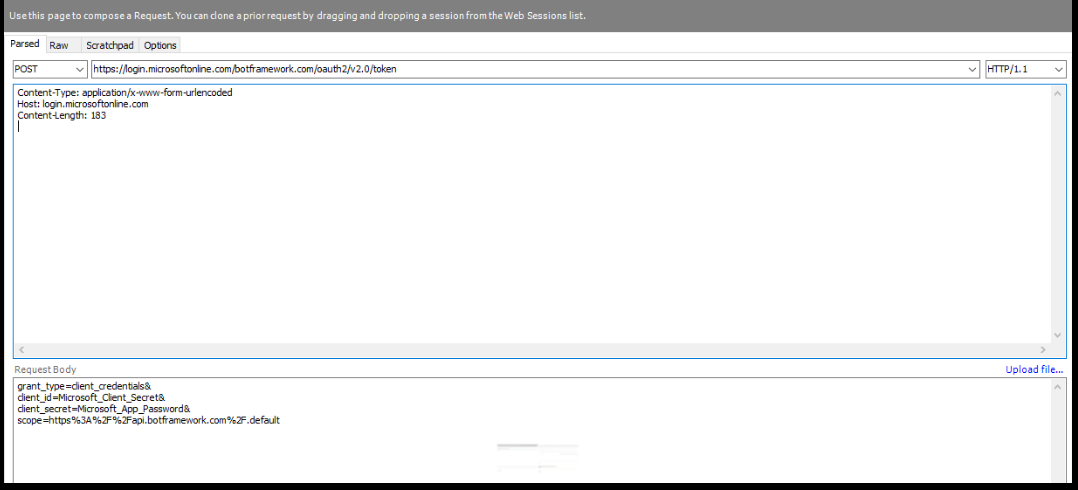
- Calling the given endpoint
{{serviceUrl}/v3/conversations/{conversationID}/members}
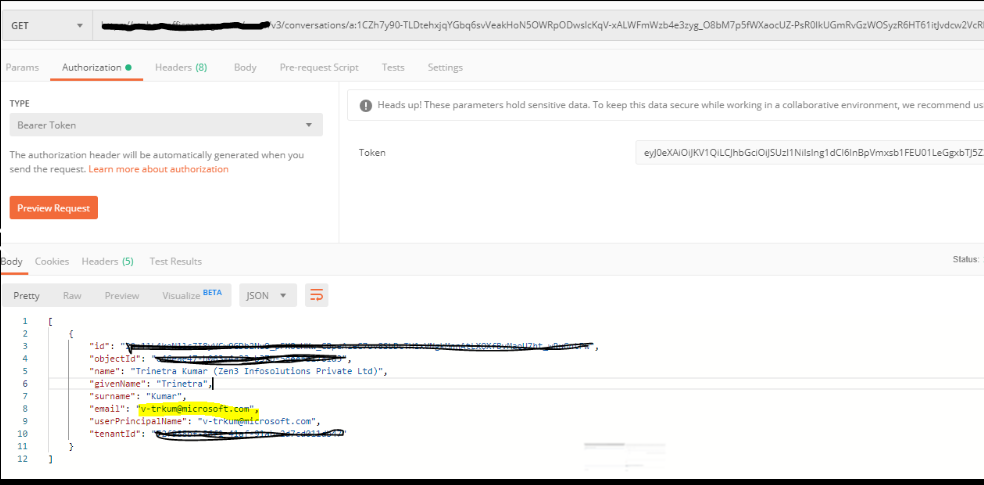
 Trinetra-MSFT
on 23 Apr 2020
Trinetra-MSFT
on 23 Apr 2020
@Trinetra-MSFT but what if the bot is not installed on the team? The user got the aadId +tenentId from a globally installed messaging extension. When I use.{{serviceUrl}/v3/conversations/{conversationID}/members} it says I can't get the information because the bot is not installed in the conversation.
 liangchr
on 23 Apr 2020
liangchr
on 23 Apr 2020
@ndileep , Did you tried fetching the user profile through Get User Graph API? You can also retrieve the details of a particular user using their Teams user Id, UPN, or AAD Object Id. Please look at
get single user details.
Trinetra-MSFT
on 24 Apr 2020
Doesn't calling the graph API requires extra permissions from the user? With just the bot token and the payload it receives from MS when the user clicks the message extension, is there a way to get user's email without asking for extra permissions? (The scenario here is that the bot is not installed in the team/1:1 channel where the user is clicking the message extension).
ndileep
on 24 Apr 2020
Hi - You can use the just-in-time install flow to get your bot installed before trying to fetch the roster: https://docs.microsoft.com/en-us/microsoftteams/platform/resources/messaging-extension-v3/create-extensions?tabs=typescript#request-to-install-your-conversational-bot
 clearab
on 24 Apr 2020
clearab
on 24 Apr 2020
@clearab This is a cool solution we overlooked. Thanks for the suggestion
liangchr
on 24 Apr 2020
If you're looking for a specific user, use the TeamsInfo.GetMember() endpoint in the newest SDK version to avoid latency issues in large teams.
clearab
on 25 Apr 2020
Hi - You can use the just-in-time install flow to get your bot installed before trying to fetch the roster: https://docs.microsoft.com/en-us/microsoftteams/platform/resources/messaging-extension-v3/create-extensions?tabs=typescript#request-to-install-your-conversational-bot
Thanks @clearab, for your reply. Won't this require user to have permission to install the bot? In most of the enterprises the admin or a few members have bot install permission.
ndileep
on 27 Apr 2020
Yes, the user would need to have permissions to install a bot in that context. In organizations that use apps, it usually isn't _that_ locked down, but you'd definitely have some % of users that were unable to complete that process.
If you think about it however, this is exactly why you're unable to retrieve the roster of that particular context. Retrieving that roster requires someone who has been granted authority consent to your app existing, and collecting information, from that particular context.
If all you're looking for is that one user's information, and they've invoked your messaging extension then one of these things must be true (otherwise they wouldn't be seeing your messaging extension):
- The user has your app personally installed.
- The user is in a context where your app is already installed (group chat or team channel)
In the first case, you should already have access to the full user information. If you haven't stored it somewhere you can use the 1:1 conversation between your app and that user to call getConversationMember() to retrieve the needed information.
In the latter case, you should be able to call getConversationMember() to retrieve that particular user's information from the context the messaging extension was invoked from.
All of this is predicated on your app containing a conversational bot, as well as a messaging extension.
One final note, please keep in mind that sometime in 2021, all getMember calls will stop returning email and UPNs: see this article
clearab
on 27 Apr 2020
Thanks @clearab !
The scenario in our case is that the Admin installed the app as a "pinned app in the Teams app navigation bar". The app then shows up on the left navigation bar of the client and also as a message extension for all users in 1:1 and team channels. The users themselves don't have permission to install the app.
ndileep
on 27 Apr 2020
Ok, in that case it won't matter, as the app is already installed for them. You'll get a conversation update event of MembersAdded when that happens, that will contain the necessary information. You should store it then.
Approach number 1 above will also work.
clearab
on 27 Apr 2020
You'll get one of these for every user: https://docs.microsoft.com/en-us/microsoftteams/platform/bots/how-to/conversations/subscribe-to-conversation-events?tabs=dotnet#team-members-added
clearab
on 27 Apr 2020
Yes, for new members after the app installed, we can make use of the events. Looks like for existing members there is no way to get UPN without calling Graph APIs, which requires some other flow to get required permissions.
ndileep
on 27 Apr 2020
No, for existing users you have all the necessary information to retrieve a full Teams Channel Account. The psuedocode would be something like this:
- On messaging extension invoke, retrieve the teams userId for that user (something like activity.from.id). This value should be stored.
- Call CreateConversation using that user Id. Example here. This get's use the necessary conversationReference. This value should also be stored.
- Now you need a turn context in the right context (in this case the 1:1 chat between you and the user). You'll use turnConversation.Adapter.ContinueConversationAsync for this.
- Now that you've got the right context, call getMember() to get the email.
- Make sure you save everything so you can just validate the info occasionally (or at least asynchronously)
Use something like for the continue conversation call (not validated):
var member = new TeamsChannelAccount()
await turnContext.Adapter.ContinueConversationAsync(_botId, conversationReference, async (context, token) => {
    member = TeamsInfo.GetMember(context, AADId, token);
}
Please feel free to reopen if you have further query
Trinetra-MSFT
on 4 May 2020
Related issues
 DamienDoumer
·
7Comments
DamienDoumer
·
7Comments
 Navyjetfixer
·
4Comments
Navyjetfixer
·
4Comments
 Wajeed-msft
·
5Comments
Wajeed-msft
·
5Comments
 jonmill
·
6Comments
jonmill
·
6Comments
 KyleSchroeder
·
5Comments
KyleSchroeder
·
5Comments
Most helpful comment
Hi - You can use the just-in-time install flow to get your bot installed before trying to fetch the roster: https://docs.microsoft.com/en-us/microsoftteams/platform/resources/messaging-extension-v3/create-extensions?tabs=typescript#request-to-install-your-conversational-bot