Mssql-docker: 2017-CU13 and above crashing with volume under docker for windows
This is related to #441, but the workaround posted there (using CU12) seems to be killed by my attempt to install the
mssql-server-ftspackage
I am trying to run mssql with FTS enabled in docker for windows. What I learned is, that the latest 2017 images have problems with volumes under windows:
docker run -it -e ACCEPT_EULA=Y -v /c/tmp/vol:/var/opt/mssql mcr.microsoft.com/mssql/server:2017-latest
fails immediately with:
This program has encountered a fatal error and cannot continue running at Tue Apr 23 11:46:40 2019
The following diagnostic information is available:

       Reason: 0x00000006
       Status: 0x40000015
      Message: Kernel bug check
      Address: 0x6ae44180
   Parameters: 0x10861f680
   Stacktrace: 000000006af2fc73 000000006ae441db 000000006ae31422
               000000006ae3fe62 000000006af2e08a 000000006af2cb8d
               000000006af6c0d2 000000006b2ac000 000000006b238000
               000000006b240000 0000000000000001
      Process: 8 - sqlservr
       Thread: 12 (application thread 0x4)
  Instance Id: 45fbfa58-d7f5-4f21-92f7-113aef693083
     Crash Id: f1d12f00-04aa-4ee4-b363-1d6589a608c5
  Build stamp: b2ce95e3a6684060d1d3bb1264841a1a8fc1d501ed6d1cfdb89cfcdde8048253
 Distribution: Ubuntu 16.04.6 LTS
   Processors: 4
 Total Memory: 4119797760 bytes
    Timestamp: Tue Apr 23 11:46:40 2019

Ubuntu 16.04.6 LTS
Capturing core dump and information to /var/opt/mssql/log...
dmesg: read kernel buffer failed: Operation not permitted
No journal files were found.
No journal files were found.
Attempting to capture a dump with paldumper
WARNING: Capture attempt failure detected
Attempting to capture a filtered dump with paldumper
WARNING: Attempt to capture dump failed.  Reference /var/opt/mssql/log/core.sqlservr.8.temp/log/paldumper-debug.log for details
Attempting to capture a dump with gdb
WARNING: Unable to capture crash dump with GDB. You may need to
allow ptrace debugging, enable the CAP_SYS_PTRACE capability, or
run as root.
so I tracked the CU releases down until I found that CU12 is working. So I am basing my image on this version and install the FTS package:
Dockerfile
FROM mcr.microsoft.com/mssql/server:2017-CU12-ubuntu

# Install prerequistes since it is needed to get repo config for SQL server
RUN export DEBIAN_FRONTEND=noninteractive && \
    apt-get update && \
    apt-get install -yq curl apt-transport-https && \
    # Get official Microsoft repository configuration
    curl https://packages.microsoft.com/keys/microsoft.asc | apt-key add - && \
    curl https://packages.microsoft.com/config/ubuntu/16.04/mssql-server-2017.list | tee /etc/apt/sources.list.d/mssql-server.list && \
    apt-get update && \
    # Install optional packages
    apt-get install -y mssql-server-fts && \
    # Cleanup the Dockerfile
    apt-get clean && \
    rm -rf /var/lib/apt/lists

# Run SQL Server process
ENV ACCEPT_EULA=Y
ENV MSSQL_PID=Express
CMD /opt/mssql/bin/sqlservr
docker build
docker build . --pull -t sqlexpresswithfts:dev
Interesting bit from the output:
The following additional packages will be installed:
  mssql-server
The following NEW packages will be installed:
  mssql-server mssql-server-fts
0 upgraded, 2 newly installed, 0 to remove and 53 not upgraded.
Need to get 416 MB of archives.
why does it have to install mssql-server? Will it get the newer (>CU12) version, that has a known problem with volumes under windows? 🤔
docker run
docker run -it -v /c/tmp/vol:/var/opt/mssql sqlexpresswithfts:dev
error output
This program has encountered a fatal error and cannot continue running at Tue Apr 23 11:16:22 2019
The following diagnostic information is available:

       Reason: 0x00000006
       Status: 0x40000015
      Message: Kernel bug check
      Address: 0x6ae44180
   Parameters: 0x10861f680
   Stacktrace: 000000006af2fc73 000000006ae441db 000000006ae31422
               000000006ae3fe62 000000006af2e08a 000000006af2cb8d
               000000006af6c0d2 000000006b2ac000 000000006b238000
               000000006b240000 0000000000000001
      Process: 8 - sqlservr
       Thread: 12 (application thread 0x4)
  Instance Id: 45fbfa58-d7f5-4f21-92f7-113aef693083
     Crash Id: cf2cce7e-3495-4141-a7de-f00f31fa79f8
  Build stamp: 70437f6583b8ef39b1ef70539ef84690980315dc7a4436c9c40015f28610e4aa
 Distribution: Ubuntu 16.04.6 LTS
   Processors: 4
 Total Memory: 4119797760 bytes
    Timestamp: Tue Apr 23 11:16:22 2019

Ubuntu 16.04.6 LTS
Capturing core dump and information to /var/opt/mssql/log...
dmesg: read kernel buffer failed: Operation not permitted
No journal files were found.
No journal files were found.
Attempting to capture a dump with paldumper
WARNING: Capture attempt failure detected
Attempting to capture a filtered dump with paldumper
WARNING: Attempt to capture dump failed.  Reference /var/opt/mssql/log/core.sqlservr.8.temp/log/paldumper-debug.log for details
Attempting to capture a dump with gdb
WARNING: Unable to capture crash dump with GDB. You may need to
allow ptrace debugging, enable the CAP_SYS_PTRACE capability, or
run as root.
This is exactly the error coming from CU12+ images. However, the volume itself is somehow working (note the missing data folder):
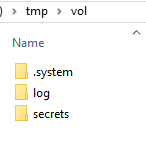
So docker environment seems to be fine. I need either advide on
- how to prevent the installation of sql-server >CU12 during image build
- how to make the latest images working with volume under docker for windows
 marcwittke
All 2 comments
Found out, that the images from microsoft don't have sql-server installed via apt-get. That's why I am getting the latest sql-server installed automagically.
Solved it for now using this Dockerfile:
FROM ubuntu:16.04

# Install prerequistes since it is needed to get repo config for SQL server
RUN export DEBIAN_FRONTEND=noninteractive && \
    apt-get update && \
    apt-get install -yq curl apt-transport-https && \
    # Get official Microsoft repository configuration
    curl https://packages.microsoft.com/keys/microsoft.asc | apt-key add - && \
    curl https://packages.microsoft.com/config/ubuntu/16.04/mssql-server-2017.list | tee /etc/apt/sources.list.d/mssql-server.list && \
    apt-get update && \
    apt-get install -y mssql-server=14.0.3045.24-1 && \
    apt-get install -y mssql-server-fts=14.0.3045.24-1 && \
    # Cleanup the Dockerfile
    apt-get clean && \
    rm -rf /var/lib/apt/lists

# Run SQL Server process
ENV ACCEPT_EULA=Y
ENV MSSQL_PID=Express
CMD /opt/mssql/bin/sqlservr
Note the bare ubuntu 16.04 base and the specific build numbers when apt-get-ting sql-server and sql-server-fts. 14.0.3045.24 refers to CU12.
marcwittke
on 23 Apr 2019
Hi,
Thanks for your support and the Dockerfile you post:-)
 forkazmoden
on 24 Apr 2019
forkazmoden
on 24 Apr 2019
Related issues
 evotjh
·
5Comments
evotjh
·
5Comments
 LuisBosquez
·
5Comments
LuisBosquez
·
5Comments
 Ducatel
·
4Comments
Ducatel
·
4Comments
 KristianFenn
·
5Comments
KristianFenn
·
5Comments
 mwrzeszcz
·
4Comments
mwrzeszcz
·
4Comments
Most helpful comment
Found out, that the images from microsoft don't have
sql-serverinstalled via apt-get. That's why I am getting the latest sql-server installed automagically.Solved it for now using this Dockerfile:
Note the bare ubuntu 16.04 base and the specific build numbers when
apt-get-tingsql-serverandsql-server-fts. 14.0.3045.24 refers to CU12.