Mssql-docker: "Unhealthy" Issues running a local docker build of windows develop SQL container
Summary:
I am attempting to do my own docker build of windows SQL, so that I can run a windows SQL container with a non-default collation.
After some troubleshooting I am able to complete the docker build, but the resulting image runs "unhealthy" and SQL does not appear to be running and cannot be connected to.
I have several questions about my environment and approach. I am also interested in providing more logs and information, but I am new enough to containers and command line SQL that I'm not sure where to look first.
We are in a situation with an older system using a non default collation (Latin1_General_CI_AS) and Filestreams. Containerization is one way we hope to deal with environment oddities.
We look at linux SQL containers first, but they appear to not support filestreams at this time. Please let me know if this is not the case.
I was able to run the SQL windows developer image without issue, including connecting to the database, using this command (adjusted for 2 gb of ram default):
docker run -d -p 1433:1433 `
    -e sa_password=supersecretpassword`
    -e ACCEPT_EULA=Y `
    -m 2g `
    microsoft/mssql-server-windows-developer
After realizing we needed a non-default collation, I began looking into how the image was constructed, and I was very pleased to find the source available in this repo. Thank you so much for open sourcing these efforts, it really helps our development!
I am specifically refering to the mssql-server-windows-developer build here:
https://github.com/Microsoft/mssql-docker/tree/master/windows/mssql-server-windows-developer
In attempting to build a version with a different collation, I ran into a few issues. I went back to just trying to build the stock dockerfile as is from the repo.
One issue I encountered is that the size of the disk involved is too small, and results in this confusing error message:
docker : re-exec error: exit status 1: output: time="2018-03-12T16:02:24-07:00" level=error msg="hcsshim::ImportLayer failed in Win32: The system cannot find the path specified. (0x3)
layerId=\\\\?\\C:\\ProgramData\\Docker\\windowsfilter\\35e377712f0b86adfd901b243cbbf0782a63fce57965e74331a901973548e6fe flavour=1 folder=C:\\ProgramData\\Docker\\tmp\\hcs515717115"
At line:1 char:1
+ docker image build -t mssql-localbuild .
+ ~~~~~~~~~~~~~~~~~~~~~~~~~~~~~~~~~~~~~~~~
    + CategoryInfo          : NotSpecified: (re-exec error: ...\\hcs515717115":String) [], RemoteException
    + FullyQualifiedErrorId : NativeCommandError

hcsshim::ImportLayer failed in Win32: The system cannot find the path specified. (0x3) layerId=\\?\C:\ProgramData\Docker\windowsfilter\35e377712f0b86adfd901b243cbbf0782a63fce57965e74331a901973548e6fe flavour=1
folder=C:\ProgramData\Docker\tmp\hcs515717115
After research pointed to the disk issue, I implemented the recommended solution, and adjusted my advanced daemon file (in Settings > Daemon > Advanced) to include a 20 GB storage options like this:
{
  "registry-mirrors": [],
  "insecure-registries": [],
  "debug": true,
  "experimental": true,
  "storage-opts": [
    "size=20G"
  ]
}
After this change I was able to complete the build, but the running image was not functional as described later.
This build depends on a few things as outlined in the docker file:
https://github.com/Microsoft/mssql-docker/blob/master/windows/mssql-server-windows-developer/dockerfile
Specifically:
FROM microsoft/windowsservercoreis upstream and might changeENV exe "https://go.microsoft.com/fwlink/?linkid=840945"ENV box "https://go.microsoft.com/fwlink/?linkid=840944"These references point at external files which I assume are static, but might not be.- The build environment is docker on windows configured for windows VMs
- I was running this in the powershell ISE generally, rather than the CMD command line, but I have used both interchangeably for this process.
I don't feel that any of these should have changed anything, but I list them as thinking points because something isn't working.
After this build completes, I use the locally created image using the same 'start' command with my image.
docker run -d -p 1433:1433 `
    -e sa_password=supersecretpassword`
    -e ACCEPT_EULA=Y `
    -m 2g `
    mssql-localbuild
The official image takes a short while to start up, the status goes from 'starting' to 'healthy', and I can connect to SQL on the default port on localhost via SSMS.
The local build image starts over about a minute, then transitions to 'unhealthy'. Leaving it running for a while (e.g. over lunch) does not help. I cannot connect to the database instance from SSMS.
I can get a command line on the running container with:
docker container exec -it 973f cmd
Attempting to do the health check command gives this error:
C:\>sqlcmd -Q "select 1"
Sqlcmd: Error: Microsoft ODBC Driver 13 for SQL Server : Login failed for user 'User Manager\ContainerAdministrator'..
This is interesting, as it appears that SQL is running, but refuses connections from the container user?
UPDATE:
I found the SQL install logs, and it appears that the install itself failed.
C:\Program Files\Microsoft SQL Server\140\Setup Bootstrap\Log>type Summary.txt
Overall summary:
  Final result:                  Failed: see details below
  Exit code (Decimal):           -2061893606
  Start time:                    2018-03-14 16:52:38
  End time:                      2018-03-14 16:55:43
  Requested action:              Install

Setup completed with required actions for features.
Troubleshooting information for those features:
  Next step for SQLEngine:       Use the following information to resolve the error, uninstall this feature, and then run the setup process again.


Machine Properties:
  Machine name:                  1E0CA7586CD2
  Machine processor count:       2
  OS version:                    Microsoft Windows Server 2016 Datacenter - ServerCore (10.0.14393)
  OS service pack:
  OS region:                     United States
  OS language:                   English (United States)
  OS architecture:               x64
  Process architecture:          64 Bit
  OS clustered:                  No

Product features discovered:
  Product              Instance             Instance ID                    Feature                                  Language             Edition              Version         Clustered  Configured

Package properties:
  Description:                   Microsoft SQL Server 2017
  ProductName:                   SQL Server 2017
  Type:                          RTM
  Version:                       14
  SPLevel:                       0
  Installation location:         C:\setup\x64\setup\
  Installation edition:          Developer

Product Update Status:
  User selected not to include product updates.

User Input Settings:
  ACTION:                        Install
  ADDCURRENTUSERASSQLADMIN:      false
  AGTSVCACCOUNT:                 NT Service\SQLSERVERAGENT
  AGTSVCPASSWORD:                *****
  AGTSVCSTARTUPTYPE:             Manual

[...]

  CONFIGURATIONFILE:             C:\Program Files\Microsoft SQL Server\140\Setup Bootstrap\Log\20180314_165234\ConfigurationFile.ini

[...]

  INSTALLSHAREDDIR:              C:\Program Files\Microsoft SQL Server\
  INSTALLSHAREDWOWDIR:           C:\Program Files (x86)\Microsoft SQL Server\
  INSTALLSQLDATADIR:             <empty>
  INSTANCEDIR:                   C:\Program Files\Microsoft SQL Server\
  INSTANCEID:                    MSSQLSERVER
  INSTANCENAME:                  MSSQLSERVER
  ISMASTERSVCACCOUNT:            NT AUTHORITY\Network Service
  ISMASTERSVCPASSWORD:           <empty>
  ISMASTERSVCPORT:               8391
  ISMASTERSVCSSLCERTCN:          <empty>
  ISMASTERSVCSTARTUPTYPE:        Automatic
  ISMASTERSVCTHUMBPRINT:         <empty>
  ISSVCACCOUNT:                  NT AUTHORITY\Network Service
  ISSVCPASSWORD:                 <empty>
  ISSVCSTARTUPTYPE:              Automatic
  ISTELSVCACCT:                  <empty>
  ISTELSVCPASSWORD:              <empty>
  ISTELSVCSTARTUPTYPE:           0
  ISWORKERSVCACCOUNT:            NT AUTHORITY\Network Service
  ISWORKERSVCCERT:               <empty>

[...]

  SQLCOLLATION:                  SQL_Latin1_General_CP1_CI_AS
  SQLSVCACCOUNT:                 NT AUTHORITY\System
  SQLSVCINSTANTFILEINIT:         false
  SQLSVCPASSWORD:                <empty>
  SQLSVCSTARTUPTYPE:             Automatic
  SQLSYSADMINACCOUNTS:           BUILTIN\ADMINISTRATORS
  SQLTELSVCACCT:                 NT Service\SQLTELEMETRY
  SQLTELSVCPASSWORD:             <empty>

[...]

  Configuration file:            C:\Program Files\Microsoft SQL Server\140\Setup Bootstrap\Log\20180314_165234\ConfigurationFile.ini

Detailed results:
  Feature:                       Database Engine Services
  Status:                        Failed
  Reason for failure:            An error occurred during the setup process of the feature.
  Next Step:                     Use the following information to resolve the error, uninstall this feature, and then run the setup process again.
  Component name:                SQL Server Database Engine Services Instance Features
  Component error code:          0x851A001A
  Error description:             Wait on the Database Engine recovery handle failed. Check the SQL Server error log for potential causes.
  Error help link:               https://go.microsoft.com/fwlink?LinkId=20476&ProdName=Microsoft+SQL+Server&EvtSrc=setup.rll&EvtID=50000&ProdVer=14.0.1000.169&EvtType=0xD15B4EB2%400x4BDAF9BA%401306%4026&EvtType=0xD15B4EB2%400x4BDAF9BA%401306%4026

  Feature:                       SQL Browser
  Status:                        Passed

  Feature:                       SQL Writer
  Status:                        Passed

  Feature:                       SQL Client Connectivity
  Status:                        Passed

  Feature:                       SQL Client Connectivity SDK
  Status:                        Passed

  Feature:                       Setup Support Files
  Status:                        Passed

Rules with failures:

Global rules:

Scenario specific rules:

Rules report file:               C:\Program Files\Microsoft SQL Server\140\Setup Bootstrap\Log\20180314_165234\SystemConfigurationCheck_Report.htm
From research this appears to be some kind of account permissions error?
```1. The account which user selected on Server Configuration page window ( during installation) is somehow not able to bring SQL Server database engine services online."
"3. The reason can be also that SQL Server installation was successful in installing SQL Server and its services but due to some other limitation in system or other system related errors SQL Server is not able to come online.```
https://www.arcanadev.com/support/kb/K00000433.aspx
This error occurs if the account that the SQL Server service is running under does not have Read access to the root directory on the drive where SQL Server is being installed.
From my perspective this build "should" be a repeatable processes that use the same tools providing the same environment. Given the different behaviors, I assume something is different that I am not anticipating and it is affecting my build of the image.
It looks like the install process is failing.
Overall is this an expected and reasonable approach to building a customized 'base' image to support our scenario?
What might be affecting the build to cause differences with Microsoft's official image? What can I do to investigate or mitigate these differences?
 ColinDabritzViewpoint
All 14 comments
Anyone else came to any conclusion to solving this? I am stuck with same exact symptoms.
 Demijan81
on 7 May 2018
Demijan81
on 7 May 2018
Here's a workaround that gives the illusion of working:
Edit the dockDockerfile and change the SQLSVCACCOUNT to (https://stackoverflow.com/a/29738200/270155):
/SQLSVCACCOUNT='NT AUTHORITY\NETWORK SERVICE'
Then try building using:
docker build --memory 4g .
 tekkies
on 14 May 2018
tekkies
on 14 May 2018
Similar to above, I couldnt run the image that i built successfully(apparently) with the microsoft dockerfile forthe windows sql server express image. I raised a github issue, (https://github.com/Microsoft/mssql-docker/issues/334) but no resolution. The --memory switch didnt work for me. (invalid argument for docker build -t --memory 4g sqlservercontainerv2 .) The image builds but just wont run. I tried changing the SQLSVCACCOUNT but no change in behaviour. It keeps failing during the start.ps1 powershellscript at:
start-service : Failed to start service 'SQL Server (SQLEXPRESS)
Im guessing there is something different about the microsoft docker image build environment. The MS built image works fine but is useless to me without some reconfiguration.
 ctgarvey
on 12 Jul 2018
ctgarvey
on 12 Jul 2018
I had a couple of different issues, one of them was the container being unhealthy due to SQL Server consumption of resources and SQL Server installation consumption resources.
Two main factors were storage capacity and memory.
- I increased storage capacity through the daemon (docker engine) configuration in advanced mode or cli;
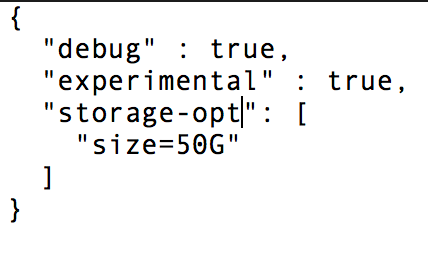
(admin)$ dockerd --storage-opt dm.basesize=50G
- Increased memory for building of image; and
docker image build -m 3GB --tag $env:image --file $env:dockerfile .
- Increased memory through the instantiation of the container with command run;
docker container run -d -p 1433 --memory=3g --volume D:\container:C:\host --name $env:container $env:image
 alancapc
on 12 Jul 2018
alancapc
on 12 Jul 2018
I tried the memory switch for build and run. They didnt do anything for me, but i did notice a change in behavour using different windows server core images. At least the image tagged as 1709 builds and then runs in interactive mode (and SQL server service reports as running) . The 1803 image will not even run for me, even in -it interactive mode. it just fails with.. "Failed to start service 'SQL Server (SQLEXPRESS)"
ctgarvey
on 16 Jul 2018
Hi Garvey, perhaps using the image the OP is using would be an advantage, that would be
microsoft/mssql-server-windows-developer.
Those recommendations were done at the same time, just in case you might have tried them separately. Try and post your log results, building and running results, etc. The more information you provide the better.
alancapc
on 17 Jul 2018
@alancapc I ran into issues when trying to repeat the build from the docker file to generate a similar docker image. That would be this file:
https://github.com/Microsoft/mssql-docker/blob/master/windows/mssql-server-windows-developer/dockerfile starting: FROM microsoft/windowsservercore
I was able to successfully run the existing image at microsoft/mssql-server-windows-developer
It was in attempting to "rebuild" this image that I ran into problems.
To clarify, do you mean you were able to do a docker build from that file, to generate a valid image that then ran, or do you mean you were able to run the microsoft/mssql-server-windows-developer image as a container directly, given the additional resources?
ColinDabritzViewpoint
on 17 Jul 2018
Hi @ColinDabritzViewpoint, I also ran into this issue while using this image as a base to deploy my custom database, here's the dockerfile that uses the mssql server windows developer as a starting point.
I did a docker image build based on the image created from the below dockerfile:
# escape=`
FROM microsoft/mssql-server-windows-developer
SHELL ["powershell", "-Command", "$ErrorActionPreference = 'Stop';"]

ENV sa_password <password>

WORKDIR /

# Adding FULLTEXT feature
COPY ./install/SQLServer2017-DEV-x64-ENU.exe .\sql.exe
COPY ./install/SQLServer2017-DEV-x64-ENU.box .\sql.box
RUN Start-Process -Wait -FilePath .\sql.exe -ArgumentList /qs, /x:setup ;
RUN .\setup\setup.exe /IACCEPTSQLSERVERLICENSETERMS /ACTION="Install" /SQLSYSADMINACCOUNTS="BUILTIN\Administrators" /INSTANCENAME="MSSQLSERVER" /ENU="True" /QUIET="True" /UpdateEnabled="False" /FEATURES=FULLTEXT /UpdateSource="MU" /HELP="False" /INDICATEPROGRESS="True" /X86="False" ;
RUN Remove-Item -Recurse -Force sql.exe, sql.box, setup

# Add DacFramework (SQLPackage.exe is here)
COPY ./install/DacFramework.msi /DacFramework.msi
RUN Start-Process -FilePath 'msiexec.exe' -ArgumentList '/quiet','/qn','/norestart', '/log','\DacFramework.log', '/i','\DacFramework.msi' -Wait ;

# Copy dacpac and scripts to initialize it
WORKDIR C:\init
VOLUME C:/data
RUN Set-ItemProperty -Path 'HKLM:\SYSTEM\CurrentControlSet\Control\Session Manager\DOS Devices' -Name 'G:' -Value "\??\C:\data" -Type String;
COPY ./PathToDatabase/bin/Release/ .
COPY ./scripts/Initialize-Database.ps1 .

CMD ./Initialize-Database.ps1 -sa_password $env:sa_password -Verbose
Ah. That is a different scenario somewhat than I was discussing, you appear to be-reinstalling in place overtop of the existing install?
If it's working though, it's an interesting approach.
ColinDabritzViewpoint
on 17 Jul 2018
Somewhat different, what happens is that the base image (mssql-server-windows-developer) will already have a SQL Server instance installed, all this dockerfile does is to add a new feature to it (FULLTEXT in this case), add DacFramework so I can deploy my custom database with SqlPackage.exe. The CMD actually does so (creating or updating) the database.
The base image will have SQL Server instance up and running already.
If you need to temper with your SQL Server features just write a layer on top of it, much simpler to be honest. :)
alancapc
on 17 Jul 2018
Unfortunately changing collation after install is very messy and error prone. In theory possible, but I was trying to avoid that by rebuilding fresh.
ColinDabritzViewpoint
on 17 Jul 2018
Well, you don't have to change collation, by default SqlPackage won't change it if it is the same, nonetheless you can enforce this through CompareUsingTargetCollation=(BOOLEAN) switch for publishing.
Some value to be gained from here: Docker Best Practices
Make sure you specify your versions precisely as well. :)
alancapc
on 17 Jul 2018
Thank you for the links, that approach was specifically not sufficient for our use case, unfortunately. We are looking for a SQL level database wide default collation being set to a non standard value on initial install. Your approach should work for many use cases though, hopefully it helps others.
Our builds need to be reproduceable and repeatable from the upstream definition in this case, which we haven't been able to achieve.
ColinDabritzViewpoint
on 17 Jul 2018
@ColbyTresness The symptoms you describe look like caused by memory problems.
Please check C:\Program Files\Microsoft SQL Server\140\Setup Bootstrap\LogFailed allocate pages: FAIL_PAGE_ALLOCATION 1 then alancapcs advice to use -m 3GB switch with docker build should help.
 mrzinger
on 4 Mar 2019
mrzinger
on 4 Mar 2019
Related issues
 LWDArjan
·
3Comments
LWDArjan
·
3Comments
 schrc3b6
·
5Comments
schrc3b6
·
5Comments
 Myrmex
·
3Comments
Myrmex
·
3Comments
 arunchandarQA
·
5Comments
arunchandarQA
·
5Comments
 mateodelnorte
·
6Comments
mateodelnorte
·
6Comments
Most helpful comment
I had a couple of different issues, one of them was the container being unhealthy due to SQL Server consumption of resources and SQL Server installation consumption resources.
Two main factors were storage capacity and memory.