Mssql-docker: Reliable BSOD when connecting to SQL in Windows containers from SSMS
I'm not sure if this is the right github repo for this issue, but I am able to get a reliable BSOD when connecting to the running SQL container through SSMS.
Error is: DRIVER_IRQL_NOT_LESS_OR_EQUAL in winnat.sys
I am running Windows 10 Creators Update.

 gregpakes
All 42 comments
+1
 adamhwang
on 14 May 2017
adamhwang
on 14 May 2017
+1
This also happens to me when I run SqlPackage against my container on container IP from my host.
Docker version: 17.05.0-ce
Windows version: 15063.296
Surface Pro 4
 ermontgo
on 23 May 2017
ermontgo
on 23 May 2017
Are we talking about a SQL Server _Windows_ container or a _Linux_ container running on Docker for Windows here?
 twright-msft
on 23 May 2017
twright-msft
on 23 May 2017
@twright-msft Windows Host and Windows Container.
gregpakes
on 23 May 2017
+1 (windows container)
 HugoNijmek
on 23 May 2017
HugoNijmek
on 23 May 2017
We're looking into this...
twright-msft
on 24 May 2017
[@gregpakes, @adamhwang, @ermontgo, @HugoNijhuis]
I tried to repro this issue on multiple machines using the microsoft/mssql-server-windows:latest image, with no success so far. A couple of questions/requests so we can narrow down the investigation:
Are you all using the microsoft/mssql-server-windows:latest (CTP2.1) image? Is it possible to see if you get the same issue with the previous microsoft/mssql-server-windows:vnext-ctp2.0 image?
Are you all running Windows 10 Creators Update? Is it a VM?
Any chance someone can share detailed repro steps (including the docker run command and the SSMS version)?

 perrysk-msft
on 25 May 2017
perrysk-msft
on 25 May 2017
@perrysk-msft
So my machine no longer exhibits the issue (I rebuilt my docker environment from scratch), but I will try and help.
- I was using the latest image at the time, not vnext.
- I was running Creators Update
- I was mapping 1433 to my host, so I was connecting to localhost in SSMS.
gregpakes
on 25 May 2017
@perrysk-msft Thanks for investigating! Unfortunately I've since uninstalled Docker from the affected machine and am running SQL Server locally so cannot test the vnext image.
- Yes, I was running
microsoft/mssql-server-windows:latest - I was running Windows 10 Creators Update on host, not VM. Exact iso was:
(Creator Update) SW_DVD5_WIN_ENT_10_1703_64BIT_English_MLF_X21-36478.iso - Docker was latest as of 10 days ago when I originally posted. The InstallDocker.exe I used does not contain a version number but revision was
{9D162334-8073-42CC-AB3E-A989BA9CA500}.
Repro steps
- Ran the command
docker run -d -p 1433:1433 -e sa_password=<SA_PASSWORD> -e ACCEPT_EULA=Y microsoft/mssql-server-windowsafter changing pw (from Docker hub) - Connect from SSMS on host to localhost or .
- See BSOD
Alternatively, even without connecting, would eventually get BSOD 5-10 mins after the container was started. Hope this helps
adamhwang
on 25 May 2017
Thanks @gregpakes and @adamhwang. Still no repro on my side, but I'll also try on a couple of different environments.
perrysk-msft
on 26 May 2017
This is occurring again on my machine. Makes docker unusable...
Current Error:

gregpakes
on 9 Jun 2017
Getting the same with microsoft/mssql-server-windows-developer:latest, Win10 Creators Edition, same steps as @adamhwang.
Using Docker for Windows, Version 17.03.1-ce-win12 (12058)
Channel: stable
d1db126
 flcdrg
on 24 Jun 2017
flcdrg
on 24 Jun 2017
Also getting the same BSOD when connecting via SSMS (17.1) to a docker SQL image (using latest windows mssql-server-windows-developer).. same steps as above
Fresh install of windows(Windows 10 Creator) and docker(12058), only other software VS 2017, Bitdefender and Office. Bash for Windows turned on.
 corsjune
on 28 Jun 2017
corsjune
on 28 Jun 2017
Thanks @corsjune, @flcdrg! We will try to repro this issue and investigate. Do you get the same behavior when using the container IP (from docker inspect) instead of localhost or . in SSMS?
perrysk-msft
on 28 Jun 2017
@perrysk-msft: I'm also experiencing this exact issue running Docker (12627) on Windows 10 Creators Update, connecting to localhost with SSMS. Using the container IP seems to help, though, as I have not yet experienced any BSODs when doing that.
 tormodfj
on 29 Jun 2017
tormodfj
on 29 Jun 2017
Yesterday.. I was experiencing the BSOD using . TO repro, I would first fail auth using Windows Auth two or three times and then try the sa password. If sa auth was successful, BSOD.
I think localhost did the same.
Today the container IP and external HOST IP seems successful. Also, but strangely . and localhost is going through also w/o a BSOD also. Only difference between last night and today is that I installed the June OS Rollups for Creator Edition
corsjune
on 29 Jun 2017
@perrysk-msft fresh boot.. tried . , instant BSOD
boot again, tried container IP, success:
tried . again, instant BSOD bad header pool
latest "stable" docker bits and OS bits
corsjune
on 29 Jun 2017
it seems that if I use the HOST external IP first and then try . , it is slightly more stable.. no bsod just SSMS hang
EDIT: I take that back.. although it seemed fine when I went to restart, another BSOD PAGE_FAULT_IN_NONPAGED_AREA
corsjune
on 29 Jun 2017
While this thread so far has revolved around connecting to the container using SSMS, it is worth mentioning that the BSOD also occurs when connecting to the 'localhost' using ADO.NET in general. I just got the BSOD when an application I'm developing tried to connect to the database via 'localhost'. Again, connecting using IP does not give BSOD.
tormodfj
on 30 Jun 2017
I'm having the exact same issue. My laptop would BSOD upon connecting with SSMS to localhost. The actual error of the BSOD was different everytime. Looks like pointer into the kernel going wrong...
 bravecobra
on 12 Jul 2017
bravecobra
on 12 Jul 2017
Thanks everyone! We were able to repro this behavior. We'll update here when the issue is resolved.
perrysk-msft
on 12 Jul 2017
Can we get some insight into the severity of this issue and thus the timeline for when we might expect this to be resolved? Or even if it will be a new docker Image or wait for a new Windows update?
 bloodybeet
on 2 Aug 2017
bloodybeet
on 2 Aug 2017
+1
 liri2006
on 3 Aug 2017
liri2006
on 3 Aug 2017
Running SQL Server in a Docker Container, I'm getting exactly the same error: DRIVER_IRQL_NOT_LESS_OR_EQUAL winnat.sys
- Windows 10 Creators Update (10.0.15063.0)
- Docker (17.06.0-ce, build 02c1d87)
Getting this error consistently running the either SMSS or RedGate's SQLCompare. The container is forwarding port 1433 to the main host.
 jlouros
on 11 Aug 2017
jlouros
on 11 Aug 2017
Having the same issue running Docker CE version 17.06.0-ce-win19 (12801) running microsoft/mssql-server-windows-developer image on Windows 10 Enterprise. Starting the image through Kitematic then tries to connect using SSMS 17.2. BSOD on every connection attempt.
 AlexanderViken
on 16 Aug 2017
AlexanderViken
on 16 Aug 2017
Upgraded to Docker CE version 17.06.1-ce-win24 (13025) today and it seems that the problem (for me at least) is solved. Started the container and connected with SSMS without BSOD.
AlexanderViken
on 22 Aug 2017
Windows 10 with creators update
Docker Version 17.06.1-ce-win24 (13025) Channel: stable 54dc09c
Microsoft SQL Server Management Studio 14.0.17177.0 (v17.2)
winnat.sys BSOD right afer connecting to database.
 DNosralla
on 25 Aug 2017
DNosralla
on 25 Aug 2017
Having same problem. BSOD withBAD_POOL_HEADER and DRIVER_IRQL_NOT_LESS_OR_EQUAL in winnat.sys
It seems to be triggered when i use Localhost as servername, instead of IP address.
Running:
Windows 10 Version 10.0.15063 Build 15063
Docker Version 17.06.2-ce-win27 (13194)
Channel: stable
428bd6c
microsoft/mssql-server-windows-developer:latest
 richardwhatever
on 21 Sep 2017
richardwhatever
on 21 Sep 2017
+1
 BringerOD
on 3 Oct 2017
BringerOD
on 3 Oct 2017
Same issue happens today (BSOD with BAD_POOL_HEADER). The error happens every time when I try to connect to dockerlized DB instance using SQL Server Management Studio. Context is listed here:
Key | Value
---- | ----
OS Version | Windows 10 Professional (Build 15063.608)
Docker Version | 17.09.0-ce-Win32 (Build Tue Sep 26 22:40:09 2017)
Image | microsoft/mssql-server-windows (latest atm)
Also I have used dumpchk.exe to check the memory dump file created by Windows. The log says
Probably caused by : NETIO.SYS ( NETIO!WfpPoolFree+19 )
Suspect that the issue is related to network problem.
 rvhuang
on 5 Oct 2017
rvhuang
on 5 Oct 2017
Having the same problem.
OS Version: Microsoft Windows 10 Pro (Build 15063)
Docker Version: 17.09.0-ce
Image: Microsoft/mssql-server-windows (latest atm)
A couple times I got BSOD right after attempting to connect to the container through SSMS and supplying localhost as the server name, although this had been working previously. Tried supplying IP address explicitly instead and connected successfully, but several minutes later, got BSOD again.
Also tried just starting the dockerized DB instance and not connecting via SSMS (or anything else). Lasted longer, but eventually got BSOD again.
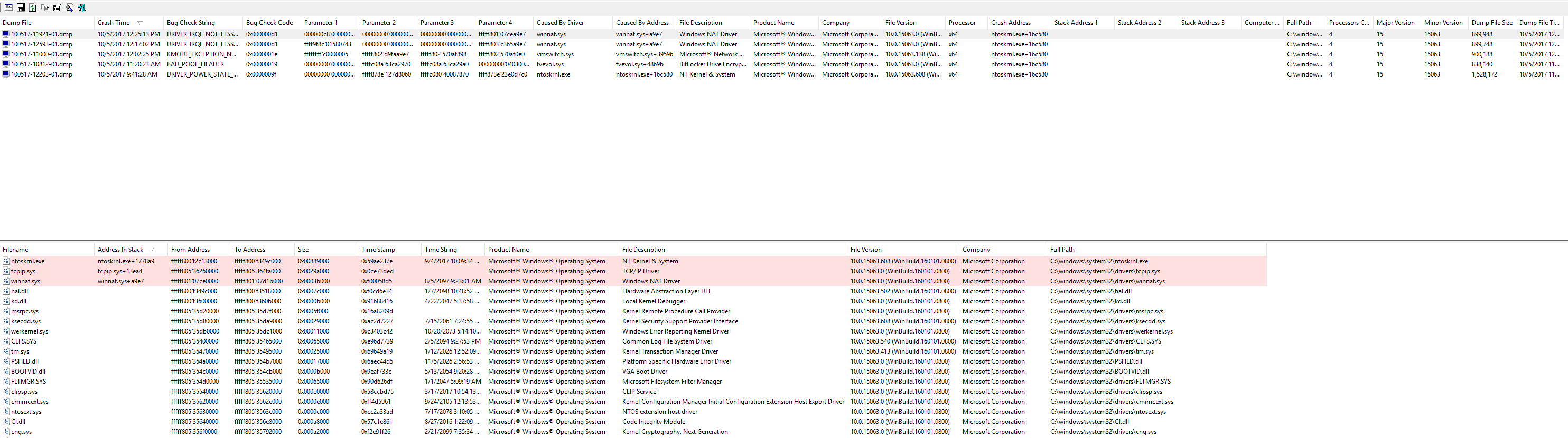
I've attached a screenshot of the dump file viewer, and can provide more info on those if necessary.
 agorely
on 5 Oct 2017
agorely
on 5 Oct 2017
Update: successfully connected to dockerlized instance via SQL Server Management Studio. As @perrysk-msft mentioned, it seems the instance must be connected via the IP listed by docker inspect command. Connecting the instance through localhost or 127.0.0.1 will cause BSOD immediately.
rvhuang
on 6 Oct 2017
[update: Same as #116 ]
According to the Windows Server team, this issue has been mitigated in the latest version of Windows Server, which is coming on Azure in early October, according to this blog post.
You start testing now, by participating in the Windows Insider program
Thanks,
Perry (MSFT)
perrysk-msft
on 13 Oct 2017
@perrysk-msft
What about Windows 10? This seems much more like a development issue than a server issue. Obviously it’s great they fix it in Server, but does that count towards all versions of Windows?
gregpakes
on 14 Oct 2017
Good point @gregpakes.
Because only Hyper-V Windows Containers are supported on Windows 10, this upcoming Windows Server version will also address the BSOD issue on Windows 10 (I believe there will be a Windows 10 update, but I'll double check and get back to you if otherwise).
perrysk-msft
on 14 Oct 2017
Found my problem.
Docker for Win: 17.09.0-ce
OS: Windows 10,
Windows Container with microsoft/mssql-server-windows-developer:2016-sp1
Same as already described - SSMS connecting to the instance with localhost.
Running this for development - same as @gregpakes .Would be nice to have a fix for Windows 10.
 zigmo
on 19 Oct 2017
zigmo
on 19 Oct 2017
Can confirm this is happening for me too.
Docker for Win: 17.09.0-ce-win33 (13620)
OS: Windows 10.0.15063
Windows Container with microsoft/mssql-server-windows-express:2017
The workaround for me is to connect directly via IP to the sql server instance. This seems to work fine so it suggests that there is something going on in the network port mapping.
 caveman-dick
on 31 Oct 2017
caveman-dick
on 31 Oct 2017
Windows 10 Pro 1703
Docker version 17.10.0-ce, build f4ffd25
Windows containers on Windows
every time when running latest microsoft/mssql-server-windows-developer image in about minute from starting the container.
What is the status of this bug? It looks like a common problem.
 masterkawaster
on 5 Dec 2017
masterkawaster
on 5 Dec 2017
I have been able to reproduce a similar error on the following versions of Win 10, docker, and docker compose.
Platform ServicePack Version VersionString
-------- ----------- ------- -------------
Win32NT 10.0.14393.0 Microsoft Windows NT 10.0.14393.0
docker -v
Docker version 17.12.0-ce, build c97c6d6
docker-compose.exe -v
docker-compose version 1.18.0, build 8dd22a96
I have a memory dump file for the windows team if you'd like to get in contact. I ran !analyze -v on it in WinDbg, with the following info (some info stripped out due to the public nature of this post):
Here's how I reproduce the problem using a public repository I posted just for this issue:
https://github.com/langboost/docker-compose-sql
(Please keep in mind some of these steps are related to research I was doing, and may not impact the issue. But these are the exact steps that reproduce the problem on my machine.)
- I run "docker build -t sqldb ." from the sqldb folder
- I run "docker build -t sqldb2 ." from the sqldb2 folder
- I run "docker-compose.exe up" from the compose_sqldb folder
Once I confirm both sqldb and sqldb2 containers are up, I attempt to connect to sqldb2 (which happens to be the one exposing 1433:1433) from SSMS and using "localhost" as the server name. Then, the BSOD occurs within 1 or 2 authentication attempts.
SSMS version info:
Microsoft SQL Server Management Studio 14.0.17199.0
Microsoft Analysis Services Client Tools 14.0.1008.227
Microsoft Data Access Components (MDAC) 10.0.14393.0
Microsoft MSXML 3.0 6.0
Microsoft Internet Explorer 9.11.14393.0
Microsoft .NET Framework 4.0.30319.42000
Operating System 6.3.14393
Other info
It is worth noting that the BSOD does not happen if I connect against the 172.x.x.x IP that docker assigns, bypassing the port mapping. I think others on the thread have observed the same behavior.
It is also worth noting that the BSOD did NOT occur using the same git repo on a 2nd, personal Windows 10 laptop. The personal laptop version details are:
Platform ServicePack Version VersionString
-------- ----------- ------- -------------
Win32NT 10.0.16299.0 Microsoft Windows NT 10.0.16299.0
docker -v
Docker version 17.12.0-ce, build c97c6d6
docker-compose.exe -v
docker-compose version 1.18.0, build 8dd22a96
I will workaround the issue for now by directly connecting via the 172.x.x.x address, but please do get in contact if you are with MS Support and want the memory dump.
Thanks.
 langboost
on 26 Feb 2018
langboost
on 26 Feb 2018
I just ran into this issue on
Win 10 1703
Docker for win: 18.03.0-ce-win58 (16761)
I didnt have to connect. After a couple of minutes the system will just bluescreen. If there are any additional information i can collect please let me know.
 165plo
on 27 Mar 2018
165plo
on 27 Mar 2018
Have the same issue: BSOD after couple of seconds after connect to mssql server with localhost or host machine name. Connect to local container IP works like a charm.
Microsoft Windows [Version 10.0.15063]
Docker version: 18.09.0
Image: microsoft/mssql-server-windows-developer (latest for today)
Run: docker run -d -p 1433:1433 -e sa_password=
 n4meless0ne
on 29 Nov 2018
n4meless0ne
on 29 Nov 2018
I am running in exactly the same issue.
It does not matter what i do as soon as docker is starting on windows it is just giving a blue screen.
 equidevium
on 10 Jul 2019
equidevium
on 10 Jul 2019
Related issues
 goostleek
·
7Comments
goostleek
·
7Comments
 evotjh
·
5Comments
evotjh
·
5Comments
 mateodelnorte
·
6Comments
mateodelnorte
·
6Comments
 axelfontaine
·
5Comments
axelfontaine
·
5Comments
 KristianFenn
·
5Comments
KristianFenn
·
5Comments
Most helpful comment
Can we get some insight into the severity of this issue and thus the timeline for when we might expect this to be resolved? Or even if it will be a new docker Image or wait for a new Windows update?