Msbuild: MSBuild fails to load project after setup of VS 16.8 Preview
Issue Description
Since VS 16.8 Preview setup (including .NET Core SDK 5.0 preview), my tools and unit tests depending on MSBuild fail to load projects.
Steps to Reproduce
Repro repo: https://github.com/dedale/msbuild_issue
Code failing:
using (var coll = new ProjectCollection())
{
    var p = coll.LoadProject(path); // <- exception
    return p.Properties;
}
Project content:
<Project Sdk="Microsoft.NET.Sdk" DefaultTargets="Build">
  <PropertyGroup>
    <AssemblyName>$(MSBuildProjectName)</AssemblyName>
    <RootNamespace>$(AssemblyName)</RootNamespace>
    <TargetFramework>net471</TargetFramework>
  </PropertyGroup>
</Project>
Expected Behavior
No exception when loading project.
Actual Behavior
Exception when loading a project in .NET Core SDK format:
Microsoft.Build.Exceptions.InvalidProjectFileException : Invalid static method invocation syntax:"[MSBuild]::GetTargetFrameworkIdentifier('$(TargetFramework)')". Method '[MSBuild]::GetTargetFrameworkIdentifier' not found.
Static method invocation should be of the form: $([FullTypeName]::Method()), e.g. $([System.IO.Path]::Combine(a,b)).
Check that all parameters are defined, are of the correct type, and are specified in the right order.
C:\Program Files\dotnet\sdk\5.0.100-preview.8.20417.9\Sdks\Microsoft.NET.Sdk\targets\Microsoft.NET.TargetFrameworkInference.targets
Analysis
Did not fail when I was using latest 16.7 Preview end of July.
Now it fails in VS 16.8 Preview & VS 16.7.2
Versions & Configurations
Apps & unit tests target .NET Core 3.1
NuGet packages:
- Microsoft.Build [16.5.0]
- Microsoft.Build.Framework [16.5.0]
- Microsoft.Build.Task.Core [16.5.0]
- Microsoft.Build.Utilities.Core [16.5.0]
- Microsoft.Build.Locator [1.2.6]
dotnet --info
.NET SDK (reflecting any global.json):
Version: 5.0.100-preview.8.20417.9
Commit: fc62663a35Runtime Environment:
OS Name: Windows
OS Version: 10.0.18363
OS Platform: Windows
RID: win10-x64
Base Path: C:\Program Files\dotnet\sdk\5.0.100-preview.8.20417.9\Host (useful for support):
Version: 5.0.0-preview.8.20407.11
Commit: bf456654f9.NET SDKs installed:
2.1.202 [C:\Program Files\dotnet\sdk]
2.1.505 [C:\Program Files\dotnet\sdk]
2.2.103 [C:\Program Files\dotnet\sdk]
3.0.100 [C:\Program Files\dotnet\sdk]
3.1.100 [C:\Program Files\dotnet\sdk]
3.1.401 [C:\Program Files\dotnet\sdk]
5.0.100-preview.8.20417.9 [C:\Program Files\dotnet\sdk].NET runtimes installed:
Microsoft.AspNetCore.All 2.1.2 [C:\Program Files\dotnet\shared\Microsoft.AspNetCore.All]
Microsoft.AspNetCore.All 2.1.9 [C:\Program Files\dotnet\shared\Microsoft.AspNetCore.All]
Microsoft.AspNetCore.All 2.1.21 [C:\Program Files\dotnet\shared\Microsoft.AspNetCore.All]
Microsoft.AspNetCore.All 2.2.1 [C:\Program Files\dotnet\shared\Microsoft.AspNetCore.All]
Microsoft.AspNetCore.App 2.1.2 [C:\Program Files\dotnet\shared\Microsoft.AspNetCore.App]
Microsoft.AspNetCore.App 2.1.9 [C:\Program Files\dotnet\shared\Microsoft.AspNetCore.App]
Microsoft.AspNetCore.App 2.1.21 [C:\Program Files\dotnet\shared\Microsoft.AspNetCore.App]
Microsoft.AspNetCore.App 2.2.1 [C:\Program Files\dotnet\shared\Microsoft.AspNetCore.App]
Microsoft.AspNetCore.App 3.0.0 [C:\Program Files\dotnet\shared\Microsoft.AspNetCore.App]
Microsoft.AspNetCore.App 3.1.0 [C:\Program Files\dotnet\shared\Microsoft.AspNetCore.App]
Microsoft.AspNetCore.App 3.1.7 [C:\Program Files\dotnet\shared\Microsoft.AspNetCore.App]
Microsoft.AspNetCore.App 5.0.0-preview.8.20414.8 [C:\Program Files\dotnet\shared\Microsoft.AspNetCore.App]
Microsoft.NETCore.App 2.0.9 [C:\Program Files\dotnet\shared\Microsoft.NETCore.App]
Microsoft.NETCore.App 2.1.9 [C:\Program Files\dotnet\shared\Microsoft.NETCore.App]
Microsoft.NETCore.App 2.1.21 [C:\Program Files\dotnet\shared\Microsoft.NETCore.App]
Microsoft.NETCore.App 2.2.1 [C:\Program Files\dotnet\shared\Microsoft.NETCore.App]
Microsoft.NETCore.App 3.0.0 [C:\Program Files\dotnet\shared\Microsoft.NETCore.App]
Microsoft.NETCore.App 3.1.0 [C:\Program Files\dotnet\shared\Microsoft.NETCore.App]
Microsoft.NETCore.App 3.1.7 [C:\Program Files\dotnet\shared\Microsoft.NETCore.App]
Microsoft.NETCore.App 5.0.0-preview.8.20407.11 [C:\Program Files\dotnet\shared\Microsoft.NETCore.App]
Microsoft.WindowsDesktop.App 3.0.0 [C:\Program Files\dotnet\shared\Microsoft.WindowsDesktop.App]
Microsoft.WindowsDesktop.App 3.1.0 [C:\Program Files\dotnet\shared\Microsoft.WindowsDesktop.App]
Microsoft.WindowsDesktop.App 3.1.7 [C:\Program Files\dotnet\shared\Microsoft.WindowsDesktop.App]
Microsoft.WindowsDesktop.App 5.0.0-preview.8.20411.6 [C:\Program Files\dotnet\shared\Microsoft.WindowsDesktop.App]
Attach a binlog
N/A
 dedale
All 13 comments
Found out I can fix the issue with this global.json:
{
  "sdk": {
    "version": "3.1.100",
    "rollForward": "latestFeature",
    "allowPrerelease": false
  }
}
Team Triage: The workaround works because GetTargetFrameworkIdentifier was introduced in net core 5, so by using SDK 3.1.100 you get older targets that don't reference GetTargetFrameworkIdentifier.
It sounds like you're loading a newer SDK with an older MSBuild engine. A quick look at your repro project looks fine though.
 BenVillalobos
on 30 Sep 2020
BenVillalobos
on 30 Sep 2020
I have failed to reproduce this on my machine with a similar set of SDKs installed.
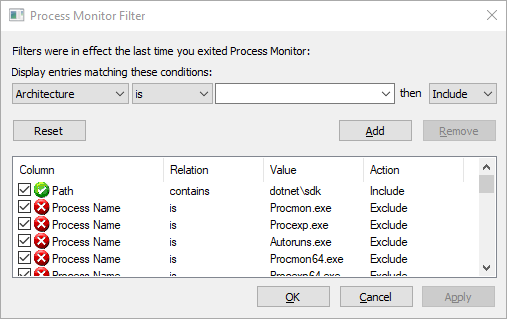
@dedale can you please paste the contents of your global.json that reproduces the issue, or confirm that there is no global.json? Thinking of the best way to debug this, I'm wondering if you'd be willing to record a trace of relevant disk I/O on your system with Process Monitor and share it with us. Filtering to paths containing "dotnet\sdk" is enough and it should give us a hint as to where the mismatch happens.
 ladipro
on 2 Oct 2020
ladipro
on 2 Oct 2020
@ladipro Sorry for my late answer.
To reproduce the problem, I use initial commit of my repro repo without any global.json.
I currently have VS 16.8.0 Preview 4.0.
Test still fails but error message has changed:
Microsoft.Build.Exceptions.InvalidProjectFileException : The SDK resolver type "WorkloadSdkResolver" failed to load. Could not load file or assembly 'System.Runtime, Version=5.0.0.0, Culture=neutral, PublicKeyToken=b03f5f7f11d50a3a'. The system cannot find the file specified. C:\Users\ded\AppData\Local\Temp\TestLoad\Project.csproj
----> System.IO.FileNotFoundException : Could not load file or assembly 'System.Runtime, Version=5.0.0.0, Culture=neutral, PublicKeyToken=b03f5f7f11d50a3a'. The system cannot find the file specified.
With VS 16.7.6: same error
Here is a procmon recording filtered on dotnet\sdk when I run the unit test with VS 16.7.6:
sdk.zip
Still with VS 16.7.6, if I update all NuGet packages (Microsoft.Build.* 16.7.0, Locator 1.2.6., etc.), unit test still fail with the same error.
HTH
dedale
on 16 Oct 2020
Same for me with final VS 16.8 and .NET 5.0.100.
The source code that is using Roslyn to open a .CSPROJ file is a .Net Core 3.1 console app. This fails to load the project.
Updating all NuGet packaged doesn't change it.
 ikarstein
on 13 Nov 2020
ikarstein
on 13 Nov 2020
I have both .Net SDK 3.1.404 and 5.0.100 installed and I am using the following code to read a .csproj file:
ProjectOptions options = new ProjectOptions();
using (Stream s = ...)
using (XmlReader xr = XmlReader.Create(s))
{
    return Project.FromXmlReader(xr, options);
}
Before I installed 5.0.100, this code ran fine. With both 3.1.404 and 5.0.100 installed, I also get the same WorkloadSdkResolver failed to load error as above when executing "Project.FromXmlReader(...)".
If I set the environment variable MSBUILD_EXE_PATH to "C:\Program Filesdotnet\sdk\3.1.404\MSBuild.dll" before executing this code then "Project.FromXmlReader(...)" successfully reads the .csproj file.
 El-Gor-do
on 15 Nov 2020
El-Gor-do
on 15 Nov 2020
Thank you for the update. Unfortunately your solution does not work for me.
ikarstein
on 15 Nov 2020
Ok. I think they did not thought out that someone is still using netstandard 2.0 projects?? When upgrading to latest VS 16.8.1 the .NET Core SDK 3.0.403 got deleted. So I had to reinstall it!? Then in my build project I have to explicitly set the MSBuild path. As new ProjectCollection() leads to the exception @dedale is facing I fixed it with:
                var startInfo = new ProcessStartInfo("dotnet", "--list-sdks") {
                    RedirectStandardOutput = true
                };

                var process = Process.Start(startInfo);
                process.WaitForExit(1000);

                var output = process.StandardOutput.ReadToEnd();
                   var sdkPaths = Regex.Matches(output, "([0-9]+.[0-9]+.[0-9]+(-[a-z]+.[0-9]+.[0-9]+.[0-9]+)?) \\[(.*)\\]")
                    .OfType<Match>()
                    .Where(m => m.Groups[1].Value.StartsWith("3.")) // The runtime you actually use for Teronis.Build.
                    .Select(m => Path.Combine(m.Groups[3].Value, m.Groups[1].Value, "MSBuild.dll"));

                var sdkPath = sdkPaths.Last();
                Environment.SetEnvironmentVariable("MSBUILD_EXE_PATH", sdkPath);
Now there is the dotnet tool which is using the net5.0 SDK by default. When building with my build project, one of my projects is rising an interesting error:
C:\Program Filesdotnet\sdk\5.0.100\Sdks\Microsoft.NET.Sdk\targets\Microsoft.NET.TargetFrameworkInference.targets(62,5): error MSB4184: Der Ausdruck "[MSBuild]::GetTargetPlatformIdentifier(netstandard2.0)" kann nicht ausgewertet werden. Object reference not set to an instance of an object.
This I had to fix by specifying a global.json in my root project folder containing:
{
  "sdk": {
    "version": "3.1.404",
    "rollForward": "latestFeature",
    "allowPrerelease": false
  }
}
where version is the version of the .NET Core SDK that you just installed manually. When you feel confident you then may set the version to "version": "3.1" (see https://docs.microsoft.com/en-US/dotnet/core/tools/global-json?tabs=netcore3x).
But all of these solutions seems like a huge huge hack. Everyone can give me advice to do it better?
 teroneko
on 16 Nov 2020
teroneko
on 16 Nov 2020
I'm having the same The SDK resolver type "WorkloadSdkResolver" failed to load. issue on our build agents that were built using the dotnet sdk 3.5 docker image updated on November 10th to include the new MSBuild exes.
 Stiverton
on 16 Nov 2020
Stiverton
on 16 Nov 2020
Currently my whole Dev and Build setup for a complex product that I develop is damaged. I have two custom tools based on .net core 3.1 that did automatic code generation based on Roslyn and worked before VS 16.8 / .NET 5 . The scanned source code is based on .NET 4.8 in the new .CSPROJ format. - Since the weekend I try to find a solution for this mess.
ikarstein
on 17 Nov 2020
@dedale thank you for the trace. I'm coming back to this after a longer break, apologies for the delay. I can reproduce it now, not sure why I couldn't before.
The root cause lies in the logic used by MSBuildLocator to find the SDK to bind to. It simply runs dotnet --info and goes with the version printed by the command. Since dotnet runs against the latest SDK by default, it prints out something like this with both 3.1 and 5.0 installed:
.NET SDK (reflecting any global.json):
 Version:   5.0.100
 Commit:    5044b93829

Runtime Environment:
 OS Name:     Windows
 OS Version:  10.0.19042
 OS Platform: Windows
 RID:         win10-x64
 Base Path:   C:\Program Files\dotnet\sdk\5.0.100\

...
MSBuildLocator then tries to load MSBuild assemblies from sdk\5.0.100 and fails because the process runs against 3.1 runtime. The fix is going to be in MSBuildLocator so I'll close this issue and will continue working on it there (https://github.com/microsoft/MSBuildLocator/issues/96).
ladipro
on 27 Nov 2020
Also linking https://github.com/microsoft/MSBuildLocator/issues/92 which looks like a duplicate of the same problem.
ladipro
on 27 Nov 2020
Found out I can fix the issue with this
global.json:{ "sdk": { "version": "3.1.100", "rollForward": "latestFeature", "allowPrerelease": false } }
Had to use this after upgrading to Visual Studio Version 16.8.5
 busbina
on 18 Feb 2021
busbina
on 18 Feb 2021
Related issues
 dsplaisted
·
4Comments
dsplaisted
·
4Comments
 davkean
·
3Comments
davkean
·
3Comments
 dasMulli
·
4Comments
dasMulli
·
4Comments
 v-lali
·
3Comments
v-lali
·
3Comments
 rainersigwald
·
3Comments
rainersigwald
·
3Comments
Most helpful comment
Found out I can fix the issue with this
global.json: