Msbuild: ResolveComReference task fails when executing build from child AppDomain
I've run into following problem, when trying to execute build in child app domain of main process:
Invoke-MSBuild : C:\Program Files (x86)\Microsoft Visual Studio\2017\Enterprise\MSBuild\15.0\Bin\Microsoft.Common.CurrentVersion.targets(2545,5):
error MSB4061: The "ResolveComReference" task could not be instantiated from "Microsoft.Build.Tasks.Core, Version=15.1.0.0, Culture=neutral, PublicKeyToken=b03f5f7f11d50a3a".
Could not load file or assembly 'Microsoft.Build, Version=15.1.0.0, Culture=neutral, PublicKeyToken=b03f5f7f11d50a3a' or one of its dependencies.
The system cannot find the file specified.
The issue appears to be caused by fact that build is being run from child app domain of main process (powershell.exe in my case). ResolveComReference (extended from AppDomainIsolatedTaskExtension) does not use ApplicationBase of child appdomain, but instead uses ApplicationBase of parent PowerShell process.
Log from Fuslogvw.exe (Assembly Binding Log Viewer)
*** Assembly Binder Log Entry  (2017-03-22 @ 22:53:23) ***

The operation failed.
Bind result: hr = 0x80070002. The system cannot find the file specified.

Assembly manager loaded from:  C:\Windows\Microsoft.NET\Framework64\v4.0.30319\clr.dll
Running under executable  C:\Windows\System32\WindowsPowerShell\v1.0\powershell.exe
--- A detailed error log follows.

=== Pre-bind state information ===
LOG: DisplayName = Microsoft.Build, Version=15.1.0.0, Culture=neutral, PublicKeyToken=b03f5f7f11d50a3a
 (Fully-specified)
LOG: Appbase = file:///C:/Windows/System32/WindowsPowerShell/v1.0/
LOG: Initial PrivatePath = NULL
LOG: Dynamic Base = NULL
LOG: Cache Base = NULL
LOG: AppName = powershell.exe
Calling assembly : (Unknown).
===
LOG: This bind starts in default load context.
LOG: No application configuration file found.
LOG: Using host configuration file:
LOG: Using machine configuration file from C:\Windows\Microsoft.NET\Framework64\v4.0.30319\config\machine.config.
LOG: GAC Lookup was unsuccessful.
LOG: Attempting download of new URL file:///C:/Windows/System32/WindowsPowerShell/v1.0/Microsoft.Build.DLL.
LOG: Attempting download of new URL file:///C:/Windows/System32/WindowsPowerShell/v1.0/Microsoft.Build/Microsoft.Build.DLL.
LOG: Attempting download of new URL file:///C:/Windows/System32/WindowsPowerShell/v1.0/Microsoft.Build.EXE.
LOG: Attempting download of new URL file:///C:/Windows/System32/WindowsPowerShell/v1.0/Microsoft.Build/Microsoft.Build.EXE.
LOG: All probing URLs attempted and failed.
 kovalikp
All 5 comments
I think MSBuild might need to set a resolution hook for its own assemblies when starting the new appdomain for an isolated task.
This was also the root cause of https://github.com/tunnelvisionlabs/antlr4cs/issues/173.
 rainersigwald
on 22 Mar 2017
rainersigwald
on 22 Mar 2017
I would love to see this fixed. This issue prevents us from using live unit testing in a project
 PaulVrugt
on 15 Jan 2019
PaulVrugt
on 15 Jan 2019
I'm in the same boat. This is preventing my team from using live unit testing as well.
This issue is linked by the following MS Dev Community problem:
https://developercommunity.visualstudio.com/content/problem/309213/live-unit-testing-not-starting-when-having-a-com-r.html
 bartsipes
on 18 Jan 2019
bartsipes
on 18 Jan 2019
This is still causing issues with Live Unit testing in VS 2019.
 stevehurcombe
on 11 Mar 2019
stevehurcombe
on 11 Mar 2019
I'm also having trouble with this. The workaround suggested here doesn't seem to be accurate any more. The suggested workaround:
Copy System.Runtime.InteropServices.RuntimeInformation.dll present under
C:\Program Files (x86)\Microsoft Visual Studio\Preview\Enterprise\Common7\IDE\PrivateAssemblies\ to
C:\Program Files (x86)\Microsoft Visual Studio\Preview\Enterprise\Common7\ServiceHub\Hosts\ServiceHub.Host.CLR.x86. (Change the paths to match your local VS install location.)
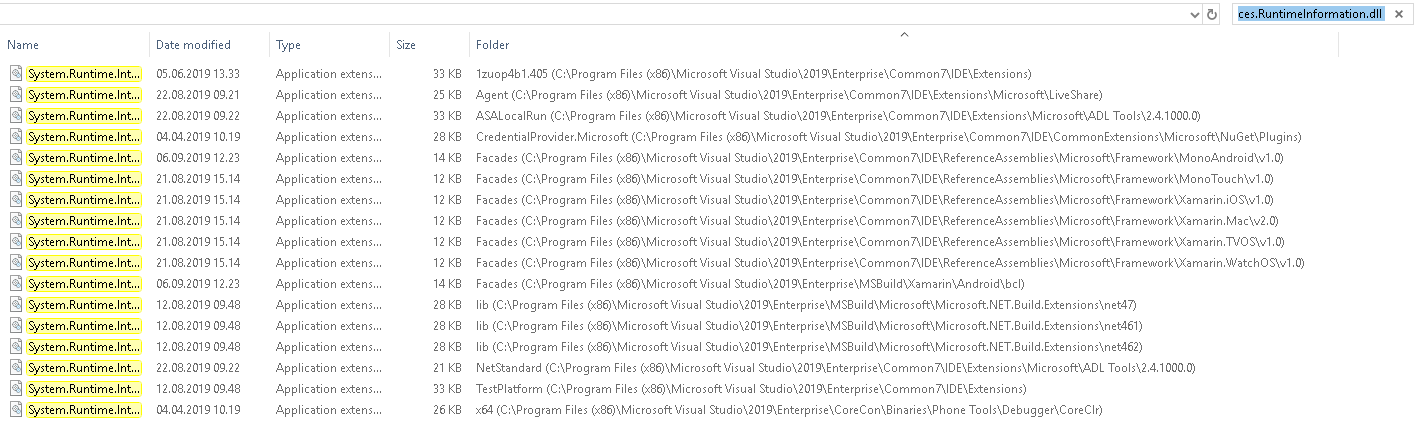
Problem is, that dll doesn't exist at that path in my installation (VS 2019, 16.2.4). I can find it in 17 other locations, but I wouldn't know which one to copy, if this is still a viable way to fix it.
Result of a search for the file:
 mavaa
on 13 Sep 2019
mavaa
on 13 Sep 2019
Related issues
 vatsan-madhavan
·
3Comments
vatsan-madhavan
·
3Comments
 hawkerm
·
4Comments
hawkerm
·
4Comments
 ghost
·
4Comments
ghost
·
4Comments
 twenzel
·
4Comments
twenzel
·
4Comments
 dsplaisted
·
4Comments
dsplaisted
·
4Comments
Most helpful comment
I would love to see this fixed. This issue prevents us from using live unit testing in a project