Mremoteng: UI: language setting ignored for some strings
Expected Behavior
- [X] "Connection" string, below the 'File' menu, should use the same language as set in the 'Appearance' options;
- [x] Putty Saved Sessions should, by default, open in the same 'General' tab as 'Connections' instead of using the OS locale tab name for 'General';
Current Behavior
- "Connection" string (
strLabelConnect), below the 'File' menu, uses the OS locale translation even if another language is selected in 'Appearance' option; - Putty Saved Sessions are opening in a second tab which name (
strGeneral) is the direct translation of the OS locale, even if another language is selected in 'Appearance' option. When the intent is to have both "Putty Saved Sessions" and "Connections" opening in the same 'General' tab it is not possible because the Putty connections will always use the translated tab name;
Possible Solution
Make sure that the strings mentioned check for the language set in options instead of going straight for the language auto-detection.
Steps to Reproduce (for bugs)
- Open mRemoteNG, change the language in Tools > Options > Appearance
- Restart mRemoteNG and check both cases mentioned
Note: This might not be reproducible/noticeable in an English OS environment.
Your Environment
- Windows 10 1903 x64
At this time I just remove the translation DLLs (mRemoteNG.resources.dll) to not have to deal with it, but I recognize that this is a very minor issue.
 ner00
ner00
All 6 comments
@ner00 What language are you running mRemoteNG in?
 farosch
on 1 Sep 2019
farosch
on 1 Sep 2019
@ner00 What language are you running mRemoteNG in?
@farosch Running in English, but in those few cases mentioned it defaults to the OS locale (non-English) despite that. Not sure if it picks them from any ini generated at first run because in the first run mRemoteNG always defaults to the OS language (assuming a translation file is available). The quick and dirty solution is to remove the locale DLL and that solves most of those which then default to English.
ner00
on 1 Sep 2019
"Connection" string (strLabelConnect), below the 'File' menu, uses the OS locale translation even if another language is selected in 'Appearance' option;
This was due to the forms being created before the language culture was properly set. I have fixed this issue with the above commit.
Putty Saved Sessions are opening in a second tab which name (strGeneral) is the direct translation of the OS locale, even if another language is selected in 'Appearance' option. When the intent is to have both "Putty Saved Sessions" and "Connections" opening in the same 'General' tab it is not possible because the Putty connections will always use the translated tab name;
I will need some more time for that problem though as I need a system with a non-english default locale to test this. I'll keep you posted!
farosch
on 3 Oct 2019
Okay, I have tested the second problem and can verify it.
Though I am not sure if this behaviour is intentional.
@kmscode @sparerd What do you guys think abot this?
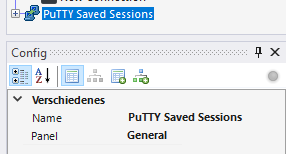
I would prefer to have the possiility to set a panel name for putty saved connections directly on the "PuTTY Saved Sessions" node.
Something like this:
farosch
on 3 Oct 2019
Though I am not sure if this behaviour is intentional.
It doesn't seem intentional because in English that does not happen, and personally I prefer having them in the same tab. I was under the impression that the tab/panel name was already customizable (and ignored in non-English locale), but if not it seems a good idea to me.
ner00
on 4 Oct 2019
Closing this,
the first point has been fixed a while ago and the second point seems to be no longer true - must have been fixed with some other commit
farosch
on 30 May 2020
Related issues
 sparerd
·
3Comments
sparerd
·
3Comments
 nerddtvg
·
3Comments
nerddtvg
·
3Comments
 LIyoai
·
4Comments
LIyoai
·
4Comments
 PCNerd2001
·
3Comments
PCNerd2001
·
3Comments
 seth-c-stenzel
·
4Comments
seth-c-stenzel
·
4Comments