Mremoteng: Unable to save putty settings in the mremoteNG
Unable to save putty settings in the mremoteNG
Expected Behavior
Under Tools>Option>Advanced> launch putty
I changed some settings for the putty like background color but unable to save those.
So I have change the seeting every time whenever i open a new session.
I should be able to save those custom putty settings
Current Behavior
I changed some settings for the putty like background color but unable to save those.
So I have change the seeting every time whenever i open a new session.
Possible Solution
Steps to Reproduce (for bugs)
Use the version 1.75.7012.16814 and try to save your custom putty session settings
1.
2.
3.
4.
Context
Your Environment
- Version used:
- Operating System and version (e.g. Windows 10 1709 x64):
 mugali93
>All comments
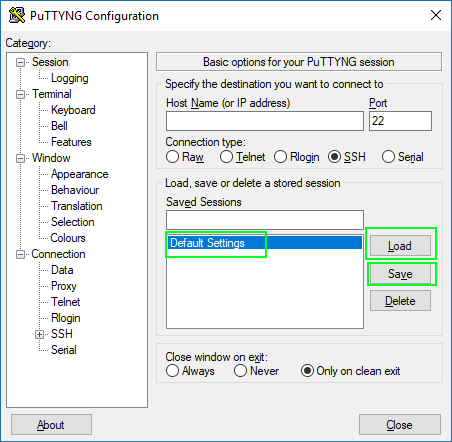
When in the PuTTY setting, Load the "Default Settings" -> make you changes -> Save "Default Settings"
 kmscode
on 29 Jul 2018
kmscode
on 29 Jul 2018
👍4
Was this page helpful?
0 / 5 - 0 ratings
Related issues
 jasong1978
·
3Comments
jasong1978
·
3Comments
 PCNerd2001
·
3Comments
PCNerd2001
·
3Comments
 senseof94
·
4Comments
senseof94
·
4Comments
 sparerd
·
3Comments
sparerd
·
3Comments
 LIyoai
·
4Comments
LIyoai
·
4Comments
Most helpful comment
When in the PuTTY setting, Load the "Default Settings" -> make you changes -> Save "Default Settings"
