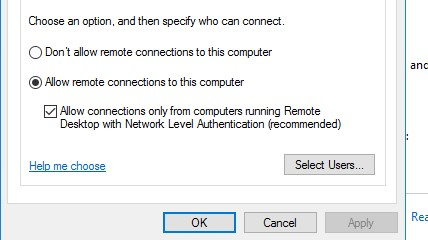
Its mainly for accessing Server 2016 RDP, I keep facing this error where I have to check and uncheck NETWORK LEVEL AUTHENTICATION accessing the server physically to be accessible by MRemoteNG, doesn't happen in 2012 but happens often in 2016. Specially when I have to reboot the server due to maintenance or updates.
 ibrahim052
All 11 comments
Seems related to #220. This may be an issue between the version of the mstsc RDP library that we use and Windows Server 2016. I am doing some work in v1.77 to improve RDP compatibility (#826) that might help with this.
 sparerd
on 17 Apr 2018
sparerd
on 17 Apr 2018
Amazing. I still face this issue. Had tried alpha which doesn't have this problem at all but then ;-) other bugs are there plus stable is so stable. I am trying to manage somehow but it's a pain when it happens with a guest os as vm and then I have to access it physically to disable NLA or sometime check it again if unchecked.
On April 17, 2018 7:57:50 PM David Sparer notifications@github.com wrote:
Seems related to #220https://github.com/mRemoteNG/mRemoteNG/issues/220. This may be an issue between the version of the mstsc RDP library that we use and Windows Server 2016. I am doing some work in v1.77 to improve RDP compatibility (#826https://github.com/mRemoteNG/mRemoteNG/issues/826) that might help with this.
—
You are receiving this because you authored the thread.
Reply to this email directly, view it on GitHubhttps://github.com/mRemoteNG/mRemoteNG/issues/912#issuecomment-382046162, or mute the threadhttps://github.com/notifications/unsubscribe-auth/AjfYMa-zvpd--rio2YSo-r9Atg7xKSB2ks5tphD5gaJpZM4SkMS4.
ibrahim052
on 17 Apr 2018
I am sorry if I am asking too much but it happened that my mremoteng stopped working and didn't start at all. It appears on task manager and disappears immediately. I tried installing the latest pre release to try my luck and to my bad luck I realized that my settings were encrypted. Now I am unable to retain the settings. I am stuck, I tried to install the previous version but it's same. If there is any charges I would be happy to contribute as donation but this problem would cost my job because I had everything well organized from a long time dependent that this catastrophe would never happen.
On April 17, 2018 8:03:34 PM Ibrahim Rasheed ibrahim52@outlook.com wrote:
Amazing. I still face this issue. Had tried alpha which doesn't have this problem at all but then ;-) other bugs are there plus stable is so stable. I am trying to manage somehow but it's a pain when it happens with a guest os as vm and then I have to access it physically to disable NLA or sometime check it again if unchecked.
On April 17, 2018 7:57:50 PM David Sparer notifications@github.com wrote:
Seems related to #220https://github.com/mRemoteNG/mRemoteNG/issues/220. This may be an issue between the version of the mstsc RDP library that we use and Windows Server 2016. I am doing some work in v1.77 to improve RDP compatibility (#826https://github.com/mRemoteNG/mRemoteNG/issues/826) that might help with this.
—
You are receiving this because you authored the thread.
Reply to this email directly, view it on GitHubhttps://github.com/mRemoteNG/mRemoteNG/issues/912#issuecomment-382046162, or mute the threadhttps://github.com/notifications/unsubscribe-auth/AjfYMa-zvpd--rio2YSo-r9Atg7xKSB2ks5tphD5gaJpZM4SkMS4.
ibrahim052
on 15 Jan 2019
I'm sorry this has happened to you, @ibrahim052. Here are several pages that may be able to help. First, try to recover the last good backup of your connections file. Also, take a look at the log file to see what may be causing the application to stop working. You can also try deleting the user settings file. We have seen it cause startup problems if it is corrupted.
sparerd
on 15 Jan 2019
Tried renaming and to open the backup file, this is what I get. I had a whole half day of depression of making a mistake not taking any backup. I hope this gets resolved.
[cid:[email protected]]
Sent from Mailhttps://go.microsoft.com/fwlink/?LinkId=550986 for Windows 10
From: David Sparer notifications@github.com
Sent: Tuesday, January 15, 2019 6:14:32 PM
To: mRemoteNG/mRemoteNG
Cc: ibrahim052; Mention
Subject: Re: [mRemoteNG/mRemoteNG] RDP Disconnected 6151 (#912)
I'm sorry this has happened to you, @ibrahim052https://github.com/ibrahim052. Here are several pages that may be able to help. First, try to recover the last good backup of your connections file. Also, take a look at the log file to see what may be causing the application to stop working. You can also try deleting the user settings file. We have seen it cause startup problems if it is corrupted.
- https://github.com/mRemoteNG/mRemoteNG/wiki/Backups-and-Recovery
- https://github.com/mRemoteNG/mRemoteNG/wiki/Troubleshooting-and-Logging
- https://github.com/mRemoteNG/mRemoteNG/wiki/User-settings-file
—
You are receiving this because you were mentioned.
Reply to this email directly, view it on GitHubhttps://github.com/mRemoteNG/mRemoteNG/issues/912#issuecomment-454405880, or mute the threadhttps://github.com/notifications/unsubscribe-auth/AjfYMVTJHBRUcpmAIhA1dhiOF89NoPRUks5vDeJIgaJpZM4SkMS4.
ibrahim052
on 15 Jan 2019
(If you've included an image, I am not able to see it. Images in emails do not get transferred to GitHub)
You may need to go back to an older backup. Checking the file size of the backups may help determine the last good backup (look for the largest file).
sparerd
on 15 Jan 2019
Alright, sir you are GENIUS. This is what I did, from AppData\Roaming\mRemoteNG\mRemoteNG.exe_Urlxxxxxxxxx current version folder I copied the user.config file to
AppData\Local\mRemoteNG\mRemoteNG.exe_Url_xxxxx renaming existing user.config and placing the copied one resolved the issue. WOOOHOOOOOOOOOOOOOO, still donating as promised. Phewwwww THANK YOU THANK YOU THANK YOU.
Sent from Mailhttps://go.microsoft.com/fwlink/?LinkId=550986 for Windows 10
From: Ibrahim Rasheed ibrahim52@outlook.com
Sent: Tuesday, January 15, 2019 8:46:18 PM
To: mRemoteNG/mRemoteNG; mRemoteNG/mRemoteNG
Cc: Mention
Subject: RE: [mRemoteNG/mRemoteNG] RDP Disconnected 6151 (#912)
Tried renaming and to open the backup file, this is what I get. I had a whole half day of depression of making a mistake not taking any backup. I hope this gets resolved.
[cid:[email protected]]
Sent from Mailhttps://go.microsoft.com/fwlink/?LinkId=550986 for Windows 10
From: David Sparer notifications@github.com
Sent: Tuesday, January 15, 2019 6:14:32 PM
To: mRemoteNG/mRemoteNG
Cc: ibrahim052; Mention
Subject: Re: [mRemoteNG/mRemoteNG] RDP Disconnected 6151 (#912)
I'm sorry this has happened to you, @ibrahim052https://github.com/ibrahim052. Here are several pages that may be able to help. First, try to recover the last good backup of your connections file. Also, take a look at the log file to see what may be causing the application to stop working. You can also try deleting the user settings file. We have seen it cause startup problems if it is corrupted.
- https://github.com/mRemoteNG/mRemoteNG/wiki/Backups-and-Recovery
- https://github.com/mRemoteNG/mRemoteNG/wiki/Troubleshooting-and-Logging
- https://github.com/mRemoteNG/mRemoteNG/wiki/User-settings-file
—
You are receiving this because you were mentioned.
Reply to this email directly, view it on GitHubhttps://github.com/mRemoteNG/mRemoteNG/issues/912#issuecomment-454405880, or mute the threadhttps://github.com/notifications/unsubscribe-auth/AjfYMVTJHBRUcpmAIhA1dhiOF89NoPRUks5vDeJIgaJpZM4SkMS4.
ibrahim052
on 15 Jan 2019
Thank you for saving my day, your concern and response was enough to push me for giving it a try one more time. Made a small contribution to my favorite app which I use most.
Sent from Mailhttps://go.microsoft.com/fwlink/?LinkId=550986 for Windows 10
From: Ibrahim Rasheed ibrahim52@outlook.com
Sent: Tuesday, January 15, 2019 9:09:37 PM
To: mRemoteNG/mRemoteNG; mRemoteNG/mRemoteNG
Cc: Mention
Subject: RE: [mRemoteNG/mRemoteNG] RDP Disconnected 6151 (#912)
Alright, sir you are GENIUS. This is what I did, from AppData\Roaming\mRemoteNG\mRemoteNG.exe_Urlxxxxxxxxx current version folder I copied the user.config file to
AppData\Local\mRemoteNG\mRemoteNG.exe_Url_xxxxx renaming existing user.config and placing the copied one resolved the issue. WOOOHOOOOOOOOOOOOOO, still donating as promised. Phewwwww THANK YOU THANK YOU THANK YOU.
Sent from Mailhttps://go.microsoft.com/fwlink/?LinkId=550986 for Windows 10
From: Ibrahim Rasheed ibrahim52@outlook.com
Sent: Tuesday, January 15, 2019 8:46:18 PM
To: mRemoteNG/mRemoteNG; mRemoteNG/mRemoteNG
Cc: Mention
Subject: RE: [mRemoteNG/mRemoteNG] RDP Disconnected 6151 (#912)
Tried renaming and to open the backup file, this is what I get. I had a whole half day of depression of making a mistake not taking any backup. I hope this gets resolved.
[cid:[email protected]]
Sent from Mailhttps://go.microsoft.com/fwlink/?LinkId=550986 for Windows 10
From: David Sparer notifications@github.com
Sent: Tuesday, January 15, 2019 6:14:32 PM
To: mRemoteNG/mRemoteNG
Cc: ibrahim052; Mention
Subject: Re: [mRemoteNG/mRemoteNG] RDP Disconnected 6151 (#912)
I'm sorry this has happened to you, @ibrahim052https://github.com/ibrahim052. Here are several pages that may be able to help. First, try to recover the last good backup of your connections file. Also, take a look at the log file to see what may be causing the application to stop working. You can also try deleting the user settings file. We have seen it cause startup problems if it is corrupted.
- https://github.com/mRemoteNG/mRemoteNG/wiki/Backups-and-Recovery
- https://github.com/mRemoteNG/mRemoteNG/wiki/Troubleshooting-and-Logging
- https://github.com/mRemoteNG/mRemoteNG/wiki/User-settings-file
—
You are receiving this because you were mentioned.
Reply to this email directly, view it on GitHubhttps://github.com/mRemoteNG/mRemoteNG/issues/912#issuecomment-454405880, or mute the threadhttps://github.com/notifications/unsubscribe-auth/AjfYMVTJHBRUcpmAIhA1dhiOF89NoPRUks5vDeJIgaJpZM4SkMS4.
ibrahim052
on 15 Jan 2019
Glad to hear that you got it working! :)
sparerd
on 15 Jan 2019
I am sorry but it happened that MremoteNG was on , I lost battery and laptop switched off unexpectedly. After that as usual when I am trying to open mremoteng , it doesn’t work and ask for password. Unfortunately there are no automatic backup as well since I emailed you last. Followed the same steps of solution I discovered last time but does not work this time.
Sent from Mailhttps://go.microsoft.com/fwlink/?LinkId=550986 for Windows 10
From: David Sparer notifications@github.com
Sent: Wednesday, January 16, 2019 12:30:52 AM
To: mRemoteNG/mRemoteNG
Cc: ibrahim052; Mention
Subject: Re: [mRemoteNG/mRemoteNG] RDP Disconnected 6151 (#912)
Glad to hear that you got it working! :)
—
You are receiving this because you were mentioned.
Reply to this email directly, view it on GitHubhttps://github.com/mRemoteNG/mRemoteNG/issues/912#issuecomment-454539929, or mute the threadhttps://github.com/notifications/unsubscribe-auth/AjfYMUb1Wn0JtOyQ8laocAmm1IJTbX8jks5vDjp8gaJpZM4SkMS4.
ibrahim052
on 3 Mar 2019
Never mind, the backup of back in jan 15 was still sufficient. Thank you but please if you can fix the surprise shutdown issue in future. Have a nice day.
Sent from Mailhttps://go.microsoft.com/fwlink/?LinkId=550986 for Windows 10
From: Ibrahim Rasheed ibrahim52@outlook.com
Sent: Sunday, March 3, 2019 12:51:45 PM
To: mRemoteNG/mRemoteNG; mRemoteNG/mRemoteNG
Cc: Mention
Subject: RE: [mRemoteNG/mRemoteNG] RDP Disconnected 6151 (#912)
I am sorry but it happened that MremoteNG was on , I lost battery and laptop switched off unexpectedly. After that as usual when I am trying to open mremoteng , it doesn’t work and ask for password. Unfortunately there are no automatic backup as well since I emailed you last. Followed the same steps of solution I discovered last time but does not work this time.
Sent from Mailhttps://go.microsoft.com/fwlink/?LinkId=550986 for Windows 10
From: David Sparer notifications@github.com
Sent: Wednesday, January 16, 2019 12:30:52 AM
To: mRemoteNG/mRemoteNG
Cc: ibrahim052; Mention
Subject: Re: [mRemoteNG/mRemoteNG] RDP Disconnected 6151 (#912)
Glad to hear that you got it working! :)
—
You are receiving this because you were mentioned.
Reply to this email directly, view it on GitHubhttps://github.com/mRemoteNG/mRemoteNG/issues/912#issuecomment-454539929, or mute the threadhttps://github.com/notifications/unsubscribe-auth/AjfYMUb1Wn0JtOyQ8laocAmm1IJTbX8jks5vDjp8gaJpZM4SkMS4.
ibrahim052
on 4 Mar 2019
Related issues
 jasong1978
·
3Comments
jasong1978
·
3Comments
 kmscode
·
5Comments
kmscode
·
5Comments
 LIyoai
·
4Comments
LIyoai
·
4Comments
 agiz10
·
4Comments
sparerd
·
3Comments
agiz10
·
4Comments
sparerd
·
3Comments