Mremoteng: Missing horizontal scrollbar on Connections Panel
|||
|--:|---|
|Operating system | Windows 10 Pro x64 1703 (15063.413)|
|mRemoteNG version| 1.75.7008.17907 |
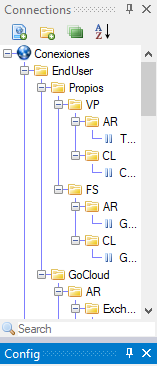
I've updated to the latest Windows 10 (creators update), and I've lost the horizontal scrollbar for the Connections Panel. I've tried starting from scratch (new mremote installation with new config xml), but still nothing.
 YogurtuNgue
All 7 comments
I believe that this is related to the newer "TreeNode" code that was implemented in 1.75...
The scroll bar is created in 1.74 on Win10 1703.
 kmscode
on 16 Jun 2017
kmscode
on 16 Jun 2017
You are correct, I downgraded to 1.74.6023.15437 and the scroll bar is back. I do have to recreate my xml though
YogurtuNgue
on 22 Jun 2017
Shouldn't this issue remain open ? Since #613 is closed!
 smoras
on 5 Jul 2017
smoras
on 5 Jul 2017
@smoras this issue is open and was not closed.
kmscode
on 6 Jul 2017
Hi Team,
Any update for this issue, since otherwise the connections panel occupies too much screen on windows 10.
Please help.
Thanks,
 devinderdev
on 18 Oct 2017
devinderdev
on 18 Oct 2017
Implemented a fix for this that will be available in the next patch
 sparerd
on 28 Oct 2017
sparerd
on 28 Oct 2017
Thank you @sparerd David and contributors for fixing this. This was a much needed fix.
smoras
on 29 Oct 2017
Related issues
 iron51
·
3Comments
iron51
·
3Comments
 nerddtvg
·
3Comments
nerddtvg
·
3Comments
 seth-c-stenzel
·
4Comments
seth-c-stenzel
·
4Comments
 jelbo
·
4Comments
jelbo
·
4Comments
 pfjason
·
4Comments
pfjason
·
4Comments