Mqttnet: Want to build MQTT server on raspberry pi, Idea is to send message from ESP to raspberry pi, display onto webpage. I did this using python on raspberry pi, but I need to do usign c# dotnet.
Describe your question
A clear and concise description of what you want to know.
Which project is your bug related to?
- Server
 MISSEY
All 38 comments
I want to start a server on raspberry pi built on C# dotnet and want to connect with ESP8266 using MQTT.
Please help me.
MISSEY
on 26 Jul 2019
- You need to install .NetCore on your Raspberry Pi. I would follow e.g. https://www.hanselman.com/blog/InstallingTheNETCore2xSDKOnARaspberryPiAndBlinkingAnLEDWithSystemDeviceGpio.aspx or https://thomaslevesque.com/2018/04/17/hosting-an-asp-net-core-2-application-on-a-raspberry-pi/ (with the latest version of the core).
- Afterwards, you can build your C# project with the server configuring it like described here: https://github.com/chkr1011/MQTTnet/wiki/Server
- Build your .NetCore project with target
armfollowing https://github.com/dotnet/core/blob/master/samples/RaspberryPiInstructions.md or https://www.hackster.io/Ra5tko/running-native-net-core-apps-on-raspberry-pi-arm-0bb717. - Check with e.g. MQTT.fx if you can connect to your MQTT broker.
- Checkout the example from the https://github.com/knolleary/pubsubclient project and add this to your ESP as desired.
- You're done (Hopefully).
 SeppPenner
on 26 Jul 2019
SeppPenner
on 26 Jul 2019
On the other hand you can grab the MQTTnet.Server binary from the latest release (ARM-Version).
- Then extract it.
- Mark _MQTTnet.Server_ as executable.
- Run _MQTTnet.Server_ from within the extracted files.
- Connect your device via TCP as described above.
 chkr1011
on 26 Jul 2019
chkr1011
on 26 Jul 2019
On the other hand you can grab the MQTTnet.Server binary from the latest release (ARM-Version).
Then extract it.
Mark MQTTnet.Server as executable.
Run MQTTnet.Server from within the extracted files.
I guess that was too easy for me :D
SeppPenner
on 26 Jul 2019
Well maybe your example is better because he wants to use C# code. So maybe I am completely wrong 😄 We will see...
chkr1011
on 26 Jul 2019
- You need to install .NetCore on your Raspberry Pi. I would follow e.g. https://www.hanselman.com/blog/InstallingTheNETCore2xSDKOnARaspberryPiAndBlinkingAnLEDWithSystemDeviceGpio.aspx or https://thomaslevesque.com/2018/04/17/hosting-an-asp-net-core-2-application-on-a-raspberry-pi/ (with the latest version of the core).
- Afterwards, you can build your C# project with the server configuring it like described here: https://github.com/chkr1011/MQTTnet/wiki/Server
- Build your .NetCore project with target
armfollowing https://github.com/dotnet/core/blob/master/samples/RaspberryPiInstructions.md or https://www.hackster.io/Ra5tko/running-native-net-core-apps-on-raspberry-pi-arm-0bb717.- Check with e.g. MQTT.fx if you can connect to your MQTT broker.
- Checkout the example from the https://github.com/knolleary/pubsubclient project and add this to your ESP as desired.
- You're done (Hopefully).
In 2nd step, I built server using following code :
var mqttServer = new MqttFactory().CreateMqttServer();
await mqttServer.StartAsync(new MqttServerOptions());
Console.WriteLine("Press any key to exit.");
Console.ReadLine();
await mqttServer.StopAsync();
for MQTT.fx what would be the ipaddress of the MQTT server ? is it raspberry pi ipaddress ?
MISSEY
on 29 Jul 2019
for MQTT.fx what would be the ipaddress of the MQTT server ? is it raspberry pi ipaddress ?
Yes, it should be the IP address of the Raspberry Pi and Port 1883 (non SSL) or 8883 (SSL) if you didn't change the configuration options there.
SeppPenner
on 29 Jul 2019
for MQTT.fx what would be the ipaddress of the MQTT server ? is it raspberry pi ipaddress ?
Yes, it should be the IP address of the Raspberry Pi and Port 1883 (non SSL) or 8883 (SSL) if you didn't change the configuration options there.
I am having following error while running the publish code on raspberry pi
Unhandled Exception: System.Net.Sockets.SocketException: Permission denied
   at System.Net.Sockets.Socket.UpdateStatusAfterSocketErrorAndThrowException(SocketError error, String callerName)
   at System.Net.Sockets.Socket.SetSocketOption(SocketOptionLevel optionLevel, SocketOptionName optionName, Int32 optionValue, Boolean silent)
   at System.Net.Sockets.Socket.SetSocketOption(SocketOptionLevel optionLevel, SocketOptionName optionName, Int32 optionValue)
   at MQTTnet.Implementations.MqttTcpServerListener.Start(Boolean treatErrorsAsWarning, CancellationToken cancellationToken)
   at MQTTnet.Implementations.MqttTcpServerAdapter.RegisterListeners(MqttServerTcpEndpointBaseOptions options, X509Certificate2 tlsCertificate, CancellationToken cancellationToken)
   at MQTTnet.Implementations.MqttTcpServerAdapter.StartAsync(IMqttServerOptions options)
   at MQTTnet.Server.MqttServer.StartAsync(IMqttServerOptions options)
   at MQTT_Server.Program.Main(String[] args) in /home/pi/Desktop/projects/C003-AQU/RaspberryPi_MQTT/MQTTnet server/MQTT_Server/MQTT_Server/Program.cs:line 27
   at MQTT_Server.Program.<Main>(String[] args)
Aborted
for MQTT.fx what would be the ipaddress of the MQTT server ? is it raspberry pi ipaddress ?
Yes, it should be the IP address of the Raspberry Pi and Port 1883 (non SSL) or 8883 (SSL) if you didn't change the configuration options there.
I am having following error while running the publish code on raspberry pi
Unhandled Exception: System.Net.Sockets.SocketException: Permission denied
at System.Net.Sockets.Socket.UpdateStatusAfterSocketErrorAndThrowException(SocketError error, String callerName)
at System.Net.Sockets.Socket.SetSocketOption(SocketOptionLevel optionLevel, SocketOptionName optionName, Int32 optionValue, Boolean silent)
at System.Net.Sockets.Socket.SetSocketOption(SocketOptionLevel optionLevel, SocketOptionName optionName, Int32 optionValue)
at MQTTnet.Implementations.MqttTcpServerListener.Start(Boolean treatErrorsAsWarning, CancellationToken cancellationToken)
at MQTTnet.Implementations.MqttTcpServerAdapter.RegisterListeners(MqttServerTcpEndpointBaseOptions options, X509Certificate2 tlsCertificate, CancellationToken cancellationToken)
at MQTTnet.Implementations.MqttTcpServerAdapter.StartAsync(IMqttServerOptions options)
at MQTTnet.Server.MqttServer.StartAsync(IMqttServerOptions options)
at MQTT_Server.Program.Main(String[] args) in /home/pi/Desktop/projects/C003-AQU/RaspberryPi_MQTT/MQTTnet server/MQTT_Server/MQTT_Server/Program.cs:line 27
at MQTT_Server.Program.(String[] args)
Aborted
Used following code, it is working fine on visual studio(windows) but giving me above error on raspberry pi
using MQTTnet;
using MQTTnet.Client;
using MQTTnet.Client.Disconnecting;
using MQTTnet.Client.Options;
using MQTTnet.Server;
using System;
using System.Diagnostics;
using System.Threading;
using System.Threading.Tasks;

namespace MQTT_Server
{
    class Program
    {
        private static IMqttClient mqttClient = null;
        private static IMqttClientOptions mqttOptions = null;
        private static string server;
        private static string username;
        private static string password;
        private static string clientId;
        private static string groupname;
        private static string feedname;

        static async Task Main(string[] args)
        {
            var optionsBuilder = new MqttServerOptionsBuilder()
            .WithConnectionBacklog(100)
            .WithDefaultEndpointPort(1884);

            var mqttServer = new MqttFactory().CreateMqttServer();
            await mqttServer.StartAsync(optionsBuilder.Build());
            Console.WriteLine("Press any key to exit.");
            Console.ReadLine();
            await mqttServer.StopAsync();
        }

    }
}
This seems to be related to https://github.com/chkr1011/MQTTnet/issues/720 and should be fixed in the next version (and the beta already as well). Correct me if I'm wrong @chkr1011.
SeppPenner
on 29 Jul 2019
@SeppPenner and @chkr1011 It worked with v3.0.6-beta1,
Thank you so much
Best Regards
MISSEY
on 30 Jul 2019
@MISSEY Thank you for the information ;)
SeppPenner
on 30 Jul 2019
I followed this wiki
https://github.com/chkr1011/MQTTnet/wiki/Server
Able to run the MQTT server on raspberry pi, but when I merged it with Asp dotnet, MQTT.fx couldn't connect to raspberry pi address.
MISSEY
on 30 Jul 2019
Able to run the MQTT server on raspberry pi, but when I merged it with Asp dotnet, MQTT.fx couldn't connect to raspberry pi address.
What do you mean with merging with ASP .Net?
SeppPenner
on 30 Jul 2019
@MISSEY Do you have some sample code?
@SeppPenner @JanEggers I remember that there was a ticket saying that MQTT.fx is not working properly doe to some reason. Do you maybe remember the details? I saw that sample code in the ASP.NET Test app which using web sockets. Is this also using MQTT.fx or some other library?
chkr1011
on 30 Jul 2019
@chkr1011 Do you mean this issue: https://github.com/chkr1011/MQTTnet/issues/552#issuecomment-473103118? Or this one https://github.com/chkr1011/MQTTnet/issues/132? (It's about an issue with a broker on the Raspberry Pi, too).
SeppPenner
on 31 Jul 2019
Sorry for the late reply, Somehow I managed to resolve the problem.
Thank you so much for assisting me.
Below is the code
Program.cs
namespace MQTTServer
{
    public class Program
    {
        public static void Main(string[] args)
        {
            CreateWebHostBuilder(args).Build().Run();
        }

        public static IWebHostBuilder CreateWebHostBuilder(string[] args) =>
                       WebHost.CreateDefaultBuilder(args).UseKestrel(o =>
                       {
                           o.ListenAnyIP(1883, l => l.UseMqtt()); // mqtt pipeline
                           o.ListenAnyIP(5000); // default http pipeline
                       })
            .UseStartup<Startup>();
        private static IWebHost BuildWebHost(string[] args) =>
            WebHost.CreateDefaultBuilder(args).UseKestrel(o => {
            o.ListenAnyIP(1883, l => l.UseMqtt()); // mqtt pipeline
            o.ListenAnyIP(5000); // default http pipeline
        })
    .UseStartup<Startup>()
    .Build();
    }
}
Startup.cs
namespace MQTTServer
{
    public class Startup
    {
        public Startup(IConfiguration configuration)
        {
            Configuration = configuration;
        }

        public IConfiguration Configuration { get; }

        // This method gets called by the runtime. Use this method to add services to the container.
        public void ConfigureServices(IServiceCollection services)
        {
            //this adds a hosted mqtt server to the services
            services.AddHostedMqttServer(builder => builder.WithDefaultEndpointPort(1883));

            //this adds tcp server support based on Microsoft.AspNetCore.Connections.Abstractions
            services.AddMqttConnectionHandler();

            //this adds websocket support
            services.AddMqttWebSocketServerAdapter();

            services.Configure<CookiePolicyOptions>(options =>
            {
                // This lambda determines whether user consent for non-essential cookies is needed for a given request.
                options.CheckConsentNeeded = context => true;
                options.MinimumSameSitePolicy = SameSiteMode.None;
            });


            services.AddMvc().SetCompatibilityVersion(CompatibilityVersion.Version_2_1);


        }

        // This method gets called by the runtime. Use this method to configure the HTTP request pipeline.
        public void Configure(IApplicationBuilder app, IHostingEnvironment env)
        {
            if (env.IsDevelopment())
            {
                app.UseDeveloperExceptionPage();
            }
            else
            {
                app.UseExceptionHandler("/Home/Error");
                app.UseHsts();
            }

            app.UseHttpsRedirection();
            app.UseStaticFiles();
            app.UseCookiePolicy();

            app.UseMvc(routes =>
            {
                routes.MapRoute(
                    name: "default",
                    template: "{controller=Home}/{action=Index}/{id?}");
            });
        }
    }
Ok. I will close this issue then.
SeppPenner
on 5 Aug 2019
@SeppPenner Server gets started, can Connect using MQTT.fx. But not able to send or recieve messages.
Startup.cs
`
 namespace MQTTServer
  {
   public class Startup
   {
      public Startup(IConfiguration configuration)
      {
          Configuration = configuration;
      }

       public IConfiguration Configuration { get; }

      // This method gets called by the runtime. Use this method to add services to the container.
      public void ConfigureServices(IServiceCollection services)
      {
        //this adds a hosted mqtt server to the services
        services.AddHostedMqttServer(builder => builder.WithDefaultEndpointPort(1883));

        //this adds tcp server support based on Microsoft.AspNetCore.Connections.Abstractions
        services.AddMqttConnectionHandler();

        //this adds websocket support
        services.AddMqttWebSocketServerAdapter();

        services.Configure<CookiePolicyOptions>(options =>
        {
            // This lambda determines whether user consent for non-essential cookies is needed for a given request.
            options.CheckConsentNeeded = context => true;
            options.MinimumSameSitePolicy = SameSiteMode.None;
        });


        services.AddMvc().SetCompatibilityVersion(CompatibilityVersion.Version_2_1);


    }

    // This method gets called by the runtime. Use this method to configure the HTTP request pipeline.
    public void Configure(IApplicationBuilder app, IHostingEnvironment env)
    {
        if (env.IsDevelopment())
        {
            app.UseDeveloperExceptionPage();
        }
        else
        {
            app.UseExceptionHandler("/Home/Error");
            app.UseHsts();
        }

        app.UseHttpsRedirection();
        app.UseStaticFiles();
        app.UseCookiePolicy();

        app.UseMvc(routes =>
        {
            routes.MapRoute(
                name: "default",
                template: "{controller=Home}/{action=Index}/{id?}");
        });
      }
   }
}
`
Program.cs
        namespace MQTTServer
        {
            public class Program
            {
                public static void Main(string[] args)
                {
                    CreateWebHostBuilder(args).Build().Run();
                }

                public static IWebHostBuilder CreateWebHostBuilder(string[] args) =>
                            WebHost.CreateDefaultBuilder(args).UseKestrel(o =>
                            {
                                o.ListenAnyIP(1883, l => l.UseMqtt()); // mqtt pipeline
                                o.ListenAnyIP(5000); // default http pipeline
                            })
                    .UseStartup<Startup>();
            }
        }
HomeController.cs
        namespace MQTTServer.Controllers
        {
            public class HomeController : Controller
            {

                static IMqttServer mqttServer = new MqttFactory().CreateMqttServer();

                public IActionResult Index()
                {


                    //RecieveMQTT();
                    SendMqttAsync();

                    return View();
                }

                static void RecieveMQTT()
                {
                mqttServer.UseApplicationMessageReceivedHandler(e =>
                        {
                            Console.WriteLine("### RECEIVED APPLICATION MESSAGE ###");
                            Console.WriteLine($"+ Topic = {e.ApplicationMessage.Topic}");
                            Console.WriteLine($"+ Payload = {Encoding.UTF8.GetString(e.ApplicationMessage.Payload)}");
                            Console.WriteLine($"+ QoS = {e.ApplicationMessage.QualityOfServiceLevel}");
                            Console.WriteLine($"+ Retain = {e.ApplicationMessage.Retain}");
                            Console.WriteLine();

                        //Task.Run(() => mqttClient.PublishAsync("hello/world"));
                    });
                }
                static async Task SendMqttAsync()
                {
                    var message = new MqttApplicationMessageBuilder()
                    .WithTopic("hello/world")
                    .WithPayload("Hello World")
                    .WithExactlyOnceQoS()
                    .WithRetainFlag()
                    .Build();

                    await mqttServer.PublishAsync(message);
                }


            }
        }
I am trying to display the message on html page through HomeController. Neither I am getting the message nor I can't publish the message.
Thanks in advance.
MISSEY
on 5 Aug 2019
One thing that could be a problem is that you're not awaiting your receive or publish task.
Did you try (I know, it's blocking) the following?
public IActionResult Index()
     {
        // RecieveMQTT().Wait();
        SendMqttAsync().Wait();
        return View();
    }
Worked with below code in startup.cs
I want same to be implemented in controller
             app.UseConnections(c => c.MapConnectionHandler<MqttConnectionHandler>("/mqtt", options => {
            options.WebSockets.SubProtocolSelector = MQTTnet.AspNetCore.ApplicationBuilderExtensions.SelectSubProtocol;
        }));

        //app.UseMqttEndpoint();
        app.UseMqttServer(server =>
        {
            server.StartedHandler = new MqttServerStartedHandlerDelegate(async args =>
            {
                var msg = new MqttApplicationMessageBuilder()
                    .WithPayload("Mqtt is awesome")
                    .WithTopic("message");

                while (true)
                {
                    try
                    {
                        await server.PublishAsync(msg.Build());
                        msg.WithPayload("Mqtt is still awesome at " + DateTime.Now);
                    }
                    catch (Exception e)
                    {
                        Console.WriteLine(e);
                    }
                    finally
                    {
                        await Task.Delay(TimeSpan.FromSeconds(2));
                    }
                }
            });
        });
And one more thing, I want to debug my ASP.net application on Windows machine, but couldn't connect to MQTT.fx with localhost. But when I host the application raspberry pi, I used to get connect with MQTT.fx. Why ?
MISSEY
on 6 Aug 2019
Wait. Just to understand you correctly: You want to publish a message if some action of the controller is called, is that correct?
And one more thing, I want to debug my ASP.net application on Windows machine, but couldn't connect to MQTT.fx with localhost.
Maybe a firewall issue? This should work I would say. (As long as you're not using some certificates because these will most likely not work with localhost).
SeppPenner
on 6 Aug 2019
Wait. Just to understand you correctly: You want to publish a message if some action of the controller is called, is that correct?
And one more thing, I want to debug my ASP.net application on Windows machine, but couldn't connect to MQTT.fx with localhost.
Maybe a firewall issue? This should work I would say. (As long as you're not using some certificates because these will most likely not work with localhost).
Yes, I want to perform some button actions.
How to fix the firewall issue, No I am not using any certificate.
MISSEY
on 6 Aug 2019
- Go to Windows Firewall with Advanced Security (choose Advanced Settings in Firewall prompt)
- Click Inbound Rules then on right hand pane add a New Rule
- This will bring up a New Rules wizard, just follow the prompt entering the following
- Set rule type as Port.
- Enter a Specific local port your server is running under WSL, in this case, 1883
- Choose TCP port
in the next tab Action tab, choose Allow the connection
next where this rule Applies choose all appropriate Domains, such as Public (entire Internet) or Private (just my local LAN traffic) or check all for complete access from outside.
and finally just name the Rule (Mosquitto port 1883) or something similar and press Finish.
from http://www.abrandao.com/2018/03/running-mosquitto-mqtt-on-windows-10-super-easy/ should work.
SeppPenner
on 6 Aug 2019
- Go to Windows Firewall with Advanced Security (choose Advanced Settings in Firewall prompt)
- Click Inbound Rules then on right hand pane add a New Rule
- This will bring up a New Rules wizard, just follow the prompt entering the following
- Set rule type as Port.
- Enter a Specific local port your server is running under WSL, in this case, 1883
- Choose TCP port
in the next tab Action tab, choose Allow the connection
next where this rule Applies choose all appropriate Domains, such as Public (entire Internet) or Private (just my local LAN traffic) or check all for complete access from outside.
and finally just name the Rule (Mosquitto port 1883) or something similar and press Finish.from http://www.abrandao.com/2018/03/running-mosquitto-mqtt-on-windows-10-super-easy/ should work.
No still unable to connect.
MISSEY
on 6 Aug 2019
Mhm... I have no idea anymore :confused:. @JanEggers or @chkr1011: Have you seen this issue already somewhere else?
SeppPenner
on 6 Aug 2019
This is log trace I am getting,
while same code when I run on raspberry pi, working fine.
2019-08-06 13:10:10,829 ERROR --- MqttFX ClientModel : Please verify your Settings (e.g. Broker Address, Broker Port & Client ID) and the user credentials!
org.eclipse.paho.client.mqttv3.MqttException: Unable to connect to server
at org.eclipse.paho.client.mqttv3.internal.TCPNetworkModule.start(TCPNetworkModule.java:94) ~[org.eclipse.paho.client.mqttv3-1.2.0.jar:?]
at org.eclipse.paho.client.mqttv3.internal.ClientComms$ConnectBG.run(ClientComms.java:701) ~[org.eclipse.paho.client.mqttv3-1.2.0.jar:?]
at java.util.concurrent.Executors$RunnableAdapter.call(Unknown Source) ~[?:1.8.0_181]
at java.util.concurrent.FutureTask.run(Unknown Source) ~[?:1.8.0_181]
at java.util.concurrent.ScheduledThreadPoolExecutor$ScheduledFutureTask.access$201(Unknown Source) ~[?:1.8.0_181]
at java.util.concurrent.ScheduledThreadPoolExecutor$ScheduledFutureTask.run(Unknown Source) ~[?:1.8.0_181]
at java.util.concurrent.ThreadPoolExecutor.runWorker(Unknown Source) [?:1.8.0_181]
at java.util.concurrent.ThreadPoolExecutor$Worker.run(Unknown Source) [?:1.8.0_181]
at java.lang.Thread.run(Unknown Source) [?:1.8.0_181]
Caused by: java.net.ConnectException: Connection refused: connect
at java.net.DualStackPlainSocketImpl.waitForConnect(Native Method) ~[?:1.8.0_181]
at java.net.DualStackPlainSocketImpl.socketConnect(Unknown Source) ~[?:1.8.0_181]
at java.net.AbstractPlainSocketImpl.doConnect(Unknown Source) ~[?:1.8.0_181]
at java.net.AbstractPlainSocketImpl.connectToAddress(Unknown Source) ~[?:1.8.0_181]
at java.net.AbstractPlainSocketImpl.connect(Unknown Source) ~[?:1.8.0_181]
at java.net.PlainSocketImpl.connect(Unknown Source) ~[?:1.8.0_181]
at java.net.SocksSocketImpl.connect(Unknown Source) ~[?:1.8.0_181]
at java.net.Socket.connect(Unknown Source) ~[?:1.8.0_181]
at org.eclipse.paho.client.mqttv3.internal.TCPNetworkModule.start(TCPNetworkModule.java:84) ~[org.eclipse.paho.client.mqttv3-1.2.0.jar:?]
... 8 more
2019-08-06 13:10:10,850 INFO --- ScriptsController : Clear console.
2019-08-06 13:10:10,851 ERROR --- BrokerConnectService : Unable to connect to server
MISSEY
on 6 Aug 2019
I found some thing,
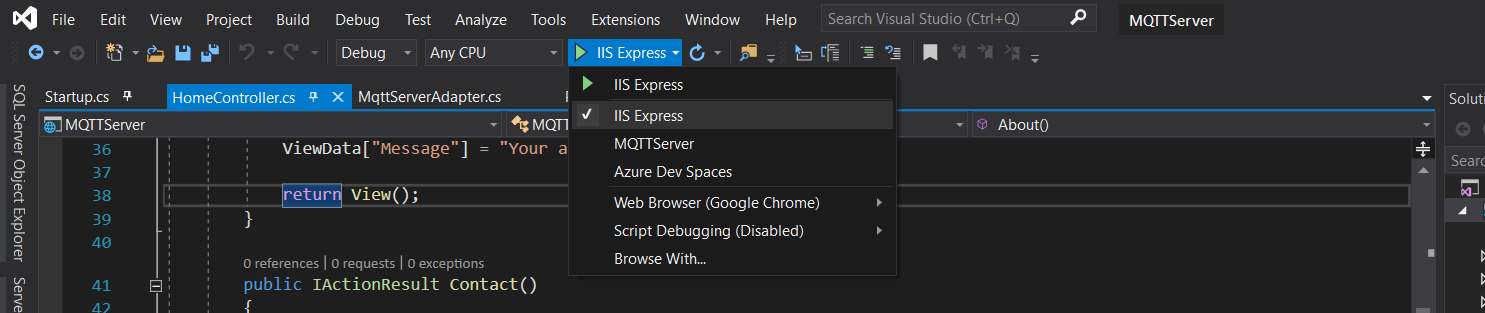
When I run IISExpress , I am not able to connect with MQTT.fx,
But when I chose Application name(in my case MQTTServer), I am able to connect with MQTT.fx but couldn't open the website on browser.
Just see the image for both options.
MISSEY
on 6 Aug 2019
How do your launchsettings look like? You can find them under Properties --> launchSettings.json.
You can also take a look at my project https://github.com/SeppPenner/NetCoreMQTTExampleIdentityConfig/blob/master/NetCoreMQTTExampleIdentityConfig/Properties/launchSettings.json and check if there is something different. I haven't added the MQTT connection yet but this shouldn't be a problem at all...
SeppPenner
on 6 Aug 2019
This is how my launchsettings.json look like
{
"iisSettings": {
"windowsAuthentication": false,
"anonymousAuthentication": true,
"iisExpress": {
"applicationUrl": "http://localhost:60897",
"sslPort": 44318
}
},
"profiles": {
"IIS Express": {
"commandName": "IISExpress",
"launchBrowser": true,
"environmentVariables": {
"ASPNETCORE_ENVIRONMENT": "Development"
}
},
"MQTTServer": {
"commandName": "Project",
"launchBrowser": true,
"environmentVariables": {
"ASPNETCORE_ENVIRONMENT": "Development"
},
"applicationUrl": "http://localhost:5000"
}
}
}
This url worked for me. Last option.
https://www.thesslstore.com/blog/fix-err-ssl-protocol-error/
MISSEY
on 6 Aug 2019
Wait. Just to understand you correctly: You want to publish a message if some action of the controller is called, is that correct?
And one more thing, I want to debug my ASP.net application on Windows machine, but couldn't connect to MQTT.fx with localhost.
Maybe a firewall issue? This should work I would say. (As long as you're not using some certificates because these will most likely not work with localhost).
@SeppPenner you understood well, I want to perform some actions in the controller, So how I can do ?
MISSEY
on 6 Aug 2019
So, you are now able to access the API over the browser?
@SeppPenner you understood well, I want to perform some actions in the controller, So how I can do ?
I need to check this. I will come back to you soon.
SeppPenner
on 6 Aug 2019
How did you even get the API and the MQTT server to run properly? My project here https://github.com/SeppPenner/NetCoreMQTTExampleIdentityConfig doesn't seem to work correctly...
@chkr1011 Do you have some idea here?
I have created a project issue here: https://github.com/SeppPenner/NetCoreMQTTExampleIdentityConfig/issues/3
SeppPenner
on 7 Aug 2019
@SeppPenner What function would be for onconnect and onmessage ?
MISSEY
on 9 Aug 2019
@SeppPenner What function would be for onconnect and onmessage ?
What do you mean with that? Which OnConnect and OnMessage methods?
SeppPenner
on 9 Aug 2019
MQTT provide onmessage and onconnect functions, and this library is based on http://mqtt.org/
So that I was asking for onmessage and onconnect functions.
MISSEY
on 9 Aug 2019
If I understood you correctly:
OnMessageis described here: https://github.com/chkr1011/MQTTnet/wiki/Server#intercepting-application-messages.OnConnectis described here: https://github.com/chkr1011/MQTTnet/wiki/Server#validating-mqtt-clients.
At least, if we still are talking about the server part...
SeppPenner
on 10 Aug 2019
Related issues
 dpsenner
·
4Comments
dpsenner
·
4Comments
 rcollada
·
9Comments
rcollada
·
9Comments
 SGStino
·
4Comments
SGStino
·
4Comments
 pournasserian
·
7Comments
pournasserian
·
7Comments
 LouisCPro
·
7Comments
LouisCPro
·
7Comments
Most helpful comment
Well maybe your example is better because he wants to use C# code. So maybe I am completely wrong 😄 We will see...