Mpv: MPV Windows builds default brightness too dark in HDR mode
Provide following Information:
- mpv version
Any and all versions after mpv-x86_64-20191027-git-8e50d7a
This issue occured between mpv-x86_64-20191027-git-8e50d7a & mpv-x86_64-20191102-git-00838fe
- Windows Version
Windows 10 Enterprise 64-bit v1803 OS Build 17134.1365
- Source of the mpv binary
MPV Windows builds from Sourceforge https://sourceforge.net/projects/mpv-player-windows/files/64bit/
- If known which version of mpv introduced the problem
mpv-x86_64-20191102-git-00838fe
- Possible screenshot or video of visual glitches
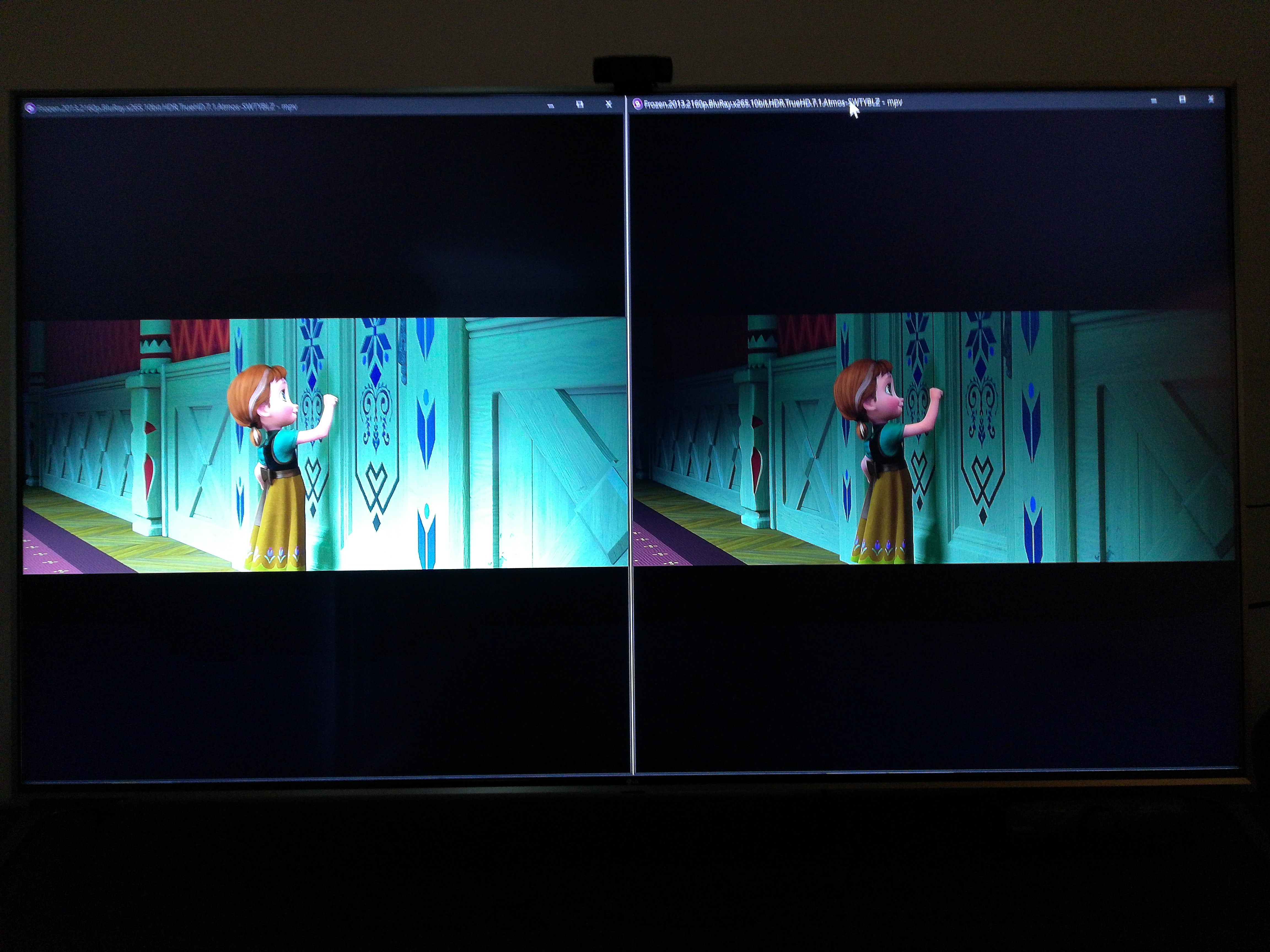
It's not possible to take an accurate screenshot to show the darkness comparison in HDR, so here are pictures taken with my phone of unmodified git-8e50d7a vs unmodified git-00838fe:

If you're not using git master or the latest release, update.
Releases are listed here: https://github.com/mpv-player/mpv/releases
This issue is present in the latest release.
Reproduction steps
The issue occurs with the default unmodified build, no steps to reproduce are necessary other than having an HDR display with HDR enabled in your operating system. The video file you are watching does not need to be HDR for this issue to occur.
Log file
This is a log file from unmodified git-00838fe after playing 4K HDR video on an HDR display with HDR turned on in Windows:
 shirepirate
All 18 comments
Your issue report isn't being specific, but maybe you are reporting this?
 Doofussy2
on 10 Apr 2020
Doofussy2
on 10 Apr 2020
Your issue report isn't being specific, but maybe you are reporting this?
7346
I don't know what else I can say to describe the problem more specifically, unfortunately. Your issue is likely pertaining to the same change in git-00838fe. If you try any version before that it will probably disappear.
Basically, everything I watch in HDR mode (HDR or SDR content) is much darker in MPV than before that specific release (or in any other video player).
shirepirate
on 10 Apr 2020
I hadn't noticed you were using such an old version. You're still using tone-mapping with that version. That's going to be your issue. Use a current build, so you don't need to tone-map
Doofussy2
on 10 Apr 2020
I hadn't noticed you were using such an old version. You're still using tone-mapping with that version. That's going to be your issue. Use a current build, so you don't need to tone-map
This issue affects every version of MPV from git-00838fe onward (I had already specified this). If there are some additional steps i need to take in my config to fix it in current build that is fine, but I don't know what those steps might be nor does it seem like the default behavior should be darker than other players.
shirepirate
on 10 Apr 2020
Mine are indistinguishable between VLC, mpv and Windows Movie and TV. But from your log, it isn't using 10bit
[   0.160][v][vo/gpu/d3d11] Queried output: \\.\DISPLAY1, 3840x2160 @ 8 bits, colorspace: RGB_FULL_G2084_NONE_P2020 (12)
[   0.160][v][vo/gpu/d3d11] Selected swapchain format R8G8B8A8_UNORM (28), attempting to utilize it.
[   0.163][v][vo/gpu/d3d11] Selected swapchain color space RGB_FULL_G2084_NONE_P2020 (12), attempting to utilize it.
[   0.164][v][vo/gpu/d3d11] Swapchain capabilities for color space RGB_FULL_G2084_NONE_P2020 (12): normal: yes, overlay: no
[   0.164][v][vo/gpu/d3d11] Swapchain successfully configured to color space RGB_FULL_G2084_NONE_P2020 (12)!
Your GPU doesn't support 10bit
https://developer.nvidia.com/video-encode-decode-gpu-support-matrix
Doofussy2
on 10 Apr 2020
If you use --d3d11-output-csp=srgb, does it look like you think it should?
Doofussy2
on 10 Apr 2020
@Doofussy2
The 10 bit there is the detected bit depth of the display . So whether or not hardware decoding works is separate completely.
@shirepirate
So what mpv sees from your display's configuration:
- UHD res, 8 bit
- colorspace is PQ+BT.2020
...and configures the swap chain accordingly. Can I get a dxdiag dump from that (windows button + write dxdiag there + hit "Save All Information")? Seems like something funky is going on with that configuration.
Thus compared to the usual case the output format is not configured, but output csp is. To get what is usually done with this configuration you can set manually --d3d11-output-format=rgb10_a2 (that way you should get swap chain configured for 10bit output, and PQ).
To get what you got before (mpv does not attempt to configure its output according to your screen), then indeed setting --d3d11-output-csp=srgb will set the swap chain and output format for mpv to be "normal RGB" instead of "PQ+BT.2020 RGB".
It would be interesting to know:
- With 10bit swap chain depth added does the output change at all?
- If not, have you ever run any other app in HDR mode and compared to its SDR mode? How do those compare?
 jeeb
on 10 Apr 2020
jeeb
on 10 Apr 2020
I'm thinking it's something along the lines of what I reported with SDR content being too dark because of the gamma. I had to correct for it, using auto-profiles. I had to raise the gamma by 14 points.
There are issues around this
Doofussy2
on 10 Apr 2020
@shirepirate
So what mpv sees from your display's configuration:
- UHD res, 8 bit
- colorspace is PQ+BT.2020
...and configures the swap chain accordingly. Can I get a
dxdiagdump from that (windows button + write dxdiag there + hit "Save All Information")? Seems like something funky is going on with that configuration.
Thus compared to the usual case the output format is not configured, but output csp is. To get what is usually done with this configuration you can set manually
--d3d11-output-format=rgb10_a2(that way you should get swap chain configured for 10bit output, and PQ).To get what you got before (mpv does not attempt to configure its output according to your screen), then indeed setting
--d3d11-output-csp=srgbwill set the swap chain and output format for mpv to be "normal RGB" instead of "PQ+BT.2020 RGB".
SRGB fixes the darkness problem, and brings it to the same brightness it was before in git-8e50d7a, but the color is off. When compared to git-8e50d7a is is obviously lacking in color depth and looks more bland/washed out.
It would be interesting to know:
- With 10bit swap chain depth added does the output change at all?
No, this seems to be the same as the default unmodified current build, it is still darker than expected without adjusting gamma (and even raising the gamma it doesn't look quite right, not like it did in git-8e50d7a)
- If not, have you ever run any other app in HDR mode and compared to its SDR mode? How do those compare?
Windows 10 (especially before the last 2 major updates) is very wonky when it comes to HDR. You can get most any application that runs in exclusive fullscreen mode to play in HDR, but sometimes you have to tab out of the app and tab back in or switch to windowed and back to fullscreen, otherwise it will revert back to SDR. Ive played the following games in HDR mode (most with no official support for HDR), and was able to compare them when running to the washed-out SDR (a night and day difference): Final Fantasy 13, Crosscode, Spyro Reignited Trilogy, Bioshock Infinite, Octopath Traveler.
shirepirate
on 10 Apr 2020
Here is another log file from mpv-x86_64-20191027-git-8e50d7a (the last release version before this issue occurred), in case it helps in some way. This was also playing 4K HDR video on an HDR display with HDR turned on in Windows:
This resulted in the expected outcome of normal brightness level (same as other players) and accurate color depth.
shirepirate
on 10 Apr 2020
I wonder if compute peak is getting involved?
Try using --hdr-compute-peak=no
Doofussy2
on 10 Apr 2020
I wonder if compute peak is getting involved?
Try using
--hdr-compute-peak=no
This doesn't change anything.
shirepirate
on 10 Apr 2020
Well, it was a long shot. At least we ruled it out.
Have you tested specifying the target-peak? Maybe at 1000?
Doofussy2
on 10 Apr 2020
Well, it was a long shot. At least we ruled it out.
Have you tested specifying the target-peak? Maybe at 1000?
Setting a target peak doesn't change anything either.
shirepirate
on 10 Apr 2020
@shirepirate
Thanks for the log, apparently your connection is through YCbCr, and we indeed don't take that into mention when configuring the swap chain. (the hint is Display Pixel Format: DISPLAYCONFIG_PIXELFORMAT_NONGDI).
That said, it's not like applications on the desktop can actually output YCbCr, so the only thing that would change is probably that we should just always set swap chain bit depth to 10 bits no matter what the display bit depth is.
Can you try lowering your display refresh rate and checking out this screen? Would be interesting to see if you get any differences with purely RGB output (even if your refresh rate at 30Hz or 24Hz will be crap for the testing period).
And this is where it gets murky:
- It could be Windows/the display driver brightening up SDR content higher than the same nits in HDR (for example while SDR range is 100 nits, I wouldn't be surprised if it was brought up to 250-300 nits).
- It could be Windows/the display driver doing some sort of tone mapping as we do not push any brightness related metadata for the swap chain. This is mostly because the swap chain initialization is on the output side, while the input side contains all the metadata. I can still add an option for it, of course.
- Something else? HDR output is generally heavily in flux right now.
And finally, the Windows desktop actually seems to handle SDR applications on an HDR desktop alright, since it basically does linear float in its "mixer", and then just tone maps to the required output range. That is also why you can just set HDR output in mpv/another application in the swap chain, and Windows will map it to your actual screen's output range just fine. But this is also why 1. could be a possibility.
@Doofussy2
Any additional tone mapping would probably just lower the brightness. By default HDR output just passes the content through since the TRC is the same and things end up at 10k nits.
jeeb
on 10 Apr 2020
That's interesting. I run my desktop at 4:2:2 12bit. Is that the reason for the gamma shift? Maybe that's why VLC doesn't have the same issue? I'll have to test that, later.
I would speculate that most of us using HDR on Win 10 are using TVs not monitors, so we're going to be using YCbCr.
Doofussy2
on 10 Apr 2020
Can you try lowering your display refresh rate and checking out this screen? Would be interesting to see if you get any differences with purely RGB output (even if your refresh rate at 30Hz or 24Hz will be crap for the testing period).
Setting my display at 24hz 12bpc RGB I still see the same difference in brightness between git-8e50d7a & later versions (at least, I think that's what you were asking me to test?)
shirepirate
on 10 Apr 2020
From messing around a bit, I've found that d3d11-output-format=rgba16f is the closest thing I can get to git-8e50d7a. It's actually 99.5% the same, the gamma might be half a percent off or so. This option works great for me on the current release, so I'm willing to close this issue as far as my personal concern, but if there are other questions or potential changes to be made then by all means. If not, please close the issue.
shirepirate
on 10 Apr 2020
Related issues
 ghost
·
3Comments
ghost
·
3Comments
 laichiaheng
·
3Comments
laichiaheng
·
3Comments
 AndydeCleyre
·
3Comments
AndydeCleyre
·
3Comments
 422658476
·
3Comments
422658476
·
3Comments
 Edenharder
·
4Comments
Edenharder
·
4Comments
Most helpful comment
If you use
--d3d11-output-csp=srgb, does it look like you think it should?