Mpv: Subtitles (ASS) with perspective appear wrong and cause freezing
Important Information
Provide following Information:
- mpv version: 0.32.0 (I also tried with a build from February 2nd of this year with the exact same results)
- Windows Version: Windows 10 Home 1909 (Build 18363.592)
- Source of the mpv binary: shinchiro build
- Possible screenshot or video of visual glitches:
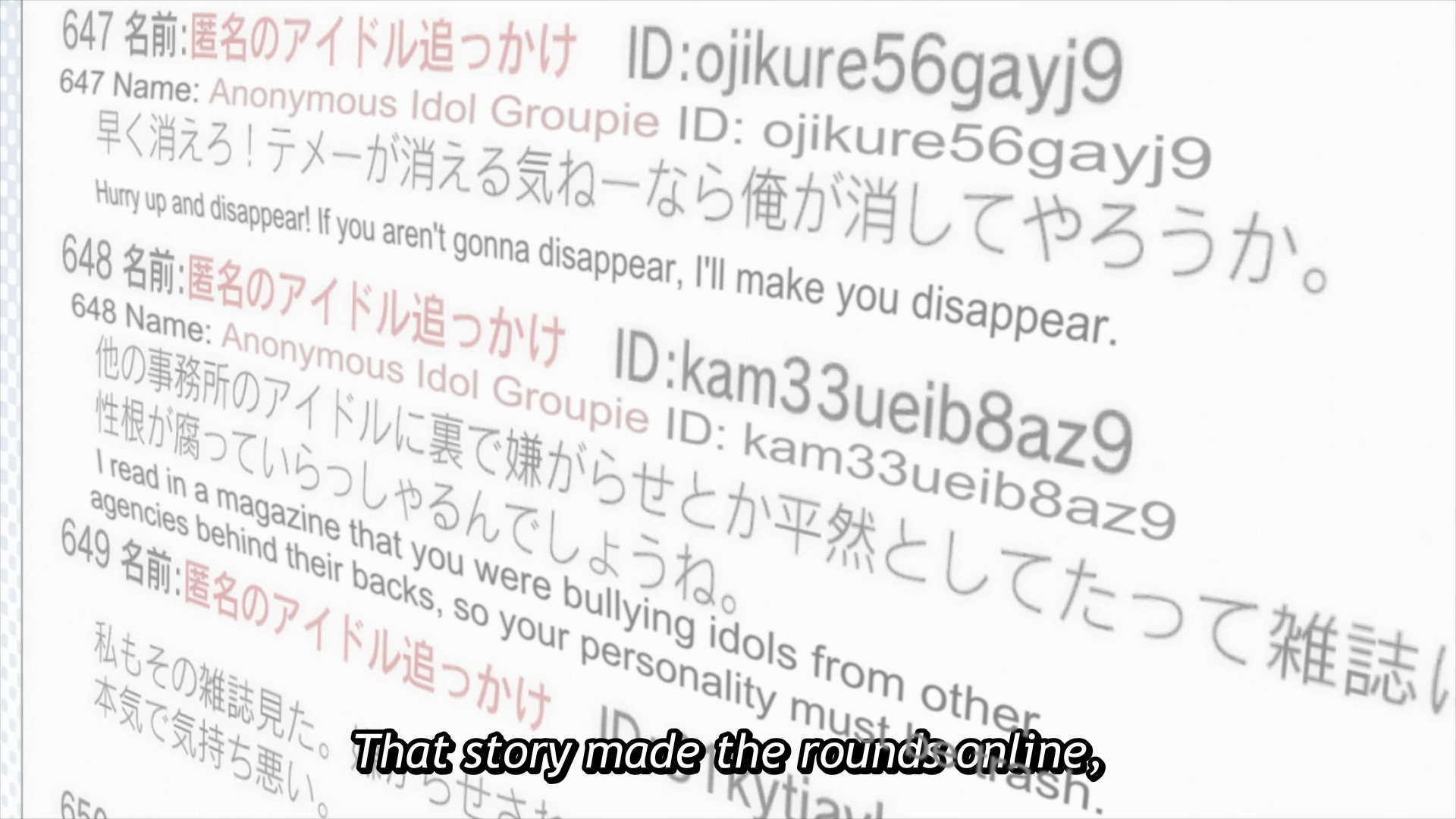
The way it should look: https://i.imgur.com/NjYlex4.png
The way it looks in mpv: https://i.imgur.com/m0EKXjx.png
Reproduction steps
- Download the clip attached below
- Run the video
- You'll likely experience slowdown/stuttering/freezing as it goes to the next scene showing a computer screen up close from a perspective
- The subs appear as such in the video: https://i.imgur.com/m0EKXjx.png
Expected behavior
https://i.imgur.com/NjYlex4.png
No slowdowns either
Screenshot taken from VLC, which does play that scene smoothly on the same computer
Actual behavior
https://i.imgur.com/m0EKXjx.png
Plus, freezing and stuttering
Log file
Sample files
 NurioHin
All 8 comments
seems okay with --sub-ass-vsfilter-blur-compat=no
 Akemi
on 4 Feb 2020
Akemi
on 4 Feb 2020
Wow, this first freezes and then segfaults in libass. A libass issue for sure.
This may be slightly better with --blend-subtitles=video because it renders at video resolution instead of (the usually larger) window resolution.
 ghost
on 4 Feb 2020
ghost
on 4 Feb 2020
@Akemi that's a pretty big difference. Should this option be set to this value by default?
Anyway, libass still shouldn't crash ever.
ghost
on 4 Feb 2020
seems okay with
--sub-ass-vsfilter-blur-compat=no
I can confirm this produces the expected result without any freezing
NurioHin
on 4 Feb 2020
To clarify, there are two issues here:
The text is distorted: this isn’t a libass or mpv bug. You’ll see the same in a traditional DirectVobSub/VSFilter setup or with XySubFilter. The file is using 3D transforms with a subtitle script resolution that differs from the video resolution, and unfortunately, different player setups display them differently. Currently, mpv defaults to replicating the behaviour of traditional setups, as does XySubFilter, because there are real files that require that. Other players such as MPC-HC and VLC follow (knowingly or not) a different approach, which this particular file requires. This is precisely what mpv’s
--sub-ass-vsfilter-blur-compatswitch toggles. Unfortunately, there’s no way to know in advance which mode a file needs.At large screen sizes (and without
--blend-subtitles=video), this consumes a lot of memory and CPU time, and at worst stutters, freezes and crashes. This is caused by the subtitles applying blur to large (visually) chunks of text. This is something that could potentially be solved with clever optimizations in libass. wm4’s pull request linked above fixes an outright crash, but slowdown and potential out-of-memory crashes remain possible until such optimizations are applied. In the meantime, this can be alleviated by--blend-subtitles=video(assuming you’re playing the video at a higher resolution than the video file’s native 1920×1080). In this particular case, it also happens to be alleviated by--sub-ass-vsfilter-blur-compat=nobecause the text becomes more compact and therefore requires less memory and processing, but this is not true in general.
 astiob
on 4 Feb 2020
astiob
on 4 Feb 2020
The file is using 3D transforms with a subtitle script resolution that differs from the video resolution, and unfortunately, different player setups display them differently.
I'm slightly surprised by this. I would've thought that there is one set 'standard' for interpreting any and all transformations on subtitles. This may not be the right place for it, but I am somewhat interested in how two different standards/interpretations came to be about this, forcing the need for a compatibility mode.
This may be slightly better with --blend-subtitles=video because it renders at video resolution instead of (the usually larger) window resolution.
At large screen sizes (and without --blend-subtitles=video), this consumes a lot of memory and CPU time, and at worst stutters, freezes and crashes.
Sadly, I am not one of the people who has fancy 4K screens or anything. It's just a 1080p screen, and I play the video at fullscreen, so for almost everything I watch, the video resolution is equal to window/screen resolution. But this is good to keep in mind for if I ever get a higher-resolution screen.
NurioHin
on 4 Feb 2020
I'm slightly surprised by this. I would've thought that there is one set 'standard' for interpreting any and all transformations on subtitles. This may not be the right place for it, but I am somewhat interested in how two different standards/interpretations came to be about this, forcing the need for a compatibility mode.
because there never was a standard. the first subtitle renderer written (VSFilter) became the 'standard', even with the bugs in that code. nothing was ever formally written down which could be considered a standard, besides that code. libass which came later had to replicate those bugs to stay compatible. hence why we have compatibility flags.
Akemi
on 5 Feb 2020
Yep. It was relatively simple at first, as everyone was using one and the same VSFilter. A few patches to VSFilter briefly diverged but were merged into a new mainstream implementation.
But as time went on, more and more diverging versions of VSFilter and brand new renderers started appearing, including libass. Many have died off since, but several remain in common use. And they have changed their behaviour over time, too, trying to improve compatibility with each other, trying to improve performance (with unintentional side effects), improve quality or fix bugs.
Unfortunately, those same bugs that had remained from VSFilter times were already being exploited in real subtitle files, and fixing them often meant _breaking_ the rendered appearance of those files. After all, people would just tweak their subtitle scripts until things looked just right—and they didn’t care whether it involved intentional and sensible features of the format or renderer bugs.
More unfortunately still, at times when some renderers differ in behaviour, some people use one renderer to look at their file and some use another, and when they all tweak their subtitles until they look just right, each file can end up looking wrong in the other renderer.
The approach traditionally taken by xy-VSFilter/XySubFilter and slightly more recently by libass has been to aim at compatibility with a certain old version of VSFilter that was “common enough”, and render files exactly the same way or as close as possible. (libass still has some major exceptions, and even xy-VSFilter has a much-better-looking but therefore different blur, but at least that was/is the goal.) But this means breaking (often more recent) files that were designed with other renderers in mind.
Furthermore, libass requires some cooperation from the media player to achieve maximum compatibility, but it seems mpv is the only player that cooperates in full. And since other files exist, mpv offers options to partly disable that cooperation and make libass’s behaviour align more closely with that of other renderers.
astiob
on 5 Feb 2020
Related issues
 laichiaheng
·
3Comments
laichiaheng
·
3Comments
 olivergondza
·
3Comments
olivergondza
·
3Comments
 WoLpH
·
3Comments
WoLpH
·
3Comments
 fitipe
·
3Comments
fitipe
·
3Comments
 szg0000
·
3Comments
szg0000
·
3Comments
Most helpful comment
Yep. It was relatively simple at first, as everyone was using one and the same VSFilter. A few patches to VSFilter briefly diverged but were merged into a new mainstream implementation.
But as time went on, more and more diverging versions of VSFilter and brand new renderers started appearing, including libass. Many have died off since, but several remain in common use. And they have changed their behaviour over time, too, trying to improve compatibility with each other, trying to improve performance (with unintentional side effects), improve quality or fix bugs.
Unfortunately, those same bugs that had remained from VSFilter times were already being exploited in real subtitle files, and fixing them often meant _breaking_ the rendered appearance of those files. After all, people would just tweak their subtitle scripts until things looked just right—and they didn’t care whether it involved intentional and sensible features of the format or renderer bugs.
More unfortunately still, at times when some renderers differ in behaviour, some people use one renderer to look at their file and some use another, and when they all tweak their subtitles until they look just right, each file can end up looking wrong in the other renderer.
The approach traditionally taken by xy-VSFilter/XySubFilter and slightly more recently by libass has been to aim at compatibility with a certain old version of VSFilter that was “common enough”, and render files exactly the same way or as close as possible. (libass still has some major exceptions, and even xy-VSFilter has a much-better-looking but therefore different blur, but at least that was/is the goal.) But this means breaking (often more recent) files that were designed with other renderers in mind.
Furthermore, libass requires some cooperation from the media player to achieve maximum compatibility, but it seems mpv is the only player that cooperates in full. And since other files exist, mpv offers options to partly disable that cooperation and make libass’s behaviour align more closely with that of other renderers.