Mpv: utilise macOS HDR/EDR functionality
Edit: To those who wonder what EDR is, here's a brief explanation: Apple’s “EDR” Brings High Dynamic Range to Non-HDR Displays
I was testing Quicktime Player and mpv 0.31.0 the other day on my 2017 13" Macbook Pro running macOS Catalina 10.15.2. The material I've been using is an HDR video which is linked below.
https://mdt6.com/MDTTVTESTBETA082HEVC10BIT2020.mp4
At 00:00:08, the video displays three rectangles with different luminance. According to the source (in Chinese unfortunately), the bottom one is 100 nits, the middle one is 350 nits while the top one being maximum of the screen.
With the default config tone-mappinng=hable, mpv is able to reveal the difference among three rectangles as below.

However, Quicktime Player has significantly different behaviour. The rectangle on the top is brighter than mpv, even much brighter than a normal pure white picture (the screenshot below couldn't reproduce what's on the screen). If I manually turn up the brightness, the gap closes up. It seems that Quicktime Player is able to utilize more luminance of the screen than mpv, even though Macbook Pro only has an SDR one built-in.

My expectation is to see the relatively "correct" luminance and colour within the capability of my screen. If I remember correctly, the config should be tone-mapping=clip tone-mapping-param=1.0 and target-peak to be the brightness of my monitor. But with this setting, mpv still couldn't reach the brightness of Quicktime Player. Maybe the latter could automatically use the maximum brightness of the screen?
I'm wondering if they are treating luminance in fundamentally different ways. But I don't have a clue. Hope I could find an answer here.
 Robot-DaneelOlivaw
All 36 comments
i assume it's a duplicate of #4248.
 Akemi
on 10 Jan 2020
Akemi
on 10 Jan 2020
It seems that they are separate issues. The difference in #4248 is subtle while it's significant in my case.
I believe Quicktime Player is able to utilize a new feature of Catalina which increases the brightness of the screen when playing HDR content.
Robot-DaneelOlivaw
on 11 Jan 2020
quicktime and mpv look 'identically' if i use mpv --no-config. so i would assume quicktime doesn't do any tone mapping. if i use the settings you suggested my middle rectangle is completely clipped and nearly identically to the brightest one.
Akemi
on 12 Jan 2020
Sorry, forget about my setting. iina/iina#2705 has a better explanation of this situation.
Robot-DaneelOlivaw
on 12 Jan 2020
so if you play both at the same time, in quicktime and mpv, they looks the 'same' brightness wise? since quicktime increases the screen brightness?
if the screen brightness really increased target-peak won't work because it would be dynamic in that case.
Akemi
on 12 Jan 2020
Nope. Only the Quicktime window would have higher brightness, although I'm not quite sure how that's achieved. Wonder if that's possible for mpv to adopt this function.
Robot-DaneelOlivaw
on 13 Jan 2020
if it's not the screen but only that window, i can only think about a few possibilities. though i am not sure how this would fit into mpv's render pipeline.
- https://developer.apple.com/documentation/quartzcore/caopengllayer/1521900-wantsextendeddynamicrangecontent
- https://developer.apple.com/documentation/appkit/nsscreen/1388362-maximumextendeddynamicrangecolor
- https://developer.apple.com/documentation/appkit/nsscreen/3180382-maximumreferenceextendeddynamicr
- https://developer.apple.com/documentation/appkit/nsscreen/3180381-maximumpotentialextendeddynamicr
i would need to test this and maybe it would be helpful to know what those values output on your end.
Akemi
on 13 Jan 2020
I would like to help but I have no idea how to. Could you tell me how can I get these values?
Robot-DaneelOlivaw
on 14 Jan 2020
i will have to write some small script for that. maybe next week when i am on vacation.
Akemi
on 14 Jan 2020
if you want you can test following script and paste me the output here:
https://gist.github.com/Akemi/67f7a566d758bb843cb2ae405feecfa1
call like:
swift hdr.swift
Thanks for your script. Here's my result:
When the video I mentioned is played with mpv / When nothing is played:
Color LCD
maximumPotentialExtendedDynamicRangeColorComponentValue: 2.0
maximumReferenceExtendedDynamicRangeColorComponentValue: 0.0
maximumExtendedDynamicRangeColorComponentValue: 1.0
Played with Quicktime:
Color LCD
maximumPotentialExtendedDynamicRangeColorComponentValue: 2.0
maximumReferenceExtendedDynamicRangeColorComponentValue: 0.0
maximumExtendedDynamicRangeColorComponentValue: 2.0
Robot-DaneelOlivaw
on 23 Jan 2020
on a side note, i am still on 10.14 so i only get the last value. in both cases only mpv is playing or only quicktime is playing:
maximumExtendedDynamicRangeColorComponentValue: 1.0
so i guess it's most likely the reason why quicktime can be brighter (probably twice as much).
Akemi
on 23 Jan 2020
Great. Now we know what causes the difference.
Is there a way to implement this function? I guess Quicktime has done more than simply multiplying the brightness by 2.0. There is guessing that Quicktime utilize a system built-in tone mapping method. If so, would it be possible to adopt that? Or modify our own tone mapping to achieve similar effect?
Robot-DaneelOlivaw
on 23 Jan 2020
like i said, i am not sure how this would fit into mpv's render pipeline (yet).
no we can't use the macOS tone mapping since we do our own, and yes quicktime most likely uses the system tone mapping since Apple provides a public API for that.
those values only remotely have something to do with tone mapping per se. note those values are called Extended Dynamic Range (EDR) and not HDR. this can even be helpful for none HDR content, in the case i understand everything correctly so far.
i am writing up a new test case.
Akemi
on 23 Jan 2020
Got it. Quicktime activates EDR when playing HDR videos, that's why I thought it's related to tone mapping. I'll WIP and see if I could help more.
Robot-DaneelOlivaw
on 24 Jan 2020
i made a second test:
https://gist.github.com/Akemi/185d83afbef47c0c8e0add2a3c99b6d2
call like:
swift edr.swift
you can quit the script on the terminal with CTRL+C.
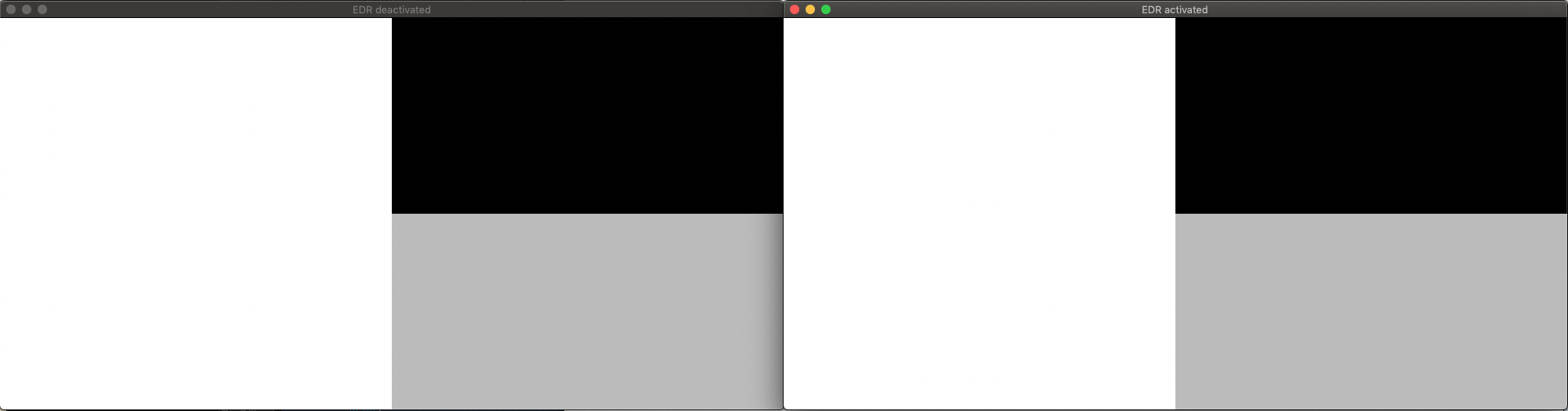
it should spawn two windows with 4 rectangles. 2 white rectangles, 1 gray and 1 black. on the left window both white rectangles should look the same. on the right window both white rectangles should be distinguishable. the bottom one should be the brighter one.
also please post the terminal output (without the deprecation warning) and possibly a screenshot. should look like this (on your screenshot the right white rectangles should be distinguishable):
----------------------------- BEFORE EDR REQUEST ------------------------------
DELL U2715H
maximumPotentialExtendedDynamicRangeColorComponentValue: -1.0
maximumReferenceExtendedDynamicRangeColorComponentValue: -1.0
maximumExtendedDynamicRangeColorComponentValue: 1.0
-------------------------------------------------------------------------------
--------- Layer with EDR: true ---------
Created CGL pixel format with attributes: kCGLPFAOpenGLProfile, kCGLOGLPVersion_3_2_Core, kCGLPFAAccelerated, kCGLPFADoubleBuffer, kCGLPFAColorSize, 64, kCGLPFAColorFloat, kCGLPFABackingStore, kCGLPFAAllowOfflineRenderers, kCGLPFASupportsAutomaticGraphicsSwitching, 0
--------- Layer with EDR: false ---------
Created CGL pixel format with attributes: kCGLPFAOpenGLProfile, kCGLOGLPVersion_3_2_Core, kCGLPFAAccelerated, kCGLPFADoubleBuffer, kCGLPFAColorSize, 64, kCGLPFAColorFloat, kCGLPFABackingStore, kCGLPFAAllowOfflineRenderers, kCGLPFASupportsAutomaticGraphicsSwitching, 0
------------------------------ AFTER EDR REQUEST ------------------------------
DELL U2715H
maximumPotentialExtendedDynamicRangeColorComponentValue: -1.0
maximumReferenceExtendedDynamicRangeColorComponentValue: -1.0
maximumExtendedDynamicRangeColorComponentValue: 1.0
-------------------------------------------------------------------------------
Akemi
on 24 Jan 2020
Wow, you're fast! Here's what I got:
----------------------------- BEFORE EDR REQUEST ------------------------------
Color LCD
maximumPotentialExtendedDynamicRangeColorComponentValue: 2.0
maximumReferenceExtendedDynamicRangeColorComponentValue: 0.0
maximumExtendedDynamicRangeColorComponentValue: 1.0
-------------------------------------------------------------------------------
--------- Layer with EDR: false ---------
Created CGL pixel format with attributes: kCGLPFAOpenGLProfile, kCGLOGLPVersion_3_2_Core, kCGLPFAAccelerated, kCGLPFADoubleBuffer, kCGLPFAColorSize, 64, kCGLPFAColorFloat, kCGLPFABackingStore, kCGLPFAAllowOfflineRenderers, kCGLPFASupportsAutomaticGraphicsSwitching, 0
--------- Layer with EDR: true ---------
Created CGL pixel format with attributes: kCGLPFAOpenGLProfile, kCGLOGLPVersion_3_2_Core, kCGLPFAAccelerated, kCGLPFADoubleBuffer, kCGLPFAColorSize, 64, kCGLPFAColorFloat, kCGLPFABackingStore, kCGLPFAAllowOfflineRenderers, kCGLPFASupportsAutomaticGraphicsSwitching, 0
------------------------------ AFTER EDR REQUEST ------------------------------
Color LCD
maximumPotentialExtendedDynamicRangeColorComponentValue: 2.0
maximumReferenceExtendedDynamicRangeColorComponentValue: 0.0
maximumExtendedDynamicRangeColorComponentValue: 1.492808222770691
-------------------------------------------------------------------------------
maximumExtendedDynamicRangeColorComponentValue after EDR request changed each time. From about 1.1 to 1.5. I guess it would gradually increase to 2.0 after opening the windows.

The screenshots look the same, but the bottom left rectangle in EDR activated window is actually brighter.
Robot-DaneelOlivaw
on 24 Jan 2020
okay, so i at least got the right switch how to trigger the increase of the EDR value. it makes sense that it gradual increases the value, an abrupt value change would most likely look weird. you can test the final value with the first script i posted, if you want.
i guess the screenshot represents exactly what you see on your screen, eg you couldn't see a difference between the two white rectangles? which is too bad and i need to look into it a bit more.
on a side note, how does the white rectangle compare to the white rectangle in the test clip you posted when played back in quicktime? is it also less bright?
Akemi
on 24 Jan 2020
okay i updated my script here https://gist.github.com/Akemi/185d83afbef47c0c8e0add2a3c99b6d2
i additionally set the wantsExtendedDynamicRangeOpenGLSurface of the view. maybe that makes it work properly, if it didn't already.
would be nice if you could try again and let me know you findings, terminal output etc.
Akemi
on 24 Jan 2020
I tried the first script. When I manually toggled system brightness to maximum, the final value was 1.6666666269302368. Other than that, it was 2.0.
you couldn't see a difference between the two white rectangles?
The second script works! I could see the difference between the two white rectangles on my screen when EDR activated. They only look the same in the screenshot. (My poor English just betrayed me.) Still, I tried the third script and here's the result:
----------------------------- BEFORE EDR REQUEST ------------------------------
Color LCD
maximumPotentialExtendedDynamicRangeColorComponentValue: 2.0
maximumReferenceExtendedDynamicRangeColorComponentValue: 0.0
maximumExtendedDynamicRangeColorComponentValue: 1.0
-------------------------------------------------------------------------------
--------- Layer with EDR: true ---------
--------- View with EDR: true ---------
Created CGL pixel format with attributes: kCGLPFAOpenGLProfile, kCGLOGLPVersion_3_2_Core, kCGLPFAAccelerated, kCGLPFADoubleBuffer, kCGLPFAColorSize, 64, kCGLPFAColorFloat, kCGLPFABackingStore, kCGLPFAAllowOfflineRenderers, kCGLPFASupportsAutomaticGraphicsSwitching, 0
--------- Layer with EDR: false ---------
--------- View with EDR: false ---------
Created CGL pixel format with attributes: kCGLPFAOpenGLProfile, kCGLOGLPVersion_3_2_Core, kCGLPFAAccelerated, kCGLPFADoubleBuffer, kCGLPFAColorSize, 64, kCGLPFAColorFloat, kCGLPFABackingStore, kCGLPFAAllowOfflineRenderers, kCGLPFASupportsAutomaticGraphicsSwitching, 0
------------------------------ AFTER EDR REQUEST ------------------------------
Color LCD
maximumPotentialExtendedDynamicRangeColorComponentValue: 2.0
maximumReferenceExtendedDynamicRangeColorComponentValue: 0.0
maximumExtendedDynamicRangeColorComponentValue: 1.212622046470642
-------------------------------------------------------------------------------
Screenshot:

Robot-DaneelOlivaw
on 24 Jan 2020
The second script works! I could see the difference between the two white rectangles on my screen when EDR activated. They only look the same in the screenshot. (My poor English just betrayed me.)
that's great. it wasn't your fault, i didn't see you write something beneath the screenshot that answered my question.
so everything works as expected. now i only need to find out how to integrate that into mpv itself. thanks for testing.
[edit]
probably need to add support for this in a different way because we don't have an internal way of supporting it the way we tested it.
Akemi
on 24 Jan 2020
Sounds a bit complicated. Hope you guys find a way to work it out.
Robot-DaneelOlivaw
on 28 Jan 2020
Hello @Akemi @LamJH , I tried edr.swift on my Mac XDR display. However, after enabling EDR, i still only got
MaximumExtended value to be 1.0, though MaximumPotential value is 5.0. Any thoughts on this?
 tommywei-cpu
on 22 Apr 2020
tommywei-cpu
on 22 Apr 2020
what's the complete output of the script? otherwise no idea for now.
Akemi
on 22 Apr 2020
what's the complete output of the script? otherwise no idea for now.
----------------------------- BEFORE EDR REQUEST ------------------------------
Pro Display XDR
maximumPotentialExtendedDynamicRangeColorComponentValue: 5.0
maximumReferenceExtendedDynamicRangeColorComponentValue: 0.0
maximumExtendedDynamicRangeColorComponentValue: 1.0
Color LCD
maximumPotentialExtendedDynamicRangeColorComponentValue: 2.0
maximumReferenceExtendedDynamicRangeColorComponentValue: 0.0
maximumExtendedDynamicRangeColorComponentValue: 1.0
-------------------------------------------------------------------------------
--------- Layer with EDR: false ---------
--------- View with EDR: false ---------
Created CGL pixel format with attributes: kCGLPFAOpenGLProfile, kCGLOGLPVersion_3_2_Core, kCGLPFAAccelerated, kCGLPFADoubleBuffer, kCGLPFAColorSize, 64, kCGLPFAColorFloat, kCGLPFABackingStore, kCGLPFAAllowOfflineRenderers, kCGLPFASupportsAutomaticGraphicsSwitching, 0
--------- Layer with EDR: true ---------
--------- View with EDR: true ---------
Created CGL pixel format with attributes: kCGLPFAOpenGLProfile, kCGLOGLPVersion_3_2_Core, kCGLPFAAccelerated, kCGLPFADoubleBuffer, kCGLPFAColorSize, 64, kCGLPFAColorFloat, kCGLPFABackingStore, kCGLPFAAllowOfflineRenderers, kCGLPFASupportsAutomaticGraphicsSwitching, 0
------------------------------ AFTER EDR REQUEST ------------------------------
Pro Display XDR
maximumPotentialExtendedDynamicRangeColorComponentValue: 5.0
maximumReferenceExtendedDynamicRangeColorComponentValue: 0.0
maximumExtendedDynamicRangeColorComponentValue: 1.0
Color LCD
maximumPotentialExtendedDynamicRangeColorComponentValue: 2.0
maximumReferenceExtendedDynamicRangeColorComponentValue: 0.0
maximumExtendedDynamicRangeColorComponentValue: 1.0
-------------------------------------------------------------------------------
@Akemi I connected Macair 2020 to XDR display, and selected profile to HDR with peak at 1600 nits.
tommywei-cpu
on 22 Apr 2020
i edited your first comment so it's a bit more readable, hope you don't mind.
could you try without the XDR display attached and only with the internal display? on what display are the windows spawned?
otherwise maybe @LamJH did something else to make it work?
Akemi
on 22 Apr 2020
I didn’t do anything special. It just worked (with the internal display). Don’t know if this function could be used on an external HDR display.
Robot-DaneelOlivaw
on 22 Apr 2020
@Akemi
If XDR is not connected, the output:
----------------------------- BEFORE EDR REQUEST ------------------------------
Color LCD
maximumPotentialExtendedDynamicRangeColorComponentValue: 2.0
maximumReferenceExtendedDynamicRangeColorComponentValue: 0.0
maximumExtendedDynamicRangeColorComponentValue: 1.0
-------------------------------------------------------------------------------
--------- Layer with EDR: true ---------
--------- View with EDR: false ---------
Created CGL pixel format with attributes: kCGLPFAOpenGLProfile, kCGLOGLPVersion_3_2_Core, kCGLPFAAccelerated, kCGLPFADoubleBuffer, kCGLPFAColorSize, 64, kCGLPFAColorFloat, kCGLPFABackingStore, kCGLPFAAllowOfflineRenderers, kCGLPFASupportsAutomaticGraphicsSwitching, 0
--------- Layer with EDR: true ---------
--------- View with EDR: false ---------
Created CGL pixel format with attributes: kCGLPFAOpenGLProfile, kCGLOGLPVersion_3_2_Core, kCGLPFAAccelerated, kCGLPFADoubleBuffer, kCGLPFAColorSize, 64, kCGLPFAColorFloat, kCGLPFABackingStore, kCGLPFAAllowOfflineRenderers, kCGLPFASupportsAutomaticGraphicsSwitching, 0
------------------------------ AFTER EDR REQUEST ------------------------------
Color LCD
maximumPotentialExtendedDynamicRangeColorComponentValue: 2.0
maximumReferenceExtendedDynamicRangeColorComponentValue: 0.0
maximumExtendedDynamicRangeColorComponentValue: 1.0
-------------------------------------------------------------------------------
However, I did notice a warning:
'wantsExtendedDynamicRangeOpenGLSurface' was deprecated in macOS 10.14: Use NSOpenGLView instead.
        wantsExtendedDynamicRangeOpenGLSurface = edr
Does this matter?
tommywei-cpu
on 23 Apr 2020
no, the warrning is normal since Apple will kill opengl soonish, most likely.
though what's weird now is that the log says --------- View with EDR: false --------- twice. one of the messages should be true.
Akemi
on 23 Apr 2020
Is there any progress on this? I receive the following output on my screen:
----------------------------- BEFORE EDR REQUEST ------------------------------
27GN950
maximumPotentialExtendedDynamicRangeColorComponentValue: 3.018328905105591
maximumReferenceExtendedDynamicRangeColorComponentValue: 0.0
maximumExtendedDynamicRangeColorComponentValue: 3.018328905105591
-------------------------------------------------------------------------------
--------- Layer with EDR: true ---------
--------- View with EDR: true ---------
Created CGL pixel format with attributes: kCGLPFAOpenGLProfile, kCGLOGLPVersion_3_2_Core, kCGLPFAAccelerated, kCGLPFADoubleBuffer, kCGLPFAColorSize, 64, kCGLPFAColorFloat, kCGLPFABackingStore, kCGLPFAAllowOfflineRenderers, kCGLPFASupportsAutomaticGraphicsSwitching, 0
--------- Layer with EDR: false ---------
--------- View with EDR: false ---------
Created CGL pixel format with attributes: kCGLPFAOpenGLProfile, kCGLOGLPVersion_3_2_Core, kCGLPFAAccelerated, kCGLPFADoubleBuffer, kCGLPFAColorSize, 64, kCGLPFAColorFloat, kCGLPFABackingStore, kCGLPFAAllowOfflineRenderers, kCGLPFASupportsAutomaticGraphicsSwitching, 0
------------------------------ AFTER EDR REQUEST ------------------------------
27GN950
maximumPotentialExtendedDynamicRangeColorComponentValue: 3.018328905105591
maximumReferenceExtendedDynamicRangeColorComponentValue: 0.0
maximumExtendedDynamicRangeColorComponentValue: 3.018328905105591
-------------------------------------------------------------------------------
And the ultra-white rectangle is definitely rendered in HDR and looks super-white! Do you plan to include this into production?
 anastasiuspernat
on 10 Dec 2020
anastasiuspernat
on 10 Dec 2020
no work has been done for this. also see my comment:
probably need to add support for this in a different way because we don't have an internal way of supporting it the way we tested it.
eg we can't render in a range from 0 to X (X > 1), the range is set to a maximum of 1.0. to get HDR the right colour space has to be set on the layer itself, so the tonemapping and related mechanisms of the OS can do its work.
Akemi
on 10 Dec 2020
I see! Do you think there's a way to implement a temporary workaround with a config flag or something like that? HDR looks so tempting.
I tried compiling mpv using your code snippet with wantsExtendedDynamicRangeContent = true in gl_layer.swift and wantsExtendedDynamicRangeOpenGLSurface = true in view.swift and video_view.m but it didn't make any difference. Also multiplied rgb shader values in pass_color_map by 2.0, didn't help either (resulted in clipped colors).
That definitely was a bad hack that didn't work ¯\_(ツ)_/¯, but is there a way you can point me in the right direction? Thank you very much!
anastasiuspernat
on 10 Dec 2020
i cant say for certain, since i couldn't test it. though yes, you probably need to set wantsExtendedDynamicRangeContent = true on the layer and wantsExtendedDynamicRangeOpenGLSurface = true on the view.
you should forget about multiplying by 2.0, it's possibly clipped somewhere else.
what you actually need to do is setting the right colorSpace here (possible predefined values https://developer.apple.com/documentation/coregraphics/cgcolorspace). it should be the colorSpace of the source you are playing, so the system know from what colourSpace it has to convert from to fit into the colorSpace of your display. if set up right the OS should do it's tonemapping etc.
https://github.com/mpv-player/mpv/blob/master/video/out/cocoa_cb_common.swift#L125
Akemi
on 10 Dec 2020
Thank you very much for the hints! I made it work! The HDR content now displays properly using mpv. Unfortunately I couldn't make it work using colorSpace approach :-( Whatever color space I tried it resulted in wrong color reproduction (though some of them used HDR extended range). Using my approach I got the same extended range picture as it was reproduced by QuickTime on the same content.
So I disabled clipping in video shader and rescaled rgb values to the maximum. Probably the correct assignment of colorSpace can do the same but so far it didn't work on my end.
Also I couldn't find a way to pass maximumPotentialExtendedDynamicRangeColorComponentValue into pass_draw_to_screen in video.c. So using 3.0 as a hard-coded value.
Here's my pull request, I added two new flags --tone-mapping=hdrpass to enable HDR and --tone-mapping=hdrscale to enable HDR and maximize brightness: https://github.com/mpv-player/mpv/pull/8387
anastasiuspernat
on 11 Dec 2020
@Akemi Thanks again! I think I found the way to apply the correct HDR colorSpace on the GLLayer. Now I need to get this information from the command line and/or video info parser into Cocoa-specific code. Can you please help me, if there's a way to pass target_trc or better gl_video_opts to CocoaCB? I see there's MPVHelper class but it doesn't contain gl_video_opts.
anastasiuspernat
on 16 Dec 2020
Related issues
 ghost
·
3Comments
ghost
·
3Comments
 ww7
·
3Comments
ww7
·
3Comments
 thebunnyrules
·
3Comments
thebunnyrules
·
3Comments
 yuvadm
·
3Comments
yuvadm
·
3Comments
 AndydeCleyre
·
3Comments
AndydeCleyre
·
3Comments
Most helpful comment
Thank you very much for the hints! I made it work! The HDR content now displays properly using mpv. Unfortunately I couldn't make it work using colorSpace approach :-( Whatever color space I tried it resulted in wrong color reproduction (though some of them used HDR extended range). Using my approach I got the same extended range picture as it was reproduced by QuickTime on the same content.
So I disabled clipping in video shader and rescaled rgb values to the maximum. Probably the correct assignment of colorSpace can do the same but so far it didn't work on my end.
Also I couldn't find a way to pass
maximumPotentialExtendedDynamicRangeColorComponentValueintopass_draw_to_screeninvideo.c. So using 3.0 as a hard-coded value.Here's my pull request, I added two new flags
--tone-mapping=hdrpassto enable HDR and--tone-mapping=hdrscaleto enable HDR and maximize brightness: https://github.com/mpv-player/mpv/pull/8387