mpv version and platform
All versions with @haasn's redeveloped tone mapping, Windows 10
Reproduction steps
My display runs in HDR10 and the desktop is calibrated to 216 nits. The display is capable of around 720 nits, when using metadata passthrough. (I have not yet made a wide gamut icc, but I have found and am using an abobe icc that works very well). My goal is to try and reproduce HDR transfer as accurately as I can, and I've got pretty close. But something I can't explain happens when setting various target peaks. First, my understanding is that if the calibrated peak is known, you should simply be able to set that peak, and the transformation should be fairly accurate. With many movies you don't notice, probably because of the way they are mastered. But with others, like Aquaman, you really start to see clipping instead of a nice transformation. And in others, it's simply beguiling. The most aggressive demonstration of this, is Chess (sorry @haasn, I know you hate using these demo videos as an example). So I'm going to use that simply to illustrate what I am referring to.
To set the stage, here is what it looks like using my calibrated peak. All screenshots with --tone-mapping=mobius, though I get the same result with the others, too. I should clarify that I have tried this with an sRGB icc that I made with my calibration, and the result is the same.
--target-peak=216 --target-prim=bt.2020
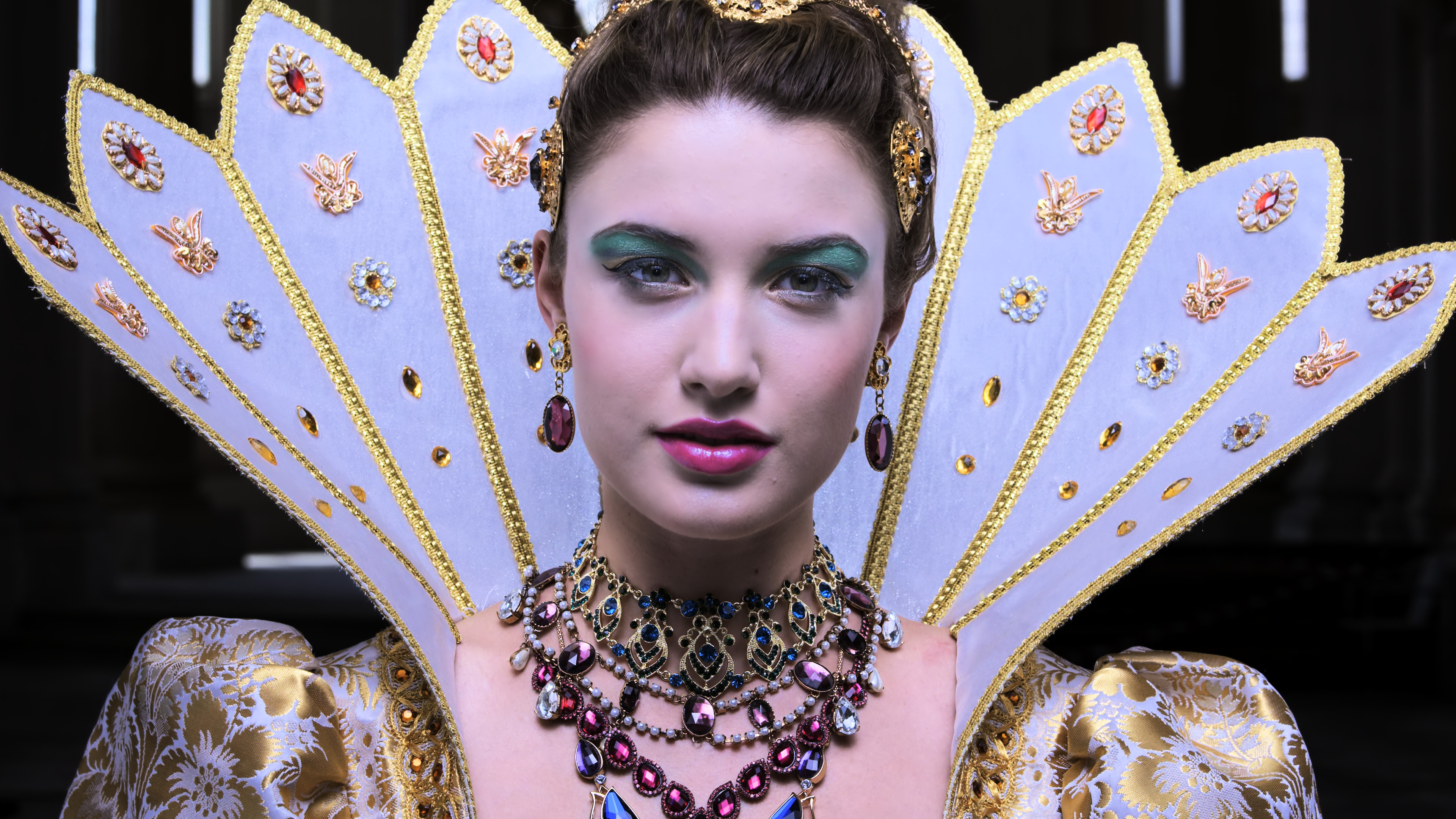
Without even seeing the original, you can clearly see it is wrong.
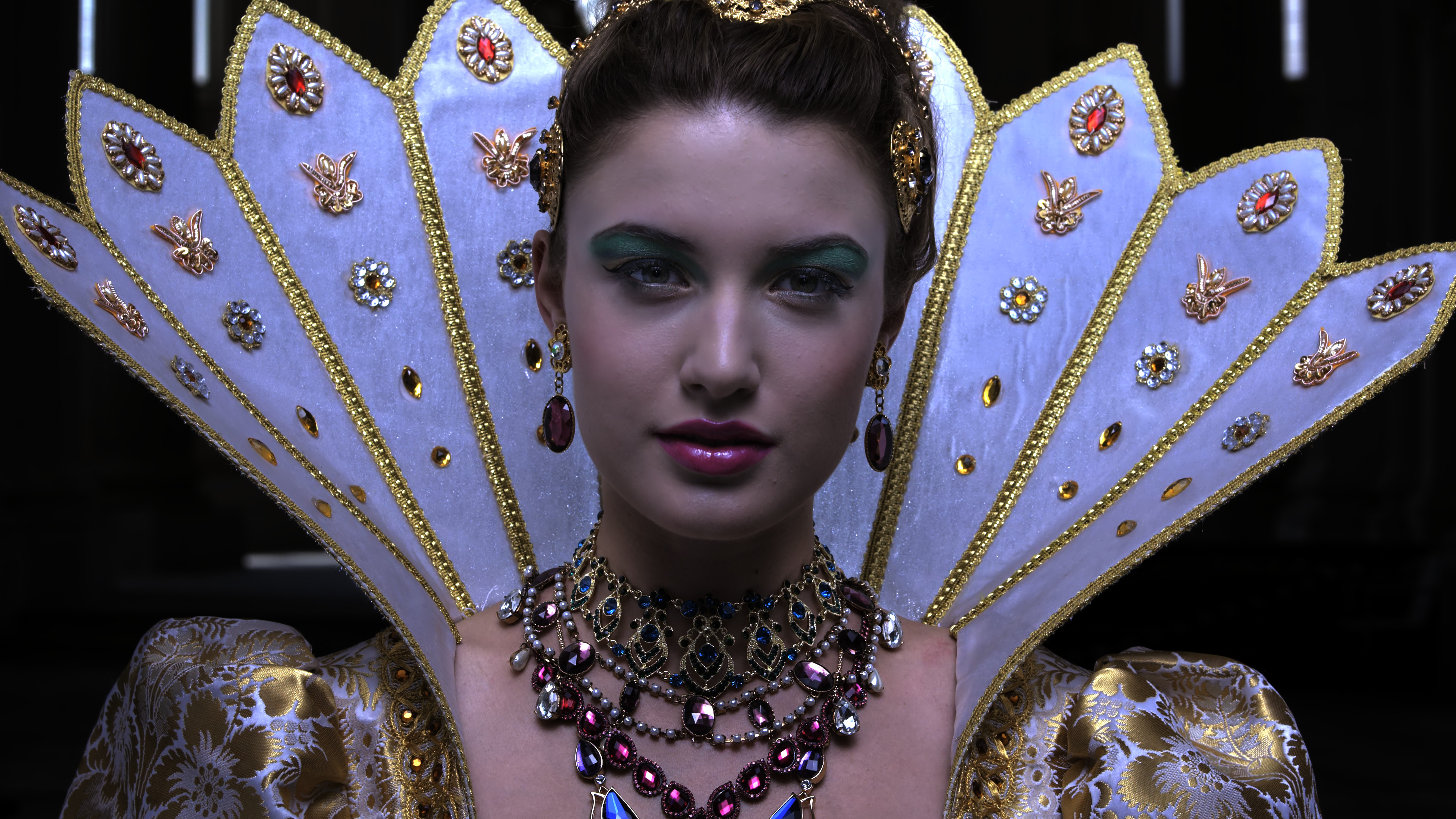
Now here's where it gets beguiling. If I raise the target peak to 1000, something magical happens. Without having the actual brightness of 1000 nits, the image is damn near perfect. The color is accurate and you get the unclipped peaks. Obviously too dim to watch, enjoyably, but the transfer it accurate. But now if I lower the target peak to 999, I get massive clipping. With just one point lower??? If I raise above 1000, there's no noticeable difference. Here're pics.
--target-peak=1000 --target-prim=bt.2020
--target-peak=999 --target-prim=bt.2020
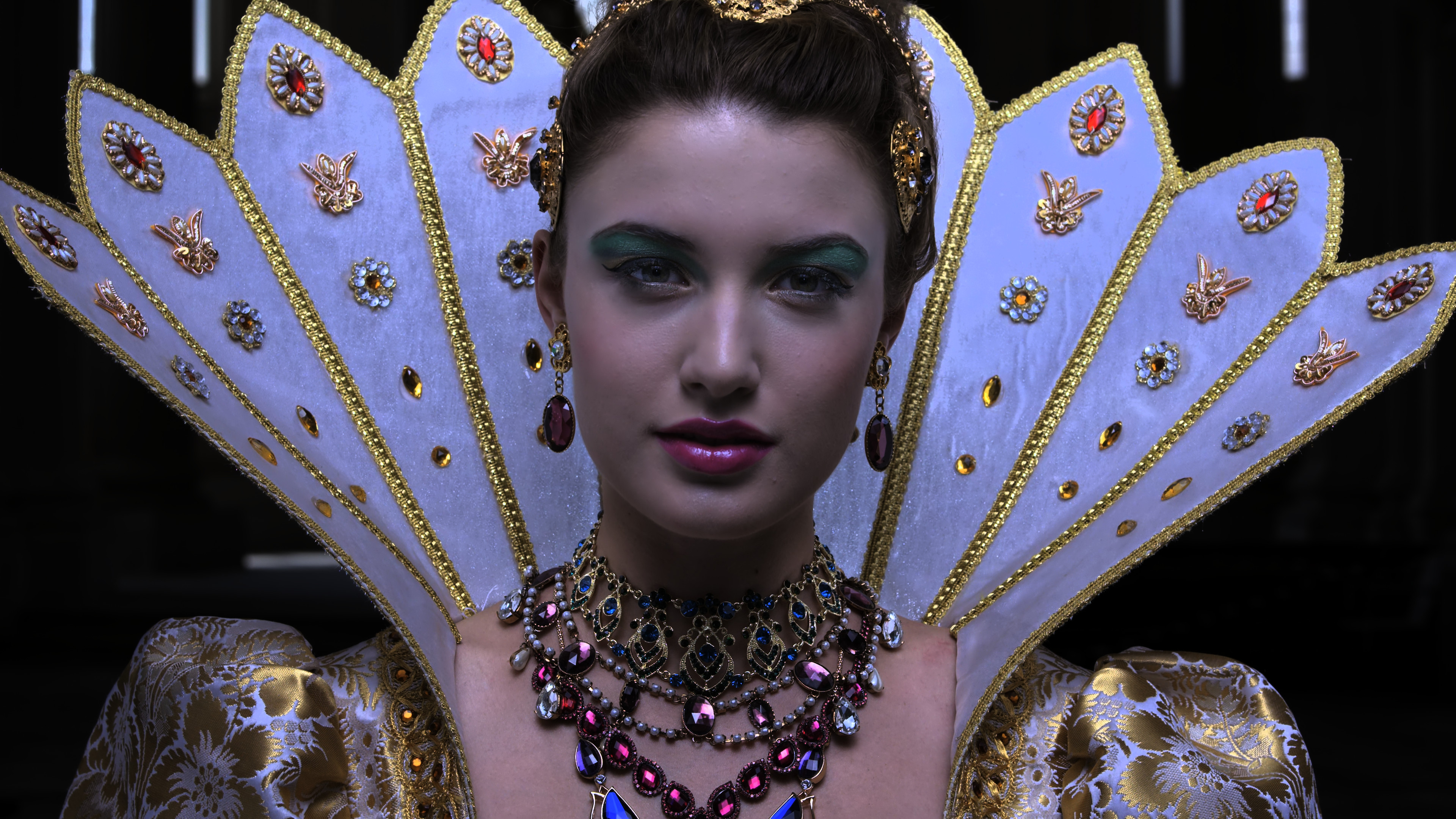
To me, something isn't correct with how --target-peak is working.
For good measure, here're screenshots using the adobe icc.
--target-peak=216
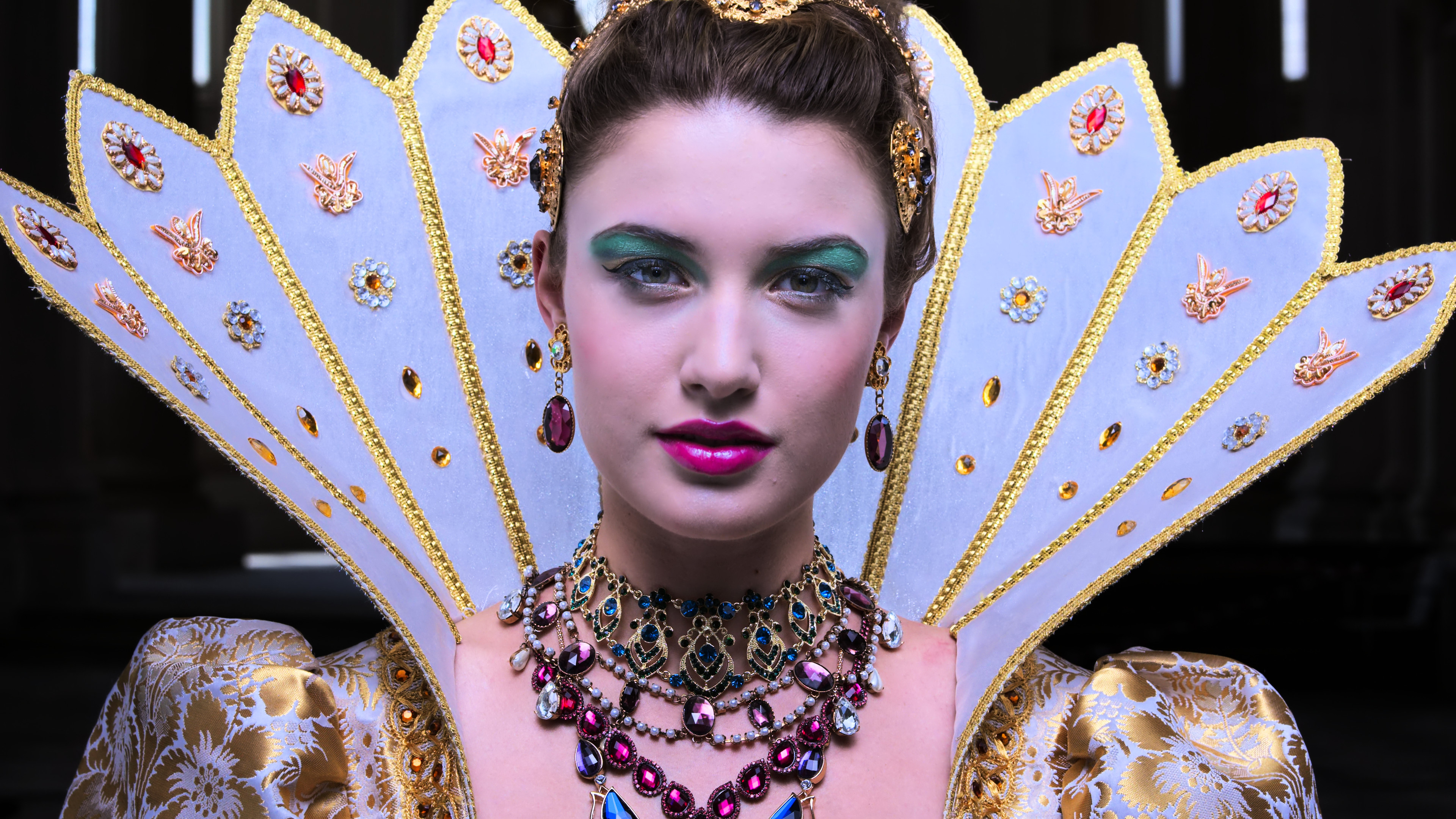
--target-peak=999
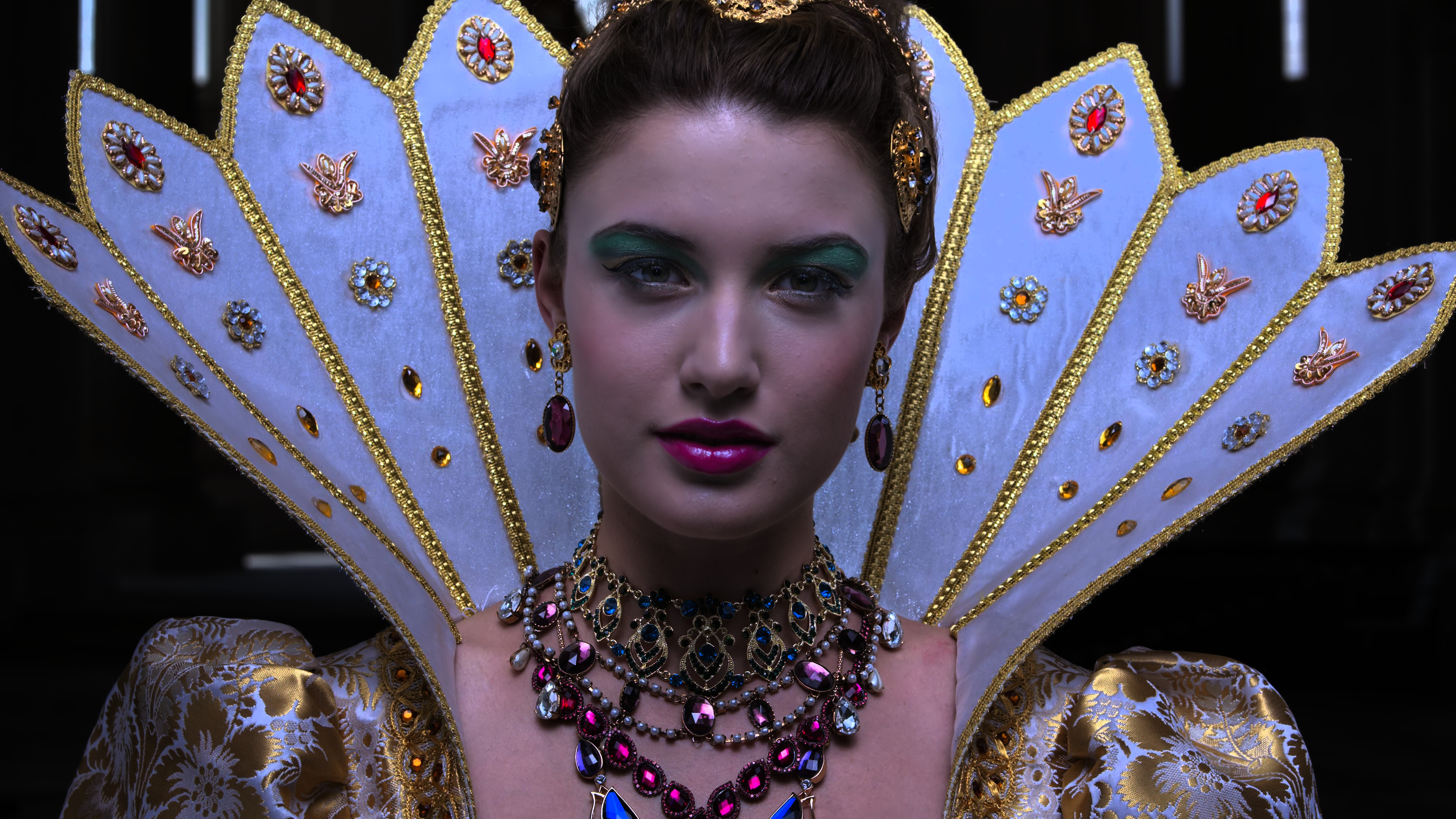
--target-peak=1000

I get better color accuracy, but you can still see the massive clipping instead of a nice transformation.
Again, I know this is an extreme case, but I have been noticing clipping similar to this in other videos.
 Doofussy2
All 65 comments
Upon further experimentation, using the abobe icc and adjusting/adding settings, I have found a more favorable outcome. But it's like 'kentucky windage'. Aiming wide of the target to hopefully come close. It really shouldn't be this strange to achieve. Her skin tone still isn't correct, but it's much closer.
hdr-compute-peak=no
tone-mapping=mobius
tone-mapping-param=0.05
tone-mapping-desaturate=2
icc-profile=C:\Windows\System32\spool\drivers\color\Adobe RGB (1998) D65 WP 2.2 Gamma.icc
icc-contrast=1000000
target-peak=300
brightness=-2

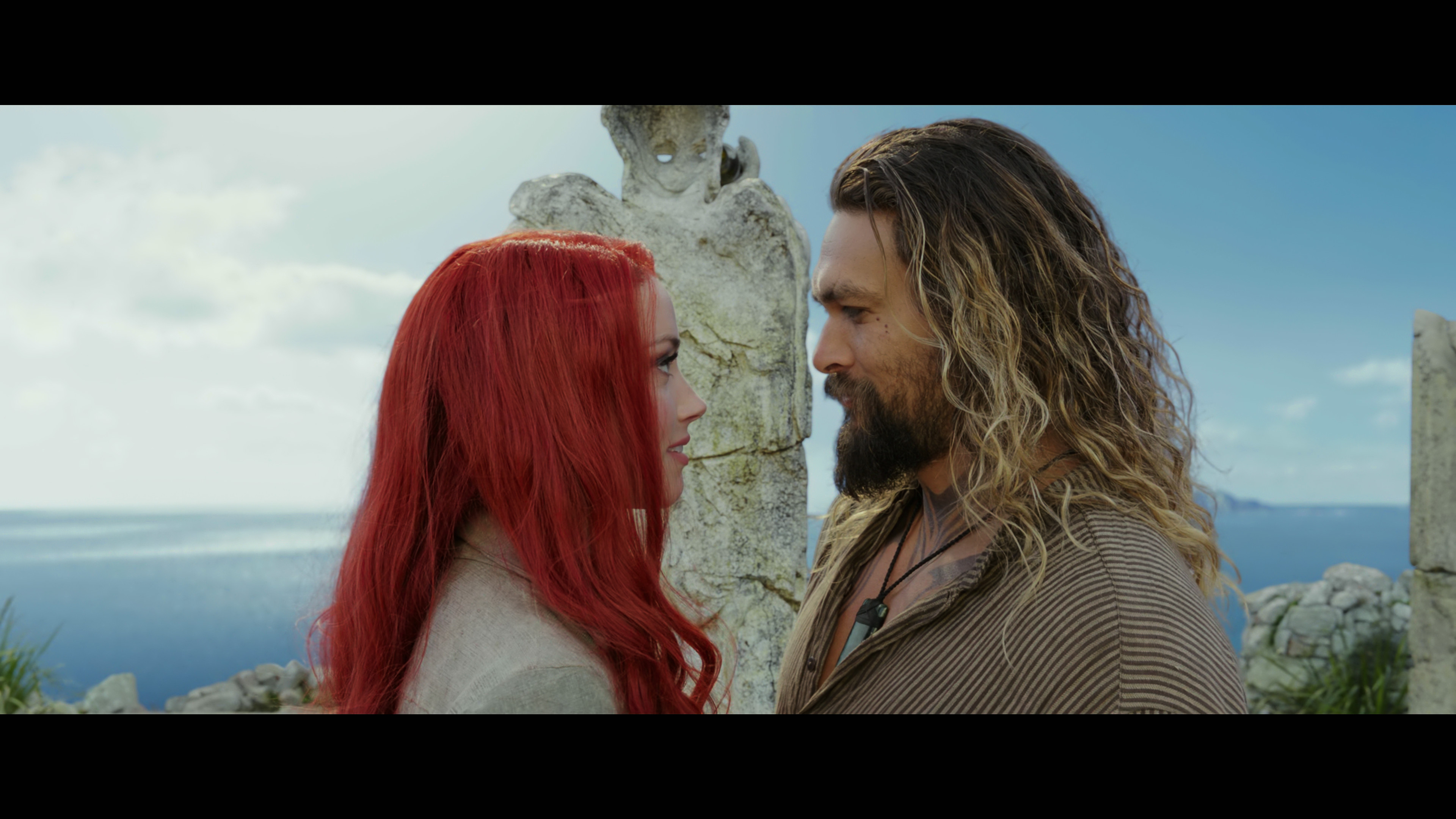
And because I mentioned it, here's a shot from Aquaman. Two things to note here. The first is her hair color. I can only get it correct, if I use the adobe icc. The second is the clouds. Played normally without these bizarre settings, they mostly look like a block of white. This still isn't great, but it's an improvement.
Doofussy2
on 9 Oct 2019
Forgive the crappy resolution (I had to take a photo), but here's a direct comparison of HDR passthrough and mpv tone mapping. It's pretty close, but obviously the luminance is lower in mpv (hence the brilliant white where the clouds are, with passthrough).
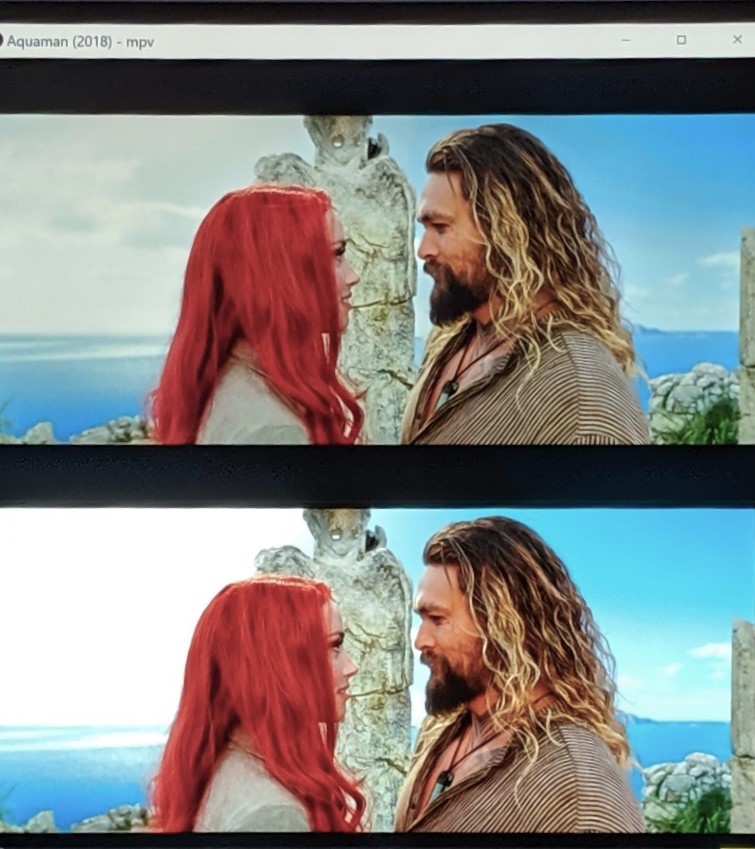
So I think some adjustments are needed for better luminance/color mapping.
Doofussy2
on 9 Oct 2019
Is it able to output the HDR content to monitor on Linux now?
The HDR movie with --gpu-context=drm looks being washed out.
 laichiaheng
on 29 Oct 2019
laichiaheng
on 29 Oct 2019
Doesn't drm negate tone mapping? I don't think I've ever tested that.
Doofussy2
on 29 Oct 2019
HDR 2: Electric Boogaloo?
 HyerrDoktyer
on 31 Oct 2019
HyerrDoktyer
on 31 Oct 2019
LMAO 😂
Doofussy2
on 31 Oct 2019
@Doofussy2 finally i was able to get it right
i have tested in HDR 10 bit movies the result were very good
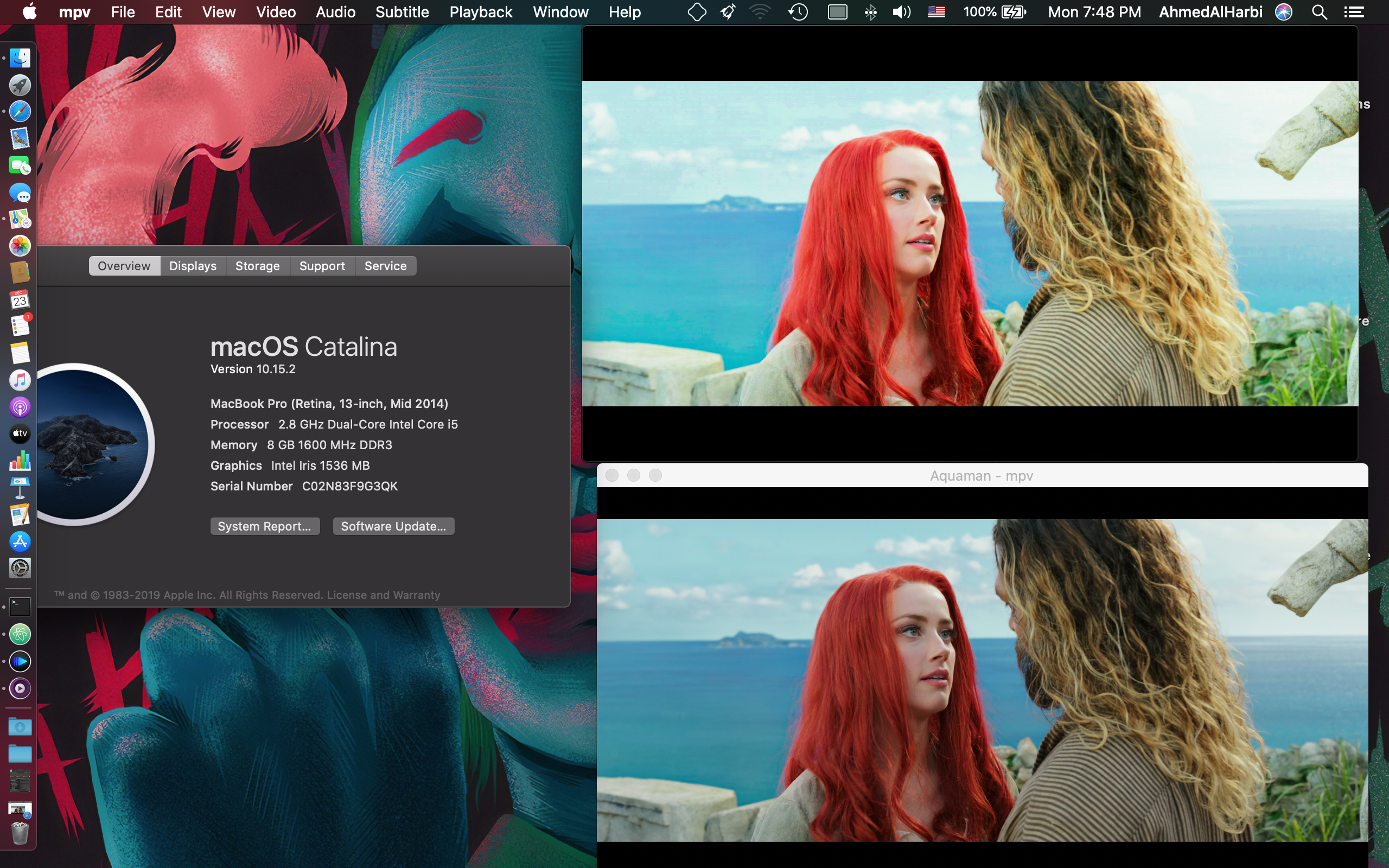
the above one which is a additional option in IINA app and the below one some modification on master mpv.conf file
the playback was smoothly even this pictures was taken during streaming
 a3lharbi
on 23 Dec 2019
a3lharbi
on 23 Dec 2019
What config did you use?
Doofussy2
on 23 Dec 2019
give it try with windows and lit me know,
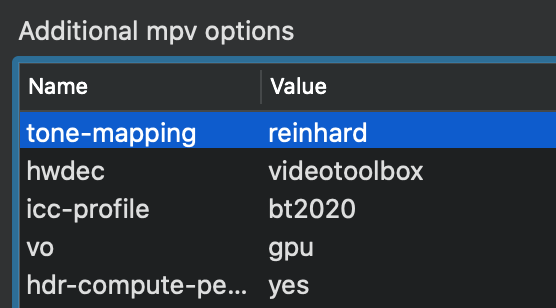

a3lharbi
on 23 Dec 2019
What icc are you actually using? I have made my own specifically for my display.
Doofussy2
on 23 Dec 2019
i have not change the color profile of my screen i kept it as lcd color "default" the fact , the fact that its play it well just because its using vo_gpu uses GPU's processing make it stunning
a3lharbi
on 23 Dec 2019
Your screenshot says you are using --icc-profile. So you are applying an icc. Plus peak detection. It sounds like you don't know what icc and maybe you have some display settings that are involved. With an icc calibrated to the display, peak luminance should follow that concisely. I get perfect color but the luminance is considerably off.
Doofussy2
on 23 Dec 2019
I'm actually ok, right now. Jeeb's commit gives me a perfect picture, without the use of an icc. I've left this open, because it still applies to every OS other than Windows 10.
Doofussy2
on 23 Dec 2019
yes my playback washout hdr in fact in the first in the beginning i was used an icc before GPU processing, so in fact the pictures would be better without icc , vo gpu will rendering the video itself,
other config was only applying tone-mapping, icc + playing with brightness and saturation which also gives pretty well, but not in terms of luminance, it will give almost as second pic quality,
anyway sharing is caring
a3lharbi
on 23 Dec 2019
Yeah, thanks for posting. But I can see in your screenshot that in the brighter picture, the colors are wrong. Take a look at her hair. The bottom picture is correct. In the top picture, the whole image is too bright. If you look at my last screenshot, that's how it's supposed to look.
Doofussy2
on 23 Dec 2019
if you use iina with vo=gpu that will probably not do anything (other than rendering in a separate window if at all), besides being a complete sub optimal solution and vo=libmpv having the same capabilities.. --hdr-compute-peak is not available on macOS at all.
 Akemi
on 23 Dec 2019
Akemi
on 23 Dec 2019
I think all that needs to happen is to be able to set the white point??? So on an SDR display you can simulate the peak. It isn't obeying the white point of an icc. I actually get a brighter peak on my SDR stuff than I do with my HDR stuff. My SDR picture with my icc is great!
Doofussy2
on 23 Dec 2019
Here's something else related. Dolby Vision. When I play the HLS link or this youtube video in mpv, I get a great HDR picture. Nice and bright. HLS dobly vision log.txt
But if I play a dolby vision video from my hard drive, the picture is no where near as bright. (Download here) Dolby vision video log.txt
It appears to be 'tone mapped' and not using the HDR function that the other videos do. Am I missing something? I know they are different videos, but the disparity seems quite large.
Doofussy2
on 3 Jan 2020
Could it be that it's dual layer and mpv isn't handling it the same way?
Doofussy2
on 4 Jan 2020
Should the DV stuff be a separate issue?
Doofussy2
on 4 Jan 2020
@Doofussy2
so where are you in terms of mpv/hdr? if you've made progress and are enjoying a better picture, would you mind sharing your mpv.cong settings and any scripts/shaders you're using? btw, i'm using a windows 10 machine...
 aeneas01
on 5 Jan 2020
aeneas01
on 5 Jan 2020
If you're using Windows 10, jeeb and Rossy have got HDR fixed up. Just enable HDR in Windows, set your GPU to wide gamut, and hit play. This is assuming you have an HDR display. The only caveat is that in pq, SDR stuff is dark. This happens at the presenter level, not mpv. If you take a screenshot and put it next to paused playback, you'll see the difference. So I just use profiles for SDR and HDR. Basically just brightening SDR and keeping HDR unmodified. A brightness of 6 seems a good value. This also stops me using an icc. I think it might be related to bit depth, but I haven't gotten around to digging into it.
Doofussy2
on 5 Jan 2020
If you're using Windows 10, jeeb and Rossy have got HDR fixed up. Just enable HDR in Windows, set your GPU to wide gamut, and hit play. This is assuming you have an HDR display. The only caveat is that in pq, SDR stuff is dark. This happens at the presenter level, not mpv. If you take a screenshot and put it next to paused playback, you'll see the difference. So I just use profiles for SDR and HDR. Basically just brightening SDR and keeping HDR unmodified. A brightness of 6 seems a good value. This also stops me using an icc. I think it might be related to bit depth, but I haven't gotten around to digging into it.
thanks very much for the reply, this looks really interesting, which build would i use? yes, i have an hdr display, can you share your profiles? also, so no need to place any special settings in the mpv.conf file in terms of hdr and/or tonemapping? btw, i read in another forum that d3d11 need to be set as the output for hdr to work correctly with mvp, not true? thannks again!
aeneas01
on 5 Jan 2020
Which build would I use?
The latest
I read in another forum that d3d11 need to be set as the output for HDR to work correctly with mpv, not true?
It's true. It's a condition of Microsoft/Windows 10, that DriectX is used. But that is the default, so just leave it on auto. https://mpv.io/manual/master/#options-d3d11-output-csp
can you share your profiles? also, so no need to place any special settings in the mpv.conf file in terms of hdr and/or tonemapping?
This is all you need (assuming you have the auto-profiles script in place)
hwdec=auto
opengl-pbo
gamma=10

hwdec-codecs=all

[HDR]
profile-desc=cond:p["video-params/primaries"]=="bt.2020"
gamma=0
fs
My actual config is more extensive than that, but for the purpose of the HDR discussion, that's all you need. You do need to make sure you're in wide color gamut. If you're using an Nvidia GPU, change it in the control panel. If you're using an Intel GPU, HDMI 2.0 doesn't support RGB10 at above 30Hz, so you'll need to lower it to that.
Doofussy2
on 5 Jan 2020
great stuff @Doofussy2 , thank very much!
in terms of "the latest", where should i get it, from one of these locations and, if so, does it matter which of these location i use? thanks again.
https://github.com/tmm1/mpv-player/blob/master/DOCS/interface-changes.rst
https://github.com/mpv-player/mpv
https://sourceforge.net/projects/mpv-player-windows/files/64bit/
aeneas01
on 5 Jan 2020
Sourceforge
Doofussy2
on 5 Jan 2020
perfect, thanks!
aeneas01
on 5 Jan 2020
If you're using Windows 10, jeeb and Rossy have got HDR fixed up. Just enable HDR in Windows, set your GPU to wide gamut, and hit play. This is assuming you have an HDR display. The only caveat is that in pq, SDR stuff is dark. This happens at the presenter level, not mpv. If you take a screenshot and put it next to paused playback, you'll see the difference. So I just use profiles for SDR and HDR. Basically just brightening SDR and keeping HDR unmodified. A brightness of 6 seems a good value. This also stops me using an icc. I think it might be related to bit depth, but I haven't gotten around to digging into it.
a couple of more questions if you don't mind...
when you say "So I just use profiles for SDR and HDR." are you referring to profiles set up in the mpv.conf file? for example you posted this mpv.conf file:
hwdec=auto
opengl-pbo
brightness=6
contrast=4

hwdec-codecs=all

[HDR]
profile-desc=cond:p["video-params/primaries"]=="bt.2020"
contrast=0
brightness=0
fs
is the [hdr] section section an example of the profiles you mentioned? if so, do you have a similar one for sdr you can share?
also, are you using any scripts or shaders, if you are are they profile specific as well?
thanks again!
aeneas01
on 7 Jan 2020
The only script I'm using is auto-profiles
https://github.com/wiiaboo/mpv-scripts/blob/master/auto-profiles.lua
For SDR stuff, everything at the top of your conf will work for that. The HDR profile is there to counteract the brightness changes.
Doofussy2
on 7 Jan 2020
The only script I'm using is auto-profiles
https://github.com/wiiaboo/mpv-scripts/blob/master/auto-profiles.lua
For SDR stuff, everything at the top of your conf will work for that. The HDR profile is there to counteract the brightness changes.
at first blush things are starting to look pretty darn sweet thanks to your help, i'll get a chance to do a lot more testing when i get home tonight, thanks again!
quick question regarding the auto_profile script, did you edit the file at all or is it ready to go as once it's placed in the script folder?
and to be clear tho, this isn't hdr passthrough similar to what madvr does, instead it's hdr tonemapping, is that correct?
also, i believe you're using emby as a frontend so this probably doesn't apply to you, but have you been able to figure out how to force just once instance of mpv file playback at a time? after some googling it seems possible with linux (after a lot of elbow grease) but not with windows, which seems strange.
thanks again @Doofussy2
aeneas01
on 7 Jan 2020
quick question regarding the auto_profile script, did you edit the file at all or is it ready to go as once it's placed in the script folder?
I just copied everything from line 51 down.
and to be clear tho, this isn't hdr passthrough similar to what madvr does, instead it's hdr tonemapping, is that correct?
It isn't passthrough, but the output is the same, if not better. To be clear, all HDR is tone mapped. Even by your TV when it gets sent the metadata. I would argue that mpv's 'tone-mapping' when using the DXGI 1.6 swapchain (as it now does), is better than what your TV would do. The picture I get is fantastic! Thank you @jeeb @rossy and @haasn. If I'm understanding the technology, correctly, the Windows 10 API/swapchain/presenter is able to read the display's capabilities (colorspace, luminance etc). And the picture can then be accurately rendered, using that information.
Doofussy2
on 8 Jan 2020
great stuff and thanks again @Doofussy2, can't wait to play around with it some more tonight....
one thing i'm finding tho, unfortunately, is that plex doesn't respect all of the code placed in the mpv.conf file as far as i can tell, and it's difficult to tell if it even respects mpv scripts even tho everything seems to be loaded just fine according to the pmp log file... moreover cpu/gpu load tends to be higher when using plex vs using mpv directly.
i've tried emby and kodi as eye-candy frontends for mpv but just don't like either, don't like their look/feel, and i don't need another server (emby) - it would be great if there existed a lightweight eye-candy front end (poster / fan art) that you could just link to you favorite player, personally i like the look of stremio but that's another animal.
re plex, i played around with svp (smooth video project) which comes with a compiled mpv.dll (mpv-1.dll) that can be used to replace the plex mpv-1.dll, which in turn allows plex to use the more recent mpv build used by svp, this can be used without using svp's interpolation software, and works much better than plex's mpv offering.
still, i'm finding that the best results come from just dragging a file into mpv, altho this is the least elegant option.
quick question regarding the auto_profile script, did you edit the file at all or is it ready to go as once it's placed in the script folder?
I just copied everything from line 51 down.
and to be clear tho, this isn't hdr passthrough similar to what madvr does, instead it's hdr tonemapping, is that correct?
It isn't passthrough, but the output is the same, if not better. To be clear, all HDR is tone mapped. Even by your TV when it gets sent the metadata. I would argue that mpv's 'tone-mapping' when using the DXGI 1.6 swapchain (as it now does), is better than what your TV would do. The picture I get is fantastic! Thank you @jeeb @rossy and @haasn. If I'm understanding the technology, correctly, the Windows 10 API/swapchain/presenter is able to read the display's capabilities (colorspace, luminance etc). And the picture can then be accurately rendered, using that information.
aeneas01
on 8 Jan 2020
PMP looks pretty unmaintained. From the public commit log over the past year, they only update the web UI. I don't know if they update libmpv, but they didn't adjust to any API changes that happened since then, so I doubt it even works with newer libmpv builds. Can not recommend.
 ghost
on 8 Jan 2020
ghost
on 8 Jan 2020
Yeah, I was gonna say that Plex doesn't appear to be doing very much, with regards to this.
Doofussy2
on 8 Jan 2020
plex claimed it updated mpv with their october build and has asked users to give it a spin:
https://forums.plex.tv/t/plex-media-player-3-0-windows-and-mac-forum-preview/476401
i gave it a try and it produced a ton of errors in the pmp log file, on top of which it didn't seem to offer anything new in terms of improved mpv integration... moreover trying to get anyone at plex to respond to questions about the build via the plex forum is nothing short of laughable... their policy seems to be that, due to the whining and pushback, they'll go ahead and not do away with their desktop players, but those using them are on their own...
anyway, as mentioned, swapping out the plex mpv.dll in favor of the svp mpv.dll seems to be a much better solution than using plex's mpv.dll, altho plex will still, clearly, override some of the mpv features.
aeneas01
on 8 Jan 2020
You do need to make sure you're in wide color gamut. If you're using an Nvidia GPU, change it in the control panel. If you're using an Intel GPU, HDMI 2.0 doesn't support RGB10 at above 30Hz, so you'll need to lower it to that.
exchanged some notes with hdfury vertex and they offered this:
- Best is 4K60 422 12b until HDMI2.1 without compression
- If your GPU cannot output that I think best is 4K60 420 10b for your GPU for 4K60
And 4K30 444 12b for 4K24/25/30,
does this make sense to you? if so, is there a way (script?) to make my display automatically switch from one to the other based on source material? thanks!
PS - from what i've read 444 is important for pc text, but with movies the difference between 444 and 420 is almost nonexistent, is this true?
aeneas01
on 9 Jan 2020
Best is 4K60 422 12b until HDMI2.1 without compression
HDMI 2.0 will support that. That's what I have mine set to. But you have an Intel GPU. Using a vertex to convert RGB8 to 422 12bit doesn't make sense. It probably just dithers the output. You should output from your GPU at 10bit, which requires lowering your refreshrate to 30Hz or lower. If all of your stuff were HDMI 2.1, then 60Hz, but none of your stuff is HDMI 2.1, so you're tied to HDMI 2.0 specs with an Intel GPU only outputting in RGB. As for 4:4:4, I think very few, if any TVs support it. Most HDR content that I've seen, is 4:2:0. RGB10 and 4:2:2 12bit, are almost indistinguishable. Almost no compression, as I understand it. These guys would know more about that, than I do.
Doofussy2
on 9 Jan 2020
Best is 4K60 422 12b until HDMI2.1 without compression
HDMI 2.0 will support that. That's what I have mine set to. But you have an Intel GPU. Using a vertex to convert RGB8 to 422 12bit doesn't make sense. It probably just dithers the output. You should output from your GPU at 10bit, which requires lowering your refreshrate to 30Hz or lower. If all of your stuff were HDMI 2.1, then 60Hz, but none of your stuff is HDMI 2.1, so you're tied to HDMI 2.0 specs with an Intel GPU only outputting in RGB. As for 4:4:4, I think very few, if any TVs support it. Most HDR content that I've seen, is 4:2:0. RGB10 and 4:2:2 12bit, are almost indistinguishable. Almost no compression, as I understand it. These guys would know more about that, than I do.
i can get 60hz 10-bit but not at 444, but at 420, would that make more sense than 60/8-bit/rgb?
i'm finally getting a chance to spend with all of this and pj, as i type this note in fact, and so far i'm really liking the results.... some of the mpv picture settings need to be a bit more fine tuned for my pj however, which is easy enough, i really like the ability to fine tune within the player as opposed to the pj (which has been calibrated to 709) given i use the pj for other things (live tv, netflix, etc.), that i don't want to necessarily use the same settings, and it seems that mpv does a nice job with picture settings...
quick question: for hdr movie files is hdr supposed to kick only when in full screen? as it is right now, i'm getting the same image for hdr in windowed mode as in full screen mode....
aeneas01
on 9 Jan 2020
also, i have more than a few 4k hdr demo files that i've downloaded from the net, and about a third drop a bunch of frames and stutter despite cpu/gpu usage in the 30s-40s while others play silky smooth, is there a usual suspect to look at for this?
thanks again for all of your great help!
UPDATE - all of my questions pertain to using mpv's latest build (sourceforge) directly, dropping files into the player, as opposed to using mpv via plex or any other frontend.
aeneas01
on 9 Jan 2020
i can get 60hz 10-bit but not at 444, but at 420, would that make more sense than 60/8-bit/rgb?
But your video starts at 10bit, outputs at 8bit and converted back to 10bit. You want to output at RGB10 from your NUC. That is the best quality.
for hdr movie files is hdr supposed to kick only when in full screen? as it is right now, i'm getting the same image for hdr in windowed mode as in full screen mode.
No, HDR will not switch Windows into HDR mode. You have to enable that yourself, as I said earlier.
Doofussy2
on 9 Jan 2020
first, thanks for the replies....
No, HDR will not switch Windows into HDR mode. You have to enable that yourself, as I said earlier.
i don't think i was clear, i have hdr enabled (toggled on) all of the time - what i was asking is if the hdr video needed to be in fullscreen mode (exclusive even) in order for hdr to work properly, i seem to remember reading that windows could only display hdr video correctly when in fullscreen mode... i ask because i'm getting the same results whether the video is in windowed or fullscreen mode.
But your video starts at 10bit, outputs at 8bit and converted back to 10bit. You want to output at RGB10 from your NUC. That is the best quality.
not sure i understand why the vid would start out at 10-bit, be output at 8-bit, and then converted back to 10-bit if windows advanced display settings showed 60hz 10-bit 420? whatever the case i'll get a chance to try out all of the different display settings tonight
thanks again!
aeneas01
on 9 Jan 2020
As for 4:4:4, I think very few, if any TVs support it.
that's completely not true. even my 10 years old Sony TV could do 4:4:4, obviously only within the capabilities of the time back then (1080p@60hz). all recent (since 2016) TVs i had and tested, of reputable manufactures (LG, Sony, Samsung), could do 4:4:4. you have to either activate extended/advanced HDMI settings (LG: ULTRA HD Deep Colour, Sony: HDMI signal format > Enhanced format) and/or set the HDMI Port to 'PC'. obviously only within the capabilities of the HDMI standard.
Akemi
on 9 Jan 2020
Ah, thanks for that, I wasn't totally sure about that. My RTX 2060 can't be set to 4:4:4 at 4k, it only accepts 4:2:2. I just assumed it was because the TV didn't support it. The option is in the control panel, but it always reverts to 4:2:2. Maybe because of the HDMI 2.0 limitation?
Doofussy2
on 9 Jan 2020
not sure i understand why the vid would start out at 10-bit, be output at 8-bit, and then converted back to 10-bit if windows advanced display settings showed 60hz 10-bit 420? whatever the case i'll get a chance to try out all of the different display settings tonight
Aren't you using a NUC? At 60Hz, it will output everything in RGB 8. So if you play a 10bit video, it will output at 8bit, because Windows sees HDMI 2.0 and disables 10bit. At 30Hz, Windows will enable RGB10, and then it'll play at 10bit. Just look at your Windows display settings. And if you look in your mpv log, it'll show 8bit display depth.
Doofussy2
on 9 Jan 2020
not sure i understand why the vid would start out at 10-bit, be output at 8-bit, and then converted back to 10-bit if windows advanced display settings showed 60hz 10-bit 420? whatever the case i'll get a chance to try out all of the different display settings tonight
Aren't you using a NUC? At 60Hz, it will output everything in RGB 8. So if you play a 10bit video, it will output at 8bit, because Windows sees HDMI 2.0 and disables 10bit. At 30Hz, Windows will enable RGB10, and then it'll play at 10bit. Just look at your Windows display settings. And if you look in your mpv log, it'll show 8bit display depth.
as mentioned, 10-bit / 60 hz output (confirmed by my pj) but at 420...
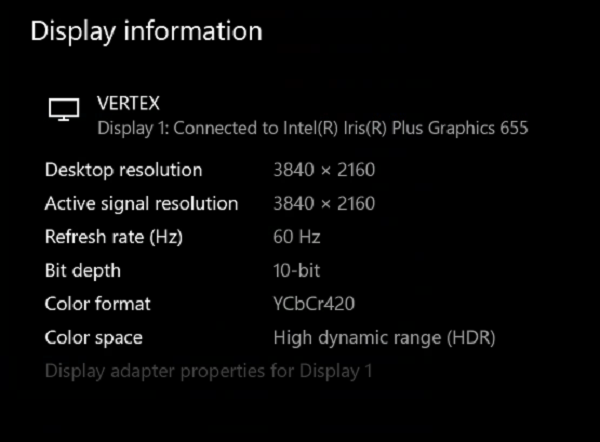
aeneas01
on 9 Jan 2020
That's what I'm talking about. You're using the Vertex to trick Windows and convert to chroma sub-sampling. But I'm not sure the Intel driver is actually supporting that. I'd be interested to see what the mpv log, shows. Probably is just pulling from Windows. I'm dubious if that is doing it correctly.
Doofussy2
on 9 Jan 2020
here's my log file after playing an hdr file for a few minutes....
aeneas01
on 10 Jan 2020
Well, the log is reporting 10bit, because that's what Windows is seeing. I just wonder what's happening 'behind the scenes'. But on its face, it's doing what it's supposed to. So you're good to go.
Doofussy2
on 10 Jan 2020
@Doofussy2
spent a lot of time last night testing many different hdr and sdr files, and overall things are pretty good but not as great as i was hoping, i find myself having to fiddle a lot with contrast, brightness, gamma and saturation levels for both sdr and hdr in an effort to get the best looking image, and often times some of these settings need to cranked way up for these to look right...
a couple of questions if you have the time:
- what display are you using, a 4k monitor, tv or projector?
- to be clear, you have hdr toggled on at all times, i.e. both 709 and 2020 files are played with hdr enabled?
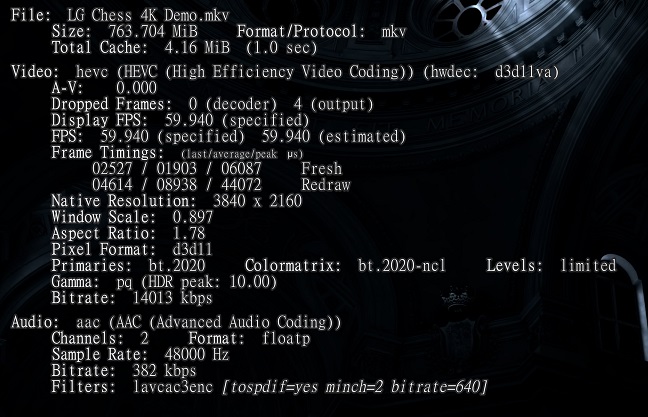
- mpv stats (I), what does your gamma pf (hdr peak) show for hdr files, lg chess 4k demo.mp4 for example?
- in windows, are you using full or limited color? what is your display set to, full or limited?
- in windows, do you have ycbcr enabled?
thanks very much!
aeneas01
on 11 Jan 2020
what display are you using, a 4k monitor, tv or projector?
TV, and it is a Samsung Q80R in PC mode, with Gamma ST.2084, and Input Signal Plus enabled (no HDR without that)
to be clear, you have hdr toggled on at all times, i.e. both 709 and 2020 files are played with hdr enabled?
Yes, HDR is enabled at all times.
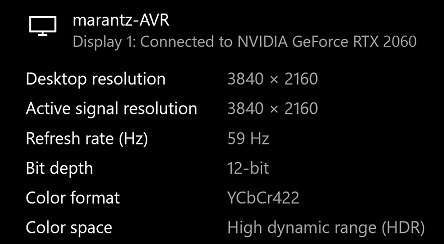
mpv stats (I), what does your gamma pf (hdr peak) show for hdr files, lg chess 4k demo.mp4 for example?
in windows, are you using full or limited color? what is your display set to, full or limited?
in windows, do you have ycbcr enabled?
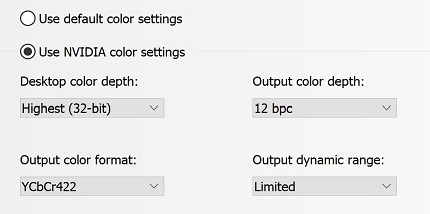
I have compared the output from mpv to VLC, to passthrough with jeeb's early test build, to passthrough with chromecast and passthrough with my Nvidia Shield TV. They all match. The picture is 100% correct with no adjustments. If your picture isn't correct, then something isn't correct with your hardware. I suspect that using the Vertex isn't doing what you hoped it would, and your Intel GPU driver may actually be reducing to 8bit. Did you actually test the output by not using the vertex and lowering your GPU refresh rate to 29Hz? That would be your baseline to compare against.
Doofussy2
on 11 Jan 2020
@Doofussy2
i see, for some reason i thought you were also using a 4k hdr projector.... 4k hdr tvs are great, you can throw anything at them and they look great, i have a 65" lg oled b-class that's about a year and a half old and it's spectacular, anything i hook up to it looks outstanding without any fiddling, and any fiddling is just added gravy, if only 4k hdr projectors came close (and they don't despite such claims by some), altho they can produce a beautiful picture... but, yes, i do indeed bet your mpv config looks fantastic on your sony....
anyway, thanks very much for your response, it was very helpful, and yes i've tried everything with the vertex out of the loop, and lowering the refresh rate to 30 to get 10-bit, no difference, in fact it confirmed that the vertex is forcing my pc to send 10-bit to my projector at 60/10-bit/420...
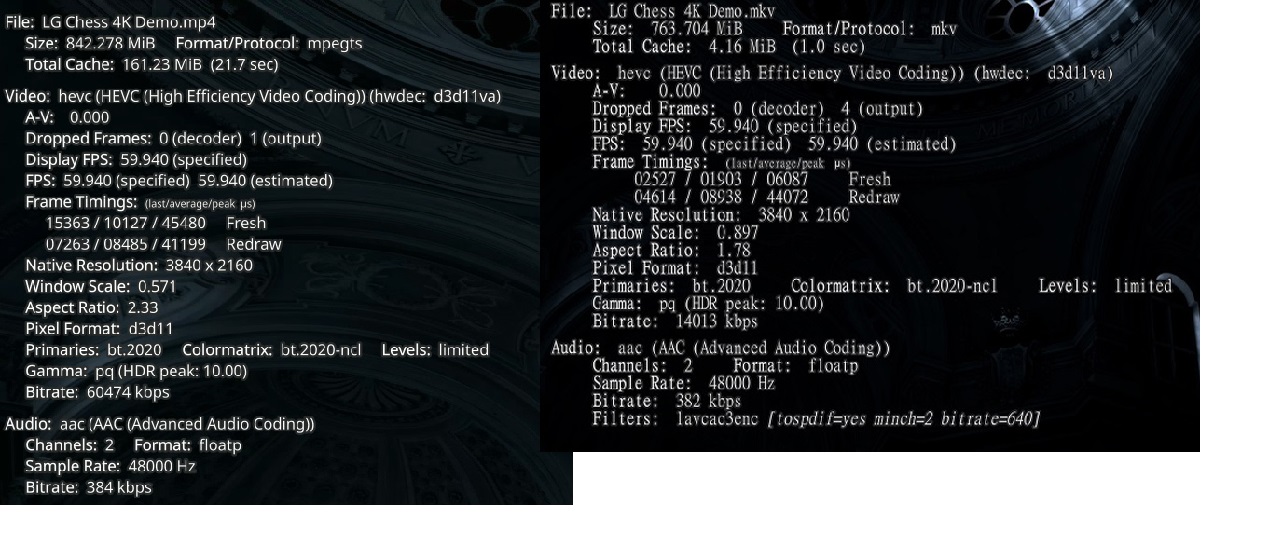
i'm going to double check my limited/full, ycbcr settings, for my pc and projector, maybe i've overlooked something there.... fwiw, here's my stat info, looks a lot like yours, save for the total cache, frame timings, and bitrate numbers, mine are much higher than yours, winder why?
aeneas01
on 11 Jan 2020
I ran mine through mkvtoolnix, that's why it's different.
Projectors are a different beast. I'm afraid I can't help you, there.
Doofussy2
on 11 Jan 2020
I ran mine through mkvtoolnix, that's why it's different.
Projectors are a different beast. I'm afraid I can't help you, there.
are you kidding, you've been an incredible help, and patient as hell as i've chased you around different forums, ha ha... and, yeah, projectors are indeed a different animal, i'm on my fourth 4k projector, which i've settled on because it does so many things so well, but none of the ones i've personally tried/demoed, including two 4k laser pj's, nor the ones i've seen demoed live, really handle 4k hdr well, they just don' have the lumens, alas... that said, you can still get a helluva picture out of some of them, and i'm close with this one, just need to turn then corner.... thanks again!
aeneas01
on 11 Jan 2020
@aeneas01 I updated my config. Adjusting the gamma, works better.
Doofussy2
on 16 Jan 2020
@aeneas01 I updated my config. Adjusting the gamma, works better.
i've been watching a bunch of different hdr files and playing with mpv's gamma and other picture settings while the movie plays, jotting down what looks best, which i'll add to hdr section of the mpv.conf file once i've settled on what looks best for the majority, it's strange tho, settings seem to require a lot of ticks in order for the results to be evident, i would have thought a click or two would result in obvious change....
btw, i noticed that in the auto-profiles.lua file the first two lines reference 'mp.utils and 'mp.msg' as requirements but i don't have these files on my machine as far as i can tell?
aeneas01
on 16 Jan 2020
I think that's for building your own. Something I intend to figure out, one day...when I get enough time :/
Doofussy2
on 17 Jan 2020
ok, gotchya....
forgot to mention, when i was testing the different mpv picture settings the night before last it occurred to me that i had never taken the time to get my desktop dialed in with hdr toggled on, doh, so i stopped with mpv and concentrated on getting windows in line... i have to say that not only was the impact of the windows adustments immediate, but it became clear that i would have to scratch all of the mpv picture settings i had been working with and start again from scratch, i'm really looking forward to seeing what mpv looks like once windows is squared away.... thing is, with windows, it's not just the desktop settings that require adjusting, but the windows video settings as well....
anyway, hopefully, one of these days, in the near future i hope, i'll actually be able to just start watching and enjoying movies without worrying if a better picture could be had, ha ha...
to date i've spent a lot of time with potplayer + madvr, plex + mpv, dvdfab, powerdvd, splash (which performs surprisingly well with non-hdr content given it offers almost zero settings) and mpv standalone, which i think i've finally settled on....
aeneas01
on 17 Jan 2020
btw, i noticed that in the auto-profiles.lua file the first two lines reference 'mp.utils and 'mp.msg' as requirements but i don't have these files on my machine as far as i can tell?
Those are not files, those are "internal" names of the Lua API used for scripts.
 Hrxn
on 17 Jan 2020
Hrxn
on 17 Jan 2020
@Doofussy2
@Hrxn
"neo-xp" @ avsforum is comparing madvr (madVRhdrMeasure86) to mpv, i wonder if he's using mpv's conf hdr profile(s)? also, he writes:
"_There also seems to be much more saturation preservation with mpv (but less luminance of course). While mpv is clean and somewhat closer to the SDR versions, madVR has that "HDR effect" I like._"
looking at the screen caps he uses as examples, it seems that it would be pretty easy to get mpv to display the "that hdr effect" that he likes, no?
thoughts?
aeneas01
on 19 Jan 2020
Yeah, we went through all of that when haasn was redeveloping the algorithms. The things that he's showing in that thread, are adjustable.
You cam read all about what we tested, in this thread. There's a lot to read :)
https://github.com/mpv-player/mpv/issues/6405
But now, in Windows 10, you'd have to do something with the Windows presenter. Disable using the swapchain or adjust for working with it. Or use an mpv build that predates the commits for that. Which you've seen all that I've written about that. But in that thread above, there are more advanced options than I wrote about, elsewhere.
Doofussy2
on 20 Jan 2020
This post I made, might interest you.
https://github.com/mpv-player/mpv/issues/6405#issuecomment-450765771
Doofussy2
on 20 Jan 2020
yes, very familiar with that thread....
so what's the state of mpv/hdr now, how do you feel it now stacks up with madvr, i'm still playing around with it (mpv/hdr) but i'm liking the results so far...
btw, what am i missing when it comes to hdr > sdr tonemapping? it seems that this is discussed a lot but if i understand it correctly i'm not sure why? i mean is there really a demand for making hdr titles look good on sdr displays? seems like a waste of time and effort, if you want sdr just watch sdr titles, if you're interested in hdr titles then just buy an hdr display, no?
aeneas01
on 20 Jan 2020
so what's the state of mpv/hdr now, how do you feel it now stacks up with madvr
I feel they are equal
btw, what am i missing when it comes to hdr > sdr tonemapping? it seems that this is discussed a lot but if i understand it correctly i'm not sure why? i mean is there really a demand for making hdr titles look good on sdr displays? seems like a waste of time and effort, if you want sdr just watch sdr titles, if you're interested in hdr titles then just buy an hdr display, no?
As Windows 10 is one of the few OSs that can use HDR directly, and mpv being multi platform, tone mapping to an SDR colorspace is an imperative. As haasn said:
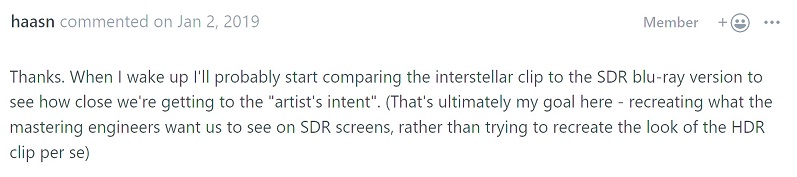
Making HDR look good in an SDR colorspace comes down to preference. People without HDR devices, wanting an HDR experience, because of FOMO. Most of them don't even understand what they're looking at, I would wager. My personal quest has been to get the most out of my equipment I can, within the parameters of my usage. Despite my creating this thread, I think mpv is fantastic, and this thread is more about a little fine tuning. But I think I'm going to close it. I chose to use Windows 10 because it does allow me to use the HDR colorspace that my devices support. And I am pretty much where I want to be.
Doofussy2
on 20 Jan 2020
So...what is the best setting for HDR now?
The default one is clearly to be too dark in dark scene.
laichiaheng
on 22 Jan 2020
are you using a tv or a projector?
if you're using a projector i'm not sure there's a right answer to your question... with my 4k hdr pixel shift projector i can get mpv to display a great hdr image from one file only to see it break down using another file, for example i can get mpv to display the "chess" clip beautifully, but using the same mpv settings "passengers" won't look great, and if i tweak mpv to look great with "passengers", "chess" won't look great with the same settings.
thing is, with my setup that includes an hdfury vertex, i can send the same hdr image to my projector and oled tv at the same time, view the same source at the same time, which i find to be pretty depressing given that the oled easily handles everything beautifully (with mpv and a host of other options), i.e. i can use the same mpv settings for "chess" and "passengers" and they both look great on my oled.
but this isn't mpv specific, i've tried every video player that works with madvr (let madvr decide and madvr hdr passthrough), i've tried potplayer plus it's built in hdr pixel shaders (which work surprisingly well imo), and i've even tried the lumagen pro (just can't get past its long, distracting syncing thing), and can't seem to come up with an ideal hdr solution for my pc + projector combo... at the moment i think powerdvd 19 probably does the best job with hdr in terms of handling different hdr files evenly.
aeneas01
on 22 Jan 2020
Related issues
 SPDurkee
·
3Comments
SPDurkee
·
3Comments
 olivergondza
·
3Comments
olivergondza
·
3Comments
 szg0000
·
3Comments
szg0000
·
3Comments
 paper9oll
·
3Comments
paper9oll
·
3Comments
 xanadupark
·
3Comments
xanadupark
·
3Comments
Most helpful comment
PMP looks pretty unmaintained. From the public commit log over the past year, they only update the web UI. I don't know if they update libmpv, but they didn't adjust to any API changes that happened since then, so I doubt it even works with newer libmpv builds. Can not recommend.