Mpv: [Feature Request] Ask confirmation from user when the user pressed "q"(Quit)
I was watching a video and I accidentally pressed "q", it did not ask me for any confirmation to quit the video player.
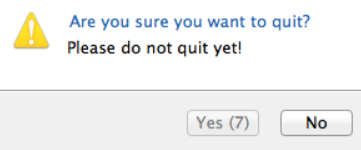
I think it will be better if the user press "q", accidentally or not, the video player will automatically pause and the quit confirmation will pop up.
Something like this:
 MingSern
👎3
All 2 comments
just unbind q and bind quit to something like Alt+q. that way you won't be able to accidentally hit it.
it would probably be possible to implement this via a lua script, but i don't think we are interested to implement such a feature.
 Akemi
on 27 Jul 2018
Akemi
on 27 Jul 2018
Here is the script. Save it as confirm-quit.lua to your scripts folder. Windows only.
utils = require 'mp.utils'

function confirm_quit()
    local was_ontop = mp.get_property_native("ontop")
    if was_ontop then mp.set_property_native("ontop", false) end
    local was_pause = mp.get_property_native("pause")
    if not was_pause then mp.set_property_native("pause", true) end
    local res = utils.subprocess({
        args = {'powershell', '-NoProfile', '-Command', [[& {
            Add-Type -AssemblyName System.Windows.Forms

            $result = [System.Windows.Forms.MessageBox]::Show('Are you sure you want to quit?', 'Warning', 'YesNo', 'Warning')

            if ($result -eq 'Yes') {
                "quit"
            } else {
                "do-not-quit"
            }
        }]]},
        cancellable = false,
    })
    if string.sub(res.stdout, 1, 1) == "q" then
        mp.command("quit")
    else
        if was_ontop then mp.set_property_native("ontop", true) end
        if not was_pause then mp.set_property_native("pause", false) end
    end
end

mp.add_key_binding('q', 'confirm-quit', confirm_quit)
 zc62
on 27 Jul 2018
zc62
on 27 Jul 2018
👍4
Was this page helpful?
0 / 5 - 0 ratings
Related issues
 SPDurkee
·
3Comments
SPDurkee
·
3Comments
 Edenharder
·
4Comments
Edenharder
·
4Comments
 thebunnyrules
·
3Comments
thebunnyrules
·
3Comments
 xanadupark
·
3Comments
xanadupark
·
3Comments
 jcowgill
·
3Comments
jcowgill
·
3Comments
Most helpful comment
Here is the script. Save it as
confirm-quit.luato yourscriptsfolder. Windows only.