It would be a great addition to have something like this:
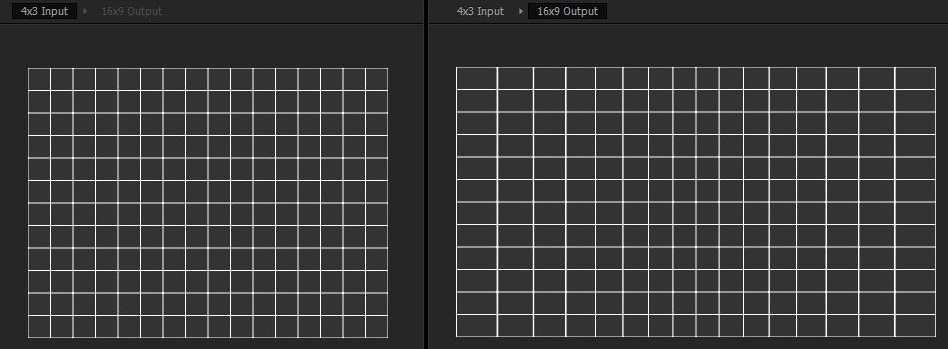
kodi seems to have the option
https://github.com/xbmc/xbmc/blob/master/system/shaders/GL/1.5/gl_stretch.glsl
#version 150

uniform sampler2D img;
uniform float m_stretch;
uniform float m_alpha;
in vec2 m_cord;
out vec4 fragColor;

vec2 stretch(vec2 pos)
{
  // our transform should map [0..1] to itself, with f(0) = 0, f(1) = 1, f(0.5) = 0.5, and f'(0.5) = b.
  // a simple curve to do this is g(x) = b(x-0.5) + (1-b)2^(n-1)(x-0.5)^n + 0.5
  // where the power preserves sign. n = 2 is the simplest non-linear case (required when b != 1)
  float x = pos.x - 0.5;
  return vec2(mix(x * abs(x) * 2.0, x, m_stretch) + 0.5, pos.y);
}

void main()
{
  fragColor.rgb = texture(img, stretch(m_cord)).rgb;
  fragColor.a = m_alpha;
}
 conductorX
All 8 comments
You can easily do pretty much exactly this with the --glsl-shaders option.
 haasn
on 6 May 2018
haasn
on 6 May 2018
it seems to need adaptation, tried to add the headers and change the functions but it doesn't work
conductorX
on 6 May 2018
What kind of brain damage is required to find this kind of "stretching" good?
 ghost
on 6 May 2018
ghost
on 6 May 2018
@wm4 it retains the geometry of the centre pixels avoiding stretching the main people/objects that are in the middle of the frame, usually produces good results, you should try it before judging.
conductorX
on 6 May 2018
@conductorX I threw together a really simple working example—take a look!
https://gist.github.com/benzrf/c9909aee70e3656895820f20ac395956
You need to pass the --no-keepaspect flag to mpv for it to work right.
 sarahzrf
on 10 May 2018
sarahzrf
on 10 May 2018
@benzrf thank you very much for this
conductorX
on 18 May 2018
no problem :)
sarahzrf
on 20 May 2018
added to the wiki https://github.com/mpv-player/mpv/wiki/User-Scripts
 Akemi
on 21 Sep 2019
Akemi
on 21 Sep 2019
Related issues
 olivergondza
·
3Comments
olivergondza
·
3Comments
 SPDurkee
·
3Comments
SPDurkee
·
3Comments
 ww7
·
3Comments
ww7
·
3Comments
 AndydeCleyre
·
3Comments
AndydeCleyre
·
3Comments
 422658476
·
3Comments
422658476
·
3Comments
Most helpful comment
@conductorX I threw together a really simple working example—take a look!
https://gist.github.com/benzrf/c9909aee70e3656895820f20ac395956
You need to pass the
--no-keepaspectflag to mpv for it to work right.