Mpv: [vo=opengl] Weird behavior on virtualized Linux using VMware
mpv version and platform
v0.27.0 (also tested on v0.28.0 dba143d)
Arch Linux 64-bit (virtualized, with 3D acceleration using VMWare Workstation)
Driver: x86-video-vmware (latest version)
MATE Desktop 1.18
Reproduction steps
- v0.27.0:
$ mpv --no-config --vo=opengl any_video.mp4 - v0.28.0:
$ mpv --no-config --vo=gpu any_video.mp4
Obviously I don't casually use VMs to watch videos, I found this by accident while I was testing stuff in one of my Linux VMs and I decided to report to you guys just in case,... ❤️
I also tested this in another VM, running Ubuntu 17.10 (on Xorg as well), which still has mpv v0.26.0 in its repo, there were no glitches at all.
Expected behavior
mpv shouldn't "zoom in" the video and leave a huge blank space on its window (see screenshot below)
Actual behavior

Log file
 guixxx
All 25 comments
Does it happen with other GL apps too, like glxgears?
 ghost
on 19 Jan 2018
ghost
on 19 Jan 2018
No, I guess?

guixxx
on 19 Jan 2018
Try with something that uses EGL, or try to force GLX on mpv.
ghost
on 19 Jan 2018
Sorry, my knowledge about this stuff is kind of limited, I don't know something that uses EGL.
But running mpv with --vo=x11 actually works! Here's a log file just in case:
So do you have an idea of what's causing this issue?
guixxx
on 19 Jan 2018
I didn't mean that, but I don't know how our every changing command line options work for that either.
ghost
on 19 Jan 2018
Actually, it is a very nasty bug, on almost all Linux guest VMWare guest machines- from Arch to SUSE. The boys from mpv plays endlessly with version, ffmpeg strange "implementations", syntax of the options, etc etc. Some years ago, it was very easy to put -vf=eq2 and to have colour controls on xv or X11. Now, this is not possible without obscure and UNDOCUMENTED lavfi tricks, "graph options", ffmpeg "options" with bad control values ( gross values, without fine tunning), and so on, and so on. But this nasty, nasty scaling bug, is the epitome of the light-heartedness of some young, untrained mpv boys, with appetite to play games. This never happened in the past with the mpv- probably, the best media player on Linux. Pls do not tell us -"bad VMWare drivers", "put glx backend option" ( not possible on Linux) and so on, and so on- just think, and correct this nasty bug.
 Panzerino
on 11 Feb 2018
Panzerino
on 11 Feb 2018
I like how @Panzerino made a GitHub account just for this stupid reddit-tier comment.
 CounterPillow
on 11 Feb 2018
CounterPillow
on 11 Feb 2018
@guixxx to force GLX on mpv, use --gpu-context=x11. The vo_x11 you've tried is not GPU-accelerated at all, so it's not much surprise that it works. It's possible EGL is broken in vmware in some way, so if GLX works it would point towards that.
CounterPillow
on 11 Feb 2018
@CounterPillow That worked, nice! But out of curiosity, is there any difference between using x11glx and x11egl? Thanks.
guixxx
on 11 Feb 2018
Okay, so it is a problem with EGL then. The difference between EGL and GLX is how the OpenGL context is created. With GLX, you create it through the X11 windowing system as far as I'm aware, whereas EGL is independent of X11.
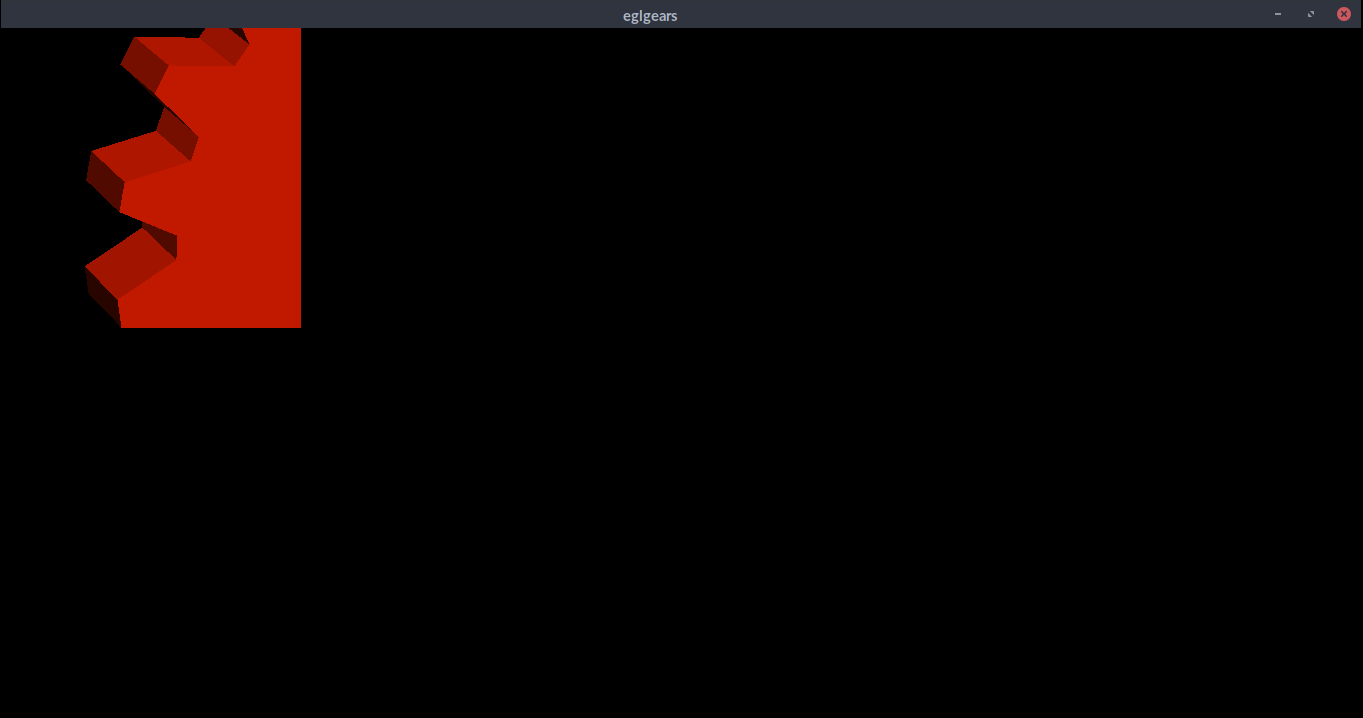
Can you try how eglgears_x11 or egltri_x11 looks?
CounterPillow
on 11 Feb 2018
eglgears_x11 looks like this when the window is resized:

However, when I maximize it:
guixxx
on 11 Feb 2018
So that looks to be a vmware driver issue then. That sucks. It's probably worth reporting this to vmware with eglgears_x11 as a test case for them. Until they fix their EGL, it's best to stick with GLX.
CounterPillow
on 11 Feb 2018
I'll report it to them, thank you! :+1:
guixxx
on 11 Feb 2018
Probably, this is not a VMware driver issue, because in Fedora 27 guest, same VMware version installation, mpv works fine with vo=gpu or opengl. Also, mpv ver 26 works fine on every single Linux guest.
I make account here in scope to be able to comment, and to help to find solution. mpv is a fine software, if, at the end, some "boys" will destroy what is already achieved. mpv is a pivotal software in linux, and i asked about basic function to work. Not some sort of commodity. opengl works on every single mpv version I'm aware of, on every single Linux guest at least from 2010 and beyond.
Panzerino
on 12 Feb 2018
Same here. I have a Debian "Testing" VM, which I use as my primary OS on top of Win10 (which is basically just there to host the VM and Outlook/Office).
Anyway, I've set vo=xv and mpv works fine with this setting, without too much CPU load. But I would also be happy to see this bug fixed.
I also tested other video players:
- VLC: uses opengl and works fine
- mplayer: uses xv per default and works fine
ghost
on 12 Feb 2018
Must confirm - with option gpu-context=x11 in mpv.conf file, and without specifying there vo parameter, mpv works properly.
@ CounterPillow, Pls, DO not confuse further the users!! -it is NOT --gpu-context=X11 ! It is simply gpu-context=x11 in mpv. conf, home directory.
The --gpu-context=x11 is only when you start the mpv from command line, AND IT IS not a syntax in the mpv config file, which is without "--". It is vastly important, because one plain user must PLAY endlessly various sort of syntax "games", because some boys endlessly, and persistently, on every new mpv version, change the syntax of the mpv.conf file, which case loss of functionality and confusion.
@ CounterPillow, are you able to enlighten us, when this hidden synatax acrobatics is documented??
Panzerino
on 12 Feb 2018
Or just read the manual or https://github.com/mpv-player/mpv/blob/master/DOCS/interface-changes.rst instead of making petty complaints about some "boys" mischievously breaking your special workflow.
 wiiaboo
on 12 Feb 2018
wiiaboo
on 12 Feb 2018
@wiiaboo The last available ver of mpv, SUSE, is 27. Also for Debian sid the last available ver is 27.
https://packages.debian.org/sid/mpv
These "changes" concern ver 28 and after. And beyond mention that "rename --opengl-backend to --gpu-context", pls, tell us, where these hidden gpu-context options are... .
Pls, do not think that all of us are idiots.
This must be mention especially- like paradigm of fault mentality and paradigm how it is easy to broke even great piece of software with delusions:
"--deinterlace option or property was set to. Now, a filter always does
what its filter options and defaults imply. The --deinterlace option and
property strictly add/remove its own filters. For example, if you run
"mpv --vf=vavpp --deinterlace=yes", this will insert another, redundant
filter, which is probably not what you want. For toggling a deinterlace
filter manually, use the "vf toggle" command, and do not set the
deinterlace option/property. To customize the filter that will be
inserted automatically, use --vf-defaults. Details how this works will
probably change in the future."
Be clear, be short, be comprehensive- in clear language! DO not import obscure language acrobatics in important syntax, on every new software version- keep unified model, with lesser unneeded changes.
One time the syntax in the mpv.conf files is with "--", in the next version, the syntax is with " -", the next- without "-". Sometime ="parameter" works, sometimes- does not. And this endless game last about 7-8 years. In scope to find how to start the player without borders- 1 or 2 days games are needed- one wrote- use "= no-borders", other wrote "-no-border", another- "no-borders", and so on, and so on. In the next version, the "-no-borders", UNDOCUMENTED is changed to simply- "no-borders".
Why you not define "how this work" in the most stable and reasonable fashion?
Panzerino
on 12 Feb 2018
--gpu-context=help? Or --list-options?
What do you mean by hidden options?
This must be mention especially- like paradigm of fault mentality:
What?
wiiaboo
on 12 Feb 2018
You didn't understand, that because of the command-line richness of the software, the options must be clearly documented, with plenty of paradigms.
When you wrote in your VERY VERY confused manual, about the syntax, you never mentioned IT IS A mpv.conf syntax, or IT IS command-line syntax. The obscure mentions in the beginning of the manual, is not worth to be mentioned at all.
Why one syntax for the command line, other in the mpv.conf file? Are you unable to unify the syntax, according ONE rule> If it not possible, why do not clarify, which syntax is for the config file, and which is for the command line?
Pls, enlighten us, if some users want to use vo x11 and xv, and keys 3 and 4 to control the brightness, how this will be possible? In the good old days -vf=eq2 works on every single mpv version- plainly and simply.
Now, with this lavfi graphs and so on tricks, pls, enlighten us, how to do this simply and plainly, for plain peoples. The lavfi graph syntax values ARE static, the keys 3-4 was a dynamic values changes.
mpv is a great piece of software. Do not destroy this by unneeded tech vanity.
Panzerino
on 12 Feb 2018
You didn't understand, that because of the command-line richness of the software, the options must be clearly documented, with plenty of paradigms.
When you wrote in your VERY VERY confused manual, about the syntax, you never mentioned IT IS A mpv.conf syntax, or IT IS command-line syntax. The obscure mentions in the beginning of the manual, is not worth to be mentioned at all.
Why one syntax for the command line, other in the mpv.conf file? Are you unable to unify the syntax, according ONE rule> If it not possible, why do not clarify, which syntax is for the config file, and which is for the command line?
https://mpv.io/manual/master/#location-and-syntax
If you're not using vo=gpu lots of things don't work, since the devs don't really care much for the others, since they're either old, or harder to maintain, or broken or all of them at the same time.
wiiaboo
on 12 Feb 2018
Probably, this is not a VMware driver issue, because in Fedora 27 guest, same VMware version installation, mpv works fine with vo=gpu or opengl. Also, mpv ver 26 works fine on every single Linux guest.
Because it's probably using GLX and not EGL in those situations. I really don't know to explain to you that a supposed mpv bug cannot magically break eglgears_x11.
CounterPillow
on 12 Feb 2018
One time the syntax in the mpv.conf files is with "--", in the next version, the syntax is with " -", the next- without "-". Sometime ="parameter" works, sometimes- does not.
I know I'm feeding the troll, but you realize literally all of those are valid syntax and have always been, right?
 haasn
on 12 Feb 2018
haasn
on 12 Feb 2018
Can someone block Panzerino already?
ghost
on 12 Feb 2018
FWIW, the only working GL implementation for Linux VM guests with virtualized GPUs that is also reasonably fast seems to be Virgil, which can only be used with QEMU and virtio-gpu.
 mia-0
on 24 Feb 2018
mia-0
on 24 Feb 2018
Related issues
 olivergondza
·
3Comments
olivergondza
·
3Comments
 beew
·
3Comments
beew
·
3Comments
 WoLpH
·
3Comments
WoLpH
·
3Comments
 Edenharder
·
4Comments
Edenharder
·
4Comments
 szg0000
·
3Comments
szg0000
·
3Comments
Most helpful comment
Can someone block Panzerino already?