Mpv: [ytdl_hook] Unable to stream Youtube videos
mpv version and platform
Windows 10 Home
mpv 0.28.0
Reproduction steps
mpv AYoutubeURL
Expected behavior
Streams the video.
Actual behavior
Cannot stream youtube video.
[ytdl_hook] youtube-dl failed, trying to play URL directly ...
Log file
notes
Youtube-dl itself can download the video. It has been placed in mpv directory.
Mpv is able to stream (some) other sites besides Youtube.
Internet connection (wired) and speeds are not a problem.
 stevenxed
All 30 comments
Works fine here. There were a couple fixes for youtube-dl on git master already. Could you try with that or at least give a log with --msg-level=ytdl_hook=debug?
 wiiaboo
on 11 Jan 2018
wiiaboo
on 11 Jan 2018
Erh, could you tell me how to try those fixes? I'm new to all this.
Here's the log
https://pastebin.com/VQAfqUx9
stevenxed
on 11 Jan 2018
That doesn't seem like a mpv issue, could you run that command manually?
"C:/Program Files/mpv/youtube-dl" --no-warnings -J --flat-playlist --sub-format ass/srt/best --no-playlist --format best --no-check-certificate --all-subs -- https://www.youtube.com/watch?v=0_wtNwsAF3k
wiiaboo
on 11 Jan 2018
I'm not sure if this is what u wanted:
mpv "C:/Program Files/mpv/youtube-dl" --no-warnings -J --flat-playlist --sub-format ass/srt/bes
t --no-playlist --format best --no-check-certificate --all-subs -- https://www.youtube.com/watch?v=0_wtNwsAF3k
Error parsing option warnings (option not found)
Setting commandline option --no-warnings= failed.

Exiting... (Fatal error)
Remove "mpv" from the start. The point is to run youtube-dl with the same command mpv uses.
wiiaboo
on 11 Jan 2018
I use Powershell normally, I've included the cmd logs too.
https://pastebin.com/w6kbbmyp
stevenxed
on 11 Jan 2018
Seems to work. Try with a newer build, maybe shinchiro's.
wiiaboo
on 12 Jan 2018
Okay, I've deleted the old mpv files and tried shinchiro's build (mpv-x86_64-20180110-git-0a406f9.7z).
mpv https://www.youtube.com/watch?v=0_wtNwsAF3k
Playing: https://www.youtube.com/watch?v=0_wtNwsAF3k
[ytdl_hook] youtube-dl failed
Failed to recognize file format.


Exiting... (Errors when loading file)
Add --log-file=whatever.txt to mpv's command and then pastebin it.
wiiaboo
on 12 Jan 2018
stevenxed
on 12 Jan 2018
Honestly have no idea. Try moving that whole mpv directory elsewhere out of "Program Files".
wiiaboo
on 12 Jan 2018
And what's your youtube-dl version (run youtube-dl --version)?
wiiaboo
on 12 Jan 2018
youtube-dl --version
2018.01.07
I've moved it to %appdata% (C:\Users\steve\AppData\Roaming\mpv).
Same error in powershell.
stevenxed
on 12 Jan 2018
Save this as ytdl_hook.lua inside your mpv's config directory, inside a directory called scripts and run with mpv --no-ytdl https://www.youtube.com/watch?v=0_wtNwsAF3k --msg-level=ytdl_hook=debug --log-file=whatever.txt and pastebin the log again.
wiiaboo
on 12 Jan 2018
stevenxed
on 12 Jan 2018
Well, there's some issue with whatever youtube-dl executable you're using. Can you try installing python 3.6, then install youtube-dl through it (py -3 -m pip install youtube-dl).
Delete youtube-dl.exe from mpv's config dir and then make sure python's youtube-dl is in PATH by using where youtube-dl.exe. If this failed, add the directory Scripts inside python's install directory to the system PATH.
If this still doesn't fix it, I have no idea.
wiiaboo
on 12 Jan 2018
How do I use python? Where do I paste that in.
stevenxed
on 12 Jan 2018
Powershell or cmd should be fine. The where command actually needs to be in cmd, not powershell.
wiiaboo
on 12 Jan 2018
youtube-dl.exe is in python's Scripts folder.
I've added C:\Users\steve\AppData\Local\Programs\Python\Python36-32Scripts into system PATH.
But running it again doesn't work.
mpv https://www.youtube.com/watch?v=0_wtNwsAF3k
Playing: https://www.youtube.com/watch?v=0_wtNwsAF3k
[ytdl_hook] youtube-dl failed
[ytdl_hook2] youtube-dl failed: not found or not enough permissions
[ytdl_hook3] youtube-dl failed: not found or not enough permissions
Failed to recognize file format.

Exiting... (Errors when loading file)
Also, I've noticed Mpv cannot stream videos from any site now(same errors as above).
stevenxed
on 12 Jan 2018
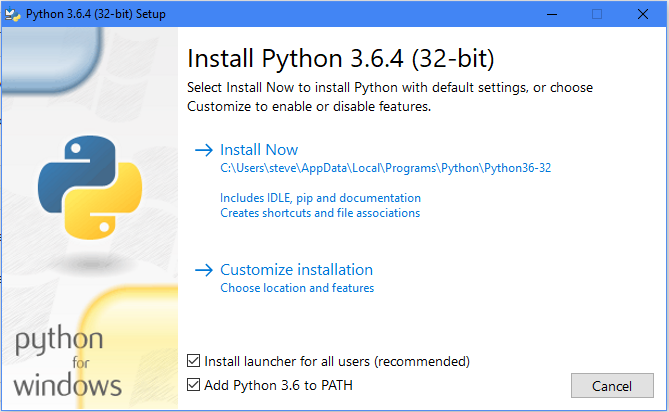
FYI, if you run the Python installer, all required default directories should already be added to PATH.
_Edit:_
BTW, that's fishy.
C:\Users\steve\AppData\Local\Programs\Python\Python36-32Scripts
Python36-32?
 Hrxn
on 12 Jan 2018
Hrxn
on 12 Jan 2018
Something is very wrong in your system or configuration.
If no one else can reproduce this, I'd say this is beyond this issue tracker.
wiiaboo
on 12 Jan 2018
Can you please download the 0.28 from here, extract it to some normal directory without spaces (e.g. c:\testmpv\), and then drag that youtube link onto the mpv.exe inside that dir? I'm thinking maybe there's more than one mpv or ytdl at the path which confuses things. And please use normal shell too (i.e. not power shell).
edit - seems it doesn't include youtube-dl.exe, so please download it from here and put it at the same dir as mpv.
 avih
on 12 Jan 2018
avih
on 12 Jan 2018
@Hrxn
Whoops. Entirely my fault. There is another youtube-dl file I've placed in the mpv directory I downloaded from the official download page(the bolded link). Did not occur to me that it would affect anything.

(I did delete it from the mpv directory once, when asked to use the ytdl_hook.lua script.)
I fixed it by deleting mpv directories I had and reinstalled with just youtube-dl.exe this time.
What led me to download it was how slow mpv (actually youtube-dl.exe) was at retrieving the video (which was fixed by forcing ipv4 in the youtube-dl configs with -4, but didn't find this out until later). So I assumed something was wrong with mpv and it led to this. Sorry about the hassle.
Maybe mention the ipv4 thing in case somebody like me thinks it's mpvs fault.
stevenxed
on 12 Jan 2018
TBH, it should look like this:
C:\Users\Hrxn\AppData\Local\Programs\Python\Python36
Hrxn
on 13 Jan 2018
Only if it's not the 32-bit version.
wiiaboo
on 13 Jan 2018
Well, f.. me sideways, I think you're right.
Hrxn
on 13 Jan 2018
this problem can be solved by upgrading your youtube-dl(if you already have )
to upgrade use this
sudo pip install --upgrade youtube_dl
run it
enjoy
 shebin007
on 20 Sep 2018
shebin007
on 20 Sep 2018
Had the same issues and it was very strange indeed, I could only get it to work by installing youtube-dl from native windows python/pip. The official binary in the mpv folder (2020.06.16.1) wouldnt work and strangely enough would be skipped even though it's earlier in the search path. youtube-dl from cygwin pip also wouldnt work.
 VolatileCable
on 23 Jul 2020
VolatileCable
on 23 Jul 2020
If you youtube-dl executable is just a python file with a shebang, it won't work, because we use CreateProcess, and Windows doesn't understand that.
 ghost
on 23 Jul 2020
ghost
on 23 Jul 2020
No, it's the official release from their website, it's some compiled python binary for windows. The pip install on cygwin is actually a python file and just imports the modules or whatever, while the windows pip install is again a native binary.
I don't really use that youtube-dl function otherwise, as it's kinda cumbersome, especially with the blanket ytdl-format often getting it wrong, so I don't care to investigate this further, but just thought I would share my experience here to maybe help others.
The error message is really undescript and I would imagine wrong, too:
[   0.786][e][ytdl_hook]
[   0.786][e][ytdl_hook] youtube-dl failed: not found or not enough permissions
Related issues
 thebunnyrules
·
3Comments
thebunnyrules
·
3Comments
 yuvadm
·
3Comments
yuvadm
·
3Comments
 jcowgill
·
3Comments
jcowgill
·
3Comments
 WoLpH
·
3Comments
WoLpH
·
3Comments
 532910
·
3Comments
532910
·
3Comments
Most helpful comment
this problem can be solved by upgrading your youtube-dl(if you already have )
to upgrade use this
sudo pip install --upgrade youtube_dl
run it
enjoy