Hello 😄
OS: Windows Vista SP2 Home Premium 32bit, fully updated (all officially released MS updates until April 2017, plus Windows Server 2008 SP2 updates installed manually - more here).
According to System Requirements: or Windows Vista or later, my current OS should still be supported. This is an old, low-resourced, laptop, thus I don't have the luxury of compiling myself mpv.exe windows binaries on this machine (and, AFAICT, MSYS2 is already partially broken on Vista... 😞 ). So I basically rely on the pre-compiled binaries offered at https://mpv.srsfckn.biz/ & https://sourceforge.net/projects/mpv-player-windows/files/32bit/
Of the @lachs0r builds currently on offer:
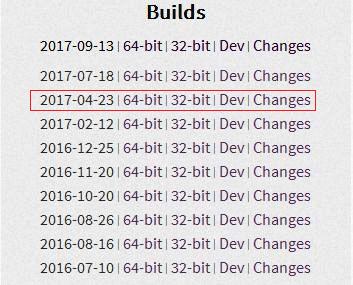
the very last that would run on this Vista machine is the 20170423 one, v0.25.0:
mpv 0.25.0 (C) 2000-2017 mpv/MPlayer/mplayer2 projects
 built on Sun Apr 23 03:06:36 CEST 2017
ffmpeg library versions:
   libavutil       55.61.100
   libavcodec      57.93.100
   libavformat     57.72.101
   libswscale      4.7.101
   libavfilter     6.86.100
   libswresample   2.8.100
ffmpeg version: N-85608-g7c0d12010f
Both subsequent releases, believed to be v0.26.0 & 0.27.0, _fail to run_, throwing:
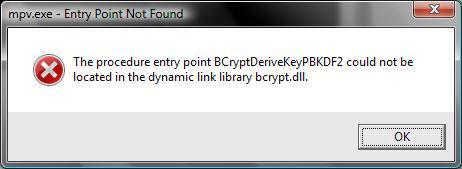
The situation is utterly dire at the @shinchiro SF repo, where all builds currently offered there won't run, with the same error thrown 😭 ; that repo is purged from time to time, with older compiles removed; previous time I fetched anything from there was in early June, 't was mpv-i686-20170603-git-7e889e5.7z and this is the most recent mpv code I have on disk that would run on Vista:
mpv 0.25.0-98-g7e889e5e6 (C) 2000-2017 mpv/MPlayer/mplayer2 projects
 built on Sat Jun  3 09:21:01 UTC 2017
ffmpeg library versions:
   libavutil       55.63.100
   libavcodec      57.96.101
   libavformat     57.72.101
   libswscale      4.7.101
   libavfilter     6.91.100
   libswresample   2.8.100
ffmpeg version: N-44881-g148429f82e
Actually, this issue was first reported over at the SMPlayer forums, right after the maintainer upgraded the mpv package to v0.27.0 ...
To conclude, was loss of Vista support an inadvertent occurrence or intentional decision?
Is the actual mpv code still Vista compatible? if that's affirmative, maybe the incompatibility is created by the compiler chain during compilation :confused: (here's hoping...). Whichever the case, this requires further investigation/clarification...
I'd seriously mourn the demise of mpv on Vista, however many thanks for your excellent coding efforts thus far... 👍
Best regards
 Vangelis66
All 17 comments
That looks like something (maybe even the mingw-w64 CRT if schannel APIs are enabled, which are used for SSL support etc.) now depends on “newer” Windows crypto APIs introduced with Windows 7. That just means we won’t support Windows Vista anymore, as even Microsoft’s extended support has ended.
 mia-0
on 4 Oct 2017
mia-0
on 4 Oct 2017
FWIW it looks like libarchive is what’s loading that function. I have no intention to work around that with my builds, but it looks like it can be built with libnettle instead.
If you want to build mpv for Vista yourself, you should build everthing with OpenSSL or LibreSSL instead of the Windows SChannel/bcrypt APIs, because those will lack functionality on Vista and likely have security vulnerabilities. For instance, modern SSL cipher suites will not work.
mia-0
on 4 Oct 2017
That just means we won’t support Windows Vista anymore, as even Microsoft’s extended support has ended.
FWIW, prior to posting my report, I'd searched this tracker and there's mention of mpv running on Vista as recently as Aug 16th, 2017; so this breakage is a relatively recent thing (despite my last running build dating June 3rd).
And I saw it coming, but why would a dev team's actions be dictated by Microsoft's commercial decisions? In the same vein, Win7 (most popular Windows OS) moves out of ES on Jan 2020; will that OS be dropped just as easily when its time comes in 2 years?
FWIW it looks like libarchive is what’s loading that function. I have no intention to work around that with my builds, but it looks like it can be built with libnettle instead.
If you want to build mpv for Vista yourself, you should build everthing with OpenSSL or LibreSSL
Thank you immensely for this further troubleshooting, but as stated is of little practical efficacy to me; I'd have to borrow a friend's powerful PC/laptop with Win7+ x64, setup a building environment there and convince this friend that his/her machine will be OK being busy for several hours at high CPU consumption just to compile a few MBs of an executable I'll be using (and repeat this process next month when the update arrives...).
instead of the Windows SChannel/bcrypt APIs, because those will lack functionality on Vista and likely have security vulnerabilities. For instance, modern SSL cipher suites will not work.
In theory you are correct, of course, about the state of Vista's SChannel (which goes as far as TLS 1.0, now mostly outdated); but, as I said, I've manually installed WS2008SP2 (post Vista EOL) updates and in KB4019276 MS patched SChannel to TLS 1.1/1.2, making it secure and compliant with the latest stable TLS version (though not with 1.3); what the heck, even Vista's IE9 can be made to implement those secure TLS versions; so I urge you to become a tad more open-minded with regards to the Vista OS; it still has life into it although, admittedly, its prospects are thin once devs (not meaning you personally here) just throw in the towel and succumb to MS's agenda...
I see your decision has been made, I fear whatever I (and fellow Vista users) add to the discussion won't change things - thank you despite.
As a closing note, there's a vast shortage on the internet of older mpv.exe binaries; if kind souls reading this have in their possession builds made from June to mid August 2017 (presumed to be Vista compatible) or can actually compile the latest code in a Vista compatible fashion (see above), chime in and they'll be highly appreciated...
Vangelis66
on 4 Oct 2017
On 2017 M10 4, Wed 04:33:33 CEST Vangelis66 wrote:
And I saw it coming, but why would a dev team's actions be dictated by
Microsoft's commercial decisions? In the same vein, Win7 (most popular
Windows OS) moves out of ES on Jan 2020; will that OS be dropped just as
easily when its time comes in 2 years?
Microsoft’s business decisions actually don’t factor into this at all, but
they’re a welcome excuse, to be frank. Vista is not only ancient and
unsupported—it also doesn’t even register in my download statistics:
https://mpv.srsfckn.biz/stats.html
There is very little incentive to spend effort on maintaining support,
that’s all. I can’t say yet whether Windows 7 will be dropped just as easily
in 2020. It might well be another disaster like Windows XP.
Thank you immensely for this further troubleshooting, but as stated is of
little practical efficacy to me; I'd have to borrow a friend's powerful
PC/laptop with Win7+ x64, setup a building environment there and convince
this friend that his/her machine will be OK being busy for several hours at
high CPU consumption just to compile a few MBs of an executable I'll be
using (and repeat this process next month when the update arrives...).
You could use a Linux VM, too. All my builds are cross-compiled on Linux,
and a minimal setup won’t need much RAM. Plus, it’ll build faster than on
Windows (unless your CPU is so old it doesn’t have hardware virtualization).
As a closing note, there's a vast shortage on the internet of older mpv.exe
binaries; if kind souls reading this have in their possession builds made
from June to mid August 2017 (presumed to be Vista compatible) or can
actually compile the latest code in a Vista compatible fashion (see above),
chime in and they'll be highly appreciated...
The archive of old builds is not exposed on my website because I was literally
too lazy to add a link, but here’s a list: https://0x0.st/Fjr.txt
mia-0
on 4 Oct 2017
The archive of old builds is not exposed on my website because I was literally too lazy to add a link, but here’s a list: https://0x0.st/Fjr.txt
Thank you Martin for this 👍 ; I'm sure many will appreciate it, especially folks still on Windows XP SP3, since the last XP compatible build (mpv-i686-20151029) can be found within that list.
As for me (on Vista), I would need an equivalent list of the SourceForge win32 repo, kindly offered by @shinchiro, to hunt down the very latest compile (after mpv-i686-20170603-git-7e889e5 but before mpv-i686-20170805-git-0389852) that would run on Vista; most sadly, while your own repo has existing but not advertised links to older builds, it well appears that on the SF repo older builds have been actually removed... 😢 😞
you should build everything with OpenSSL or LibreSSL instead of the Windows SChannel/bcrypt APIs
This dawned on me quite some time after you posted this, but as I recall from past FFmpeg compiling experiences (when MSYS2 allowed for this on Vista), OpenSSL and its fork LibreSSL are covered by restrictive (i.e. non-free) licences when included in a compiled binary, so the resultant binaries would be non-redistributable (... in the event I used a friend's computer and compiled there, I would be breaking the licence terms if I transfer the binary over for my own purposes); is this assumption true?
Cheers
Vangelis66
on 4 Oct 2017
You could use a Linux VM, too. All my builds are cross-compiled on Linux, and a minimal setup won’t need much RAM. Plus, it’ll build faster than on Windows (unless your CPU is so old it doesn’t have hardware virtualization).
Or just dual boot so there's no VM overhead at all. Plus the ability to actually run a 64-bit OS on 64-bit hardware (because while it's technically possible that you could be unlucky and have IA32-only hardware in it, my bet is on most Vista laptops having at least a Core 2 or Athlon64 in them).
This dawned on me quite some time after you posted this, but as I recall from past FFmpeg compiling experiences (when MSYS2 allowed for this on Vista), OpenSSL and its fork LibreSSL are covered by restrictive (i.e. non-free) licences when included in a compiled binary, so the resultant binaries would be non-redistributable (... in the event I used a friend's computer and compiled there, I would be breaking the licence terms if I transfer the binary over for my own purposes); is this assumption true?
Pretty sure that's not what was intended by 'non-redistributable'. Especially if you take the binary with you and delete the working directories from said friend's computer. Or just take that stuff with you too, so you can re-use the FFmpeg build files later.
Or you could just use the GnuTLS stack (also requires gcrypt and possibly gpg-error, which are covered much earlier in that guide). No license fiddling there, as I don't include anything that requires using --enable-nonfree.
 qyot27
on 4 Oct 2017
qyot27
on 4 Oct 2017
@Vangelis66 I just built mpv binary which doesn't depend on schannel and bcrypt libs. If you're still in vista, you can try it. Probably it works
mpv-x86_64-20171204.zip
 shinchiro
on 4 Dec 2017
shinchiro
on 4 Dec 2017
@shinchiro wrote:
I just built mpv binary which doesn't depend on schannel and bcrypt libs.
Immensely grateful for your consideration and kindess 👍
If you're still in vista,
... I am...
you can try it. Probably it works
Most unfortunately, my OS architecture is 32bit (x86), but your attached binaries (also indicated by the "x86_64" bit in the zip filename...) are intended for x64 OSes 😞 :sob: :
mpv.exe is not compatible with the version of Windows you're running.
Check your computer's system information to see whether you need a x86 (32-bit)
or x64 (64-bit) version of the program, and then contact the software publisher.
I just had another try at your i686 build over at SF:
https://sourceforge.net/projects/mpv-player-windows/files/32bit/mpv-i686-20171204-git-ff7e294.7z/download,
sadly it continues to throw the same BCryptDeriveKeyPBKDF2 error as reported in my OP of this thread...
Have you already compiled an mpv-i686-20171204.exe binary without the bcrypt lib?
If yes, probably that's what I 'm after... If not, thanks all the same for the efforts (and possible troubles) thus far...
Best regards
Vangelis66
on 4 Dec 2017
Ok. Have another try with this
mpv-i686-20171205-git-fdc3116.zip
shinchiro
on 4 Dec 2017
Have another try with this
mpv-i686-20171205-git-fdc3116.zip
OMG, this is the answer to my prayers:
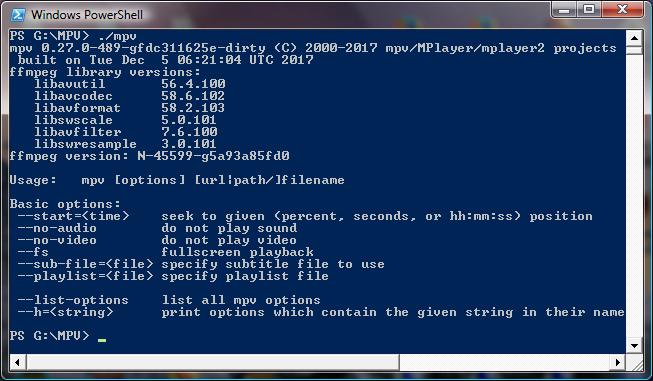
The GUI also starts OK when double-clicked,
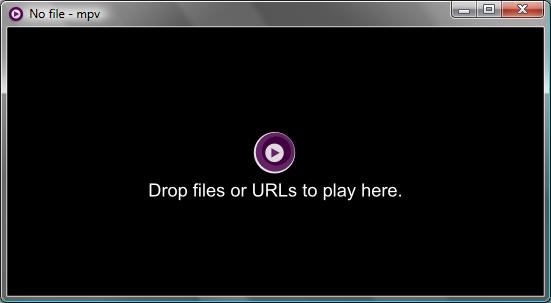
and, most importantly, latest SMPlayer (which, incidentally, _continues to support Vista - so does mplayer_) loads it and uses it fine:

Proof of OS used:

So, in every aspect, a superb compile, the end result of a sterling work on your part 👍 👍 👍 🥇
While I enjoy my early Christmas present, I have two (small?) favours to ask you:
- Could you please upload this compile (together with its 64bit counterpart that I can't test) on your SF repo and clearly mark it as Windows Vista SP2 compatible? I know many Vista die-hards (believe it or not, this is not an extinct species) will find it more easily there and, no doubt, appreciate it a great deal...
- Could you, if it's not that cumbersome, schedule and upload on SF Vista compatible binaries every once in a while, say every 4 months (provided the mpv codebase itself retains Vista compatibility) ?
This would be a great service as, and I speak from experience, it's literally impossible to find on the net pre-compiled mpv windows binaries outside lachs0r's (who won't do it...) and yours repositories...
To conclude, the most appropriate moto that comes to my mind now is
All good things come to those who wait 😄
Many thanks indeed!
PS: One funny thing I noticed is the compilation time of the binary:
built on Tue Dec 5 06:21:04 UTC 2017
Is it possible this refers to your actual timezone and not UTC? Because as I type this, it's currently Tue Dec 5 00:34 GMT 2017 (02:34 in my timezone), so your binary reports a future compilation time :roll_eyes:
Vangelis66
on 5 Dec 2017
That's good. I'll keep this same configuration in my future builds (since I'm already ditched schannel)
Just to confirm something, does it works well without error when running this:
1) mpv --no-config --gpu-context=d3d11 video.mkv and with --hwdec=auto and screenshot
2) mpv --no-config --gpu-context=angle video.mkv
shinchiro
on 5 Dec 2017
Hello again shinchiro 😃
Apologies for not getting back to you sooner; timezone differences and a hectic day out of home...
With regards to your video tests, I am afraid no valuable results could be drawn out of running them;
as stated in my original post, this is a low-resourced laptop with a pre-2008 Intel chipset (onboard gfx card) without any support for HW accelerated video decoding for the h264 codec (only for mpeg1/mpeg2video); as such, only SW decoding is available (which works fine with your mpv build!).
But just to humour you, I decided to conduct those tests with the following 3sec matroska sample file (h264/aaclc): video.mkv.zip
Commands issued:
mpv --no-config --gpu-context=d3d11 video.mkv
mpv --no-config --hwdec=auto --gpu-context=d3d11 video.mkv
mpv --no-config --gpu-context=angle video.mkv
In all three commands, the sample video file was played back successfully, but, as expected, with only CPU decoding; command prompt window screenshot:

FWIW, I have browsed the relevant section of the mpv-manual.pdf file where it's stated that:
In general, it's very strongly advised to avoid hardware decoding unless absolutely necessary,
i.e. if your CPU is insufficient to decode the file in questions.
If you run into any weird decoding issues, frame glitches or discoloration,
and you have --hwdec turned on, the first thing you should try is disabling it.
So for me no hwdec isn't an issue as such...
For someone to provide meaningful results for your tests he/she would have to run Vista SP2 with a (dedicated?) gfx card with support for h264... Sorry if I wasn't that helpful...
Best wishes
Vangelis66
on 5 Dec 2017
Well, that's quite useful info. Looks like current mpv's codebase still compatible with Vista.
(though I dont know whether the failure of ID3D11Device::CreateQuery related with Vista or not)
shinchiro
on 5 Dec 2017
Looks like current mpv's codebase still compatible with Vista.
... I should hope so; the Vista breakage reported in my OP has to do with libarchive, third party lib...
(though I dont know whether the failure of ID3D11Device::CreateQuery related with Vista or not)
It appears that the --gpu-context switch is a relatively new addition to the mpv codebase; as mentioned in the OP, prior to your latest offering
mpv-i686-20170603-git-7e889e5.7z [snipped] is the most recent mpv code I have on disk that would run on Vista
With the above June 2017 binary, --gpu-context isn't parsed as a valid option, hence video playback errors out and aborts:
mpv 0.25.0-98-g7e889e5e6 (C) 2000-2017 mpv/MPlayer/mplayer2 projects
 built on Sat Jun  3 09:21:01 UTC 2017
ffmpeg library versions:
   libavutil       55.63.100
   libavcodec      57.96.101
   libavformat     57.72.101
   libswscale      4.7.101
   libavfilter     6.91.100
   libswresample   2.8.100
ffmpeg version: N-44881-g148429f82e
mpv --no-config --gpu-context=d3d11 video.mkv =>
Error parsing option gpu-context (option not found)
Setting command line option '--gpu-context=d3d11' failed.

Exiting... (Fatal error)
(though I dont know whether the failure of ID3D11Device::CreateQuery related with Vista or not)
Ah, my bad. Apparently timestamp queries are optional on 10level9 devices, so it's a limitation of the driver/hardware rather than the operating system. We should check for support before trying to create them. I'll fix it ASAP.
The dxva2 error might be fixed soon as well. (I'm working on dxva2 support in d3d11 at the moment.)
 rossy
on 6 Dec 2017
rossy
on 6 Dec 2017
The CreateQuery warnings should be fixed in 6ab7e0d465d3
rossy
on 9 Dec 2017
The CreateQuery warnings should be fixed in vo_gpu: d3d11: check for timestamp query support
Thanks to shinchiro's latest compile (to be found on his SF repo), which does include referenced commit, I am able to confirm on my Vista SP2 32-bit laptop:

i.e. the red-lettered warnings are now gone... 👍
The dxva2 error might be fixed soon as well (I'm working on dxva2 support in d3d11 at the moment).
yes, still there:

but please take your time for as long as it's required :smiley:
Happy Holidays to all! 🎅
Vangelis66
on 17 Dec 2017
Related issues
 lightonflux
·
4Comments
lightonflux
·
4Comments
 szg0000
·
3Comments
szg0000
·
3Comments
 thebunnyrules
·
3Comments
thebunnyrules
·
3Comments
 SPDurkee
·
3Comments
SPDurkee
·
3Comments
 WoLpH
·
3Comments
WoLpH
·
3Comments
Most helpful comment
Ok. Have another try with this
mpv-i686-20171205-git-fdc3116.zip