Mpv: Colour in mpv is dimmed compared to QuickTime Player
mpv version and platform
macOS 10.12.3, mpv 0.24.0, pre-built by stolendata
Reproduction steps
Open the attached sample video in mpv and QuickTime Player.
Expected behavior
The colour in mpv looks the same as in QuickTime Player.
Actual behavior
The colour in mpv is dimmed compared to QuickTime Player.
QuickTime Player (good)

mpv (dimmed)

Log file
Sample files
Config
player-operation-mode=pseudo-gui
icc-profile="/Library/ColorSync/Profiles/Displays/Color LCD-F466F621-B5FA-04A0-0800-CFA6C258DECD.icc"
hwdec=auto
log-file=/Users/fumoboy007/Desktop/output.txt
Sample Video
https://www.dropbox.com/s/khnzs60z1wz2fjt/Rec%20709%20Sample.mp4?dl=1
The video is tagged with the colour profile that Finder describes as HD (1-1-1) (Rec 709).
 fumoboy007
All 133 comments
cc @UliZappe
I’ve been reading through those old gigantic threads about colour management. What conclusion did we come to?
fumoboy007
on 17 Mar 2017
@fumoboy007
No final conclusion yet, unfortunately.
Meanwhile, we _do know_ what would be needed to achieve 100% color consistency with QuickTime Player (the only color-managed video player so far).
However, there are two problems:
There is disagreement if QuickTime Player compatibility should be the goal at all. There are basically two points of view: A POV drawing from earlier stand-alone video technology which wants to emulate this technology and its workflow and understands _color management_ as only some (isolated) kind of color control, and a POV drawing from computer technology which understands _color management_ as the more ambitious task of getting consistent color _between_ all applications on a computer (which de facto means ICC color management and QuickTime Player compatibility). After we were almost there achieving this second goal, mpv’s implementation switched to the first POV, trying to emulate classic stand-alone video technology, which produces results different from QuickTime Player.
A QuickTime Player compatible (i.e. ICC compliant) mpv will need LittleCMS (the color management library it uses) to be ColorSync (Apple’s color management library) compatible, which means LIttleCMS would need to adopt the so-called _Slope Limit_ technology which corrects the TRC (tone response curve) for near-black colors. While Adobe, Apple and Kodak all use Slope Limiting in their color management modules, it is not an official part of the ICC spec, just a de facto standard. I’ve written a patch to add Slope Limiting to LIttleCMS, but so far, Marti Maria (the author of LittleCMS) has not wanted to incorporate it in the official distribution, because he worries about patent issues and probably also because he wants to strictly stick to the ICC spec. The mpv project, on the other hand, seems to only want to use the unmodified LittleCMS library.
I’ve been an ardent advocate for the second POV, arguing that color management _on a computer_ means, above all, color consistency between applications and a measurably correct color reproduction, and that it makes no sense to try and emulate isolated video technology from former times including its shortcomings (apart from, maybe, an optional legacy mode).
Unfortunately, I had no time left in the last year, so I could not continue with this discussion. However, I have been doing some additional research which I will hopefully be able to present here when it’s finished.
 UliZappe
on 17 Mar 2017
UliZappe
on 17 Mar 2017
By the way, can QuickTime Player's behaviour be reproduced on another OS somehow, or is this issue strictly macOS only?
 Hrxn
on 17 Mar 2017
Hrxn
on 17 Mar 2017
The only other OS that actually had a QuickTime app was Windows, but that has since been abandoned.
 Cpuroast
on 17 Mar 2017
Cpuroast
on 17 Mar 2017
QuickTime Player is macOS only. An mpv player with correct ICC color management would be the first video player to reproduce this behavior on other operating systems.
Just to avoid misunderstandings: When I wrote about color consistency between all applications, I did _not_ mean between _all video player applications_ (because then this would be a Mac only issue, als long as QuickTime Player is the only video player with this behavior), but really between _all applications_ (with some kind of visual output, of course).
So this is an issue for all operating systems, it’s only that so far only QuickTime Player solves it, and thus only on macOS.
UliZappe
on 17 Mar 2017
The only other OS that actually had a QuickTime app was Windows, but that has since been abandoned.
And that was the _old_ version of QuickTime Player, which was not ICC color managed, either.
UliZappe
on 17 Mar 2017
To elaborate for those who are not deeply into this discussion:
Basically, the issue at hand is the _handling_ of _color appearance phenomena_ (→ Wikipedia).
Color perception is always subjective (color only exists in our heads), but the _CIE 1931 Standard Observer_ model (which ICC colorimetry is based upon) did a pretty good job in mapping the spectral power distribution of the light to human color perception. However, this model works only for standardized viewing conditions, e.g. a certain amount of surrounding light. If viewing conditions change much, the way the color _appears_ to us starts to differ from that model.
For instance, if the surrounding light becomes very dim, we begin to see that the “black” colors on an LCD screen are still emitting light, i.e. they are actually gray, not black (which, BTW, means that the following will not apply to OLED screens …). This makes it seem as if the image has less contrast. To adjust for this appearance phenomenon, the image contrast must be enlarged in dim viewing environments.
_How much_ it must be enlarged to preserve the appearance is more subjective than the basic colorimetry of the _CIE 1931 Standard Observer_ model is, so it’s a matter of debate. (This vagueness also provided a certain amount of leeway for producers of TV sets to deliver an incorrectly high contrast under the disguise of a color appearance correction, as “high contrast sells”.)
But for the sake of the argument, let’s just assume a contrast enhancement is required for dim viewing environments (and CRT or LCD screens).
In the early days of television, video was basically the direct transferral from a live analog video signal to the TV sets of viewers. Since the video studio was bright, but the viewing environment around a TV set was assumed to be typically dim, a contrast enhancement was required. Since there was little video processing technology at the time, the easiest way to achieve this contrast enhancement was the “creative combination” of the physical equipment. Use a CRT with a bigger gamma value than the video camera has, and you get the desired contrast enhancement.
So when the analog TV workflow standardized, the contrast enhancement became “baked in” into the process flow. It didn’t matter much at which process stage exactly the contrast enhancement was performed as long as it was a standardized place and it was guaranteed the the TV set would reproduce the image with enhanced contrast.
Now let’s have a look at modern ICC color management on a computer. Here, the digital process chain is strictly modularized. Incoming image data are converted from the specific behavior of the physical input device to an abstracted, standardized color space (sRGB, Adobe RGG, ProPhoto RGB, Rec. 709, whatever …) and stay in that space until, at the very end of the process chain, they are converted to match the specific behavior of the physical output device.
Between the two conversions and the input and the output stage colors are let completely untouched (unless you want to do color editing, of course). This is absolutely crucial for a working (i.e. inter-application consistent) color management on a computer.
So, if we want to take color appearance phenomena into account on a computer, there is only one architecturally correct place to do this, and this is the conversion at the output stage (i.e. the ICC display profile). Because strictly speaking, if we want to take color appearance phenomena into account, the “physical output device” the ICC display profile describes is not just the monitor per se, but _the monitor in a specific viewing environment_, the complete physical reproduction _system_ that starts with the light emitting device and ends in our heads.
So if we feel a contrast enhancement is required because of dim viewing conditions, we need a specific ICC display profile for this viewing condition. This profile will, of course, affect _all_ ICC color managed applications on this computer exactly in the same way, which only makes sense – _and_ assures that color remains consistent between these applications.
When ICC color management was introduced, computers weren’t fast enough for video color management. So video applications remained a “color island” on computers and still used the old ways of baking in a fixed, assumedly required contrast enhancement. So they stayed incompatible with ICC color managed applications. Additionally, the assumption of a required contrast enhancement makes little sense for computers because a dim viewing environment is certainly not the standard viewing environment of a computer.
This all changed when the ICC color managed QuickTime Player was introduced by Apple (2009, IIRC). It’s remarkable no-one followed suit, so far. Unfortunately, mpv in its current incarnation (last time I had time to look, that is) again follows the old, incorrect ways of baking in an assumedly required contrast enhancement. (What therefore puzzles me is that @fumoboy007 reports that mpv is delivering _less_ contrast than QuickTime Player – last time I checked, it was more. But I’m currently on the road and cannot check. In any case, mpv seems to be incorrectly color managed currently.)
A _psychological_ issue in this whole discussion might be that users have sticked with contrast enhancing video applications while moving to computers with brighter viewing environments, in effect becoming accustomed to a contrast that is too bright, while considering a correct contrast to light. (But again, this is obviously not the issue for @fumoboy007.)
UliZappe
on 17 Mar 2017
What therefore puzzles me is that @fumoboy007 reports that mpv is delivering less contrast than QuickTime Player
it's probably because @fumoboy007 doesn't use a ICC profile generated for his display by a colour management software but just the standard one provided by the OS, which doesn't include all the necessary info that mpv needs. just on a side note, for me it seems pointless to have colour management enabled if one just uses a standard profile that doesn't represent the characteristics of ones display anyway, but yeah that is a whole different problem. see this in his log.
[ 0.330][w][vo/opengl] ICC profile detected contrast very high (>100000), falling back to contrast 1000 for sanity. Set the icc-contrast option to silence this warning.
so it assumes a most likely wrong contrast value. can't expect it to look 'right' like this.
just to prevent any misunderstandings. i don't mean to say that what mpv does currently is right or wrong, since i don't have a clue. the right person to talk to for this (or the person to convince) is @haasn, but you probably know that already.
 Akemi
on 17 Mar 2017
Akemi
on 17 Mar 2017
What therefore puzzles me is that @fumoboy007 reports that mpv is delivering less contrast than QuickTime Player
it's probably because @fumoboy007 doesn't use a ICC profile generated for his display by a colour management software but just the standard one provided by the OS, which doesn't include all the necessary info that mpv needs
I would say that this is correct. All my Macs are color calibrated with an X-Rite i1Display Pro and the color reproduction in QuickTime and mpv is identical. My understanding is that QuickTime makes similar assumptions to mpv according to certain heuristics or flags in the video file (https://mpv.io/manual/master/#video-filters-format).
Haven't tested fully color managed workflows such as with Final Cut Pro X, but I imagine they would work?
No idea about the slope limit thing. Haven't tested Windows either.
I do get the ICC profile detected contrast very high error with my X-Rite profiles though, but it doesn't seem to impact things.
I'm also using the icc-profile-auto option. I'm not sure whether this is required or enabled by default.
 Pacoup
on 17 Mar 2017
Pacoup
on 17 Mar 2017
The difference between quicktime and mpv boils down to the question of how to handle the display's black point.
The approach used by most transfer curves designed for interoperation / computer usage is to keep the calculations the same regardless of the black point; in doing so essentially “squishing” the output response along the axis of the display's output. This has the advantage of being easily reversed and using identical math in all environments, but has the downside of crushing blacks on non-ideal displays. Slope limiting, like the type sRGB has built in (and quicktime implements for pure power curves as well) is a workaround to the black crush issue.
The approach used by conventional television/film, and mpv, is to keep the overall output curve shape the same and squish the input signal along this curve, thus also achieving an effective drop in contrast but without crushing the blacks. This conforms to the ITU-R recommendation BT.1886, which is why mpv uses it. The catch is that to perform the conversions correctly, mpv needs to know what the display's black point is. “Fake” profiles, “generic” profiles, “black-scaled” profiles and profiles which already incorporate stuff like slope limiting lack the required information, so mpv doesn't know how much to stretch the profile by - and these profiles usually already have a “contrast drop” built into them, so mpv will most likely end up double-compensating either way.
So the best solution is to use a real (colorimetric, 1:1) ICC profile that's measured for your device, instead of a “perceptual” pseudo-profile that tries to do contrat drop etc. in the profile already.
That said, it's possible we could do a better job of working around such profiles - for example, instead of assuming contrast 1000:1 and applying the contrast drop based on that, we could instead delegate black scaling to the profile, and simply perform the required slope limiting / gamma adjustment to approximate the BT.1886 shape under these conditions. The QTX values of 1.96 gamma + slope limiting are probably a good choice for a ~1000:1 display, so we could fall back to those values instead.
 haasn
on 17 Mar 2017
haasn
on 17 Mar 2017
The approach used by most transfer curves designed for interoperation / computer usage is to keep the calculations the same regardless of the black point
Yep.
in doing so essentially “squishing” the output response along the axis of the display's output.
Only if the CMM does not incorporate slope limiting for matrix profiles.
The approach used by conventional television/film, and mpv, is to keep the overall output curve shape the same and squish the input signal along this curve,
Which is precisely the point where it becomes incompatible with ICC color management, for the architectural reason discussed above (no color appearance corrections whatsoever _before_ the final display profile conversion – which then affects _all_ applications identically).
This conforms to the ITU-R recommendation BT.1886
Which is aiming at conventional video workflows, not computers, and is architecturally incompatible with ICC color management.
which is why mpv uses it. The catch is that to perform the conversions correctly, mpv needs to know what the display's black point is.
The additional catch is that its color reproduction becomes incompatible with other ICC color managed applications.
So the best solution is to use a real (colorimetric, 1:1) ICC profile that's measured for your device, instead of a “perceptual” pseudo-profile that tries to do contrat drop etc. in the profile already.
But the display profile is the one and only place where perceptual/appearance phenomena should be dealt with in ICC color management. Nothing “pseudo” about that.
The QTX values of 1.96 gamma + slope limiting are probably a good choice for a ~1000:1 display, so we could fall back to those values instead.
It’s also the right choice for ICC compatibility with _any_ display. (Well, without slope limiting in case of LUT display profiles.)
UliZappe
on 17 Mar 2017
@UliZappe @Akemi @Pacoup @haasn
First, let me clarify my situation.
- The video I am testing has its color profile tag set to Rec 709. Both players should recognize this.
- mpv produces a darker image compared to QuickTime Player. (I added screenshots above.)
- My display profile is the default display profile that Apple included in my operating system. It should not matter as the issue is the relative difference between QuickTime Player and mpv, which are both color-managed and thus trying to convert colors to this final display color space.
My understanding of the difference between the players is as follows.
- mpv uses a 2.4 gamma to convert the video pixels to the CIELAB color space (and subsequently to the display color space).
- The
AVFoundationframework that QuickTime Player is built on uses a 1.961 gamma to convert the video pixels to the CIELAB color space.
Is this correct? Do we all agree on the reason? This is the first step.
fumoboy007
on 18 Mar 2017
The video I am testing has its color profile tag set to Rec 709. Both players should recognize this.
Yes, unfortunately this doesn't really tell us anything about the response curve except by implying that it was most likely mastered on a BT.1886-conformant device. So one way or another, BT.1886 is what the mastering engineers are most likely using and therefore the best way to watch this sort of content; and even apple's slope-limited gamma 1.96 more or less approximates the 1886 shape overall as well, so they clearly agree with this.
(Although IIRC, a better approximation would be gamma 2.20 and not gamma 1.96, the former being a far more widespread value. 2.2 vs 1.96 most likely has to do with the perceptual contrast drop issue that UliZappe mentioned earlier)
My display profile is the default display profile that Apple included in my operating system. It should not matter as the issue is the relative difference between QuickTime Player and mpv, which are both color-managed and thus trying to convert colors to this final display color space.
It does matter because QuickTime is built around the needs of this black-scaled pseudoprofile, while mpv is built around the needs of colorimetric (1:1) profiles. QuickTime's usage of slope limited 1.96 as the input curve assumes that this “error” will combine with the display profile's “error” to approximate the BT.1886 shape overall. mpv on the other hand assumes the display profile has no error and uses the exact BT.1886 shape as the input curve instead. Hope that makes sense.
mpv uses a 2.4 gamma to convert the video pixels to the CIELAB color space (and subsequently to the display color space).
It uses a 2.4 gamma shape, but squishes the signal range along the curve to prevent black crush. This is a bit more complicated than input ^ 2.4, but essentially boils down to scale * (input + offset) ^ 2.4.
haasn
on 18 Mar 2017
@fumoboy007
The video I am testing has its color profile tag set to Rec 709. Both players should recognize this.
Well, both “recognize” it, but only QuickTime Player interprets it as an ICC profile for an ICC color managed video application. mpv in its current incarnation is _not_ ICC color management compliant but tries to emulate conventional TV color processing; as @haasn wrote in his reply, Rec. 709 “doesn't really tell us anything about the response curve” (i.e. his POV does not take it seriously as an ICC profile) “except by implying that it was most likely mastered on a BT.1886-conformant device” (i.e. his POV is referring to BT.1886 instead, which is a spec which is _only_ aimed at conventional TV color processing (by intentionally using different tone response curves for input and output devices (in order to achieve color appearance correction)), something completely at odds with the basic concept of ICC color management, as I tried to explain above).
From an ICC color management POV, the current mpv implementation makes as much sense as arguing _This image is tagged with ProPhoto RGB; this doesn't really tell us anything about the response curve except by implying that it was most likely edited on an sRGB display_. :smiling_imp:
BT.1886 cannot be applied to ICC color managed video on a computer, but @haasn keeps trying to do so.
mpv produces a darker image compared to QuickTime Player. (I added screenshots above.)
Ah, thanks for the added screenshots and the clarified wording! I took “dim” to mean _less contrast_, but you actually meant _dark = more contrast_. Yes, that’s completely in line with the expectation that because of its current color management implementation, mpv produces an image that is too dark.
My display profile is the default display profile that Apple included in my operating system. It should not matter as the issue is the relative difference between QuickTime Player and mpv, which are both color-managed and thus trying to convert colors to this final display color space.
Yes, but mpv is not ICC color management compliant as it additionally introduces a contrast enhancement by trying to emulate BT.1886, which is orthogonal to ICC color management.
mpv uses a 2.4 gamma to convert the video pixels to the CIELAB color space (and subsequently to the display color space).
The AVFoundation framework that QuickTime Player is built on uses a 1.961 gamma
… which is indeed the simplified gamma of Rec. 709 …
to convert the video pixels to the CIELAB color space.
Is this correct?
Yes.
Do we all agree on the reason? This is the first step.
We probably more or less do. The disagreement is about which one gets it right.
From my POV it’s (aesthetically) obvious again in your screenshots that QuickTime Player gets it right and mpv is too dark but @haasn seems to feel the other way round. What can be said objectively, however, is that mpv currently breaks the inter-application consistency aspect of ICC color management.
UliZappe
on 18 Mar 2017
@haasn
So one way or another, BT.1886 is what the mastering engineers are most likely using
Only those who still use the conventional TV color processing workflow.
In any case, that’s completely irrelevant for watching video on an ICC color managed video player. The very idea of ICC color management is to abstract from specific hardware conditions. If I watch an image in ProPhoto RGB, I do not have to care at all about what equipment editors of this image used.
and therefore the best way to watch this sort of content;
No, that’s a non-sequitur. As I just said: ICC color management abstracts from this kind of thing.
and even apple's slope-limited gamma 1.96 more or less approximates the 1886 shape overall as well, so they clearly agree with this.
No, Apple says Rec. 709 means (simplified) gamma 1.961, period. Because that’s what the Rec. 709 ICC profile says.
Sometimes it seems to me that even tiny unicorns you’d find in the bit sequence of a video would be an unambiguous hint for you that this video is meant to be watched on a BT.1886 monitor. :smiling_imp:
UliZappe
on 18 Mar 2017
ITU-R BT.709-6 does not actually define the electro-optical transfer function of the display, only the source OETF. It is meant to be used in conjunction with ITU-R BT.1886, where one of the considerations, to quote the recommendation, is:
j) that Recommendation ITU-R BT.709, provides specifications for the opto-electronic
transfer characteristics at the source, and a common electro-optical transfer function
should be employed to display signals mastered to this format,
ITU-R BT.709 actually has a notation on the opto-electronic conversion that states:
In typical production practice the encoding function of image sources is adjusted so that
the final picture has the desired look, as viewed on a reference monitor having the
reference decoding function of Recommendation ITU-R BT.1886, in the reference viewing
environment defined in Recommendation ITU-R BT.2035.
As a final note, in Appendix 2, ITU-R BT.1886 states:
While the image capture process of Recommendation ITU-R BT.709 had an optical to
electrical transfer function, there has never been an EOTF documented. This was due
in part to the fact that display devices until recently were all CRT devices which had
somewhat consistent characteristics device to device.
Essentially, BT.709 defines the OETF but does not provide a common EOTF, which is one of the primary goals of BT.1886.
Because that’s what the Rec. 709 ICC profile says
What is this Rec. 709 ICC profile you speak of? The standard itself does not have one. It seems that the ICC itself provides a Rec. 709 Reference Display profile based on ITU-R BT.709-5 from 2011 that uses a gamma of 2.398.
 JCount
on 19 Mar 2017
JCount
on 19 Mar 2017
OK cool, we all agree (more or less) that the difference between the players is the gamma value used for gamma-decoding the video pixels. Now let’s agree on the technical details. The following is my current understanding.
Gamma
- Luminance is not linear to human perception
- We are more sensitive to relative differences between darker tones than between lighter ones
- Luminance-perception relationship is a power function
- Digital representation (integer) is discrete and limited
- We want our digital values to be linear to our human perception so that the discrete steps are evenly distributed perception-wise
- Apply a power function to the luminance values to get the digital values
- An optical-electro transfer function (OETF) describes the luminance-to-digital encoding function
- An electro-optical transfer function (EOTF) describes the digital-to-luminance decoding function
Rec 709
- Specifies a standard OETF that video capture devices should use
- This OETF was designed to match the natural EOTF of CRTs (described in Rec 1886)
Rec 1886
- Describes the natural EOTF of CRTs (approximately
L = V^2.4) - Used by flat-panel reference displays to output Rec 709 video
- Intended for flat-panel reference display interoperability with CRT reference displays
- Intended to be employed together with Rec 2035
- From Rec 709: “In typical production practice the encoding function of image sources is adjusted so that the final picture has the desired look, as viewed on a reference monitor having the reference decoding function of Recommendation ITU-R BT.1886, in the reference viewing environment defined in Recommendation ITU-R BT.2035.”
- Room illumination is specified to be 10 lux (aka “dim surround”) to match the common viewing environment of the 1950s
- Rec 1886 and Rec 2035 together define a standard for viewing so that video is consistent throughout all phases of production
Personal Computers
- ICC color management facilitates conversion between source color profiles and destination color profiles (in this case, the destination is the display)
- Display profiles are intended to model both the display and the viewing environment such that source images are perceived by the viewer’s brain in the way that the author intended
- Changes in the viewing environment should be reflected by changes in the display profile
Effect of Surround Luminance
- Surround luminance affects the perceived image contrast
- 3 classic surround environments: light, dim, dark
- Images viewed in dim surround and dark surround need a contrast enhancement to be perceived the same way as in light surround
- Dim surround needs a 1.25 gamma boost
Is this correct? Do we all agree on the technical details? Step two.
fumoboy007
on 19 Mar 2017
@JCount
ITU-R BT.709-6 does not actually define the electro-optical transfer function of the display, only the source OETF.
Yep, but ITU-R BT.709-6 per se is no ICC color management spec. OETF and EOTF and specifically the idea that different values could be used to adjust for color appearance phenomena are concepts from the conventional TV world that are incompatible with the ICC idea of keeping the color constant and adjust for color appearance phenomena in the input and output profiles _only_.
It is meant to be used in conjunction with ITU-R BT.1886
In the conventional video world, yes. This is not what we have to deal with if we want an ICC color managed video player on a computer.
ITU-R BT.709 actually has a notation on the opto-electronic conversion that states:
In typical production practice the encoding function of image sources is adjusted so that
the final picture has the desired look, as viewed on a reference monitor having the
reference decoding function of Recommendation ITU-R BT.1886
This quote should make it completely clear that this is an approach to color handling that’s incompatible with ICC color management.
What is this Rec. 709 ICC profile you speak of?
The ICC profile Apple has provided with macOS since it introduced ICC compatible video color management, or any other Rec. 709 ICC profile that is built with the Rec. 709 parameters (not hard to do).
The standard itself does not have one.
Of course. It does not deal with ICC color management.
It seems that the ICC itself provides a Rec. 709 Reference Display profile based on ITU-R BT.709-5 from 2011 that uses a gamma of 2.398.
We don’t need a Rec. 709 _display_ profile, we need a Rec. 709 _input_ profile for correct ICC video color management – because the video data is the _input_. The correct ICC _display_ profile will _always_ be a profile that exactly describes the physical behavior of the specific display it is made for. The idea that you have to use a display with a specific behavior is completely foreign to ICC color management; the very idea of ICC color management is to get rid of such requirements of the conventional workflow.
If you happen to have a computer display that by chance or intentionally has the exact specifications of an ideal ITU-R BT.1886 display (which, as you quoted yourself, is recommended in conjunction with ITU-R BT.709), then you can use the (maybe ill-named) ICC provided Rec. 709 _display_ profile. Since this profile assumes a gamma of 2.398 for the display color space, it neutralizes the gamma 2.398 based contrast enhancement of the BT.1886 display (when converting from XYZ or Lab to the display color space) which is unwanted in ICC color management.
I can only repeat: Color processing in a conventional TV workflow, which architecturally still stems from the analog era, is very different from and incompatible with the ICC color management approach on computers which aims at inter-application consistent and metrologically correct colors, _not_ assuming and “baking in” any kind of alleged “TV like” viewing condition with specific color appearance phenomena. Unfortunately, moving from one approach to the other seems to produce a lot of confusion.
UliZappe
on 19 Mar 2017
@fumoboy007
Gamma
Luminance is not linear to human perception
We are more sensitive to relative differences between darker tones than between lighter ones
This is true, but the significance of this fact for our context is overrated and produces a lot of confusion. There is no direct connection between this fact and the technical gamma of video (and still imaging) reproduction.
In analog video, where there was no digital modelling of visual data and you had to deal with whatever physical properties your devices had, it was kind of a lucky coincidence that the perceptual nonlinearity of humans and the EOTF of CRTs are very close. That meant that _twice the voltage = twice the brightness_. Nice, but nothing more.
In 8 Bit digital color reproduction, it makes sense to use a similar nonlinearity to have more of the limited precision available in the area where the human eye is most sensitive for differences. It is not crucial that the nonlinearity used mirrors the human perception precisely; it’s just about a useful distribution of available bit values.
In 16 Bit (and more) digital color reproduction, it’s completely irrelevant, because enough bits are available. You might as well use no non-linearity at all.
So historical technical limitations aside, we may look at an image reproduction system as a black box. It doesn’t matter at all what internal representation is used, it only matters that output = input.
The _only_ thing that’s relevant for our discussion is the _relative difference_ of contrast required because of color appearance phenomena (i.e. output@surroundingBrightness2 = input@surroundingBrightness1 × appearanceCorrectionFactor), and where is the architecturally correct place to implement it.
Conventional video was an isolated system, and one that assumed a standardized viewing condition, so it was not very important where the appearance correction took place, but on the other hand, you had to deal with whatever devices you had. So the reasoning was:
- TV is always being watched in a dim viewing environment
- Source material is always recorded in a brighter environment
- From 1 and 2 follows that we need a contrast enhancement for appearance correction
- This is most easily achieved by combining a specific OETF curve with an EOTF curve with a higher gamma value.
None of these points are true for consistent color reproduction on a computer and ICC color management. In ICC color management, the reference values are always the absolute, unambiguous, gamma unrelated XYZ or Lab values of the PCS (profile connection space); gamma is a mere internal implementation detail of the various RGB and CMYK color spaces that should be considered to be completely opaque when it comes to implementing appearance correction.
We want our digital values to be linear to our human perception
No. In ICC color management, we want them to be correct and therefore unambiguous absolute XYZ or Lab values. (Lab, of course, was developed with the goal of being linear to human perception.) Linearity is nice when you have only 8 Bit color, otherwise it doesn’t matter (for viewing, that is – editing, of course, is a lot easier with perceptual linearity). What is crucial is unambiguous, absolute values.
OETF and EOTF are concepts from the conventional video world. For historical reasons, you’ll find these expressions in ICC color management, too, but basically, they’re only internals of the input and output profiles and the devices they describe. So, whether you have a gamma 1.8 display with a corresponding display profile or a gamma 2.4 display with a corresponding display profile, ideally does not matter at all in an ICC color managed environment. A specific XYZ or Lab value from the PCS should look exactly the same on both displays.
Rec 709
Specifies a standard OETF that video capture devices should use
_Can_ use in ICC color management. They could use any other parameters as well, as long as there is a corresponding video profile that produces correct XYZ/Lab values in the PCS.
Of course, it is the official standard for HD video and currently the de facto standard for almost all video.
This OETF was designed to match the natural EOTF of CRTs (described in Rec 1886)
No. It was intentionally different, so that the combination with a Rec. 1886 display would produce the desired appearance correction for dim viewing environments.
Rec 1886
Describes the natural EOTF of CRTs (approximately L = V^2.4)
Possibly, but not crucial. What’s crucial is the intended contrast enhancement relative to the Rec. 709 TRC.
Used by flat-panel reference displays to output Rec 709 video
Only in a conventional, not ICC color managed video workflow.
Personal Computers
Display profiles are intended to model both the display and the viewing environment
Yes.
such that source images are perceived by the viewer’s brain in the way that the author intended
That sounds nice, but is hardly achievable. We cannot look inside the head of the author, we don’t know her/his equipment. What if the equipment was misconfigured?
The ICC profile connection space assumes a viewing environment with 500 lx. So the objective goal can only be:
Metrologically exact color reproduction of the XYZ/Lab values of the connection space for a viewing environment with 500 lx plus appearance correction for other viewing environments, if necessary. (As I said, how much correction is required is a matter of debate.)
Changes in the viewing environment should be reflected by changes in the display profile
Yes. This way, all imaging applications are affected in the same way, as it should be.
But there is a big problem: So far, Joe User has almost no way to get appearance corrected profiles for his display.
Effect of Surround Luminance
Surround luminance affects the perceived image contrast
True for CRTs and LCDs (extent is matter of debate). Remains to be seen for OLEDs (since with them, _black_ does mean _no light at all_, not dark gray)
3 classic surround environments: light, dim, dark
With Laptops, tablets and smartphones you could easily add something like _very bright_, i.e. outside.
Interestingly, it is controversial if _dark_ needs even more correction than _dim_, or, on the contrary, less.
Dim surround needs a 1.25 gamma boost
As I said, the exact amount a matter of debate, not least because “dim” is not actually a very precise term (or if it is – 10 lx –, it only covers are very specific situation), and of course, the specific display properties also play a role.
UliZappe
on 19 Mar 2017
Essentially, BT.709 defines the OETF but does not provide a common EOTF, which is one of the primary goals of BT.1886.
More specifically, BT.1886 defines a EOTF that tries to emulate the appearance of a CRT response on an LCD, while preserving the overall image appearance - by reducing the contrast in the input space (logarithmic) in accordance with the human visual model, rather than the output space (linear).
Is this correct? Do we all agree on the technical details? Step two.
Everything you wrote seems correct to me. One thing I'd like to point out is that ICC distinguishes between colorimetric and perceptual profiles. As I understand it, colorimetric profiles should not include viewing environment adjustments, black scaling or anything of that nature - while perceptual profiles should incorporate all of the above.
It's possible that we simply need to start using a different input curve for perceptual and colorimetric profiles? I.e. use a pure power gamma 2.2 (or whatever) + BPC on for perceptual profiles, and BT.1886 + BPC off for colorimetric profiles.
haasn
on 19 Mar 2017
One thing I'd like to point out is that ICC distinguishes between colorimetric and perceptual profiles. As I understand it, colorimetric profiles should not include viewing environment adjustments, black scaling or anything of that nature - while perceptual profiles should incorporate all of the above.
No, these orthogonal issues.
For the sake of easier argumentation, let’s for now limit the color appearance phenomena to the influence of the amount of surrounding light (as all the video specs do). Then, you can easily tell color appearance issues from other color management issues by simply assuming a situation with a 500 lx viewing environment, which would imply no output color appearance adjustment at all, as 500 lx is the reference environmental illuminance of the ICC profile connection space.
In this case, the issue that colorimetric vs. perceptual profiles try to address is still unchanged: What do we do if the source color space is larger than the display color space? Cut off out-of-gamut colors (colorimetric conversion) or reduce the intensity of _all_ colors proportionally until even the most saturated colors are within the display color space (perceptual conversion).
Color appearance correction for viewing environments with an illuminance different from 500 lx is completely independent from that question.
Architecturally, the basic issue is as simple as this: In a correctly ICC color managed environment, color appearance correction affects all (imaging) applications exactly in the same way, and thus is an operating system/display profile task and outside the scope of any specific application. All mpv could and should do is provide metrologically correct Lab or XYZ data to the profile connection space and then simply perform a Lab/XYZ → Display RGB conversion strictly along the lines of the ICC display profile.
All color appearance correction, if required, would be included either in this display profile (which would imply several display profiles for several viewing environments) or in the operating system’s CMM handling of display profiles (which would imply that applications would have to use this CMM when performing color output conversion).
Unfortunately, in the real world it’s neither common to have several display profiles for different viewing environments nor to have a color appearance aware CMM. Apple seems to intend to develop the ColorSync CMM in this latter direction, which, if consistent with an acknowledged color appearance model such as CIECAM 2000, would be a huge step forward in correct computer color reproduction for all kinds of environments, but it’s not there yet, and it would again be Apple only, anyway.
So maybe a lot of the current confusion and inconsistencies stem from the fact that mpv understandably (given the limited real-world conditions) wants to perform its own color appearance correction when from an architectural POV, it shouldn’t.
UliZappe
on 19 Mar 2017
mpv essentially just wants to replicate the output you'd get out of a BT.1886+BT.2035 mastering environment
haasn
on 20 Mar 2017
mpv essentially just wants to replicate the output you'd get out of a BT.1886+BT.2035 mastering environment
Yep, but that’s just another way of saying that _mpv wants to perform its own color appearance correction when from an architectural POV, it shouldn’t_.
A BT.1886+BT.2035 mastering environment is the conventional TV approach that hardwires a specific viewing environment (the one which was considered standard in the 1950ies) and does not care about the ICC color management architecture.
It is simply not ICC color management compliant and as such inappropriate for a video player on a computer.
UliZappe
on 20 Mar 2017
Nice, so we mostly agree on the technical details of gamma, Rec 709/1886/2035, and ICC color profiles. Now let’s try to put all this information together to arrive at a sound solution.
Color Management
- The goal of color management is to reproduce colors according to the author’s intent regardless of the display characteristics.
- Conforming applications do this by converting their images to the ICC profile connection space (i.e. a universal color profile like CIEXYZ or CIELAB) and then to the display profile.
The process looks like this: source color → CIELAB color → display color.
Bringing ICC Color Management to Video
- Traditional video production is not ICC color managed.
- For Rec 709 content, the author decides their intent in a specific standard environment: using displays and viewing environments conforming to Rec 1886 and Rec 2035.
The process looks like this: source color → display color.
- Bringing ICC color management to video means decoupling the author’s intent from the characteristics of the display and the viewing environment.
- To bring ICC color management to video, we need to derive the intermediate conversion to the ICC profile connection space since it is not specified anywhere.
- That means we need to split the EOTF described in Rec 1886 into two functions: one to convert from the source color to the profile connection space, one to convert from the profile connection space to the display color.
- A video application only needs to care about the first function because the second function is described by the display color profile and is applicable to all applications in the OS.
Deriving the Conversion From Source Color to PCS
Apple’s derivation:
- The natural EOTF of CRTs (described in Rec 1886) incorporates a contrast enhancement for “dim surround” viewing environments common in the 1950s (described in Rec 2035).
- The profile connection space does not assume a “dim surround” viewing environment; instead, it assumes a room illumination of 500 lux.
- Use the natural EOTF of CRTs without the contrast enhancement as the function to convert from source color to the profile connection space.
CRT gamma / gamma boost ⇒ 2.45 / 1.25 = 1.96
- 2.45 is in the middle of 2.4 and 2.5, the range of gamma values that CRTs exhibit.
- 1.25 gamma boost is used to enhance the contrast for the classic “dim surround” viewing environment.
The process now looks like this: source color → CIELAB color → display color where the first conversion uses a gamma decoding value of 1.96.
- To emulate the viewing environment described in Rec 1886 and Rec 2035 using ICC color management, incorporate a gamma boost of 1.25 into the second conversion.
- Thus, we can achieve the same standard production viewing environment, but we can now support other viewing environments as well by changing the second conversion via the display profile.
My recommendation:
- It is clear that we should use the natural EOTF of CRTs without the gamma boost as Apple did.
- The exact gamma boost value is probably up for debate.
- Apple chose 1.25. Let’s assume that they did research and testing to arrive at this value.
- Use the same gamma boost value as Apple to be consistent with all other macOS video applications that use the
AVFoundationframework (Safari, Chrome, Messages, iTunes, Photos, etc.)
In other words, I think we should change our gamma decoding value from 2.4 to 1.96.
Do you agree, @haasn and @UliZappe?
fumoboy007
on 20 Mar 2017
Do you agree, @haasn and @UliZappe?
Well, I certainly do, as this has – in effect – been my argument all along.
Just to be fair and to be precise academically:
A video application only needs to care about the first function because the second function is described by the display color profile and is applicable to all applications in the OS.
Strictly speaking, the video application need not “care” about the first function, either, because just as the display color space is defined in the display profile, the video source color space is defined in the video profile, in this case Rec. 709 – if we take the Rec. 709 color space as an “ICC profile”, as ICC color management always does.
The simplified gamma approximation of the Rec. 709 complex tone response curve is 1.961, so from an ICC POV this is the gamma value to use. It is certainly no coincidence that the Apple derivation you quoted resulted in this value and not, let’s say, in 1.95 or 1.97. I think it’s fair to assume that Apple “reverse-engineered” this derivation to demonstrate that even from a conventional video processing POV it’s OK and consistent to switch over to ICC video color management – _if only you agree_ that in this day and age, and on a computer, it makes no sense at all to hardwire a color appearance correction for a typical 1950ies viewing environment.
It’s also important to recall that color appearance phenomena come with a high level of subjectivity, much higher than the CIE colorimetry for the standard colorimetric observer (see e.g. the already quoted Wikipedia article for the abundance of different color appearance models that all try to model color appearance phenomena correctly). There is no way to demonstrate with psychophysical experiments that Apple’s assumption of a factor 1.25 color appearance correction is wrong and it’s e.g. 1.23 or 1.27 instead. The statistical dispersion is simply too large for this kind of precision. So the suggested 1.961 gamma value might not be _the_ correct value, but neither is it wrong, and it’s the value that makes video color processing consistent with ICC color management, so it’s the value of choice.
UliZappe
on 20 Mar 2017
The simplified gamma approximation of the Rec. 709 complex tone response curve is 1.961
@UliZappe This is something I don’t understand. The tone response curve function in HD 709.icc is f(x) = (0.91x + 0.09)^2.222. Through trial-and-error on a graph, I see the closest “simple” approximation to that is f(x) = x^2.09.

(The line on the right is the 1.961 curve; the two lines on the left are the actual curve and the 2.09 curve.)
I don’t think Apple used the inverse of the Rec 709 OETF. Instead, I think they “reverse-engineered” the Rec 1886 EOTF.
fumoboy007
on 20 Mar 2017
To emulate the viewing environment described in Rec 1886 and Rec 2035 using ICC color management, incorporate a gamma boost of 1.25 into the second conversion.
You're assuming this is a common practice. It doesn't seem to be. When I generated my ICC with argyllCMS, it just measured the display's response as-is and did not incorporate a “dim ambient contrast boost” into the curve, at least not as far as I can tell. For this to be a good default practice, it would be required for all profiles to actually exhibit this behavior, no? Also, isn't it up for debate whether or not ambient-sensitive contrast alterations are even required or not? I remember @UliZappe arguing quite vehemently against them.
By the way, you can experiment with this right now. If you want to cancel out the gamma boost of 1.25, you can use --opengl-gamma=1.25 to apply an additional gamma boost as part of the color management process. You might also want to set --icc-contrast or experiment with --vf=format=gamma=gamma2.2 to make mpv use a pure power for decoding.
I don’t think Apple used the inverse of the Rec 709 OETF. Instead, I think they “reverse-engineered” the Rec 1886 EOTF.
For sure. The inverse of the 709 OETF never makes sense. The EOTF is never the inverse of the OETF.
haasn
on 20 Mar 2017
@fumoboy007
This is something I don’t understand. The tone response curve function in HD 709.icc is
f(x) = (0.91x + 0.09)^2.222. Through trial-and-error on a graph, I see the closest “simple” approximation to that isf(x) = x^2.09.
Visual trial and error won’t get you anywhere in a question like this. If you use one of the well-known curve-fitting algorithms (_least square_ etc.), you’ll find that mathematically, the closest approximation is 1.961.
Here is a visual representation of the complex Rec. 709 tone response curve (dots) and gamma 1.961 (line):

UliZappe
on 20 Mar 2017
@haasn
You're assuming this is a common practice.
I don’t think @fumoboy007 meant to say it’s common practice. I think he meant this is what should be done to emulate conventional TV behavior in an ICC compliant way. If so, he is correct.
It doesn't seem to be.
Right. This is our problem if we want mpv to be ICC color management compliant _and_ behave like conventional TV.
For this to be a good default practice, it would be required for all profiles to actually exhibit this behavior, no?
Well, it shouldn’t be the _default_ practice, because the default viewing environment for a computer certainly isn’t a 10 lx environment.
But for special situations such as people wanting to use their computer as a TV set in a dim environment, there should be _additional_ profiles for dim environments that they can switch to in this case.
Which is exactly the problem we have if we want to emulate conventional TV’s results in an ICC color management compliant way: To do this, we need display profiles with color appearance correction for a dim viewing environment (or a CMM which applies appearance correction to display profiles), and Joe User does not have them.
The EOTF is never the inverse of the OETF.
This is wrong, and only shows how much confusion the EOTF/OETF concept creates in the context of ICC color management. Again, it is a historical concept which made sense back when the only way to achieve desired contrast changes was by “creatively” combining equipment with different EOTFs/OETFs.
Of course, in an ICC color management context, you do have the task of converting optical into digital (= “electrical”) data and vice versa, too. But in ICC color management, this process is exactly, metrologically defined and therefore an “internal detail” you need not care about. If you create a precise ICC profile for physical input or output equipment, the “EOTFs” or “OETFs” depend solely on the physical transfer characteristics of the equipment such that the Lab/XYZ values stay the same when moving from the physical into the virtual world and vice versa. You need not even think about them – you can always start from the Lab/XYZ values of the profile connection space and be assured that these are correct.
So if, by chance, you happen to have an input device (scanner, camera, whatever) with an OETF of 2.81 and a display with an EOTF of 2.81, then you’ll have – by coincidence – an EOTF that’s the inverse of the OETF. Of course this can happen. But it’s irrelevant. What is relevant is that you stick to the input and output profiles for conversion to and from the profile connection space, and do not change the Lab/XYZ values in between.
So, in the case of mpv, this means:
video source in Rec. 709 → conversion to Lab/XYZ using the Rec. 709 TRC ≈ gamma 1.961→ keeping Lab/XYZ values constant → conversion to display RGB using the display profile TRC
And this is not what mpv currently does.
UliZappe
on 20 Mar 2017
Ah I see, @UliZappe. Interesting that Apple gave their reasoning as 2.45 / 1.25 = 1.96 instead of approximation of inverse = 1.96.
I did more research. The literature supports the foundation that our logical argument was based on. Here are some excerpts from A Technical Introduction to Digital Video by Charles Poynton to drive this discussion home.
CRT monitors have voltage inputs that reflect this power function. In practice, most CRTs have a numerical value of gamma very close to 2.5. […] The actual value of gamma for a particular CRT may range from about 2.3 to 2.6.
The surround effect has implications for the display of images in dark areas, such as projection of movies in a cinema, projection of 35 mm slides, or viewing of television in your living room. If an image is viewed in a dark or dim surround, and the intensity of the scene is reproduced with correct physical intensity, the image will appear lacking in contrast. Film systems are designed to compensate for viewing surround effects.

The dim surround condition is characteristic of television viewing. In video, the “stretching” is accomplished at the camera by slightly undercompensating the actual power function of the CRT to obtain an end-to-end power function with an exponent of 1.1 or 1.2. This achieves pictures that are more subjectively pleasing than would be produced by a mathematically correct linear system.
Rec. 709 specifies a power function exponent of 0.45. The product of the 0.45 exponent at the camera and the 2.5 exponent at the display produces the desired end-to-end exponent of about 1.13.
Poynton is saying that the Rec 709 OETF is the inverse of the natural CRT EOTF but with a contrast enhancement to help with “dim surround” viewing environments. Removing that contrast enhancement will get us back to the original picture for normal viewing environments.
fumoboy007
on 22 Mar 2017
@haasn I tried --opengl-gamma=1.2239 (2.4 / 1.961 ≈ 1.2239), but now it has too little contrast compared to QuickTime Player!

Any ideas?
fumoboy007
on 22 Mar 2017
Ah I see, @UliZappe. Interesting that Apple gave their reasoning as
2.45 / 1.25 = 1.96instead ofapproximation of inverse = 1.96.
For whatever reason, and in contrast to the still imaging community, the video community is very conservative technologically – just think of the initial reaction to Final Cut Pro X (the first ICC color managed NLE, BTW). So my best guess is that Apple tried to avoid the ICC color management concept (little known in this community) and the kind of lengthy discussion we had/have here on the GitHub mpv forum by providing an explanation within the conceptual boundaries of conventional TV.
UliZappe
on 22 Mar 2017
Any ideas?
Try adding --icc-contrast=100000 or something
haasn
on 22 Mar 2017
@haasn Huzzah! Same contrast!

There is some noise in the guy’s jacket (on the right). Is that because of the issue that @UliZappe mentioned regarding LittleCMS and slope limiting?
fumoboy007
on 23 Mar 2017
Is that because of the issue that @UliZappe mentioned regarding LittleCMS and slope limiting?
Doubtful. If anything, lack of slope limiting would cause black crush. Could perhaps be debanding, you could try disabling that.
Another thing you could try doing to replicate QTX behavior is using --vf=format=gamma=gamma2.2 --opengl-gamma=1.1218765935747068
haasn
on 23 Mar 2017
Another thing you could try doing to replicate QTX behavior is using
--vf=format=gamma=gamma2.2 --opengl-gamma=1.1218765935747068
@haasn Can you explain what that does and why it works?
fumoboy007
on 9 Apr 2017
@fumoboy007 Sure.
--vf=format overrides the detected video parameters with your own choice. Normally such video files get auto-detected as BT.1886 gamma, but with --vf=format=gamma=gamma2.2 you force mpv to pretend it's a gamma 2.2 file instead.
opengl-gamma is a sort of hacky option that lets you provide a raw exponent to apply on top of the decoded signal. (It's similar to --gamma but it uses raw numbers instead of “human-scaled” adjustment values from -100 to 100). Encoding with 2.2 and then applying an 1.1218765935747068 exponent on top is the same as encoding with 1.961 function, because [x^(1/2.2)]^1.1219 = x^[1/(2.2/1.129)] ≈ x^(1/1.961)
Or in less confusing notation, 1.961 * 1.12187... = 2.2. That's where the constant comes from, at any rate. The combination of the two options makes mpv treat the video as being pure power gamma 1.961. But since we don't have an actual --vf=format=gamma=gamma1.961 option, the best we can do is gamma2.2 + --opengl-gamma. (Note: --gamma would work just as well, assuming you could figure out what exact parameter maps to that constant)
haasn
on 10 Apr 2017
Sorry for jumping into the discussion without much prior knowledge on this matter.
I thought I more or less understood the conclusion in the original issue #534 that mpv now assumes the source to be gamma 1.961 instead of 2.2 (?), and this change was exactly to make mpv's output match the color we see in QuickTime Player. So I figured color management-enabled mpv should always match the result in QuickTime since then (assuming the icc profile is not broken and everything works as intended).
Do I understand this wrong? Or it's actually a different matter being discussed here?
 bodayw
on 10 Apr 2017
bodayw
on 10 Apr 2017
@bodayw
I thought I more or less understood the conclusion in the original issue #534 that mpv now assumes the source to be gamma 1.961 instead of 2.2 (?), and this change was exactly to make mpv's output match the color we see in QuickTime Player.
It is correct that we started with QuickTime Player as a reference point, as it’s the only color managed video player software on a computer so far.
It is also correct that we were _almost_ there in achieving this goal. The remaining problem was the black crush issue that turned out to be rooted in the differences between the ColorSync CMS (uses Slope Limiting) and LittleCMS (does not use Slope Limiting) which mpv uses, and the problem that the LittleCMS author does not want to implement Slope Limiting in LittleCMS.
So I figured color management-enabled mpv should always match the result in QuickTime since then (assuming the icc profile is not broken and everything works as intended).
The point is that somewhere down the line (I don’t remember exactly when and why) @haasn decided that QuickTime Player has it all wrong and tried to emulate “classic” stand-alone TV technology instead. This approach is conceptually incompatible with ICC color management on computers, but it’s the current state of mpv color reproduction. (I wouldn’t call it _color management_ because on computers, this implies interoperability with other applications, which is not true for the current mpv.)
I still hope I’ll be able to provide additional evidence that Apple’s approach is the correct way to go, but I still need some time to complete my research and, unfortunately, have little time currently.
Do I understand this wrong? Or it's actually a different matter being discussed here?
No, it’s exactly the matter being discussed here (again), but as I tried to explain, mpv’s current approach does not use QuickTime Player as a reference point anymore.
UliZappe
on 10 Apr 2017
Do I understand this wrong? Or it's actually a different matter being discussed here?
That thread is very old and no longer representative of current mpv behavior. As of today, mpv implements the function described by ITU-R BT.1886, which defines a contrast-dependent gamma curve. (To get the display's contrast value, we use the ICC profile's reverse tables to look up the black point)
haasn
on 11 Apr 2017
Is there any update on this? I would love to have an option that implements what @UliZappe is suggesting. I have no choice now but to use Quicktime if I want correct color which sucks...
 akhenig
on 9 Aug 2017
akhenig
on 9 Aug 2017
If you want the output to be identical to QuickTime, then I recommend either using QuickTime or the hack listed above. I have no plans at this time to implement quicktime emulation in mpv.
haasn
on 10 Aug 2017
If you want the output to be identical to QuickTime, then I recommend either using QuickTime or the hack listed above. I have no plans at this time to implement quicktime emulation in mpv.
Well, it’s not about „QuickTime emulation“. It’s about being ICC color management compliant, which mpv isn’t and QuickTime happens to be, and about reproducing colors correctly, which mpv does not and QuickTime happens to do …
UliZappe
on 10 Aug 2017
BTW, since you seem to be somewhat versed when it comes to QuickTime:
Do you eventually know if/how/when QuickTime makes use of the Metal API?
Asking because OpenGL has stalled on macOS, and this leads to issues, as can be seen with some cases here on the tracker.
Hrxn
on 10 Aug 2017
BTW, since you seem to be somewhat versed when it comes to QuickTime:
Do you eventually know if/how/when QuickTime makes use of the Metal API?
Due to being continuously bugged by time constraints, I’m currently not as up-to-date as I’d like to be.
That being said, there is some terminological confusion as _QuickTime_ as an API is dead and it’s only the QuickTime Player software we’re talking about, which uses _AVFoundation_ nowadays. AVFoundation can certainly be used in conjunction with Metal, but I have no idea whether the current implementation of QuickTime Player makes use of that fact.
UliZappe
on 10 Aug 2017
I came across mpv after trying IINA (which it uses) and VLC in the hopes of finding a video player for macOS with accurate colors. I'm not an expert, but I have definitely noticed that the output in these players is over-saturated and there is a loss in detail which is not the case for QuickTime.
 mohd-akram
on 18 Sep 2017
mohd-akram
on 18 Sep 2017
iina uses opengl-cb where icc-profile-auto=yes isn't supported. it also doesn't implement its own colour management or rather doesn't make use of mpv's icc profile related options (as far as i know). so you don't get any colour management with iina.
Akemi
on 18 Sep 2017
The output seemed identical to me honestly. I used mpv 0.26.0 from MacPorts and IINA 0.0.12.
mohd-akram
on 18 Sep 2017
Well, the basic issue is that the current mpv color handling isn’t ICC color management compliant.
UliZappe
on 18 Sep 2017
@mohd-akram are you using icc-profile-auto=yes? Color management is not enabled by default because on platforms other than OSX it does not make sense to
 pigoz
on 18 Sep 2017
pigoz
on 18 Sep 2017
I added that to ~/.config/mpv/mpv.conf, but it didn't seem to make a difference. I'm using a MBP 13" (2016).
mpv

QuickTime Player

mohd-akram
on 18 Sep 2017
Same problem here. I'm using an MacBook Pro 13" (2016).
Following this thread, after days of tweaking, I'm even more confused than before. I'm currently using mpv 0.27.2 under macOS 10.13.4 Beta (17E160e), and here are some of my findings:
- When applying no tweak like
--iccor--gamma, the rendering result in mpv (above) appeared darker than in QuickTime Player (below), with obvious loss of detail (i.e. black crush).


Setting
--opengl-gamma=1.22386537481 --icc-contrast=100000inmpv.conf(as suggested above) resulted in a brighter and more grayish image (under-contrasted compared to QuickTime Player).

Setting
--vf=format=gamma=gamma2.2 --opengl-gamma=1.1218765935747068(also suggested above, by @haasn) resulted in an image darker than 2. / slightly brighter than QuickTime Player (well-balanced, maybe?).

In any case above, whether
--hwdecor--icc-profile-autowas on or off didn't affect the result. All mpv results had dimmer highlight zones and slightly over-saturated color, compared to QuickTime Player. The hue was also slightly different.
So my question is: Why did tweak 2 and 3 produce different results?
 chinnnki
on 5 Mar 2018
chinnnki
on 5 Mar 2018
So my question is: Hack 2. and 3. should produce the same result but didn't.
My memory is hazy but iirc I suggested --icc-contrast=100000 to work around the use of an ICC profile that already embeds black point compensation. (Which is atypical for ICC profiles in colorimetric mode. It would only make sense in perceptual mode, which mpv doesn't use by default)
haasn
on 5 Mar 2018
Can confirm, vf and gamma multiplier hack do bring gamma to the same level, but there is still a noticeable hue and saturation difference between mpv and Quicktime.
mpv:

Quicktime:

 kkanungo17
on 7 Mar 2018
kkanungo17
on 7 Mar 2018
That might be due to BT.601/BT.709 differences?
haasn
on 7 Mar 2018
Is there a way to get around this?
kkanungo17
on 9 Mar 2018
Try with both --vf=format:colormatrix=bt.601 and --vf=format:colormatrix=bt.709.
haasn
on 9 Mar 2018
Yup, setting --vf=format:colormatrix=bt.601 and --saturation = -5 fixed it.
kkanungo17
on 10 Mar 2018
What kind of file is this? JPEG?
haasn
on 10 Mar 2018
720p 8-bit h.264 yuv420p mp4 video.
EDIT: there may still be a slight difference in the color of the skirt, but my eyes hurt from staring too hard, so I can't tell. Well, it is negligible enough, so I can live with it.
kkanungo17
on 10 Mar 2018
I've noticed that gamma correction is ignored when scaling.
When viewing the image from http://www.ericbrasseur.org/gamma.html?i=1 with halved size (mpv gamma_dalai_lama_gray.jpg --geometry=129x111), it's a grey rectangle. If I adjust the gamma, e.g. by passing --target-trc=srgb or --opengl-gamma=2, it's a brighter or darker grey rectangle.
Edit:
--profile=gpu-hq made it work, thanks.
 HybridDog
on 1 Apr 2018
HybridDog
on 1 Apr 2018
720p 8-bit h.264 yuv420p mp4 video.
mpv assumes 720p and higher is BT.709 (HD) by default, rather than BT.601 (SD). Probably QuickTime does the opposite, for whatever reason. There's no real correct behavior here without proper tagging on the files.
I've noticed that gamma correction is ignored when scaling.
Try using --profile=gpu-hq.
haasn
on 1 Apr 2018
What about the higher than normal saturation?
kkanungo17
on 3 Apr 2018
Maybe TV vs PC range confusion? If this was originally a JPEG and transcoded to H.264 without correct tagging, then the H.264 version will be detected by mpv as BT.709 TV range, whereas the equivalent JPEG would have been BT.601 PC range.
As for which one of those two is the one ultimately corresponding to the correct presentation of the source material, I can't tell you. In either case, correct tagging should fix all of your issues.
haasn
on 3 Apr 2018
It's just a 720p video downloaded from YouTube. I don't know how YouTube tags its videos.
EDIT: QuickTime apparently does this for all my files. (Though all of them are shitty re-encodes of anime/movies)
kkanungo17
on 3 Apr 2018
1.18 is sort of close to 2.2/1.961. (It would actually be gamma 2.3. Not that far off given sRGB's effective gamma 2.2 / technical gamma 2.4)
For sRGB in particular, a single gamma value should be insufficient to capture this phenomenon. (As you can see in the graph)
haasn
on 7 Jan 2019
Hi, I actually just noticed that I made a mistake in that I was calculating the shift in terms of the Y value after it was passed through the matrix calc, so I deleted my previous comment. Let me try that again, I ran an input image that contained sRGB converted from the linear RGB values [0, 255] through the AVFoundation H264 encoding logic to produce a HD video that uses the BT.709 matrix. The goal here was to determine the "boost" that Apple seems to be applying to sRGB data before it is sent to the H.264 encoder. What I found seems to be the best fit is pow(x,1.0/1.14), the graph here shows the Y values. Note that this is a boost amount that would be applied after the sRGB data has been converted to a linear value using the function defined in the sRGB spec. The blue line is X=Y and the quant yellow values are fit by the red values.

 mdejong
on 7 Jan 2019
mdejong
on 7 Jan 2019
The goal here was to determine the "boost" that Apple seems to be applying to sRGB data before it is sent to the H.264 encoder.
How did you get the impression that Apple applies any kind of “boost”? Apple simply performs a sRGB → PCS → BT.709 ICC color conversion, using the BT.709 ICC profile with a simplified gamma of 1.961. Have you tried simply using the ColorSync Utility color calculator with the sRGB and BT.709 ICC profiles?
UliZappe
on 7 Jan 2019
Hello Uli, I generated the data above by encoding a linear grayscale ramp defined in the sRGB colorspace to H264 using AVFoundation APIs that accept BGRA pixels and output YCbCr wrapped as H264. I have attached the example input image I am using and the source code (this is a work in progress) is located on github at https://github.com/mdejong/MetalBT709Decoder. Could you describe the formula used for this "simplified gamma of 1.961" or a reference to someplace where it is defined so that I could reproduce the results exactly? Currently, I am converting from sRGB to linear and then applying this pow(x,1.0/1.14) logic, it seems close to what Apple AVFoundation and vImage does, but it is not exactly the same.

mdejong
on 7 Jan 2019
Here is a quick step by step of the calculations that show the need for a sRGB boost. First conversion is shown, it is incorrect as compared to AVFoundation output. Then, the "boosted" calculation which is very close though not exactly the same (this could be simply due to rounding and range issues).
Gray 50% linear intensity:
sRGB (188 188 188) -> Linear RGB (128 128 128) -> REC.709 (179 128 128)
sRGB in : R G B : 188 188 188
linear Rn Gn Bn : 0.5029 0.5029 0.5029
R G B in byte range : 128.2361 128.2361 128.2361
lin -> BT.709 : 0.7076 0.7076 0.7076
Ey Eb Er : 0.7076 0.0000 0.0000
Y Cb Cr : 171 128 128
Note that this differs from AVFoundation output Y = 179
Color Sync results "sRGB -> Rec. ITU-R BT.709-5"
0.7373 0.7373 0.7373 -> 0.7077 0.7077 0.7077
188 188 188 -> 180 180 180
This shows that the sRGB -> linear -> BT.709 conversion I am using in C code is exactly the same as the output of Color Sync and both of these values are too small as compared to AVFoundation since the output Y using this grayscale value is Y = 171.
Same calculation with sRGB boost applied: pow(x, 1.0f / 1.14f)
sRGB in : R G B : 188 188 188
linear Rn Gn Bn : 0.5029 0.5029 0.5029
boosted Rn Gn Bn : 0.5472 0.5472 0.5472
byte range Rn Gn Bn : 139.5313 139.5313 139.5313
lin -> BT.709 : 0.7388 0.7388 0.7388
Ey Eb Er : 0.7388 0.0000 0.0000
Y Cb Cr : 178 128 128
I am still trying to work out the decode logic, but this calculation above shows that AVFoundation seems to apply a boost to input sRGB values which I am attempting to emulate.
mdejong
on 7 Jan 2019
I agree that sRGB (188, 188, 188) results in BT.709 (180, 180, 180).
However, BT.709 (180, 180, 180) results in Y'CbCr (180, 128, 128) if you use the full 0…255 bit range, as your graphic suggests you do. I fail to see how you arrive at Y'CbCr (171, 128, 128); this would be the correct result for the limited 16…235 bit range.
UliZappe
on 8 Jan 2019
Humm, my code is for BT.709 encoding with limited tv range of Y = [16, 235] but the result you point out is interesting. The graph above is displaying a normalized value where the Y = [16, 235] range is treated as normalized to the [0.0, 1.0] range or the purpose of graphing it, but this value has been converted back to a grayscale value in the [0, 255] range. My actual code only deals with values in terms of a normalized floats. The conversion from sRGB -> linear -> BT709 treats these normalized floats as non-linear (sRGB), linear, then non-linear (BT.709).
mdejong
on 8 Jan 2019
I don’t know which of the AVFoundation APIs you are actually using for your calculation, but IIRC correctly, they don’t project 0…1.0 onto 16…235. But AVFoundation probably takes care of potential overflows, ie. it probably somehow limits Y'CbCR values as soon as they approach 16 oder 235. Other than that, they probably take RGB data at face value. I would assume that if you want sRGB[0…255] processed correctly in AVFoundation, you’d have to project [0…255] onto [16…235] yourself. But it’s quite some time since I worked with these APIs, so I might remember this incorrectly.
UliZappe
on 8 Jan 2019
So, that is a confusing detail about AVFoundation, if you make use of the AVAssetWriter API and pass a sRGB (RGB input range 0 to 255) CoreVideo buffer then it actually maps this to Y = [16, 237]. It is kind of insane and I don't know why Apple does this. If you use vImage to generate BT.709 then it properly sets the range to [16, 235]. But, that is not critical since it results in the generated Y values only being off by a little bit, I have not really found a flag that determines which type of range encoding was used, so it is kind of crazy town attempting to write a decoder :)
mdejong
on 8 Jan 2019
I did not really understand why you are trying to do this. What doesn’t work correctly from your POV? The current (AVFoundation based) QuickTime Player is 100% colorimetrically correct, whatever you throw at it.
UliZappe
on 8 Jan 2019
I want to properly decode the YCbCr values generated in the colorimetrically correct way that Apple writes values into a H.264 file. The trouble I am having is that when I attempt to write C code to convert the YCbCr values into sRGB, the results I get does not match the values decoded by CoreVideo or vImage even with the same input values. It is really quite strange because I implemented the gamma function from BT.709 and validated that it is working properly, but Apple actually does something different for gamma encoding and I am attempting to reverse engineer exactly what that difference is. My results so far seem to indicate that sRGB values are initially boosted by pow(x,1.14) but I am not positive if this is correct or if I made a mistake somewhere. I don't know what these numbers mean, I am just attempting to determine what Apple actually did to implement this since it is really weird. Going back to the conversion example I posted, is Y Cb Cr : 178 128 128 in fact the correct output and why does my implementation not generate that output without the boost added?
mdejong
on 8 Jan 2019
The BT.709 curve is irrelevant for decoding
haasn
on 8 Jan 2019
Perhaps I am just completely missing something, but I was under the impression that the R', G', B' values delivered into the BT.709 matrix transform are gamma corrected values that then need to be converted back to linear values with a reverse transformation. I was basing this on how sRGB provides a gamma encode and a gamma decode function. Is this not actually how BT.709 and H.264 are implemented? Are the values written into the conversion matrix simply linear inputs?
static inline
float BT709_nonLinearNormToLinear(float normV) {

  if (normV < 0.081f) {
    normV *= (1.0f / 4.5f);
  } else {
    const float a = 0.099f;
    const float gamma = 1.0f / 0.45f;
    normV = (normV + a) * (1.0f / (1.0f + a));
    normV = pow(normV, gamma);
  }

  return normV;
}

static inline
int BT709_convertYCbCrToLinearRGB(
                             int Y,
                             int Cb,
                             int Cr,
                             float *RPtr,
                             float *GPtr,
                             float *BPtr,
                             int applyGammaMap)
{
  // https://en.wikipedia.org/wiki/YCbCr#ITU-R_BT.709_conversion
  // http://www.niwa.nu/2013/05/understanding-yuv-values/

  // Normalize Y to range [0 255]
  //
  // Note that the matrix multiply will adjust
  // this byte normalized range to account for
  // the limited range [16 235]

  float Yn = (Y - 16) * (1.0f / 255.0f);

  // Normalize Cb and CR with zero at 128 and range [0 255]
  // Note that matrix will adjust to limited range [16 240]

  float Cbn = (Cb - 128) * (1.0f / 255.0f);
  float Crn = (Cr - 128) * (1.0f / 255.0f);

  const float YScale = 255.0f / (YMax-YMin);
  const float UVScale = 255.0f / (UVMax-UVMin);

  const
  float BT709Mat[] = {
    YScale,   0.000f,  (UVScale * Er_minus_Ey_Range),
    YScale, (-1.0f * UVScale * Eb_minus_Ey_Range * Kb_over_Kg),  (-1.0f * UVScale * Er_minus_Ey_Range * Kr_over_Kg),
    YScale, (UVScale * Eb_minus_Ey_Range),  0.000f,
  };

  // Matrix multiply operation
  //
  // rgb = BT709Mat * YCbCr

  // Convert input Y, Cb, Cr to normalized float values

  float Rn = (Yn * BT709Mat[0]) + (Cbn * BT709Mat[1]) + (Crn * BT709Mat[2]);
  float Gn = (Yn * BT709Mat[3]) + (Cbn * BT709Mat[4]) + (Crn * BT709Mat[5]);
  float Bn = (Yn * BT709Mat[6]) + (Cbn * BT709Mat[7]) + (Crn * BT709Mat[8]);

  // Saturate normalzied linear (R G B) to range [0.0, 1.0]

  Rn = saturatef(Rn);
  Gn = saturatef(Gn);
  Bn = saturatef(Bn);

  // Gamma adjustment for RGB components after matrix transform

  if (applyGammaMap) {
    Rn = BT709_nonLinearNormToLinear(Rn);
    Gn = BT709_nonLinearNormToLinear(Gn);
    Bn = BT709_nonLinearNormToLinear(Bn);
  }

  *RPtr = Rn;
  *GPtr = Gn;
  *BPtr = Bn;

  return 0;
}
If I am in fact implementing this decoding of non-linear input values correctly, then an input of X = Y (each linear RGB value) should be gamma adjusted and then when the BT709_nonLinearNormToLinear() function converts the value back to linear RGB then the graph of the value should be adjusted back to meet the X=Y line. What I am seeing when using AVFoundation and vImage Apple APIs is the following. The blue line here is the X = Y line, the green values are how vImage encodes the input values and the yellow line shows the result of BT709_nonLinearNormToLinear(). It seems that Apple has added the yellow line to boost input values up higher, I can only assume this has something to do with the "dark room" issue with gray levels and video?

mdejong
on 8 Jan 2019
The BT.709 curve is irrelevant for decoding
Not in an ICC compliant implementation of color management (which is the only reasonable color management approach on computers). In ICC color management, you must always come back to exactly the same PCS values (XYZ or Lab) that you started with. Therefore, if you used BT.709 to encode video, you _must_ also use BT.709 to decode video and forward the correct XYZ values to the display color space.
I have no idea why this is so hard to understand.
UliZappe
on 8 Jan 2019
I feel like I've already watched the same debate unfold on here before.
I wonder why..
Hrxn
on 8 Jan 2019
You do? :smiling_imp:
UliZappe
on 8 Jan 2019
I am really not trying to start a flame war or anything :) I just literally cannot find any good information online about how this RGB -> BT709 YCbCr process is meant to work. I wrote code to encode and then decode and I can round trip the value without gamma, but Apple has done something completely different and it is really confusing.
mdejong
on 8 Jan 2019
Perhaps I am just completely missing something, but I was under the impression that the R', G', B' values delivered into the BT.709 matrix transform are gamma corrected values that then need to be converted back to linear values with a reverse transformation. I was basing this on how sRGB provides a gamma encode and a gamma decode function.
Yep, that’s totally correct. Generally speaking, you’d have to transform sRGB to XYZ (the profile connection space) and then XYZ to BT.709; that’s how ICC color management works. But since sRGB and BT.709 share the primaries, that comes down to converting from sRGB tone response curve to linear and then back to the BT.709 tone response curve. The “simplified gamma” I was talking about simply replaces the complex tone response curve of BT.709 with an approximated gamma of 1.961 (just like the complex sRGB tone response curve is sometimes replaced by a “simplified gamma” approximation of 2.2). So there’s nothing special here.
But this obviously isn’t the issue at all, since all approaches seem to agree upon the same BT.709 RGB values (possibly with some rounding errors) derived from given sRGB values.
The issue seems to be the conversion from BT.709 RGB to Y'CbCr. It’s here where the inconsistencies seem to appear.
UliZappe
on 8 Jan 2019
I am really not trying to start a flame war or anything :)
Never mind. We are perfectly capable of starting another one on our own. :sweat_smile:
UliZappe
on 8 Jan 2019
@mdejong
I just literally cannot find any good information online about how this RGB -> BT709 YCbCr process is meant to work.
These are the relevant standards (they're also also the ones that define H.264, but it's more or less irrelevant since that just references BT.709):
The ITU-R started caring a bit more about this stuff when they were re-exploring gamma curves in the context of HDR/UHDTV, and some of their reports on those contain good summarizations of the gamma issue up to this point, specifically:
- https://www.itu.int/pub/R-REP-BT.2246 Section 3.2.5
- https://www.itu.int/pub/R-REP-BT.2390 Section 3
I very highly recommend reading those two sections at the very least, if not the standards themselves (which can be a bit dense).
Edit:
But to summarize the answer: BT.709 is not meant to "round trip". When we are talking about BT.709 (an ITU-R standard with a clear purpose), we are talking about a set of standards based on legacy analog TV practices, as @UliZappe is usually quick to point out. The concept of "round tripping" doesn't apply here, because there is no round trip. There is only the (thorny) path from scene-referred / camera input to display-referred / end viewer. The ITU-R approach is to view, analyze and optimize this end-to-end transformation as a whole. They never talk about any context in which it makes sense to "undo" a step of processing. (Except perhaps PQ/HLG cross-conversions, which are their own can of worms)
Going backwards in this chain of processing steps by starting with the first step in the chain is nonsensical; which is why mpv only considers the last steps (display output) in all of its processing. If you are trying to design a reversible set of color encodings (which is what ICC is trying to do) based on BT.709, you have no real choice but to base your reverse function on the final output step. So if anything, rather than defining your ICC profile that approximates the BT.709 OETF, you want to be approximating the BT.1886 EOTF for typical displays. (i.e. approximating typical mastering reference displays)
I assume whatever apple engineer came up with their implementation of these ICC profiles just ended up glancing through the standards without reading into them in greater depth, and ended up coming to the same (wrong) conclusion that BT.709 was like sRGB in that the display was supposed to reverse this curve exactly, and sort of went from there. But those two standards are very different and difficult to compare.
This figure from the BT.2246 report I linked above illustrates how the BT.709+BT.1886 combined OOTF ends up preserving the scene near-linearly from camera to display, which is why it's stuck around for so long (despite the ITU-R admittedly not really understanding this interaction previously):

If you take only the BT.709 function into consideration, this near-linearity ends up destroyed. And recognizing that these are not scientifically accurate sources (e.g. calibrated cameras or scanners) but rather the output of human artists whose intent depends on what they saw on their screens at the time, mpv believes it is the most important to preserve as closely as possible on our screens what they saw on theirs. (Which is why we do BT.1886-based black point adaptation instead of relying on the CMM to do it for us)
Any of these color management discussions ultimately boil down to this question, and so far nobody really has an answer to them: "Which approach better approximates the reality of video mastering as performed in studios worldwide?", as well as other content producers such as video game developers, digital artists, web designers, etc. (Recognizing that many videos on user-driven content sites are most likely screen captures of these)
haasn
on 8 Jan 2019
Geesh, you are blowing my mind man. I have spent days and days reading video docs and writing code to attempt to deal with this weirdness and at this point I think it might be better to just give up and do something crazy like just encode with the sRGB encode and decode gamma curves. I would settle for some logic that would just reproduce the same values that Apple splits out when decoded a video that was also encoded with Apple software. What I think is going on with the Apple approach is best shown with this graph, the blue line is X=Y linear, the yellow line is the values encoded as BT.709 2 part gamma, and the green line is the special "boost" that Apple adds to incoming sRGB values.

mdejong
on 8 Jan 2019
The “simplified gamma” I was talking about simply replaces the complex tone response curve of BT.709 with an approximated gamma of 1.961 (just like the complex sRGB tone response curve is sometimes replaced by a “simplified gamma” approximation of 2.2). So there’s nothing special here.
I don't think it's okay to simply dismiss this. The "simplification" from complex curve with linear segment to pure power curve actually significantly alters the curve's behaviour near the black point. Just to make it clear, curve-matching by numerical analysis in linear light is the wrong approach. Our perception is quasi-logarithmic, so if anything, you want to minimize the sum of log(input) - log(output) (or phrased another way: "the product of relative errors input / output"). When you do this, you notice the linear segment has a significant effect to the black point in log space, as you can see in that figure 20 I posted above. Which, incidentally, is why Apple is actually right in choosing a pure power curve for their "BT.709 simplification", since by decoding the values (which have been encoded with the linear segment) using a gamma function without a linear segment, they are getting the same black point behavior (in XYZ space) as you would have seen on the screen in an ITU-R mastering booth. (Although I wouldn't call it a "BT.709 simplification" at that point. I'm not sure whether they ended up doing the right thing by accident or not, although the fact that this is the only way it all works out is most likely relevant.)
Simple trial by experimentation is enough to arrive at this conclusion, which is what both the ITU-R and Apple seem to have done (seemingly independently). The only major disagreements at this point are:
How do you handle black point adaptation? The ITU-R defines a "perceptually driven" process that tries preserving scene contrast perceptually, which is why they do black point adaptation in the source space (gamma). The alternative is doing black point adaptation in the output space (linear), which is what many CMMs choose to do since it allows doing BPC in the PCS. mpv does the former.
Do you choose to include any gamma boost to compensate for the effects of the viewing environment on our perception, which are designed into the BT.709/BT.1886 system (with an overall system gamma of about 1.2)? mpv supports this option, using
--gamma-factor.
haasn
on 8 Jan 2019
The “simplified gamma” I was talking about simply replaces the complex tone response curve of BT.709 with an approximated gamma of 1.961 (just like the complex sRGB tone response curve is sometimes replaced by a “simplified gamma” approximation of 2.2). So there’s nothing special here.
I don't think it's okay to simply dismiss this. The "simplification" from complex curve with linear segment to pure power curve actually _significantly_ alters the curve's behaviour near the black point.
I completely agree in general. I only referred to the question why in the given example the Y' of Y'CbCr is ~171 in one case and ~180 in the other. _This_ is nothing that could result from the difference between the complex and the simplified TRC of BT.709.
UliZappe
on 9 Jan 2019
So, I believe that I finally figured out what was going on with my export using AVFoundation, what appears to have happened is that I attempted to export sRGB pixels using AVFoundation/vImage and instead of using the BT.709 gamma curve, the actual data that looked "boosted" was actually just the original sRGB gamma curve encoded pixels being written into the BT.709 matrix transform without first being converted to the BT.709 gamma space. This was causing what looked like a boost but it was actually just producing invalid data since a player would assume that the BT.709 gamma encoding was used as opposed to the sRGB gamma curve. This was caused by setting the colorpace property on a CoreVideo pixel buffer, that seems to be an error. The apple docs are so strange and murky on this point and there are no examples that show this actually working that I have been able to find. Here is visual that helped me understand what was actually going on. The quant values inside the larger purple line show the original sRGB gamma encoded values, the quant values inside the reddish line what identity X=Y linear values should be if encoded properly with the BT.709 colorspace. Finally, the green quant values around the blue X=Y line show the result of reversing the BT.709 gamma encoding on the encoded values which are now correctly emitted with the BT.709 colorspace setting.

mdejong
on 10 Jan 2019
Glad you could figure it out. :blush:
UliZappe
on 10 Jan 2019
The “simplified gamma” I was talking about simply replaces the complex tone response curve of BT.709 with an approximated gamma of 1.961 (just like the complex sRGB tone response curve is sometimes replaced by a “simplified gamma” approximation of 2.2). So there’s nothing special here.
I don't think it's okay to simply dismiss this. The "simplification" from complex curve with linear segment to pure power curve actually _significantly_ alters the curve's behaviour near the black point.
I completely agree in general. I only referred to the question why in the given example the Y' of Y'CbCr is ~171 in one case and ~180 in the other. _This_ is nothing that could result from the difference between the complex and the simplified TRC of BT.709.
On the subject of the 1.961 gamma applied at decode time, there does seem to be a real problem with this approach in that computer generated colors that have very different R'G'B' primaries will become very different as X approaches 0. For example, the sRGB value (5 5 5) becomes REC.709 (18 128 128), when decoded with the BT.709 2 part gamma curve the result is (6 6 6). But, when a simplified 1.961 gamma is applied the value gets pushed to zero. This is going to lose information in dark regions, the following graph shows the effect, the blue line is X=Y and the yellow line is where BT.709 values would be gamma shifted. Note the purple line which shows the gamma adjusted values being operated on with the simplified 1.961 gamma, a significant number of values go to zero as the graph approaches zero. It seem that the lack of a linear segment here is losing a lot of information in the very dark areas.

mdejong
on 10 Jan 2019
But, when a simplified 1.961 gamma is applied the value gets pushed to zero.
No it doesn't. It gets decoded to about 0.0001001633.
haasn
on 10 Jan 2019
Note the purple line which shows the gamma adjusted values being operated on with the simplified 1.961 gamma, a significant number of values go to zero as the graph approaches zero. It seem that the lack of a linear segment here is losing a lot of information in the very dark areas.
True, which is why Apple’s CMM uses a technique called _Slope Limit_ (see above in this thread) to kind of force a linear segment during conversion in the CMM itself, independent of the specific TRC that is used. This fixes the loss of detail in dark regions.
UliZappe
on 10 Jan 2019
Hello again. I did some more detective work mucking around with Apple's color management APIs and I was able to discover the exact constants that Apple is using for HDTV -> sRGB in Quicktime X/AVFoundation. There is a 1.96 like gamma curve, but the black levels are defined with a linear slope of 16 in the very low range. These two functions capture the logic.
#define APPLE_GAMMA_196 (1.960938f)

static inline
float AppleGamma196_nonLinearNormToLinear(float normV) {
  const float xIntercept = 0.05583828f;

  if (normV < xIntercept) {
    normV *= (1.0f / 16.0f);
  } else {
    const float gamma = APPLE_GAMMA_196;
    normV = pow(normV, gamma);
  }

  return normV;
}

static inline
float AppleGamma196_linearNormToNonLinear(float normV) {
  const float yIntercept = 0.00349f;

  if (normV < yIntercept) {
    normV *= 16.0f;
  } else {
    const float gamma = 1.0f / APPLE_GAMMA_196;
    normV = pow(normV, gamma);
  }

  return normV;
}
The following attached images show the default output when decoding the Quicktime HD test video on iOS (uses CoreImage and CoreVideo logic and matches output of QTX), then the output of my Metal shader that makes use of non-linear to linear methods mentioned above. For comparison, the final image is what this test video decodes to with the BT.709 defined gamma (this final image is basically what mpv decodes as). Note that difference in the going to black area just above the colors, one can see the white boxes appearing at some point after the 50% of the screen width mark, the best match is with the slope of 16.


mdejong
on 23 Jan 2019
I did some more detective work mucking around with Apple's color management APIs and I was able to discover the exact constants that Apple is using for HDTV -> sRGB in Quicktime X/AVFoundation. There is a 1.96 like gamma curve, but the black levels are defined with a linear slope of 16 in the very low range.
Yep, both is true (gamma 1.961 in fact), but both was already discussed here and in fact already correctly implemented in mpv and my Slope Limit patch for Little CMS before @haasn decided it would be a good idea to emulate an ancient, incorrect, out-of-date technology instead which is completely incompatible with computer color management as we know it. :smiling_imp:
1.96(1) is simply the closest gamma approximation of the complex Rec. 709 TRC, although Apple went to great lengths to argue for it independently from that mathematical connection in the paper where they introduced it when they introduced video color management on computers (see the post from @fumoboy007 on 20 Mar 2017 above, paragraph “Deriving the Conversion From Source Color to PCS”). They probably did this to soothe the many video traditionalists (the video community seems to be incredibly retro oriented technologically). You will find 1.96 and 1.961 over and over if you search this thread.
With regard to slope limiting, note that this is not an Apple only behavior. Both Apple’s ColorSync CMM and the Kodak CMM do this, while the Adobe CMM also implements it, but uses 32 instead of 16 for the linear segment. Little CMS is probably the only of today’s relevant CMMs that does not implement it. Unfortunately, at least 3 years ago, Marti Maria (the author of Little CMS) did not want incorporate my patch in the main branch of Little CMS for fear of copyright issues (at least this was his explanation; he might have also disliked to “pollute” the “clean” CMM with the very “pragmatic” industry approach of slope limiting).
(this final image is basically what mpv decodes as)
Uhm, no – certainly not with the default parameters. Which parameters do you refer to?
UliZappe
on 24 Jan 2019
@mdejong Last comment seems incorrect. By default, mpv does not perform color management at all. It simply outputs the encoded colors as-is, and relies on the display implementing the correct transfer function implicitly. That looks like this:

If you explicitly set target gamma 2.2 (which is what mpv falls back to for e.g. HDR content), you get this:

And this is what it looks like when using an sRGB ICC profile as the target (assuming a 1000:1 contrast), which would be more suitable for a PNG:

Observe that opening this png in krita displays identically to what I get in mpv if I let it use my monitor's native display profile (krita on top, mpv on bottom):

haasn
on 24 Jan 2019
Interestingly, for a typical 1000:1 contrast, gamma 1.961 is a very good fit for BT.1886 at the low end, whereas gamma 2.2 better approximates it everywhere else:

For the TRCs other than BT.1886, black point compensation was done as if the CMM performs linear scaling in the PCS.
haasn
on 24 Jan 2019
And this is what it looks like if we add slope limiting. As I've pointed out before, adding the linear section to the 1.961 curve does indeed make it almost exactly match Bt.1886 at the low end:

haasn
on 24 Jan 2019
Finally, this is what the end-to-end response looks like, if we assume the input was encoded with the exact (piece-wise) BT.709 function. (Note that now, the "Inverse BT.709" graph is identical to what a purely linear function would look like, i.e. 1:1 end-to-end response)

We can indeed verify the claims that the BT.709+BT.1886 interaction near perfectly simulates a gamma drop of 1.2. We can also see that the apple curve (pink) is pretty far from the ideal curve (green) on the low end (below 10% or so). In fact, they're much closer to the gamma dropped curve (black) than the "linear" curve.
haasn
on 24 Jan 2019
@mdejong Last comment seems incorrect. By default, mpv does not perform color management at all. It simply outputs the encoded colors as-is, and relies on the display implementing the correct transfer function implicitly. That looks like this:
Ahh, yes I looked back at the output and it seems I had dragged the wrong movie file into mpv. What that 3rd image shows is reversing the BT.709 segmented gamma function exactly. The point of that was that using this exact set of 1.96 constants generated an output that matches QT X. I actually only need compatibility with the was Apple does things for my purposes.
mdejong
on 24 Jan 2019
Finally, this is what the end-to-end response looks like, if we assume the input was encoded with the exact (piece-wise) BT.709 function. (Note that now, the "Inverse BT.709" graph is identical to what a purely linear function would look like, i.e. 1:1 end-to-end response)
We can indeed verify the claims that the BT.709+BT.1886 interaction near perfectly simulates a gamma drop of 1.2. We can also see that the apple curve (pink) is pretty far from the ideal curve (green) on the low end (below 10% or so). In fact, they're much closer to the gamma dropped curve (black) than the "linear" curve.
Re this 1.2 "gamma drop", I can see how the Apple 1.96 + slope logic is rendering recorded video input in a way that looks more representative of the original scene. Does the "gamma drop" you describe counteract a "dark room" boost applied to video? The reason I am asking is because I would like to encode computer generated RGB values and I am not sure if encoding with the BT.709 segmented curve makes sense. Is the more correct approach to actually encode RGB using the Apple 1.96 segmented gamma curve so that exactly reversing the encoded values would return the original RGB values.
mdejong
on 24 Jan 2019
Does the "gamma drop" you describe counteract a "dark room" boost applied to video?
The gamma drop is the "dark room boost" applied to the video.
The reason I am asking is because I would like to encode computer generated RGB values and I am not sure if encoding with the BT.709 segmented curve makes sense.
It doesn't. Encode with sRGB.
haasn
on 24 Jan 2019
Does the "gamma drop" you describe counteract a "dark room" boost applied to video?
The gamma drop _is_ the "dark room boost" applied to the video.
The reason I am asking is because I would like to encode computer generated RGB values and I am not sure if encoding with the BT.709 segmented curve makes sense.
It doesn't. Encode with sRGB.
What are you basing this statement on? Encoding with sRGB would introduce yet another slightly different "black level" linear segment at the bottom and a slightly different gamma curve (offset 2.2 gamma) into the mix. Decoding a sRGB gamma encoded value with 1.961 segmented curve would generate something, but the RGB values would not be exact inverted values as compared to the original RGB values. I can only assume that the original camera hardware that encodes to the BT.709 format also applies this "gamma boost" and that this is why Apple implemented decoding the way they did.
mdejong
on 24 Jan 2019
Decoding a sRGB gamma encoded value with 1.961 segmented curve would generate something, but the RGB values would not be exact inverted values as compared to the original RGB values.
To clarify: You should do both encoding and decoding in sRGB. The reason is because it's (mostly) unambiguous, invertible, and widely supported. It's also designed for use with digital media and computer monitors, and in particular therefore makes a good fit for "generated" RGB content, which is typically assumed to be in sRGB anyway.
I can only assume that the original camera hardware that encodes to the BT.709 format also applies this "gamma boost" and that this is why Apple implemented decoding the way they did.
That's not really how it works in practice. Your camera would typically record to some vendor-specific logarithmic HDR color space like S-Log or V-Log, or even just raw floating point values (e.g. in OpenEXR frames, which is what the source footage for e.g. Tears of Steel is available as). This gets tone mapped, graded and encoded to BT.709 as part of the mastering process, by doing subjective adjustments on a reference display in a reference viewing environment.
If you follow ITU-R standards such as BT.709, then this reference viewing environment is essentially a pitch black room, and the reference display is modelled by BT.1886.
haasn
on 24 Jan 2019
I cannot both encode and decode with sRGB as a single solution because video already encoded as BT.709 assumes that a BT.709 matrix is used to convert from YCbCr to RGB and this data is encoded with the BT.709 piecewise gamma function. Encoding to sRGB is non-standard and it will not display correctly in QT X or any other Apple tools (like preview in Xcode).
mdejong
on 24 Jan 2019
Encoding to sRGB is non-standard and it will not display correctly in QT X or any other Apple tools (like preview in Xcode).
It's not non-standard, and if QT X doesn't support sRGB then I think it's time to remove QT X from your workflow.
haasn
on 24 Jan 2019
I am trying to achieve compatibility with the method that Apple uses to encode and decode video. It is interesting to implement a completely different approach, I will most likely implement a sRGB encoding and decoding approach for a completely different piece of software. Just ignoring the Apple approach and implementing a non-standard approach is not an option. What I am trying to address is how Apple actually implemented encoding and decoding, I am now convinced that I have the exact decoding approach down, but the encoding from RGB is still a bit of a mystery.
mdejong
on 24 Jan 2019
Just ignoring the Apple approach and implementing a non-standard approach is not an option.
Funny considering Apple is the only one implementing anything non-standard. :p
haasn
on 26 Jan 2019
I created this graph to show the exact differences between grayscale values as sRGB, BT.709 (with no dark room boost), and Apple gamma 1.96 with a linear segment. The approach I settled on is to encode RGB data using the 1.96 gamma curve so that when decoded with Apple AVFoundation APIs the results are as close to each original pixel as closely as possible.

mdejong
on 26 Jan 2019
Just ignoring the Apple approach and implementing a non-standard approach is not an option.
Funny considering Apple is the only one implementing anything non-standard. :p
So, I just discovered that it is possible to encode YCbCr and explicitly tag it with ffmpeg as using the sRGB gamma curve and still have QuicktimeX player display it properly. This approach actually provides slightly better numerical results when doing a round trip from sRGB input pixels -> BT709 encoded -> sRGB because the gamma curve represents the original data more closely. It is not a huge difference in terms of precision, but it makes a bit of difference in some cases like really smooth gradients. Here is an example ffmpeg command line:
ffmpeg -y -i osxcolor_test_image_srgb.y4m -c:v libx264 -preset:v slow -profile:v main -tune:v animation -crf 23 -color_primaries bt709 -colorspace bt709 -color_trc iec61966_2_1 osxcolor_test_image_srgb.m4v
Note how passing -color_trc iec61966_2_1 above will tag the YCbCr data as having been encoded from the sRGB gamma function. This encoded data can then be decoded by Apple APIs since the sRGB curve is supported as a gamma function. This also means that ffmpeg knows how to decode the data properly which is not the case when gamma 1.961 encoding data.
Original PNG:

Encoded M4v as ZIP:
osxcolor_test_image_srgb.m4v.zip
mediainfo osxcolor_test_image_srgb.m4v
Color range                              : Limited
Color primaries                          : BT.709
Transfer characteristics                 : sRGB/sYCC
Matrix coefficients                      : BT.709
Color range : Limited
Now use full range :p
haasn
on 7 Feb 2019
Color range : Limited
Now use full range :p
I have not found any way to encode "full range" data in a way that can be decoded on iOS devices. If you can provide an encoder or approach that works with 420 and main H.264 profile then I would be interested to see it working.
mdejong
on 7 Feb 2019
(Isn't this because of hwdec=auto? #6546)
 zc62
on 28 Mar 2019
zc62
on 28 Mar 2019
very unlikely since the video used in the first post, if you referring to that, is limited range.
[ 44.970][v][vd] Decoder format: 1920x1080 videotoolbox[nv12] bt.709/bt.709/bt.1886/limited CL=mpeg2/4/h264
Edit: I've discovered that BT.1886 does result in nearly identical results as sRGB on one of my monitors, but not if I start mpv on the other monitor. I'm not sure why it can detect one monitor's ICC profile and not the other's, but the logs suggest that it errors out trying to retrieve the second monitor's ICC profile.
I think this is the source of me thinking that the BT.1886 EOTF was incorrectly implemented in mpv, and I no longer believe this. For historical significance, I'll leave my original comment below.
I was trying to find out why mpv doesn't implement the Rec. 709 transfer curve, instead only implementing (and incorrectly at that) BT.1886, and I find... A whole lot of people talking in abstractions and not actually doing the math to double check.
BT.1886 depends on the contrast ratio of the monitor in question. Yes it uses a power of 2.4, but BT.1886 is only ever 'x^2.4' when you have an infinite contrast ratio, such as an OLED monitor in a dark room. Having done the math on my own monitor using a colorimeter, I found that the resulting BT.1886 curve is almost identical to sRGB... For my monitor only.
Lets do the math to prove that. I'll be doing this with Qalculate, a desktop calculator program which has graphing and other nice features.
The ICC profile I generated for my monitor (using a colorimeter) indicated at the time a luminance value of 250.95 cd/m². This is mapped to a Y value of 100 for the white point. The black point, meanwhile, has a Y value of 0.1022. We multiply that by the white point luminance divided by 100 to get the luminance of the black point, and arrive at 0.2564709 cd/m².
Now, lets look at the equation defined in BT.1886 (with variables expanded and equations put in an order that makes sense):
brightness = luminBlack^(1/2.4)/(luminWhite^(1/2.4) - luminBlack^(1/2.4))
contrast = (luminWhite^(1/2.4) - luminBlack^(1/2.4))^2.4
luminance = contrast*max(input + brightness, 0)^2.4
Overall, that means:
luminance = ((luminWhite^(1/2.4) - luminBlack^(1/2.4))^2.4)*max(input + (luminBlack^(1/2.4)/(luminWhite^(1/2.4) - luminBlack^(1/2.4))), 0)^2.4
So lets put that into Qalculate, and plug in our white and black luminances... So, it says that overall, the curve should approximately be:
218.12005*max(input + 0.060160214, 0)^2.4
Lets graph that, and also scale it so that 0.2564709 maps to 0, and 250.95 maps to 1.0... And compare it to Rec. 709 and sRGB:
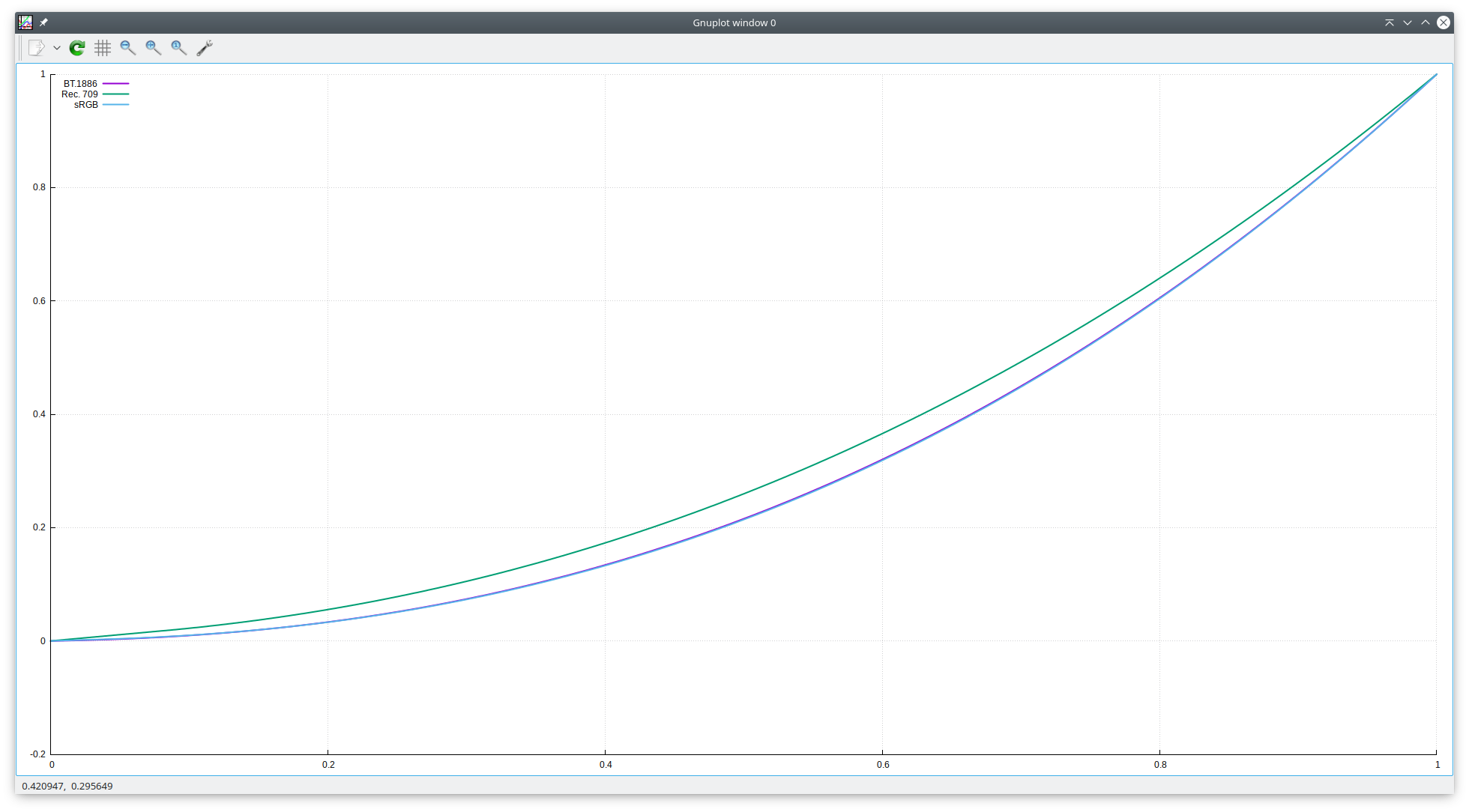
Final equations:

(Note: I don't know why it shows negative values; I've tried narrowing the plot to a range of 0 to 0.00000001 and it still has them converge perfectly on zero, but having some room under them. I'm guessing some rounding issue where it turns into -0.0 due to floating point weirdness.)
So, when I give mpv my color profile with all sorts of data, and it claims to use BT.1886 for Rec. 709 content, I would expect almost identical output from it compared to if I had specified that the content uses sRGB. This is clearly not the case, so you guys must not be implementing the equations correctly.
By the way, interesting thing about Rec. 709: the original draft had no mention of BT.1886, because BT.1886 was a standard that came out later and is focused on calibrating reference monitors so that they perceptually are the same as each other, and roughly the same as an old CRT, despite widely different contrast ratios. The BT.1886 standard explicitly states, and I'm copy/pasting directly from the document here (emphasis theirs, not mine):
This Recommendation does NOT change any signal parameters defined in Recommendation
ITU-R BT.709; legacy installations are not impacted.
And following that sentence is the specifications for the Rec. 709 OETF, of which I used the inverse for in my graph above.
So for crying out loud, please at least give both a Rec. 709 and a BT.1886 transfer curve, and don't just assume BT.1886 will cover for Rec. 709 - especially not a flawed and incorrectly implemented version of it. It doesn't help anyone.
 Tynach
on 16 Jul 2019
Tynach
on 16 Jul 2019
So what I gather is that sensible behavior would be:
- use reference viewing conditions as SDR brightness level (160 cd/m^2 brightness and dim surround) when ICC is active
- use nearly-reference viewing conditions when ICC is not active - 160 cd/m^2 but engage black crush compensation or use typical monitor conditions contrast mapping
- keep BT.1886 as default for video tagged as BT.709 because most video tagged as BT.709 is actually handled in BT.1886 reference conditions or close to it and conversion to gamma 1.961 is not applied
So essentially long plan as I see it could be:
- make BT.1886 actually be BT.1886 curve if it's not - we have gamma2.4 already for approximate one
- add BT.709 in gamma form; when needed, vf=format=gamma=bt.709 or target-trc=bt.709 can be used
- add true old BT.709 as an option, perhaps vf=format=gamma=bt.709-crt - nobody uses that for encoding either, but it can be useful with convert=yes or in target-trc if you display on a CRT without ICC
- add option to enable black crush compensation (similar to slope limiting but simpler) - use ArgyllCMS for inspiration there - ICC profile might have that baked in so cannot use it there by default
- add option such as sdr-target-peak to specify reference level for bt.709-crt and bt.1886 for contrast compensation, and for SDR content brightness if target-peak is given (with or without ICC enabled)
- read default value for target-peak from ICC profile
- set default target-peak value to 160 to ensure no-op
- ensure sdr-target-peak is clipped to target-peak if target-peak is lower
- add an option to instead do color mapping from reference to sdr-target-peak (like for HDR gamut mapping)
- add option to set different surround level for contrast compensation, I suppose almost nobody will use it
Please comment if this makes sense. It's quite some work to do.
 AstralStorm
on 9 May 2020
AstralStorm
on 9 May 2020
The only thing I'm confused about is why sdr-target-peak defaults to 160, not 100.
haasn
on 9 May 2020
That's because it would be a value in cd/m^2 and 160 cd/m^2 are the reference brightness conditions.
Another useful value would be a typical calibration target of 120 cd/m^2.
Nobody actually uses 100 cd/m^2 as it's rather dark... this as the current default makes target-peak for HDR to SDR mapping kind of problematic.
AstralStorm
on 9 May 2020
Nobody actually uses 100 cd/m^2 as it's rather dark... this as the current default makes target-peak for HDR to SDR mapping kind of problematic.
I was under the impression that 100 cd/m^2 is the figure cited in relevant standards and documents?
I personally use my display at around 90 cd/m^2.
haasn
on 9 May 2020
There is no such standard with 100.
There is ISO 3664 with value 160 nits for color proofing. (Actually 500 lx +/- 125 lx.)
https://www.gtilite.com/pdf/ISO3664%20Standard.pdf - some old version.
There's also ISO 14861 for soft color proofing, referencing it. There is Adobe RGB paper that cites 160 nit.
And finally new BT.2408-3 which has reference white for SDR at 203 nit.
https://www.itu.int/dms_pub/itu-r/opb/rep/R-REP-BT.2408-3-2019-PDF-E.pdf
100 nit is really darn dark to the point of being maybe usable in the middle of the night.
AstralStorm
on 16 May 2020
The 203 nits in BT.2408 is for the "graphics white" in HDR. A lot of video is defined with 100 nits as white point (for SDR).
I don't remember where it gets defined originally, but see f.ex. the reference to a standard environment mentioned in https://www.itu.int/dms_pubrec/itu-r/rec/bt/R-REC-BT.2087-0-201510-I!!PDF-E.pdf for example.
For this example, a red object is captured by two different cameras: one of which conforms to the Rec.709 specification and the other conforms to the Rec.2020 specification. The Rec.709 camera is connected to a Rec.709 display,which is operating in a typical reference setup (Rec.1886 EOTF with a 100 cd/m2white level, 0.005 cd/m2black level, in a Rec.2035 viewing environment). Similarly, the Rec.2020 camera is connected to a Rec.2020 display, with the same reference setup (Rec.1886 EOTF with a 100 cd/m2white level, 0.005 cd/m2black level, in a Rec.2035 viewing environment).
The Rec.2035 referenced is https://www.itu.int/dms_pubrec/itu-r/rec/bt/R-REC-BT.2035-0-201307-I!!PDF-E.pdf .
Basically, I would expect that you'd then scale the brightness up/down depending on your viewing environment brightness. I think the mac stuff does that at the moment since there's a built-in sensor for that in the OS APIs?
 jeeb
on 16 May 2020
jeeb
on 16 May 2020
No screen can produce this besides OLED in perfect darkness. Not even high end DLP projectors.
The section is informational and not normative and obviously wrong.
Therefore, nobody really uses those conditions for color proofing, because they cannot be used, as opposed to ISO 3664 viewing conditions. These also specify 287:1 contrast (somewhere) which is plenty for general SDR use.
AstralStorm
on 16 May 2020
I think the mac stuff does that at the moment since there's a built-in sensor for that in the OS APIs?
there is --gamma-auto which is only implemented for the macOS backends. though i have no idea if it still works for cocoa-cb.
Akemi
on 16 May 2020
I had look at the ITU-R Report BT.2408, this paragraph in particular strikes out at me:
5.3 Mapping of SDR graphics
SDR graphics should be directly mapped into the HDR signal at the “Graphics White” signal level specified in Table 1 (75% HLG or 58% PQ) to avoid them appearing too bright, and thus making the underlying video appear dull in comparison. Where the desire is to maintain the colour branding of the SDR graphics, a display-light mapping should be used. Where the desire is to match signage within the captured scene (in-vision signage; e.g. a score board at a sporting event), a scene-light mapping is usually preferred.
So we should definitely hard-code the SDR white point at 58% PQ (203 cd/m²) for PQ, to be "semantically correct" as per ITU-R guidance. It remains to be tested what the visual impact of this change is and what it means for the default values of e.g. tone mapping parameters.
That being said, I'm a bit surprised about why SDR content gets mapped to 75% HLG instead of 50% HLG. I was under the impression that the entire point of HLG was to make 0.0 (0%) - 1.0 (50%) refer to the existing (SDR) content range and have the values above 1.0 encode HDR content. But it seems that this was a flawed interpretation, probably because HLG's main design goal was backwards compatibility by having implicit tone mapping be part of the OETF; the linear slope doesn't map up to the SDR white when viewed on an actual SDR monitor. So naturally, content has to be produced in a way that makes the white point be significantly above HLG 50% for it to make sense when viewed directly on an SDR display. I think that means, that for us, we should simply scale the HDR values differently. (i.e. instead of scaling from 0.0 to 12.0, we should scale from 0.0 to 3.77, which is equal to 12/HLG(0.75))
Thoughts?
haasn
on 16 May 2020
Incidentally, their Table 5 also suggests that any "contrast-sensitive gamma adjustment" should, at best, be extremely minor compared to the very extreme values we currently have in place for e.g. --gamma-auto.
haasn
on 16 May 2020
Also, what worries me about this is that this sort of change will effectively end up making HDR content darker when tone-mapping to SDR screens, whereas it seems that "HDR content is too dark" remains one of user's primary concerns.
haasn
on 16 May 2020
Wrote a commit that changes this. YMMV. Don't complain if it results in some HDR movies ending up being _way_ too dark.
In b4 somebody writes a spec that tells me to target a different white level when converting from HDR to SDR than I should target when converting from SDR to HDR.
All of this is nonsensical. Both PQ and HLG are designed on terrible principles (PQ under the assumption that encoding absolute output levels make any sense whatsoever, and HLG under the assumption that designing a horridly complicated transfer function just so you can be slightly backwards compatible with SDR systems is a good idea long-term)
haasn
on 17 May 2020
@haasn which is the commit hash for this change?
 kodabb
on 17 May 2020
haasn
on 17 May 2020
kodabb
on 17 May 2020
haasn
on 17 May 2020
Wrote a commit that changes this. YMMV. Don't complain if it results in some HDR movies ending up being _way_ too dark.
In b4 somebody writes a spec that tells me to target a different white level when converting from HDR to SDR than I should target when converting from SDR to HDR.
All of this is nonsensical. Both PQ and HLG are designed on terrible principles (PQ under the assumption that encoding absolute output levels make any sense whatsoever, and HLG under the assumption that designing a horridly complicated transfer function just so you can be slightly backwards compatible with SDR systems is a good idea long-term)
@haasn Will this increase the white point when watching SDR content in an HDR environment? I hope so, as that is my use case, and a lot of white is considerably dimmed, and sometimes is simply grey.
 Doofussy2
on 16 Jun 2020
Doofussy2
on 16 Jun 2020
@Doofussy2 Yes. (Also, the patch in question is merged)
haasn
on 16 Jun 2020
Related issues
 laichiaheng
·
3Comments
laichiaheng
·
3Comments
 sant527
·
4Comments
sant527
·
4Comments
 thebunnyrules
·
3Comments
thebunnyrules
·
3Comments
 Edenharder
·
4Comments
Edenharder
·
4Comments
 532910
·
3Comments
532910
·
3Comments
Most helpful comment
@fumoboy007 Sure.
--vf=formatoverrides the detected video parameters with your own choice. Normally such video files get auto-detected as BT.1886 gamma, but with--vf=format=gamma=gamma2.2you force mpv to pretend it's a gamma 2.2 file instead.opengl-gammais a sort of hacky option that lets you provide a raw exponent to apply on top of the decoded signal. (It's similar to--gammabut it uses raw numbers instead of “human-scaled” adjustment values from -100 to 100). Encoding with 2.2 and then applying an 1.1218765935747068 exponent on top is the same as encoding with 1.961 function, because[x^(1/2.2)]^1.1219=x^[1/(2.2/1.129)]≈x^(1/1.961)Or in less confusing notation, 1.961 * 1.12187... = 2.2. That's where the constant comes from, at any rate. The combination of the two options makes mpv treat the video as being pure power gamma 1.961. But since we don't have an actual
--vf=format=gamma=gamma1.961option, the best we can do isgamma2.2+--opengl-gamma. (Note:--gammawould work just as well, assuming you could figure out what exact parameter maps to that constant)