Mplfinance: How to get a grayscale plot
Hello!
I was wondering if there is a style that can give me a grayscale image and thus not save it in RGB or RGBA format.
 tessanix
All 5 comments
@tessanix
Tessan, Please make sure you read through and understand the mplfinance styles tutorial.
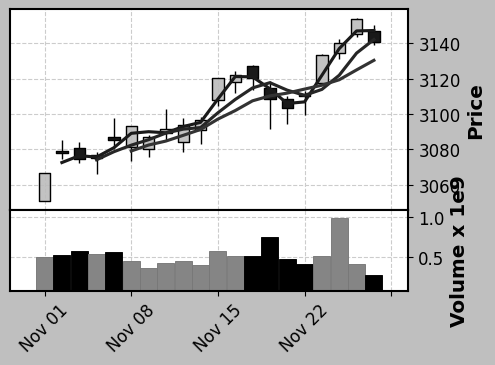
Presently, among the "built-in" mplfinance styles, only 'classic' is black and white (grayscale). However you can create your own grayscale style. When you are happy with it, please feel free to contribute it to the mplfinance repository so that others can use it also as one of the "built-in" mplfinance styles. Here are some examples of what you can do:
Starting with code from the mplfinance styles tutorial ...
kwargs = dict(type='candle',mav=(2,4,6),volume=True,figratio=(11,8),figscale=0.7)
mpf.plot(daily,**kwargs,style='classic')
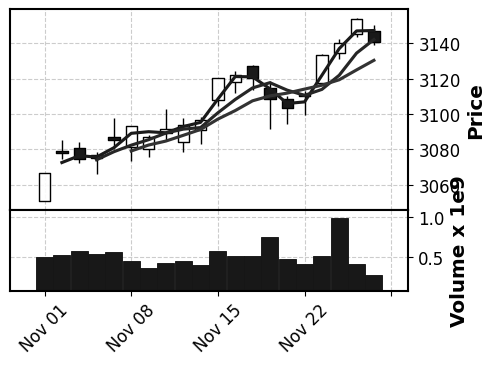
s = mpf.make_mpf_style(base_mpl_style='grayscale',base_mpf_style='classic')
mpf.plot(daily,**kwargs,style=s)

mc = mpf.make_marketcolors(base_mpf_style='classic',
                           up='#BCBCBC',down='#000000',
                           volume={'up':'#858585','down':'#000000'})
s = mpf.make_mpf_style(base_mpl_style='grayscale',base_mpf_style='classic',marketcolors=mc)
mpf.plot(daily,**kwargs,style=s)
 DanielGoldfarb
on 30 Aug 2020
DanielGoldfarb
on 30 Aug 2020
Thank you for answering but that's not exactly what I expected because when I save a plot with your method the data is saved like this :
saved_image_shape = [height, width, 3] (if format = RGB)
or
saved_image_shape = [height, width, 4] (if format = RGBA)
I can verify by using matplotlib.pyplot.imread("image1.png") or PIL.Image.open("image1.png")
and I would like to have a method to save my image like that :
saved_image_shape = [height, width, 1] (if format = grayscale).
I know that there is a method using PILOW library :
from PIL.Image import open
open("image_RGB.png").convert('L').save("image_grayscale.png")
but that's mean I have to use another library
tessanix
on 31 Aug 2020

Sorry. I misunderstood.
Let me look into this. You may be stuck using PIL to convert the image, but I'll poke around matplotlib and see if there is a way.
DanielGoldfarb
on 31 Aug 2020
I will keep poking around, but so far it seems to me this is not possible without using Pillow or a similar package. However you may want to first save the image to an io.BytesIO object (see, for example, cell "In [7]" of the savefig notebook) before using Pillow to save it to disk as grayscale, just to avoid writing to disk twice.
DanielGoldfarb
on 31 Aug 2020
Ok! thanks for your help!
tessanix
on 31 Aug 2020
Related issues
 franklee00
·
4Comments
franklee00
·
4Comments
 andresberejnoi
·
6Comments
andresberejnoi
·
6Comments
 skfnxh
·
3Comments
skfnxh
·
3Comments
 kitt-th
·
5Comments
kitt-th
·
5Comments
 jainraje
·
4Comments
jainraje
·
4Comments