Mplfinance: Bug Report: 1 candle would not display correctly.
Describe the bug
I am just posting one candle on a specific time. It will not post correctly.
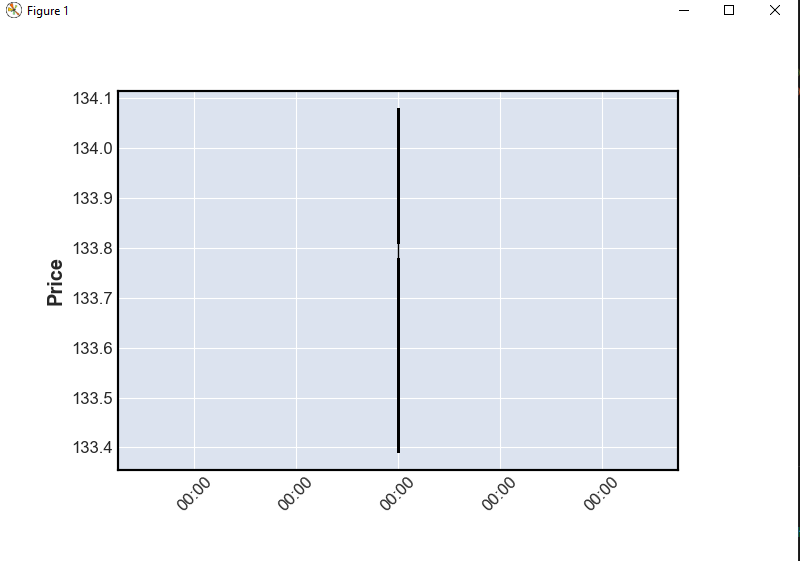
To Reproduce
Steps to reproduce the behavior:
Just run this code: The csv is on the example folder.
```python
import pandas as pd
import mplfinance as mpf
df = pd.read_csv('data/SPY_20110701_20120630_Bollinger.csv',index_col=0,parse_dates=True)
df = pd.read_csv('SPY_20110701_20120630_Bollinger.csv',index_col=0,parse_dates=True)
x = df.iloc[1:2,:]
mpf.plot(x,type = 'candle')
Expected behavior
It should create a correct candle?
 toksis
All 5 comments
Yes, this looks bad. Will correct it. Thanks for the code to reproduce.
 DanielGoldfarb
on 17 May 2020
DanielGoldfarb
on 17 May 2020
Maybe the issue is that there is no next X (time) variable? so you could not get the width of the body?
toksis
on 19 May 2020
Yes, this is a simple thing, and already fixed in my local version. However it was fixed in the context of implementing a new algorithm which nicely adjusts candle widths and volume-bar widths according many aspects of the data ... for example, number data points, frequency of the data (minute-by-minute, hourly, daily, weekly, etc.), whether show_nontrading is True or False: All of these things affect how a particular candle width looks. As you can imagine the algorithm needs to be thoroughly tested for all of these cases (including different styles) before being released. I hope to release it early next week. Thank you for helping. Much appreciated.
DanielGoldfarb
on 19 May 2020
Great to see this. I have the same issue. Looking forward to the update. Many thanks DG!
 abaldor
on 29 May 2020
abaldor
on 29 May 2020
new version 0.12.5 just released to Pypi fixes this.
DanielGoldfarb
on 8 Jun 2020
Related issues
 Full4me
·
3Comments
Full4me
·
3Comments
 cleitonmoya
·
5Comments
cleitonmoya
·
5Comments
 jainraje
·
4Comments
jainraje
·
4Comments
 allahyarzadeh
·
3Comments
allahyarzadeh
·
3Comments
 tmcguire65
·
6Comments
tmcguire65
·
6Comments
Most helpful comment
new version 0.12.5 just released to Pypi fixes this.