Mpdf: XML declaration not ignored when inlining a SVG image
I found this bug
when i include a SVG file into my pdf to create my barcode by using either of the following:
$pdfString = $this->mpdf->Output('FilenameIsIgnored', 'S');(used when i email vouchers)$this->mpdf->Output($pdf_filename, 'I');(used when i want to display voucher on screen)
I get the following result:
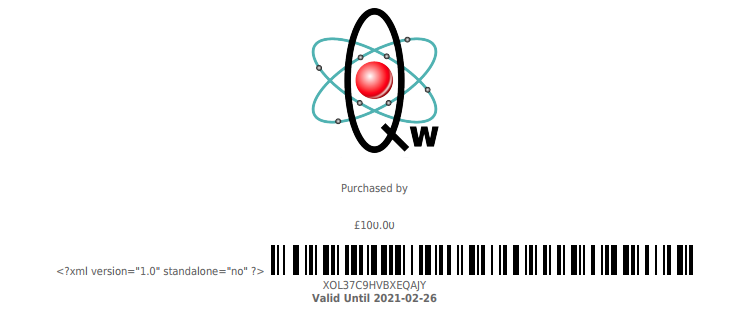
As you can see it adds the following visible text <?xml version="1.0" standalone="no" ?> and it should not be doing this.
Notes
- I generate the HTML code with the smarty template system and this is where I include the SVG using picquer/php-barcode-generator to add the barcode
- when i just display the smarty template as a normal page there are no issues with the version text above (not displayed) and the barcode displays correctly
- I have removed the version text from the smarty template (with regex) and verified it was removed before passing it to mPDF to create a pdf as a string and the version text still appears in the generated pdf.
- i have tried removing the version text from the pdf string generated by mpdf but I could not get this to work, possibly becasue it is a binary string.
- i have looked at the pdf in firefox browser, foxit pdf reader and adobe illustrator and they all show the error
- my github issue - https://github.com/shoulders/qwcrm/issues/1780
- related issue - https://github.com/mpdf/mpdf/issues/748
This is mPDF and PHP version and environment (server/fpm/cli etc) I am using
- PHP Version 7.3.12
- xampp
- Windows 10
- mpdf/mpdf v8.0.7
This is a PHP code snippet I use
This is the file order
- https://github.com/shoulders/qwcrm/blob/master/src/components/voucher/print.php (voucher specific actions)
- https://github.com/shoulders/qwcrm/blob/master/src/libraries/qframework/System/Communication.php (different actions i can do with templates)
- https://github.com/shoulders/qwcrm/blob/master/src/libraries/qframework/System/Pdf.php (mPDF class)
I will add a cut down version of the code here
<?php

/** print.php **/

// Generate the barcode (as html)
$bc_generator = new Picqer\Barcode\BarcodeGeneratorSVG();
$voucher_barcode = $bc_generator->getBarcode($this->app->components->voucher->getRecord(\CMSApplication::$VAR['voucher_id'], 'voucher_code'), $bc_generator::TYPE_CODE_128);

// Assign barcode to smarty
$this->app->smarty->assign('voucher_barcode',  $voucher_barcode                    );

// Specify what action to do (pdf in browser)
$this->app->system->communication->performAction(\CMSApplication::$VAR['commType'], $templateFile, null, $filename ?? null, $client_details ?? null, $emailSubject ?? null, $emailBody ?? null);

/** Communication.php **/

// fetch the smarty template as a string
$this->templatePayload = $this->app->smarty->fetch($templateFile);

/** Pdf.php **/

// Send the template as a pdf to the browser
$this->app->system->pdf->mpdfOutputBrowser($this->filename.'.pdf', $this->templatePayload);
This is a HTML/CSS code snippet I use
- The barcode place holder is replaced by smarty on fetch
- the full template file https://github.com/shoulders/qwcrm/blob/master/src/themes/default/templates/voucher/printing/print_voucher.tpl
````html
{barcode}
````
This is the full html template I use (**$templateFile**)
````html
"
 |
| My Name |
|
Purchased by my name |
| £100.00 |
Thanks for any help shoulders  shoulders
All 2 commentsYou need to include the resulting html that you are trying to convert, preferably the minimum required to reproduce the issue.  ssieb
on 23 Aug 2020
ssieb
on 23 Aug 2020
👍1
This is a bug, mPDF should ignore the xml declaration. Currently, until fixed, you have a few options:
 finwe
on 24 Aug 2020
finwe
on 24 Aug 2020
👍1
Was this page helpful?
0 / 5 - 0 ratings
Related issues vtulse
·
5Comments
vtulse
·
5Comments
 pablinho81
·
3Comments
pablinho81
·
3Comments
 huglester
·
5Comments
huglester
·
5Comments
 chaptan
·
4Comments
chaptan
·
4Comments
 maofree
·
3Comments
maofree
·
3Comments
|