Mpandroidchart: Change font color and size for PieChart labels
Hi, I can't find a way to change font color and font size for slice labels in pie charts. By default it is black and printed in a very small size for me.
 (sorry for bad contrast there)
Feels bad to ask basic questions like this but neither the Issues-pages nor Stackoverflow could help me so far. Thanks!
 mohoff
All 11 comments
 PhilJay
on 20 Nov 2015
PhilJay
on 20 Nov 2015
How can i accomplish the styling of the ChartData Class using a fragment?
 ispam
on 15 Feb 2017
ispam
on 15 Feb 2017
What about "Bars" and "Home" text at the top right of the screen? How can it be customized?
 HamzehSoboh
on 19 Jun 2017
HamzehSoboh
on 19 Jun 2017
Hi, I am creating Pie Chart using MPAndroidCharts Library. Everything went well, just one problem i m facing regarding ValueTextColor
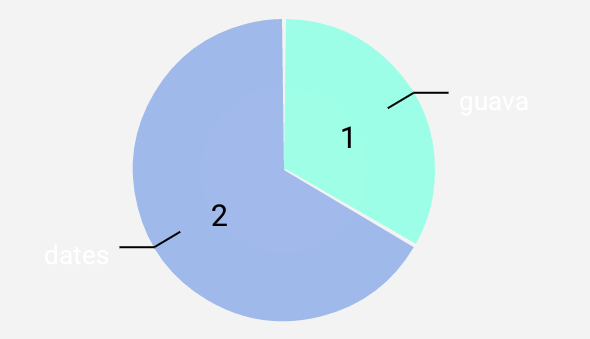

XValuesLabel are coming in White font Color, and YValueLabel in Black fontColor.
I want both of it in black color, but somehow setValueTextColor() is not making any impact in XValuesLabel
  `Log.d("PIECHART dataset", "addDataSet started");
    ArrayList<PieEntry> yEntrys = new ArrayList<>();
    ArrayList<String> xEntrys = new ArrayList<>();

    for(int i = 0; i < yData.length; i++){
        if(yData[i]>0) {

            switch(i){
                case 0:
                    yEntrys.add(new PieEntry(yData[i], "banana"));
                    break;
                case 1:
                    yEntrys.add(new PieEntry(yData[i], "guava"));
                    break;
                case 2:
                    yEntrys.add(new PieEntry(yData[i], "apple"));
                    break;
                case 3:
                    yEntrys.add(new PieEntry(yData[i], "pineapple"));
                    break;
                case 4:
                    yEntrys.add(new PieEntry(yData[i], "mango"));
                    break;
                case 5:
                    yEntrys.add(new PieEntry(yData[i], "papaya"));
                    break;
                case 6:
                    yEntrys.add(new PieEntry(yData[i], "dates"));
                    break;
                default : ;
            }

        }
    }

   /* for(int i = 0; i < xData.length; i++){
        xEntrys.add(xData[i]);
    }*/

    //create the data set

    pieDataSet = new PieDataSet(yEntrys, "");
    pieDataSet.setSliceSpace(2f);
    pieDataSet.setValueTextSize(15f);
    pieDataSet.setValueTextColor(Color.RED);/* this line not working */
    pieDataSet.setSelectionShift(10f);
    pieDataSet.setValueLinePart1OffsetPercentage(80.f);
    pieDataSet.setValueLinePart1Length(1f);
    pieDataSet.setValueLinePart2Length(0.9f);
    pieDataSet.setXValuePosition(PieDataSet.ValuePosition.OUTSIDE_SLICE);
    //pieDataSet.setYValuePosition(PieDataSet.ValuePosition.OUTSIDE_SLICE);

    //add colors to dataset
    ArrayList<Integer> colors = new ArrayList<>();
    colors.add(Color.rgb(156,254,230));
    colors.add(Color.rgb(159,185,235));
    colors.add(Color.rgb(143,231,161));
    colors.add(Color.rgb(160,239,136));
    colors.add(Color.rgb(200,246,139));
    colors.add(Color.rgb(176,219,233));
    colors.add(Color.rgb(183,176,253));

    pieDataSet.setColors(colors);

    ///// disabling chart legend
    pieChart.getLegend().setEnabled(false);

    Log.d("PIECHART dataset2", xEntrys.size()+" ");

    //create pie data object
    PieData pieData = new PieData(pieDataSet);
    pieData.setValueTextColor(Color.RED);/* only YValue color changes, Xvalues remains white*/
    pieData.setValueFormatter(new valueFormat());
    pieChart.setData(pieData);
    //pieDataSet.notifyDataSetChanged();
    //pieChart.invalidate();`
please help. Thanks
 smw7156
on 11 Aug 2017
smw7156
on 11 Aug 2017
@smw7156 did find a way to solve the problem?
 mzellho
on 4 Sep 2017
mzellho
on 4 Sep 2017
@MZellhofer yeah, i did find a solution..
int colorBlack = Color.parseColor("#000000");
pieChart.setEntryLabelColor(colorBlack);
smw7156
on 7 Sep 2017
@HamzehSobo did you find the solution?
 Swavis
on 11 Jan 2018
Swavis
on 11 Jan 2018
@HamzehSoboh @Swavis try:
Legend legend = pieChart.getLegend();
legend.setTextColor(yourColor);
 VuHongHiep
on 7 May 2018
VuHongHiep
on 7 May 2018
i used like below line.its working
data.setValueTextColor(getResources().getColor(R.color.bc_light_blue));
 AnilKumarBG
on 15 Jun 2018
AnilKumarBG
on 15 Jun 2018
int colorWhite = Color.parseColor("#FFFFFFFF");
pieDataSet.setValueTextColor(colorWhite);
 nitinrahulsingh
on 10 Jan 2019
nitinrahulsingh
on 10 Jan 2019
@HamzehSoboh @Swavis try:
Legend legend = pieChart.getLegend();
legend.setTextColor(yourColor);
Thanks to you.I was trying to find a solution for this one.
 shakiz
on 4 Apr 2020
shakiz
on 4 Apr 2020
Related issues
 enginebai
·
14Comments
enginebai
·
14Comments
 jagatb880
·
13Comments
jagatb880
·
13Comments
 gopi1410
·
18Comments
gopi1410
·
18Comments
 pankaj210891
·
15Comments
pankaj210891
·
15Comments
 bbrosius
·
14Comments
bbrosius
·
14Comments
Most helpful comment
@MZellhofer yeah, i did find a solution..
int colorBlack = Color.parseColor("#000000");
pieChart.setEntryLabelColor(colorBlack);