Mpandroidchart: How to draw horizontal stacked bar chart?
Hi PhilJay,
Could you please suggest how to draw horizontal stacked bar chart.
 naveenkumarmallappa
All 9 comments
It's just the same as a normal stacked barchart.
 PhilJay
on 7 Sep 2015
PhilJay
on 7 Sep 2015
Thank you PhilJay,
I have on more issue -

In above image the women age distribution values are not fully visible. Even after zoom also not visible. So we can't find the second entry's exact value
mChart.getAxisRight().setStartAtZero(true);
ArrayList
yValues.add(new BarEntry(new float[]{ 10, 10 }, 0));
yValues.add(new BarEntry(new float[]{ 12, 13 }, 1));
yValues.add(new BarEntry(new float[]{ 15, 15 }, 2));
yValues.add(new BarEntry(new float[]{ 17, 17 }, 3));
yValues.add(new BarEntry(new float[]{ 19, 20 }, 4));
yValues.add(new BarEntry(new float[]{ 19, 19 }, 5));
yValues.add(new BarEntry(new float[]{ 16, 16 }, 6));
yValues.add(new BarEntry(new float[]{ 13, 14 }, 7));
yValues.add(new BarEntry(new float[]{ 10, 11 }, 8));
yValues.add(new BarEntry(new float[]{ 5, 6 }, 9));
yValues.add(new BarEntry(new float[]{ 1, 2 }, 10));
naveenkumarmallappa
on 7 Sep 2015
That is because the axis in the example has a fixed limit:
mChart.getAxisRight().setAxisMaxValue(25f);
mChart.getAxisRight().setAxisMinValue(-25f);
Remove it and it will work.
PhilJay
on 7 Sep 2015
Thank you very much !
naveenkumarmallappa
on 7 Sep 2015

I want this kind of bar for working hour in a day. how to get that. and need to display for week
 tribitinfotech
on 21 Apr 2017
tribitinfotech
on 21 Apr 2017
I have the same issue. I want to have such bar for working hours. How to get this? And whether it is possible to put a filter there ? for filtering out monthly/weekly
 Rsl717
on 17 May 2017
Rsl717
on 17 May 2017
hello beother i want creat bar chart for below my json formate data in below i want Y axis as runtime and X axis as date please help me
{
"ResponseCode": "200",
"ResponseMessage": "Success",
"ResponseData": [
{
"date": "2017-07-24",
"distance": 23.045,
"run_time": "01:02:50"
},
{
"date": "2017-07-25",
"distance": 14.561,
"run_time": "01:36:18"
},
{
"date": "2017-07-27",
"distance": 19.666,
"run_time": "02:33:21"
},
{
"date": "2017-07-28",
"distance": 18.691,
"run_time": "03:17:02"
},
{
"date": "2017-07-29",
"distance": 0,
"run_time": "00:00:00"
}
],
"DisplayMessage": null
}
 nagendra25
on 31 Jul 2017
nagendra25
on 31 Jul 2017
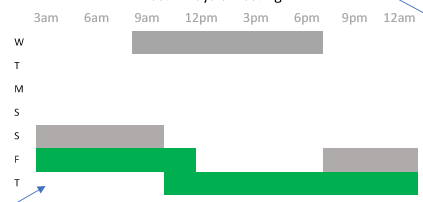
Yes this is what I would like to have as well.
 JKorsten
on 1 Feb 2018
JKorsten
on 1 Feb 2018
@Rsl717 @tribitinfotech @JKorsten Hello,did you find solution of your question?
 alex28lex
on 14 Feb 2018
alex28lex
on 14 Feb 2018
Related issues
 tsengvn
·
3Comments
tsengvn
·
3Comments
 rohitkumarbhagat
·
3Comments
rohitkumarbhagat
·
3Comments
 botondbutuza
·
3Comments
botondbutuza
·
3Comments
 blotfi
·
3Comments
blotfi
·
3Comments
 thanhcly920
·
3Comments
thanhcly920
·
3Comments
Most helpful comment
I want this kind of bar for working hour in a day. how to get that. and need to display for week