Mpandroidchart: Half Pie chart request
Is there any way to achieve this chart with this library? i have looked in the documentation and didn't find anything, but maybe i am missing something.
Example:

 ghost
ghost
All 8 comments
+1, I would be interested in that too.
 mseroczynski
on 1 Sep 2015
mseroczynski
on 1 Sep 2015
+1, this would be nice. Although, maybe if it can be done so that you can specify the "gap" in degrees? In the above picure the gapSize, if you will, will be 180.
THAT would be awesome!
 svangsgaard
on 22 Sep 2015
svangsgaard
on 22 Sep 2015
Now available: pieChart.setMaxAngle(180f)
    /**
     * Sets the max angle that is used for calculating the pie-circle. 360f means
     * it's a full PieChart, 180f results in a half-pie-chart. Default: 360f
     *
     * @param maxangle min 90, max 360
     */
    public void setMaxAngle(float maxangle);
 PhilJay
on 5 Dec 2015
PhilJay
on 5 Dec 2015
i have imported the project using gradle, but i am not seeing this setMaxAngle function anywhere. How can I use it?
 sid0893
on 10 Dec 2015
sid0893
on 10 Dec 2015
The feature is already in the latest master commit, but not released yet. That's why you cannot get it via gradle.
PhilJay
on 10 Dec 2015
so how shall i import it so i can use this feature? or are you planning a
new release soon, then i could continue through gradle..?
thanks!
On 11-Dec-2015 3:34 am, "Philipp Jahoda" [email protected] wrote:
The feature is already in the latest master commit, but not released yet.
That's why you cannot get it via gradle.—
Reply to this email directly or view it on GitHub
https://github.com/PhilJay/MPAndroidChart/issues/989#issuecomment-163762608
.
sid0893
on 10 Dec 2015
@RonEskinder : I'm working on Semi Pie chart like screen you mentioned in issue. I wonder if you completely do this chart? if you had done, can you share it for me?
Thank you very much!
 huuchi207
on 7 Aug 2018
huuchi207
on 7 Aug 2018
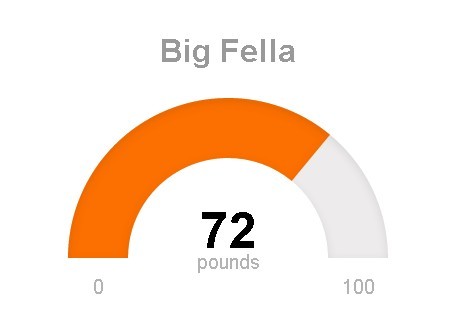
how can i add an arrow sign for indication of value in below half pie chart ?
 bhunnu
on 24 Jun 2019
bhunnu
on 24 Jun 2019
Related issues
 galex
·
3Comments
galex
·
3Comments
 DarkHelmet67
·
3Comments
DarkHelmet67
·
3Comments
 ChenZeFengHi
·
3Comments
ChenZeFengHi
·
3Comments
 blotfi
·
3Comments
blotfi
·
3Comments
 manucheri
·
3Comments
manucheri
·
3Comments
Most helpful comment
Now available:
pieChart.setMaxAngle(180f)