Moya: Not able to get URLEncoding working correctly when there is "?" and the method is "POST"
I am using the last version of Moya and Alamofire with Swift 3
I am having trouble when the method is "POST" and there is url encoding
The url must be:
products?id_category=28
but it is converted to be:
products%3Fid_category=28
which is not working and giving 400 error on the server
where can I find this conversion and stop it for the requests ?
Here is the code i used:
enum MyService {
    case products(categorytId: Int)
}

extension MyService : TargetType {

    var base: String { return Constants.MyServiceURL }
    var baseURL: URL { return URL(string: base)! }

    public var task: Task {
        return .request
    }

    var path : String {
        switch self {
        // i tried with and without them, changing the parameters down below
        case .products(let id_category):
            return "products?id_category=\(id_category)"
        }
    }

    var parameterEncoding: ParameterEncoding {
        switch self {
            case .products:
                //return MyURLEncoding.queryString
                return URLEncoding.queryString
            default:
                return JSONEncoding.default
        }
    }

    var parameters : [String : Any]? {
        switch self {
        // here I tried to add them for Testing purpose, i tried with and without them
        case .products(let id_category):
            var params: [String: Any] = [:]
            params["id_category"] = id_category
            return params
        default:
            return nil
        }
    }

    // The method must be always post always
    var method : Moya.Method {
        return .post;
    }

    var sampleDate : Data {
            return Data()
        }
    }
 }
 iballan
All 35 comments
Hey @iballan could you provide more details on how you're encoding the parameters in the URL? Are you trying to send parameters in the URL and in the request body as well?
It'd be great if you could share some code that illustrates the issue :wink:
 pedrovereza
on 28 Mar 2017
pedrovereza
on 28 Mar 2017
@pedrovereza i have updated the comment above. I think if the method is POST, the query parameters are not added to the URL even if the URLEncoding.queryString is returned in the ParameterEncoding. Right ?
iballan
on 28 Mar 2017
@iballan Can you change your implementation of path to be:
var path : String {
switch self {
case .products(let id_category):
return "products"
}
}
and parameterEncoding to:
var parameterEncoding: ParameterEncoding {
switch self {
case .products:
return URLEncoding.default
default:
return JSONEncoding.default
}
}
These changes will leave your code similar to the example we have in the docs on how to send parameters in the URL when doing a POST request (see .updateUser)
pedrovereza
on 28 Mar 2017
@pedrovereza I have tried exactly what in the example you have mentioned, The parameters are not added at all to the request.
["Moya_Logger: [28/03/2017 19:47:25] Request: http://myservice/products", "Moya_Logger: [28/03/2017 19:47:25]]
Request Headers: [ \"Content-Type\": \"application/x-www-form-urlencoded; charset=utf-8\"]"
"Moya_Logger: [28/03/2017 19:47:25] HTTP Request Method: POST"]
["Moya_Logger: [28/03/2017 19:47:25] Response: <NSHTTPURLResponse: 0x7a82a150> { URL: http://myservice/products }
{ status code: 404, headers {\n \"Cache-Control\" = \"no-cache\";\n \"Content-Length\" = 216;\n \"Content-Type\" = \"application/json; charset=utf-8\";\n Date = \"Tue, 28 Mar 2017 16:47:18 GMT\";\n Expires = \"-1\";\n Pragma = \"no-cache\";\n Server = \"Microsoft-IIS/8.5\";\n \"X-AspNet-Version\" = \"4.0.30319\";\n \"X-Powered-By\" = \"ASP.NET\";\n} }"]
Status Code: 404, Data Length: 216
@iballan try this, I recently had the same issues and solved them by using the following (I forget where, but there was another issue raised in Moya where I cobbled together this answer, wish I could give that author credit):
```swift
var parameterEncoding : Moya.ParameterEncoding {
switch self {
case .feedback:
return TokenURLEncoding.default
default:
return URLEncoding.default
}
}
/// Used to append the Token to requests which require it.
/// Don't attempt to do this in the path variable, as our server can't handle % encoding..
struct TokenURLEncoding: Moya.ParameterEncoding {
public static var default: TokenURLEncoding { return TokenURLEncoding() }
/// Creates a URL request by encoding parameters and applying them onto an existing request.
///
/// - parameter urlRequest: The request to have parameters applied.
/// - parameter parameters: The parameters to apply.
///
/// - throws: An AFError.parameterEncodingFailed error if encoding fails.
///
/// - returns: The encoded request.
public func encode(_ urlRequest: URLRequestConvertible, with parameters: Parameters?) throws -> URLRequest {
var req = try urlRequest.asURLRequest()
// first coerce a mutable URL out of the urlRequest
// next, get the components of the request
// finally, get our token
guard let request = (req as NSURLRequest).mutableCopy() as? NSMutableURLRequest,
let components = NSURLComponents(string: request.url!.absoluteString),
let token = LinesSession().token else {
// Handle the error
return req
}
let json = try JSONSerialization.data(withJSONObject: parameters!,
options: JSONSerialization.WritingOptions.prettyPrinted)
let tokenQueryItem = NSURLQueryItem(name: "token", value: token)
components.queryItems = [tokenQueryItem as URLQueryItem]
req.setValue("application/json; charset=utf-8", forHTTPHeaderField: "Content-Type")
req.url = components.url
req.httpBody = json
return req
}
}
 avicks
on 29 Mar 2017
avicks
on 29 Mar 2017
@avicks the query is not added at all still to the url. I think it has something to do with the method type "Post". btw, i put debug point inside the function you have written and used it. the break point is never reached
I changed the request type to "Get", and the query was added correctly. but I need to change it to post to work correctly
also i have tested code with Alamofire and it works:
let url = "\(Constants.MyService)products?id_category=30"
Alamofire.request(url, method: .post)
.responseData { response in
print(response.request as Any) // original URL request
print(response.response as Any) // URL response
print(response.result.value as Any) // result of response serialization
}
@iballan The query isn't added?
I'm using that encoding I posted to append my query item to the URL, making a POST request, and getting success.
Would you mind elaborating on the structure behind your call?
avicks
on 1 Apr 2017
This issue has been marked as stale because it has not had recent activity. It will be closed if no further activity occurs.
![stale[bot] picture](https://avatars.githubusercontent.com/in/1724?v=4&s=40) stale[bot]
on 3 Jun 2017
stale[bot]
on 3 Jun 2017
@avicks
@pedrovereza
the problem is instead of getting this as
URL: "http://myWebSErvice/products?id_category=30"
I get this: %3F
URL: "http://myWebSErvice/products%3Fid_category=30"
and when the "?" becomes "%3F" , the webservice throws error this "A potentially dangerous Request.Path value was detected from the client (?)."
What i want is only to send the request with ? not with %3F
iballan
on 5 Jun 2017
Hey @iballan, we recently noticed that the documentation I pointed you to was wrong (we fixed in #1120). 😅
Could you try using URLEncoding.queryString instead of default?
pedrovereza
on 20 Jun 2017
@pedrovereza Thank you so much for your help.
However, It is still not working :(
You may check my Question, i already used URLEncoding.queryString
I tried 2 ways:
First: setting the query manually:
var path : String {
switch self {
case .products(let id_category):
return "products?id_category=\(id_category)"
}
}
_Fail_: because ? was encoded into %3F. which caused webservice 400 error.
Second: As you mentioned URLEncoding.queryString
var path : String {
switch self {
case .products:
return "products"
}
}
var parameterEncoding: ParameterEncoding {
switch self {
case .products:
//return MyURLEncoding.queryString
return URLEncoding.queryString
default:
return JSONEncoding.default
}
}
var parameters : [String : Any]? {
switch self {
// here I tried to add them for Testing purpose, i tried with and without them
case .products(let id_category):
var params: [String: Any] = [:]
params["id_category"] = id_category
return params
default:
return nil
}
}
_Fail_: Not adding the parameter at all.
What made me think that it is Moya's issue, when I use Alamofire as I mentioned above the URL is encoded correctly and did not change ? to %3F.
Now in my code I used both Moya (because i already started with it and it is a really overhead work to roll back from it) and Alamofire (to get the POST requests' url query working correctly) 👎
iballan
on 23 Jun 2017
I have set up an example on how to send parameters in the URL using POST. Can you try this one out and make sure it works for you? 🤔
pedrovereza
on 23 Jun 2017
Hi everybody, today is my first time to use Moya "it is really great library", in fact I got the same problem when i use path with this received character "?" I decided to update in the Moya even is not recommended and I'm happy to share my solution with you.
the only thing I've done is to update inside this file MoyaProvider+Defaults.swift.
update this function :
private final class func url(for target: Target) -> URL {
if target.path.isEmpty {
return target.baseURL
}
return target.baseURL.appendingPathComponent(target.path)
}
with this 👍
private final class func url(for target: Target) -> URL {
if target.path.isEmpty {
return target.baseURL
}
let urlComponents = NSURLComponents(url: target.baseURL, resolvingAgainstBaseURL: true)!
let charset = CharacterSet(charactersIn: "?")
if target.path.rangeOfCharacter(from: charset) != nil {
let index = target.path.characters.index(of: "?")
if let index = index {
let path = target.path.substring(to: target.path.characters.index(before: index))
let query = target.path.substring(from: target.path.characters.index(after: index))
urlComponents.path = path
urlComponents.query = query
}
}
else{
urlComponents.path = target.path
}
return urlComponents.url!
}
I hope it will help :)
 chivalrousbob
on 28 Jun 2017
chivalrousbob
on 28 Jun 2017
I've tried the above modification but it doesn't work with my other url paths without "?". So with a slight modification this works for me now
private final class func url(for target: Target) -> URL {
if target.path.isEmpty {
return target.baseURL
}
let urlComponents = NSURLComponents(url: target.baseURL, resolvingAgainstBaseURL: true)!
let index = target.path.characters.index(of: "?")
if let index = index {
let path = target.path.substring(to: index)
let query = target.path.substring(from: target.path.characters.index(after: index))
urlComponents.path = path
urlComponents.query = query
return urlComponents.url!
} else {
return target.baseURL.appendingPathComponent(target.path)
}
}
 jx2359
on 10 Jul 2017
jx2359
on 10 Jul 2017
hi @jx2359 I updated my code you can check agin it will work with the other url also
chivalrousbob
on 10 Jul 2017
hi @chivalrousbob, I tried your code again but I got an exception at the last line when the url has no parameters in the path.
I forgot to add that in my previous comment I've also modified the line where "path" is generated. target.path.substring(to: target.path.characters.index(before: index)) returns the path with the last character removed, and it results in a 404 response.
jx2359
on 10 Jul 2017
I have same issues.
 bawn
on 10 Aug 2017
bawn
on 10 Aug 2017
@iballan You have to write custom endpoints like this:
print("baseURL:(target.baseURL)\n path:(target.path)")
let url = target.baseURL.absoluteString + target.path
print("url:(url)")
//http://XXXX/api/xlogin.ashx?action=xulogin
//This method will escape special characters
//let url = target.baseURL.appendingPathComponent(target.path).absoluteString
//http://XXXX/api/xlogin.ashx%3Faction=xulogin
let endpoint = Endpoint
url: url,
sampleResponseClosure: { .networkResponse(200, target.sampleData) },
method: target.method,
parameters: target.parameters,
parameterEncoding: target.parameterEncoding
)
//Set up your header information
return endpoint.adding(newHTTPHeaderFields: [:])
 AnupamKatiyar
on 6 Sep 2017
AnupamKatiyar
on 6 Sep 2017
@iballan Did you find any solutions? Have the same problem
 dmitrykurochka
on 8 Sep 2017
dmitrykurochka
on 8 Sep 2017
@dmitrykurochka I use Alamofire directly for functions that has & in Post methods's url
iballan
on 8 Sep 2017
@iballan Looks like I have found solution. You should use own Endpoint and url stay correct without changing from '?' to '%3F'
This my real method that works for this situation
let authPlugin = AccessTokenPlugin(token: token)
let provider = RxMoyaProvider<Service>(endpointClosure: {target in
return Endpoint(
url: "\(target.baseURL)\(target.path)",
sampleResponseClosure: { .networkResponse(200, target.sampleData) },
method: target.method,
parameters: target.parameters,
parameterEncoding: target.parameterEncoding
)
}, plugins: [authPlugin])
@dmitrykurochka
Yes, I guess the whole problem was because I used the same function, without the last parameter:
parameterEncoding: target.parameterEncoding
by adding it to the endpoint constructor now it works
iballan
on 8 Sep 2017
This issue has been marked as stale because it has not had recent activity. It will be closed if no further activity occurs.
stale[bot]
on 8 Oct 2017
try use this
var baseURL: URL{
        switch self {
        case .chagePassword(_,_,let token):
             return URL(string: "base_url?token=\(token)")!
        default:
            return URL(string: "base_url")!
        }
    }

var path:String{
        switch self {
        case .chagePassword:
            return "/api/update-password"
        }
    }
and url request will like this "base_url/api/update-password?token="114149814189"
 noizar
on 11 Oct 2017
noizar
on 11 Oct 2017
This issue has been marked as stale because it has not had recent activity. It will be closed if no further activity occurs.
stale[bot]
on 25 Oct 2017
This issue has been auto-closed because there hasn't been any activity for at least 21 days. However, we really appreciate your contribution, so thank you for that! 🙏 Also, feel free to open a new issue if you still experience this problem 👍.
stale[bot]
on 1 Nov 2017
@noizar your solution works! but how? I am curious.
 mayuur
on 6 Dec 2017
mayuur
on 6 Dec 2017
@mayuur It works because "?" should not be part of the path. It indicates the query. Therefore, the appendingPathComponent method will encode the "?" as "%3F".
 SD10
on 6 Dec 2017
SD10
on 6 Dec 2017
For me it didn't get yet.
The difference is that I'm using .get
But the problem still happens, it converts the "?" to "%3F"
 williampenna
on 3 Jan 2018
williampenna
on 3 Jan 2018
@iballan i have same problem ,can you send me a example how to save this problem? thx
 WangShunYang
on 5 Feb 2018
WangShunYang
on 5 Feb 2018
@noizar it works for me
WangShunYang
on 5 Feb 2018
I want to call this https://www.blaalb.com/restApi/testApi/myOrders?number=1&month=24
enum MyWebService {
switch self {
case getMyOrders(number: Int, month: Int)
}
}
var path: String {
switch self {
case . getMyOrders:
return "/myOrders"
}
}
}
var method: Moya.Method {
switch self {
case .getMyOrders:
return .get
}
}
var task: Task {
switch self {
case . getMyOrders(let number, let month):
let p = ["number" : number,
"month": month]
return .requestParameters(parameters:p , encoding: URLEncoding.default)
}
}
 AhmAbdallah
on 4 Jan 2020
AhmAbdallah
on 4 Jan 2020
我想称这个为 https://www.blaalb.com/restApi/testApi/myOrders?number=1&month=24
enum MyWebService { switch self { case getMyOrders(number: Int, month: Int) } } var path: String { switch self { case . getMyOrders: return "/myOrders" } } } var method: Moya.Method { switch self { case .getMyOrders: return .get } } var task: Task { switch self { case . getMyOrders(let number, let month): let p = ["number" : number, "month": month] return .requestParameters(parameters:p , encoding: URLEncoding.default) } }
你需要自定义EndpointClosure
private let myEndpointClosure = { (target: MultiTarget) -> Endpoint in
let url = target.baseURL.absoluteString + target.path
let endpoint = Endpoint(url: url,
sampleResponseClosure: { .networkResponse(200, target.sampleData) },
method: target.method,
task: target.task,
httpHeaderFields: target.headers)
return endpoint
}
 WeiRuJian
on 6 Jan 2020
WeiRuJian
on 6 Jan 2020
try use this
var baseURL: URL{
        switch self {
        case .chagePassword(_,_,let token):
             return URL(string: "base_url?token=\(token)")!
        default:
            return URL(string: "base_url")!
        }
    }

var path:String{
        switch self {
        case .chagePassword:
            return "/api/update-password"
        }
    }
and url request will like this "base_url/api/update-password?token="114149814189"
tks u for this 👍
 winterwd
on 20 Mar 2020
winterwd
on 20 Mar 2020
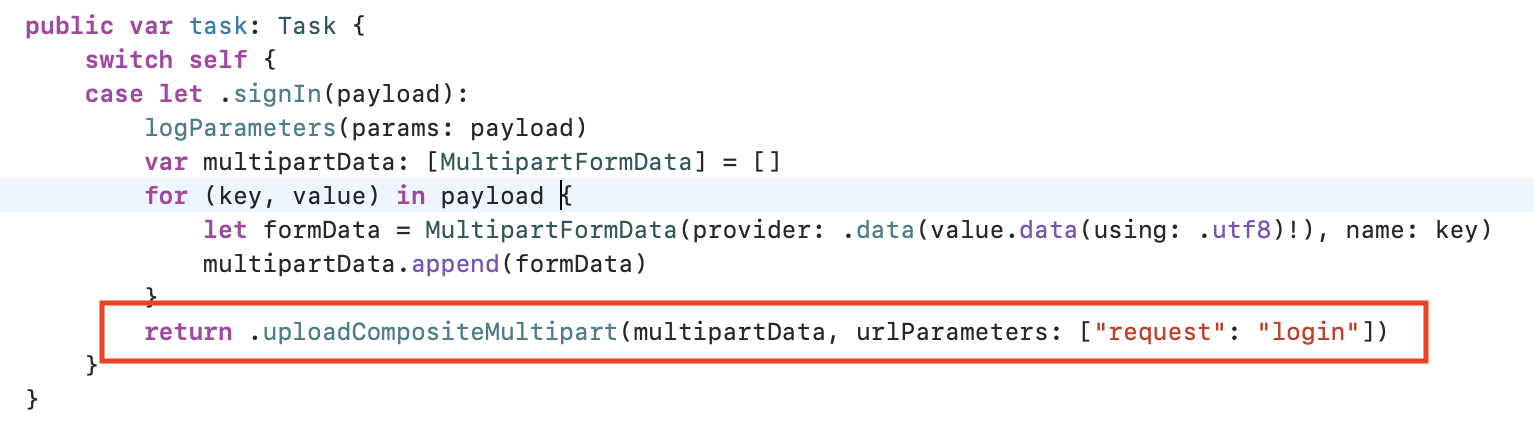
Hi everyone, if your full URL is like this:
https://www.yourdomain.com/api/home_gp/api_180913.php?request=login
then you have to use the following solution, it works for me.
your base URL will be this https://www.yourdomain.com/api/home_gp/api_180913.php and you have to pass the request endpoint as a parameter like below:
 hassan31
on 20 Jun 2020
hassan31
on 20 Jun 2020
Related issues
 ghost
·
3Comments
pedrovereza
·
3Comments
ghost
·
3Comments
pedrovereza
·
3Comments
 gunterhager
·
3Comments
gunterhager
·
3Comments
 geraldeersteling
·
3Comments
geraldeersteling
·
3Comments
 kamwysoc
·
3Comments
kamwysoc
·
3Comments
Most helpful comment
try use this
and url request will like this "base_url/api/update-password?token="114149814189"