Moviepy: i want to make video 2x speed using moviepy but its making videos zoom in,enlarge
Hi
I'm new to moviepy my requirement is to make a normal video into 2x. All the videos are recorded on the phone and the videos which are not required any rotations are working fine. By the videos which are needed to be rotated even, I apply rotation or even just trying to write the output is zoomed in with full screen here is the code
from moviepy.editor import VideoFileClip

from moviepy.audio import *

import moviepy.video.fx.all as vfx

clip = VideoFileClip("testingggg.mp4",audio=False)

clip.size

#clip = clip.rotate(90)

print("Duration of video : ", clip.duration)

print("Duration of video : ", clip.reader.fps)

clip = clip.speedx(2)

#clip = VideoFileClip("final.mp4",audio=False)

#clip.size


clip.write_videofile("final.mp4", threads=4, audio_fps=44100,codec = 'libx264')
hope someone can help me here are some images so that u can get an idea on my issue image of the original file output is in this way

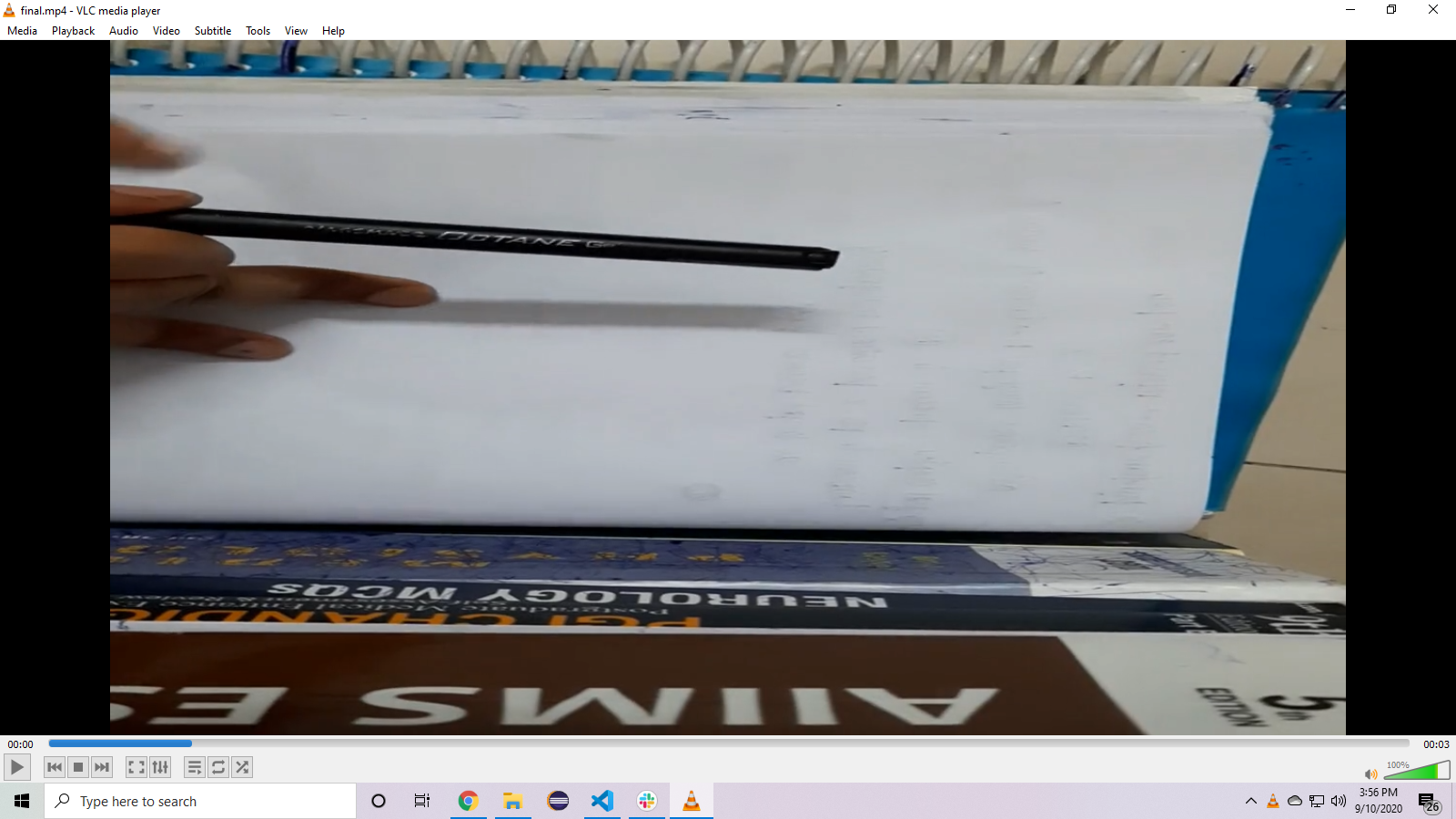
Thank you
 eswar159
All 25 comments
have you solved you problem?
i have same problem
 shih6
on 14 Sep 2020
shih6
on 14 Sep 2020
When I imported my video The video is stretched
shih6
on 14 Sep 2020
When I imported my video The video is stretched
yes and that happens only for videos which are not oriented properly(i mean which need rotation)
did u solve it
i was searching from past week but found none to resolve it
eswar159
on 14 Sep 2020
i just found it yet
shih6
on 14 Sep 2020
You could manually rotate the videos 90 degrees using some other program, then import them into moviepy and rotate them back using clip.rotate().
 tburrows13
on 14 Sep 2020
tburrows13
on 14 Sep 2020
like my requirement is to 2x the video no need of rotation or any
but this is making video stretch in the above case
how can i force not to stretch the video?
eswar159
on 14 Sep 2020
I have a lot of video to deal with and it doesn't have to appear
Do you have any software for batch processing
shih6
on 14 Sep 2020
you can try to make a img background
shih6
on 14 Sep 2020
    clip1=mp.VideoFileClip(path)
    background = (mp.ColorClip((1280, 720), (0, 0, 0))
        .set_duration(clip1.duration)
        )
    final=mp.CompositeVideoClip([background,clip1])
like my requirement is to 2x the video no need of rotation or any
but this is making video stretch in the above case
how can i force not to stretch the video?
It is likely a bug in moviepy. Rotated videos are an absolute pain to work with (from experience!).
tburrows13
on 14 Sep 2020
Thanks for the info @tburrows13
like my requirement is to 2x the video no need of rotation or any
but this is making video stretch in the above case
how can i force not to stretch the video?It is likely a bug in moviepy. Rotated videos are an absolute pain to work with (from experience!).
Thanks for the info @tburrows13
eswar159
on 14 Sep 2020
    clip1=mp.VideoFileClip(path)
    background = (mp.ColorClip((1280, 720), (0, 0, 0))
        .set_duration(clip1.duration)
        )
    final=mp.CompositeVideoClip([background,clip1])
I will try it now!
eswar159
on 14 Sep 2020
It's too much trouble to use ffmpeg
but i dont konw there is same troule in moviepy
shih6
on 14 Sep 2020
    clip1=mp.VideoFileClip(path)
    background = (mp.ColorClip((1280, 720), (0, 0, 0))
        .set_duration(clip1.duration)
        )
    final=mp.CompositeVideoClip([background,clip1])
sorry but whats mp
please share the full code or any reference
eswar159
on 14 Sep 2020
sorry
import moviepy as mp
clip1=mp.VideoFileClip(path)
background = (mp.ColorClip((1280, 720), (0, 0, 0))
.set_duration(clip1.duration)
)
final=mp.CompositeVideoClip([background,clip1])
shih6
on 14 Sep 2020
sorry
import moviepy as mp
clip1=mp.VideoFileClip(path)
background = (mp.ColorClip((1280, 720), (0, 0, 0))
.set_duration(clip1.duration)
)
final=mp.CompositeVideoClip([background,clip1])
sorry but im getting errors
module 'moviepy' has no attribute 'VideoFileClip'
AttributeError: module 'moviepy' has no attribute 'ColorClip'
AttributeError: module 'moviepy' has no attribute 'CompositeVideoClip'
eswar159
on 14 Sep 2020
!!!!!
shih6
on 14 Sep 2020
Wait a minute
shih6
on 14 Sep 2020
shih6
on 14 Sep 2020
my bad it was
import moviepy.editor as mp
shih6
on 14 Sep 2020
its ok buddy
thank you will work on it!
eswar159
on 14 Sep 2020
even after adding background, it's still enlarging the video
eswar159
on 14 Sep 2020
Any contact information?
do you have wechat?
shih6
on 14 Sep 2020
can u message me on whatsapp or facebook?
as i dont have wechat
eswar159
on 14 Sep 2020
whatsapp is also ok
shih6
on 14 Sep 2020
Related issues
 buddhashrestha
·
3Comments
buddhashrestha
·
3Comments
 RahulPrasad
·
4Comments
RahulPrasad
·
4Comments
 PyB1l
·
3Comments
PyB1l
·
3Comments
 djevo1
·
3Comments
djevo1
·
3Comments
 arianaa30
·
4Comments
arianaa30
·
4Comments