Moviepy: IOError: MoviePy error: failed to read the duration of file / Protocol not found
I keep getting this error, and some people have experienced this before using different versions of moviepy. As recommended, I manually istalled from Github, and I am stil lgetting the error.
I am using ubuntu 64-bit 14.04.1, Python 2.7.8 |Anaconda 2.1.0 (64-bit)| (default, Aug 21 2014, 18:22:21) [GCC 4.4.7 20120313 (Red Hat 4.4.7-1)] on linux2
This is the rest of the info:
IOError: MoviePy error: failed to read the duration of file GoPro: Alana Blanchard Surfer Girl On NetworkA.webm.
Here are the file infos returned by ffmpeg:
ffmpeg version 2.4.2- http://johnvansickle.com/ffmpeg/ Copyright (c) 2000-2014 the FFmpeg developers
built on Oct 9 2014 07:24:56 with gcc 4.8 (Debian 4.8.3-11)
configuration: --enable-gpl --enable-version3 --disable-shared --disable-debug --enable-runtime-cpudetect --enable-libmp3lame --enable-libx264 --enable-libx265 --enable-libwebp --enable-libspeex --enable-libvorbis --enable-libvpx --enable-libfreetype --enable-fontconfig --enable-libxvid --enable-libopencore-amrnb --enable-libopencore-amrwb --enable-libtheora --enable-libvo-aacenc --enable-libvo-amrwbenc --enable-gray --enable-libopenjpeg --enable-libopus --disable-ffserver --enable-libass --enable-gnutls --cc=gcc-4.8
libavutil 54. 7.100 / 54. 7.100
libavcodec 56. 1.100 / 56. 1.100
libavformat 56. 4.101 / 56. 4.101
libavdevice 56. 0.100 / 56. 0.100
libavfilter 5. 1.100 / 5. 1.100
libswscale 3. 0.100 / 3. 0.100
libswresample 1. 1.100 / 1. 1.100
libpostproc 53. 0.100 / 53. 0.100
GoPro: Alana Blanchard Surfer Girl On NetworkA.webm: Protocol not found
I have a list of webm files, and this is the only one giving me an error. It plays well, so I don't think it is a corrupted file or anything like that.
 lmsanch
All 14 comments
Are all the files shot with a gopro or is this the only one ?
 Zulko
on 22 Feb 2015
Zulko
on 22 Feb 2015
same here - file produced with clip.write_videofile(outPath, codec='libx264')
running on mac. moviepy installed via pip, ffmpeg manually upgraded after experiencing same issue with ffmpeg version fetched by moviepy.
`````` bash
IOError: MoviePy error: failed to read the duration of file /Users/jsphpl/tmp/fwmsxXGYYQKagHHffIeIScoCTNwShKId.mov.
Here are the file infos returned by ffmpeg:
ffmpeg version 2.6.3 Copyright (c) 2000-2015 the FFmpeg developers
built with Apple LLVM version 6.1.0 (clang-602.0.53) (based on LLVM 3.6.0svn)
configuration: --prefix=/usr/local/Cellar/ffmpeg/2.6.3 --enable-shared --enable-pthreads --enable-gpl --enable-version3 --enable-hardcoded-tables --enable-avresample --cc=clang --host-cflags= --host-ldflags= --enable-libx264 --enable-libmp3lame --enable-libvo-aacenc --enable-libxvid --enable-vda
libavutil 54. 20.100 / 54. 20.100
libavcodec 56. 26.100 / 56. 26.100
libavformat 56. 25.101 / 56. 25.101
libavdevice 56. 4.100 / 56. 4.100
libavfilter 5. 11.102 / 5. 11.102
libavresample 2. 1. 0 / 2. 1. 0
libswscale 3. 1.101 / 3. 1.101
libswresample 1. 1.100 / 1. 1.100
libpostproc 53. 3.100 / 53. 3.100
[mov,mp4,m4a,3gp,3g2,mj2 @ 0x7fe7a400d400] error reading header
/Users/jsphpl/tmp/fwmsxXGYYQKagHHffIeIScoCTNwShKId.mov: End of file
Exception AttributeError: "VideoFileClip instance has no attribute 'reader'" in
``````
 jsphpl
on 21 Jun 2015
jsphpl
on 21 Jun 2015
I'm also seeing this issue when trying to open an mp4 file with VideoFileClip.
MoviePy error: failed to read the duration of file ./scratch/broken_sample.mp4.
Here are the file infos returned by ffmpeg:

ffmpeg version 2.4.2-   http://johnvansickle.com/ffmpeg/    Copyright (c) 2000-2014 the FFmpeg developers
  built on Oct  9 2014 07:24:56 with gcc 4.8 (Debian 4.8.3-11)
  configuration: --enable-gpl --enable-version3 --disable-shared --disable-debug --enable-runtime-cpudetect --enable-libmp3lame --enable-libx264 --enable-libx265 --enable-libwebp --enable-libspeex --enable-libvorbis --enable-libvpx --enable-libfreetype --enable-fontconfig --enable-libxvid --enable-libopencore-amrnb --enable-libopencore-amrwb --enable-libtheora --enable-libvo-aacenc --enable-libvo-amrwbenc --enable-gray --enable-libopenjpeg --enable-libopus --disable-ffserver --enable-libass --enable-gnutls --cc=gcc-4.8
  libavutil      54.  7.100 / 54.  7.100
  libavcodec     56.  1.100 / 56.  1.100
  libavformat    56.  4.101 / 56.  4.101
  libavdevice    56.  0.100 / 56.  0.100
  libavfilter     5.  1.100 /  5.  1.100
  libswscale      3.  0.100 /  3.  0.100
  libswresample   1.  1.100 /  1.  1.100
  libpostproc    53.  0.100 / 53.  0.100
Input #0, mov,mp4,m4a,3gp,3g2,mj2, from './scratch/broken_sample.mp4.mp4':
  Metadata:
    major_brand     : isom
    minor_version   : 512
    compatible_brands: isomiso2avc1mp41
    encoder         : Lavf54.29.104
  Duration: 00:05:10.88, start: 0.000000, bitrate: 1119 kb/s
    Stream #0:0(und): Video: h264 (Constrained Baseline) (avc1 / 0x31637661), yuv420p, 640x360 [SAR 1:1 DAR 16:9], 1022 kb/s, 29.97 fps, 29.97 tbr, 2997 tbn, 59.94 tbc (default)
    Metadata:
      handler_name    : VideoHandler
    Stream #0:1(und): Audio: aac (mp4a / 0x6134706D), 44100 Hz, stereo, fltp, 89 kb/s (default)
    Metadata:
      handler_name    : SoundHandler
Let me know if there's anything additional I can provide as far as debug info.
Thanks!
 cemmurphy
on 7 Oct 2015
cemmurphy
on 7 Oct 2015
203 seems to be about the same bug.
 keikoro
on 19 Feb 2017
keikoro
on 19 Feb 2017
Hi I am also getting same error. Please suggest me how can I overcome ?
 Moinukhan
on 20 Jul 2017
Moinukhan
on 20 Jul 2017
Getting this error as well on Ubuntu 16.04. Any thoughts @Zulko?
Traceback (most recent call last):
  File "InstagramAPI_uploadvideo.py", line 79, in <module>
    vid_upload_resp = video_upload(InstagramAPI)
  File "InstagramAPI_uploadvideo.py", line 75, in video_upload
    upload_resp = inst_api.uploadVideo(video_local_path,thumbnail_local_path,caption=caption_str)
  File "/home/ubuntu/post/scripts/InstagramAPI/__init__.py", line 213, in uploadVideo
    if self.configureVideo(upload_id, video, thumbnail, caption):
  File "/home/ubuntu/post/scripts/InstagramAPI/__init__.py", line 279, in configureVideo
    clip = VideoFileClip(video)
  File "/home/ubuntu/post/lib/python2.7/site-packages/moviepy/video/io/VideoFileClip.py", line 81, in __init__
    fps_source=fps_source)
  File "/home/ubuntu/post/lib/python2.7/site-packages/moviepy/video/io/ffmpeg_reader.py", line 32, in __init__
    fps_source)
  File "/home/ubuntu/post/lib/python2.7/site-packages/moviepy/video/io/ffmpeg_reader.py", line 289, in ffmpeg_parse_infos
    filename, infos))
IOError: MoviePy error: failed to read the duration of file fyZBBU.mp4.
Here are the file infos returned by ffmpeg:

ffmpeg version 2.4.2-   http://johnvansickle.com/ffmpeg/    Copyright (c) 2000-2014 the FFmpeg developers
  built on Oct  9 2014 07:24:56 with gcc 4.8 (Debian 4.8.3-11)
  configuration: --enable-gpl --enable-version3 --disable-shared --disable-debug --enable-runtime-cpudetect --enable-libmp3lame --enable-libx264 --enable-libx265 --enable-libwebp --enable-libspeex --enable-libvorbis --enable-libvpx --enable-libfreetype --enable-fontconfig --enable-libxvid --enable-libopencore-amrnb --enable-libopencore-amrwb --enable-libtheora --enable-libvo-aacenc --enable-libvo-amrwbenc --enable-gray --enable-libopenjpeg --enable-libopus --disable-ffserver --enable-libass --enable-gnutls --cc=gcc-4.8
  libavutil      54.  7.100 / 54.  7.100
  libavcodec     56.  1.100 / 56.  1.100
  libavformat    56.  4.101 / 56.  4.101
  libavdevice    56.  0.100 / 56.  0.100
  libavfilter     5.  1.100 /  5.  1.100
  libswscale      3.  0.100 /  3.  0.100
  libswresample   1.  1.100 /  1.  1.100
  libpostproc    53.  0.100 / 53.  0.100
[mov,mp4,m4a,3gp,3g2,mj2 @ 0x313d220] Format mov,mp4,m4a,3gp,3g2,mj2 detected only with low score of 1, misdetection possible!
[mov,mp4,m4a,3gp,3g2,mj2 @ 0x313d220] moov atom not found
fyZBBU.mp4: Invalid data found when processing input
 GonzaloZiadi
on 1 Aug 2017
GonzaloZiadi
on 1 Aug 2017
any solutions to this problem?
 MeghaMaheshwari
on 3 Aug 2017
MeghaMaheshwari
on 3 Aug 2017
I got this error when trying to use MoviePy to edit video produced by the picamera library for recording from a Raspberry Pi. It produced a video in h.264 which didn't contain any duration information, which caused MoviePy and other video converters to crash. I was able to solve the problem using MP4Box to convert the video to mp4:
sudo apt-get install -y gpac
MP4Box -add video.h264 video.mp4
This created an mp4 file with the duration information so MoviePy could process it. I followed this guide: https://www.raspberrypi.org/documentation/usage/camera/raspicam/raspivid.md
 malcx95
on 15 Aug 2017
malcx95
on 15 Aug 2017
Someone solved this problem?
 yurastanik
on 23 Mar 2019
yurastanik
on 23 Mar 2019
I solved it in a simpler way, with the help of VLC I converted the file to the forma MPEG4 xxx TV/device,
and you can now use your new file with python without any problem
xxx = 720p or
xxx = 1080p
everything depends on your choice on the output format
 Villjoie
on 7 Nov 2019
Villjoie
on 7 Nov 2019
Feel free to reopen or start a new issue if you're experiencing this problem. However, there's probably not much that can be done to fix it without having the movie file to debug with.
 tburrows13
on 28 Apr 2020
tburrows13
on 28 Apr 2020
I fixed this problem from a video that came from the MediaRecorder Web API (html5 web cam) by just processing it in FFmpeg like this:
ffpmeg -r <your desired frame rate> -i path/to/input_video.mp4 path/to/output_video.mp4 and then using the output video in moviepy
 alexcdot
on 20 May 2020
alexcdot
on 20 May 2020
Feel free to reopen or start a new issue if you're experiencing this problem. However, there's probably not much that can be done to fix it without having the movie file to debug with.
Can confirm that this issue persists with webm files recorded in Chrome using the MediaRecorder API. The following results in the same error as the OP. The codec used within Chrome is Opus.
from moviepy.editor import *
audio_clip = AudioFileClip('original_chrome.webm')
Here's what VLC says about the Codec:
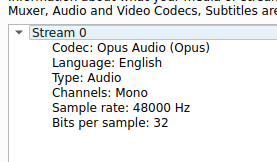
Interestingly, if I then generate a new webm file with ffmpeg, this works perfectly well.
ffmpeg -i original_chrome.webm -ss 0 -to 5 converted_ffmpeg.webm
Attaching both files in case someone else can figure out what's happening here.
 tejpochiraju
on 7 Sep 2020
tejpochiraju
on 7 Sep 2020
I faced the problem with .webm files recorded from the browser.
What I did was similar to what @tejpochiraju suggested, but programmatically using moviepys ffmpeg_tools:
ffmpeg_tools.ffmpeg_extract_audio(file_name, wav_file_name)
file_name is the .webm file's path, and wav_file_name is the output with .wav
Post this, AudioClip(wav_file_name) did not have the duration problem.
 Heedster
on 4 Oct 2020
Heedster
on 4 Oct 2020
Related issues
 bobozar
·
4Comments
bobozar
·
4Comments
 skizzy
·
3Comments
skizzy
·
3Comments
 PyB1l
·
3Comments
PyB1l
·
3Comments
 Deng-deng-deng-deng
·
3Comments
Deng-deng-deng-deng
·
3Comments
 arianaa30
·
4Comments
arianaa30
·
4Comments
Most helpful comment
I'm also seeing this issue when trying to open an mp4 file with VideoFileClip.
Let me know if there's anything additional I can provide as far as debug info.
Thanks!