Moviepy: why does moviepy's write_videofile function get slower and slower as it processes each frame? And how to improve/fix it?
My script takes two movie files as an input, and writes a 2x1 array movie output (stereoscopic Side-by-Side Half-Width). The input video clips are of equal resolution (1280x720), frame rate (60), number of frames (23,899), format (mp4)...
When the write_videofile function starts processing, it provides an estimated time of completion that is very reasonable ~20min.
As it processes every frame, the process gets slower and slower and slower (indicated by progress bar and estimated completion time). In my case, the input movie clips are about 6min long. After three minutes of processing, it indicates it will take over 3 hours to complete. After a half hour of processing, it then indicates it will take over 24hours to complete.
I have tried the 'threads' option of the write_videofile function, butit did not help.
Any idea? Thanks for the help.
---- Script ----
movie_L = 'movie_L.mp4'
movie_R = 'movie_R.mp4'
output_movie = 'new_movie.mp4')
clip_L = VideoFileClip(movie_L)
(width_L, height_L) = clip_L.size
clip_L = clip_L.resize((width_L/2, height_L))
clip_R = VideoFileClip(movie_R)
(width_R, height_R) = clip_R.size
clip_R = clip_R.resize((width_R/2, height_R))
print("*** Make an array of the two movies side by side")
arrayClip = clips_array([[clip_L, clip_R]])
print("*** Write the video file")
arrayClip.write_videofile(output_movie, threads=4, audio = False)
 denis1226
All 11 comments
This is not an answer but can you try rendering to a smaller size and fps:
arrayClip.resize(width=480).write_videofile(output_movie, audio=False, fps=30)
If this works at a steady pace then your system is probably swapping generating the larger video.
 pkarp0
on 5 Oct 2017
pkarp0
on 5 Oct 2017
I was getting the exact same issue when running a script through IDLE on python 3.6.4/Win64
Are you using IDLE? When I utilize the IDLE shell to execute a .write_videofile() the shell fills up with progress bar updates and slows down due to the constant writing to the shell. When I run the script on its own it performs fine.
To get better performance out of the IDLE, pass the parameter 'progress_bar = False' to the write_videofile()
For your example:
arrayClip.write_videofile(output_movie, threads=4, audio = False, progress_bar = False)
This will disable the writing of the bar to the shell, and increased performance on my machine considerably.
 hvonsaltza
on 6 Jan 2018
hvonsaltza
on 6 Jan 2018
I had the same problem as author. threads=4 and progress_bar = False solved my problem pretty well. Movie was written enough quick.
 vovavovavovavova
on 9 Jun 2018
vovavovavovavova
on 9 Jun 2018
for me none are working, still same speed. threads=4 and progress_bar = False might speededup 10% but not any more
 ishandutta2007
on 30 Oct 2018
ishandutta2007
on 30 Oct 2018
not more?
When i created 5 minute video, it tooks 5 min+- same without threads and progress_bar = True (default).
But when i created 11+ min movie, i didn't know about this trick and this was a nightmare. Movie was creating during 3+ hours and would not be finished, stacked at 90%. During this time python.exe eats 3GB RAM.
When i read this trick, creating time became almoust it's duration, 11+ min. It was pretty well. For 5 min movie, yes, it doesn't have a matter, but 11 min converts process from terrible to pretty and fine.
I think, authors SHOULD update docs - add this to oficial documentation into example with explanation, Because without it can be real nightmare when you create short movie within hours.
vovavovavovavova
on 30 Oct 2018
For me 1 min video is taking 2 hours in either case.
Here is my mac details
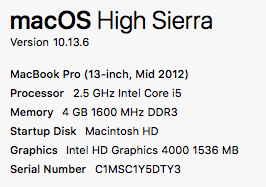
Maybe my machine is not powerful enough, but it shouldn't be so bad, I have used(nonprogramatically) other python based full fledged video editors on this machine, performace was not so bad. It shouldn't differ since underlying programming in those would be same.
ishandutta2007
on 2 Nov 2018
Here are the numbers(this is for a simplified version of 1 min video, not the same which I was talking about above or else it would take hours for each)
--- Normal(Progressbar Visible and Without Any Threads) : 1988.6883029937744 seconds ---
--- (Progressbar Hidden and Without Any Threads) : 2130.940178155899 seconds ---
--- (Progressbar Visible and With 4 Threads) : 1663.9888100624084 seconds ---
--- (Progressbar Hidden and With 4 Threads) : 1653.8769879341125 seconds ---
Improvement = (1988.68 - 1653.87)*100/1988.68 = 16.83%
And it is clear from the above numbers the little improvement which came was due to threads not progressbar
ishandutta2007
on 3 Nov 2018
from moviepy.editor import *
import os


dir_path = os.path.dirname(os.path.realpath(__file__))
clip1 = VideoFileClip("V1.mp4")
clip2 = VideoFileClip(dir_path+"\\V2.mp4")
clip3 = VideoFileClip(dir_path+"\\V3.mp4")
output_movie = 'new_movie1.mp4'

final_clip = concatenate_videoclips([clip1,clip2,clip3])

final_clip.write_videofile(output_movie, threads=4, audio = True, audio_fps=44100,codec = 'libx264'
This code works fine and fast for me try it
 Baronsindo
on 15 Feb 2019
Baronsindo
on 15 Feb 2019
It might be helpful to run _top_ in another terminal to see if memory use is causing the process to start swapping.
pkarp0
on 16 Feb 2019
it is indeed quite interesingly slow on my mackintosh pro of 2018 :/
 archywillhe
on 4 Mar 2020
archywillhe
on 4 Mar 2020
So, to summarise the above, use logger=None and/or threads=4 (or some number depending on how many cores your computer has).
Feel free to reopen this issue or create a new one if you're experiencing more problems.
 tburrows13
on 27 Apr 2020
tburrows13
on 27 Apr 2020
Related issues
 TowelDude
·
3Comments
TowelDude
·
3Comments
 Netherdrake
·
4Comments
Netherdrake
·
4Comments
 cquintini
·
4Comments
cquintini
·
4Comments
 bobozar
·
4Comments
bobozar
·
4Comments
 RahulPrasad
·
4Comments
RahulPrasad
·
4Comments
Most helpful comment
I was getting the exact same issue when running a script through IDLE on python 3.6.4/Win64
Are you using IDLE? When I utilize the IDLE shell to execute a .write_videofile() the shell fills up with progress bar updates and slows down due to the constant writing to the shell. When I run the script on its own it performs fine.
To get better performance out of the IDLE, pass the parameter 'progress_bar = False' to the write_videofile()
For your example:
arrayClip.write_videofile(output_movie, threads=4, audio = False, progress_bar = False)This will disable the writing of the bar to the shell, and increased performance on my machine considerably.