Moveable: If the container is scaled, the target will not follow the mouse when dragging
See the code in codepen:
https://codepen.io/yoyogis/pen/LYEzyOX
There is a style in the parent element, style="transform:scale(0.2, 0.2)". When drag the "moveable" element, it will move less pixels then the mouse.
 yoyogis
All 18 comments
@yoyogis
Moveable containers should not be affected by transforms.
Try the following:
const moveable = new Moveable(document.body, ....); // target.parentElement
 daybrush
on 31 Dec 2019
daybrush
on 31 Dec 2019
Thanks @daybrush. But in my project I have to drag some elements in a transformed parent container.
yoyogis
on 31 Dec 2019
@yoyogis
The target may be inside a transform but not moveable.
Shouldn't only moveable be outside the parent?
daybrush
on 31 Dec 2019
No, the moveable target in a transformed parent element.
Just think we create some moveable elements in a container, the container and its child elements can be zoom in or zoom out.
yoyogis
on 31 Dec 2019
@yoyogis
I will solve this problem. Instead it doesn't seem to be resolved quickly.
Thank you :)
daybrush
on 31 Dec 2019
hi, I'm also facing this exact scenario, where I have a scaled container.
how are you planning to fix the issue?
maybe this can be solved by passing an extra parameter to the movable constructor (that can be updated any time using setState).
this parameter will indicate the scaling factor for the X, and Y axis (separately).
that way, the movable can factor in this scaling factor when calculating the deltas on drag, scale, rotate etc. to give a smooth experience.
 avrahamcool
on 2 Feb 2020
avrahamcool
on 2 Feb 2020
@avrahamcool
Maybe I'll release it in two weeks.
daybrush
on 2 Feb 2020
@yoyogis @avrahamcool
That's how I handle zoom / scaled out drag, this.zoom being a value between 0.1 and 2 (10% to 200%)
this.moveable.on("dragStart", ({ target }) => {

origintop = parseInt(target.style.top);
originleft = parseInt(target.style.left);

}).on("drag", ({ target, left, top }) => {

if(origintop || originleft) {
    tleft = left  / this.zoom - (originleft / this.zoom) + originleft;
    ttop = top  / this.zoom - (origintop / this.zoom) + origintop;
} else {
    tleft = left / this.zoom;
    ttop = top / this.zoom;
}

tleft = parseInt(tleft);
ttop = parseInt(ttop);

target.style.left = `${tleft}px`;
target.style.top = `${ttop}px`;
})
BUT, I noticed that the Bottom and Right element snap is quite off when scaled out. Top and Left is ok. Trying to figure this out.
 Raphe-dev
on 3 Feb 2020
Raphe-dev
on 3 Feb 2020
Hey @daybrush,
Any updates on this one? This features is really killer for us. If there will be some scaleFactor support then we can build visual editors that work with shapes and has zoom feature.
 elja
on 14 Feb 2020
elja
on 14 Feb 2020
@elja
Maybe scheduled for next week.
daybrush
on 14 Feb 2020
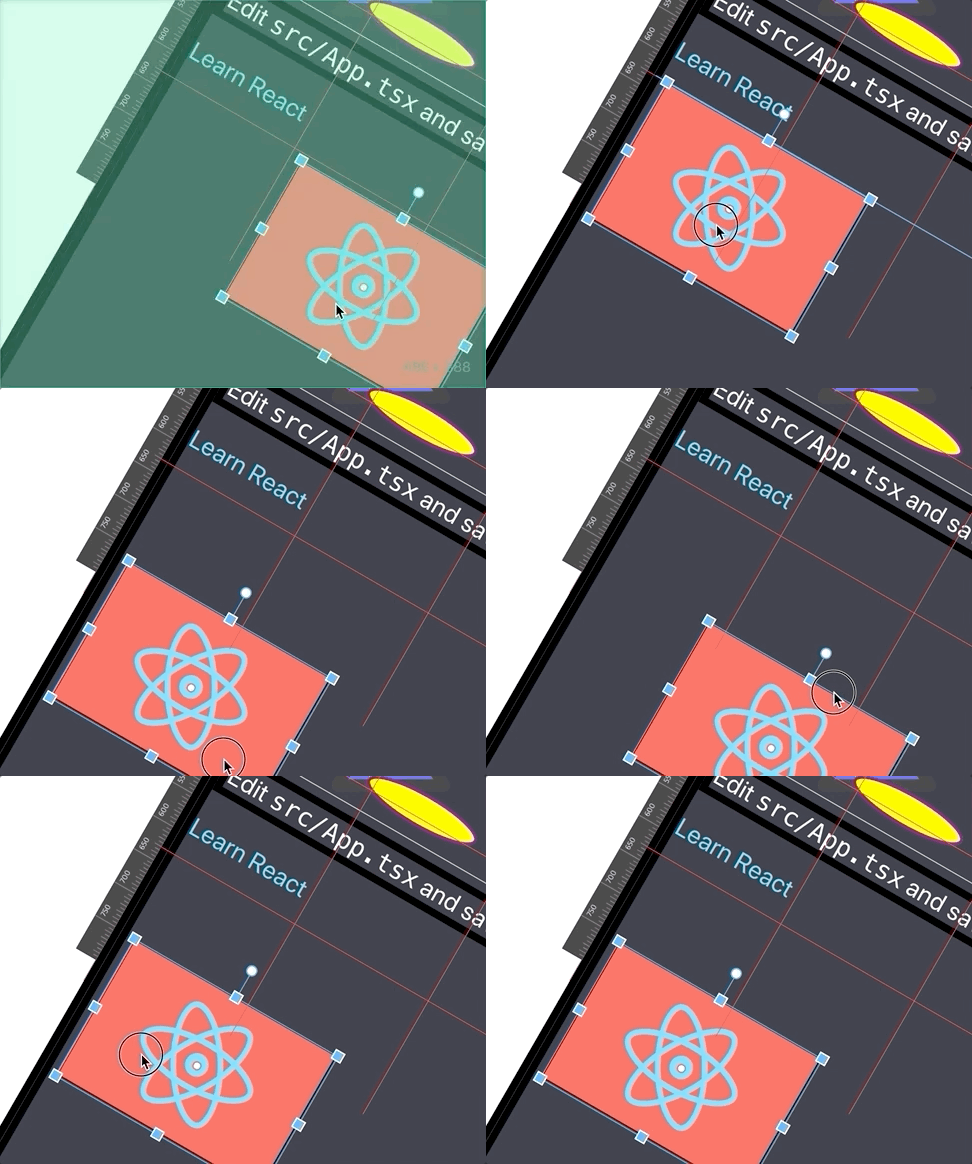
This is the problem image.
daybrush
on 22 Feb 2020
Hi, @daybrush
How are you?
I have also this issue about scaled container.
When could you possibly release fixed version?
Thanks
 Xumochuan
on 22 Feb 2020
Xumochuan
on 22 Feb 2020
@Xumochuan
Maybe 3.6 (Fri)?
Sorry for not being able to release quickly. There are now various issues linked to this issue.
daybrush
on 24 Feb 2020
@yoyogis @avrahamcool @elja @Raphe-dev
moveable0.15.1react-moveable0.18.0preact-moveable0.17.0ngx-moveable0.11.0svelte-moveable0.6.0
Added rootContainer props.
Use rootContainer to document.body or no transform element.
Thank you :)
daybrush
on 4 Mar 2020
Thanks @daybrush , I will try rootContainer
yoyogis
on 5 Mar 2020
@daybrush I add document.body as rootContainer, but it seems not work, could you look this?
https://codepen.io/yoyogis/pen/LYEzyOX?editors=1010
yoyogis
on 5 Mar 2020
@yoyogis
moveable0.15.2react-moveable0.18.1preact-moveable0.17.1ngx-moveable0.11.1svelte-moveable0.6.1
New version is upated. Check it again.
daybrush
on 5 Mar 2020
@daybrush Thank you so much. It work now. 😊
yoyogis
on 6 Mar 2020
Related issues
 monsterooo
·
4Comments
monsterooo
·
4Comments
 prasanthLalapeta
·
4Comments
prasanthLalapeta
·
4Comments
 copthuy
·
4Comments
copthuy
·
4Comments
 probil
·
4Comments
probil
·
4Comments
 pistell
·
4Comments
pistell
·
4Comments
Most helpful comment
hi, I'm also facing this exact scenario, where I have a scaled container.
how are you planning to fix the issue?
maybe this can be solved by passing an extra parameter to the
movableconstructor (that can be updated any time usingsetState).this parameter will indicate the scaling factor for the X, and Y axis (separately).
that way, the movable can factor in this scaling factor when calculating the deltas on drag, scale, rotate etc. to give a smooth experience.