Motioneyeos: Toggle Motion alerts from webhook?
Hello,
I was wondering if there was a way to toggle motion alerts from another application (like Hassio), maybe with a webhook or something. The work schedule feature is great, but sometimes it would be nice to toggle it manually.
Thanks!
 feueru
All 49 comments
I'm not using Home Assistant, but I've got a pretty simple setup going with IFTTT. I created an applet that sends a text message every time motion is detected. I acquired a webhook URL from maker.ifttt.com and used that in MotionEye's preferences. Then I had IFTTT use the SMS service to send my number a text message.
 flash76
on 25 Jan 2019
flash76
on 25 Jan 2019
thanks for the idea. I guess I could go that route and just have an iftt away button that toggles if the alerts get sent or not. I was hoping for something baked in to motioneyeos as I really like the screenshots that get sent with the smtp alerts
feueru
on 29 Jan 2019
@feueru you mean turn motion detection on and off? I'm gonna resurrect this issue for a moment ;)
I was searching the same thing for my RPi0 which I use as an entrance door camera and I want it to record motion only at night or when I'm not at home. this is the solution that I came up with:
logged in via ssh to RPi0 with motionEyeOS installed,
cd /data/etc
nano motion.conf
find the line that starts with webcontrol_localhost and make sure it is set to false and not to on.
press ctrl-x, y, enter [this exits editor, confirms save, confirms file name].
now you have unlocked getting into your motionEyeOS installation via http from other devices in your LAN! to try it out, enter this into your web browser [when connected to local network via ethernet or wifi; if you have only one camera configured, enter 1 as _camera_number_]:
http://<your_motionEyeOS_device_IP>:7999/<camera_number>/detection/status
that should show you status of motion detection [active or paused].
if you want to pause enter: _pause_ instead of _status_; and to start enter _start_ :)
if you want to have a switch in HomeAssistant [to use it in dashboard or in automations] just configure it like this:
switch:
  - platform: command_line
    switches:
      motion_detect_toggle:
        command_on: "/usr/bin/curl http://<your_motionEyeOS_device_IP>:7999/1/detection/start"
        command_off: "/usr/bin/curl http://<your_motionEyeOS_device_IP>:7999/1/detection/pause"
        command_state: "/usr/bin/curl http://<your_motionEyeOS_device_IP>:7999/1/detection/status"
        value_template: "{{ value | regex_search('ACTIVE', ignorecase=True) }}"
now you can use switch.motion_detect_toggle in dashboard or in automations, scripts etc. :)
 pejotigrek
on 15 Apr 2019
pejotigrek
on 15 Apr 2019
@pejotigrek:
How can I use this in an automation? I've been trying in vain for far too long to figure it out. Any help would be greatly appreciated!
 SdeGeata
on 29 Jul 2019
SdeGeata
on 29 Jul 2019
@SdeGeata after configuring your switch like in my earlier post, try something like this:
it can be used via scene - let's say you want motion detect to work only if you are not at home:
scene:
  - name: homealone
    - entities:
      light.some_light_device: off
      light.another_lamp: off
      switch.motion_detect_toggle: on
  - name: i_am_back
    - entities:
      light.some_light_device: on
      light.another_lamp: on
      switch.motion_detect_toggle: off
then in the automation you need to set trigger for going out/getting back to home [two automations] and in the action part just add:
    - service: scene.turn_on
      data:
        entity_id: scene.homealone  [or scene.i_am_back for the other automation]
or directly in the automation:
automation:
  - id: motion_detect_turn_on
    alias: "turn on motion detect after my trigger"
    trigger:
    - platform: <enter your desired trigger & it's configuration>
    action:
    - service: switch.turn_on [or switch.turn_off - depends what you want]
      data:
        entity_id: switch.motion_detect_toggle
hope that it helps. I'm writing from my memory, so let's keep our fingers crossed I didn't do any mistakes ;)
pejotigrek
on 29 Jul 2019
@pejotigrek:
Thanks for you reply! I'll give that a shot and see how it goes.
SdeGeata
on 29 Jul 2019
@pejotigrek:
I am having a hard time making a go of this. Any chance we could pm each other and you could give me a hand getting this thing going?
SdeGeata
on 2 Aug 2019
@SdeGeata sure, I'll try to help :) just forgive me my delay - I'm not always somewhere near the desktop, so can read/write with some lags ;)
how do you prefer to contact? do you use telegram app maybe?
pejotigrek
on 2 Aug 2019
Yup, i’m on telegram. @The_Druid_de_Geata
SdeGeata
on 2 Aug 2019
This is exactly what I was looking for! Works like a charm, awesome mate, thanks!
 MajorGlory78
on 24 Aug 2019
MajorGlory78
on 24 Aug 2019
after you modify the motion.conf, go in the web interface and reboot the system
 AndreiD
on 3 Oct 2019
AndreiD
on 3 Oct 2019
Wow! Thank you for the solution!
 jokerigno
on 7 Oct 2019
jokerigno
on 7 Oct 2019
@SdeGeata after configuring your switch like in my earlier post, try something like this:
it can be used via scene - let's say you want motion detect to work only if you are not at home:
scene:
  - name: homealone
    - entities:
      light.some_light_device: off
      light.another_lamp: off
      switch.motion_detect_toggle: on
  - name: i_am_back
    - entities:
      light.some_light_device: on
      light.another_lamp: on
      switch.motion_detect_toggle: off
then in the automation you need to set trigger for going out/getting back to home [two automations] and in the action part just add:
    - service: scene.turn_on
      data:
        entity_id: scene.homealone  [or scene.i_am_back for the other automation]
or directly in the automation:
automation:
  - id: motion_detect_turn_on
    alias: "turn on motion detect after my trigger"
    trigger:
    - platform: <enter your desired trigger & it's configuration>
    action:
    - service: switch.turn_on [or switch.turn_off - depends what you want]
      data:
        entity_id: switch.motion_detect_toggle
hope that it helps. I'm writing from my memory, so let's keep our fingers crossed I didn't do any mistakes ;)
That helped - but i can't open the video after I activate then deactivate my switch in hass.io.
 Henrik1986
on 9 Nov 2019
Henrik1986
on 9 Nov 2019
Found a solution. When i play the video file in VLC it works.
Henrik1986
on 10 Nov 2019
Hi,
@pejotigrek
I did exactly as you described. Open motion.conf from /data/etc and made sure webcontrol_localhost is set to false. So when i open http://192.XXX.XXX.XX:7999 then i just see this text:
Motion 4.2.2 Running [1] Camera
1
There is no links or anything to click on. What do i do now? The web commands don't either.
 EDsteve
on 25 Nov 2019
EDsteve
on 25 Nov 2019
@EDsteve as you already saw in the issue #1979 - I'm having the same problem.
it started after upgrading motionEyeOS. this is kinda bad thing, but not terrible, meaning:
- the method mentioned above with switching on/off via home assistant still works for me - as the motion web interface still understands commands sent via http
- motion web interface doesn't work - it only displays text, but with no links (issue #1979)
- motionEye works normally (web interface, preview, config etc. still good)
the motion web interface was cool for checking the options which could be set via http (for using them in home assistant for example) so I'm still waiting that it would miraculously be brought back, but dev said that it's motion's problem, not motionEye's so I guess it can never happen (TBH: I have some doubts, but as I'm not a programmer - I have to believe what the dev says).
pejotigrek
on 25 Nov 2019
Ohhh... damn. You made my day.
I tried it before if the commands are working but didn't so i thought something is wrong here. But now it works. I guess i miss typed before. Thanks so much
EDsteve
on 25 Nov 2019
So the commands "seem to work" and i get a good reply when i pause it:
Camera 1 Detection paused
Done
But when i check with http://192.168.8.108:7999/1/detection/status it shows me:
Camera 1 Detection status ACTIVE
And i don't get recorded video or pictures either. It's weird. Seems this guy has same problem (last post): https://github.com/ccrisan/motioneyeos/issues/842
Hmm. Any idea?
EDIT: i turned Motion Detection off and on in the web GUI. And now it creates videos and pictures (But only sometimes) . No idea why.
The http commands still don't work though. (Only sometimes i can turn Motion Detection back on with the web command) It's so strange and unpredictable behavior. I will make some more testing tomorrow.
EDsteve
on 25 Nov 2019
hm, maybe some connection issues? and motionEye not always gets the right command?
I didn't noticed any problems at my installation (well, besides that no-links-in-the-motion-interface one). my HomeAssistant switch works fine, status is reported fine, and I always get the recordings (at least I didn't noticed any issues with that yet)
pejotigrek
on 25 Nov 2019
Isn't it handshake? If motionEYE doesn't get the right command due to network issues than i should not get a positive handshake feedback saying DONE.
On which hardware are you running motioneyeOS? I am using raspberry zero W and i have the feeling that the problem might have something to do with under-powered hardware. When motion is turned ON my CPU load is constantly way over 1.
Anyhow. I found out that only this command seems to work:
http://192.168.8.108:7999/1/config/set?emulate_motion=0 (0 = On ; 1 = Off)
The http://192.168.8.108:7999/1/detection/status still only shows the actual settings from the web GUI. So it doesn't matter if i emulate_motion=0 or emulate_motion=1 .... It always shows PAUSED. But at least it now detects motion and records data and i can turn motion on and off without problem.
It's a fresh installed motioneyeOS... I think this software is just power hungry and the zero is not the right hardware for it.
EDsteve
on 26 Nov 2019
On which hardware are you running motioneyeOS? I am using raspberry zero W and i have the feeling that the problem might have something to do with under-powered hardware. When motion is turned ON my CPU load is constantly way over 1.
I'm on the same train - dedicated Rpi 0 W. indeed it can be resource-hungry (tried to use it on a Rpi3, already used for few smaller things, for managing few cameras in one place, but the load was waaaay to heavy and everything was sluggish). as for now camera works fine - I do have some frame dropping (and also I set the lower rate by myself) but detection & recording works good. even when I record photos and videos to external disk connected to my Tomato-based router.
pejotigrek
on 26 Nov 2019
So the commands "seem to work" and i get a good reply when i pause it:
Camera 1 Detection paused
Done
But when i check with
http://192.168.8.108:7999/1/detection/statusit shows me:
Camera 1 Detection status ACTIVE
Have the same issue with a RPi Zero (non W). Annoying.
I can't see how the Zero being under-powered is causing this particular issue.
 Bobo-amg
on 28 Dec 2019
Bobo-amg
on 28 Dec 2019
Hi,
I'm using this commands from my house automation (Pimatic):
On: wget -q "http://192.168.xxx.xxx:7999/1/detection/start"
Pause: wget -q "http://192.168.xxx.xxx:7999/1/detection/pause"
But what I see currently is, that after sending the Pause command, 5-10 minutes later, the motion detection reactivates itself. Very cruical is in addtion, that by then requesting the status by:
http://192.168.188.79:7999/1/detection/status
the answer stays: 'Camera 1 Detection status PAUSE'
Has someone a tip for me on this cruical behavior of motioneye?
 Pedder007
on 29 Feb 2020
Pedder007
on 29 Feb 2020
Hi,
I'm using this commands from my house automation (Pimatic):
On: wget -q "http://192.168.xxx.xxx:7999/1/detection/start"
Pause: wget -q "http://192.168.xxx.xxx:7999/1/detection/pause"But what I see currently is, that after sending the Pause command, 5-10 minutes later, the motion detection reactivates itself. Very cruical is in addtion, that by then requesting the status by:
http://192.168.188.79:7999/1/detection/status
the answer stays: 'Camera 1 Detection status PAUSE'Has someone a tip for me on this cruical behavior of motioneye?
So its not just me..
Spent ages convinced I had done something wrong, got this exact issue.
 Harpwn
on 10 Mar 2020
Harpwn
on 10 Mar 2020
What is your status? THere is a very long thread about this. We got it
resolved.
On Mon, Mar 9, 2020 at 8:21 PM Harpwn notifications@github.com wrote:
Hi,
I'm using this commands from my house automation (Pimatic):
On: wget -q "http://192.168.xxx.xxx:7999/1/detection/start"
Pause: wget -q "http://192.168.xxx.xxx:7999/1/detection/pause"But what I see currently is, that after sending the Pause command, 5-10
minutes later, the motion detection reactivates itself. Very cruical is in
addtion, that by then requesting the status by:
http://192.168.188.79:7999/1/detection/status
the answer stays: 'Camera 1 Detection status PAUSE'Has someone a tip for me on this cruical behavior of motioneye?
So its not just me..
Spent ages convinced I had done something wrong, got this exact issue.—
You are receiving this because you are subscribed to this thread.
Reply to this email directly, view it on GitHub
https://github.com/ccrisan/motioneyeos/issues/1778?email_source=notifications&email_token=AEZTUHNNMMSXKDQOI4IKHFTRGWBZZA5CNFSM4GP774F2YY3PNVWWK3TUL52HS4DFVREXG43VMVBW63LNMVXHJKTDN5WW2ZLOORPWSZGOEOJQ74I#issuecomment-596840433,
or unsubscribe
https://github.com/notifications/unsubscribe-auth/AEZTUHND6YJUAHZZNDUCYSDRGWBZZANCNFSM4GP774FQ
.
--
Thanks
Kevin Shumaker
Personal Tech Support https://kevinshumaker.wixsite.com/thethirdlevel
N38° 19' 56.52"
W85° 45' 8.56"
Semper Gumby
“Don't tell people how to do things. Tell them what to do and let them
surprise you with their results.” - G.S. Patton, Gen. USA
Ethics are what we do when no one else is looking.
Quis custodiet ipsos custodes?
“There is no end to the good you can do if you don’t care who
gets the credit.” - C Powell
You know we're sitting on four million pounds of fuel, one nuclear weapon
and a thing that has 270,000 moving parts built by the lowest bidder. Makes
you feel good, doesn't it?
 starbasessd
on 10 Mar 2020
starbasessd
on 10 Mar 2020
Sorry what do you mean by status?
This is still an active issue for me.
Can you link the thread please?
Harpwn
on 10 Mar 2020
Both this thread that you attached to, and #2311
https://github.com/ccrisan/motioneyeos/issues/2311 have lots of good info
to solve.
From #2311, once you toggle it to 'paused' you basically can't touch the
cameras until you set 'start'. Anything that you need to hit 'Apply' for
will cause the detection to re-start.
If you want to continue this, please consider doing a PM to me at the email
starbasessd (at) gmail (dot) com
On Tue, Mar 10, 2020 at 5:48 AM Harpwn notifications@github.com wrote:
Sorry what do you mean by status?
This is still an active issue for me.
Can you link the thread please?—
You are receiving this because you commented.
Reply to this email directly, view it on GitHub
https://github.com/ccrisan/motioneyeos/issues/1778?email_source=notifications&email_token=AEZTUHJBTJBIPEFKRABZF63RGYEHNA5CNFSM4GP774F2YY3PNVWWK3TUL52HS4DFVREXG43VMVBW63LNMVXHJKTDN5WW2ZLOORPWSZGOEOKW7AQ#issuecomment-596995970,
or unsubscribe
https://github.com/notifications/unsubscribe-auth/AEZTUHOEDK2RUOGALYYDPCTRGYEHNANCNFSM4GP774FQ
.
--
Thanks
Kevin Shumaker
Personal Tech Support https://kevinshumaker.wixsite.com/thethirdlevel
N38° 19' 56.52"
W85° 45' 8.56"
Semper Gumby
“Don't tell people how to do things. Tell them what to do and let them
surprise you with their results.” - G.S. Patton, Gen. USA
Ethics are what we do when no one else is looking.
Quis custodiet ipsos custodes?
“There is no end to the good you can do if you don’t care who
gets the credit.” - C Powell
You know we're sitting on four million pounds of fuel, one nuclear weapon
and a thing that has 270,000 moving parts built by the lowest bidder. Makes
you feel good, doesn't it?
starbasessd
on 10 Mar 2020
Hi all, as mentioned by @starbasessd, in #2311 my issue, I would say ‚disappeared‘.
Driven by connecting a second cam, exactly configured as the problem cam, the problems ended.
The system, respectively the problem that ‚Pause‘ seems not to be a stable state on motion detection, since then works properly.
Maybe one additional hint on #2311:
Before connecting the second (test) cam, the switch in the motioneye frontend, to activate the video device, already has been switched on. So it has been enabled, despite the fact that NO second cam has been connected.
Now, after disconnecting the second cam, I disabled that switch. Maybe that fact additionally leads to a proper work now, ... however.
Pedder007
on 10 Mar 2020
@Pedder007 Apologies I am abit confused by your response.
Are you saying adding a second cam to motionEye stopped the issue?
I am struggling to understand the second part of your comment.
Harpwn
on 11 Mar 2020
@starbasedssd (Kevin) responding: In my case, no. In my case, not touching
the setup on the PI between toggles did.
The original usage issue the user had multiple cameras and the Pause/Start
wasn't working correctly, like yours, in #2311.
We spent several days looking at it. The only way I could reproduce the
issue was to be changing settings, even unrelated to
detection. Peter ended up resetting up one of his cameras, and it went away.
I have lots of Pi Hardware and several PCs (including a VirtualBox server)
where I can reproduce most setups. I work as a
Corporate IT Help Desk/SysAdmin, and routinely follow up with these kinds
of issues.
Can you fully describe your setup? Which Pi(s), which
OS/motionEye/MotionEyeOS you are using, Ethernet/WiF network to each, How
is/are cameras connected (CSI/USB/Network)
I'm happy to test on my setup here.
On Wed, Mar 11, 2020 at 6:51 AM Harpwn notifications@github.com wrote:
@Pedder007 https://github.com/Pedder007 Apologies I am abit confused by
your response.
Are you saying adding a second cam to motionEye stopped the issue?I am struggling to understand the second part of your comment.
—
You are receiving this because you were mentioned.
Reply to this email directly, view it on GitHub
https://github.com/ccrisan/motioneyeos/issues/1778?email_source=notifications&email_token=AEZTUHJAVR4PAAMU535CPKDRG5UMLA5CNFSM4GP774F2YY3PNVWWK3TUL52HS4DFVREXG43VMVBW63LNMVXHJKTDN5WW2ZLOORPWSZGOEOPB6AQ#issuecomment-597565186,
or unsubscribe
https://github.com/notifications/unsubscribe-auth/AEZTUHI3HSJOC3H2BJVMCFLRG5UMLANCNFSM4GP774FQ
.
--
Thanks
Kevin Shumaker
Personal Tech Support https://kevinshumaker.wixsite.com/thethirdlevel
N38° 19' 56.52"
W85° 45' 8.56"
Semper Gumby
“Don't tell people how to do things. Tell them what to do and let them
surprise you with their results.” - G.S. Patton, Gen. USA
Ethics are what we do when no one else is looking.
Quis custodiet ipsos custodes?
“There is no end to the good you can do if you don’t care who
gets the credit.” - C Powell
You know we're sitting on four million pounds of fuel, one nuclear weapon
and a thing that has 270,000 moving parts built by the lowest bidder. Makes
you feel good, doesn't it?
starbasessd
on 11 Mar 2020
My setup is a pi 4 model b running Home assistant with the motionEye add-on.
MotionEye Add-On [0.7.0]
- Configuration
motion_webcontrol: false ssl: true certfile: fullchain.pem keyfile: privkey.pem action_buttons: [] - 1 Camera (Network Camera)
- File Storage on a network share
- Video streaming toggled on
- Movies Toggled on, Records on motion triggered
- Motion Detection Toggled off (however I have to the same issue with it on)
- Motion Notifications
- Run a command
mosquitto_pub -h IPADDRESS -p 1883 -t cameras/motion/livingroom -u mqttuser -P PASSWORD -m ON - Run an end command
mosquitto_pub -h IPADDRESS -p 1883 -t cameras/motion/livingroom -u mqttuser -P PASSWORD -m OFF)
- Run a command
Home assistant configuration
binary_sensor:
  - platform: mqtt
    state_topic: "cameras/motion/livingroom"
    name: Omni-1 Motion
    device_class: motion

switch:
    platform: command_line
    scan_interval: 35
    switches:
        motion_detection:
            command_on: 'curl -k "http://localhost:7999/1/detection/start" >/dev/null'
            command_off: 'curl -k "http://localhost:7999/1/detection/pause" >/dev/null'
            command_state: 'curl -s "http://localhost:7999/1/detection/status" | grep -q ACTIVE'
            friendly_name: Omni-1 Motion Status

camera:
  - platform: mjpeg
    mjpeg_url: http://localhost:8082/
    name: omni-1
Thanks for your help in advance, let me know if you need anything more specific and I will provide as quickly as I can.
Harpwn
on 11 Mar 2020
This will take a while. I don't have experience with Home Assistant.
I'm a motionEye (on Linux) and motionEyeOS (on Pi's) guy.
I'll be back with you, shortly.
On Wed, Mar 11, 2020 at 9:32 AM Harpwn notifications@github.com wrote:
My setup is a pi 4 model b running Home assistant with the motionEye
add-on.MotionEye Add-On [0.7.0]
- Configuration
motion_webcontrol: false ssl: true certfile: fullchain.pem keyfile:
privkey.pem action_buttons: []- 1 Camera (Network Camera)
- File Storage on a network share
- Video streaming toggled on
- Movies Toggled on, Records on motion triggered
- Motion Detection Toggled off (however I have to the same issue with
it on)- Motion Notifications
- Run a command
mosquitto_pub -h IPADDRESS -p 1883 -t cameras/motion/livingroom -u
mqttuser -P PASSWORD -m ON
- Run an end command
mosquitto_pub -h IPADDRESS -p 1883 -t cameras/motion/livingroom -u
mqttuser -P PASSWORD -m OFF)
Home assistant configuration
binary_sensor:
- platform: mqtt
state_topic: "cameras/motion/livingroom"
name: Omni-1 Motion
device_class: motionswitch:
platform: command_line
scan_interval: 35
switches:
motion_detection:
command_on: 'curl -k "http://localhost:7999/1/detection/start" >/dev/null'
command_off: 'curl -k "http://localhost:7999/1/detection/pause" >/dev/null'
command_state: 'curl -s "http://localhost:7999/1/detection/status" | grep -q ACTIVE'
friendly_name: Omni-1 Motion Statuscamera:
- platform: mjpeg
mjpeg_url: http://localhost:8082/
name: omni-1Thanks for your help in advance, let me know if you need anything more
specific and I will provide as quickly as I can.—
You are receiving this because you were mentioned.
Reply to this email directly, view it on GitHub
https://github.com/ccrisan/motioneyeos/issues/1778#issuecomment-597636400,
or unsubscribe
https://github.com/notifications/unsubscribe-auth/AEZTUHL3WF3TITDGU5XLK6TRG6HF7ANCNFSM4GP774FQ
.
--
Thanks
Kevin Shumaker
Personal Tech Support https://kevinshumaker.wixsite.com/thethirdlevel
N38° 19' 56.52"
W85° 45' 8.56"
Semper Gumby
“Don't tell people how to do things. Tell them what to do and let them
surprise you with their results.” - G.S. Patton, Gen. USA
Ethics are what we do when no one else is looking.
Quis custodiet ipsos custodes?
“There is no end to the good you can do if you don’t care who
gets the credit.” - C Powell
You know we're sitting on four million pounds of fuel, one nuclear weapon
and a thing that has 270,000 moving parts built by the lowest bidder. Makes
you feel good, doesn't it?
starbasessd
on 11 Mar 2020
RPi4B-4GB-64GB
HASSIO
https://github.com/home-assistant/operating-system/releases/download/3.12/hassos_rpi4-3.12.img.gz
installed terminal/ssh, motionEye 0.7.0
[image: image.png]
Config
[image: image.png]
What are you intending your motion commands doing?
On Wed, Mar 11, 2020 at 9:55 AM Kevin Shumaker kevin.shumaker@gmail.com
wrote:
This will take a while. I don't have experience with Home Assistant.
I'm a motionEye (on Linux) and motionEyeOS (on Pi's) guy.
I'll be back with you, shortly.On Wed, Mar 11, 2020 at 9:32 AM Harpwn notifications@github.com wrote:
My setup is a pi 4 model b running Home assistant with the motionEye
add-on.MotionEye Add-On [0.7.0]
- Configuration
motion_webcontrol: false ssl: true certfile: fullchain.pem keyfile:
privkey.pem action_buttons: []- 1 Camera (Network Camera)
- File Storage on a network share
- Video streaming toggled on
- Movies Toggled on, Records on motion triggered
- Motion Detection Toggled off (however I have to the same issue with
it on)- Motion Notifications
- Run a command
mosquitto_pub -h IPADDRESS -p 1883 -t cameras/motion/livingroom -u
mqttuser -P PASSWORD -m ON
- Run an end command
mosquitto_pub -h IPADDRESS -p 1883 -t cameras/motion/livingroom -u
mqttuser -P PASSWORD -m OFF)
Home assistant configuration
binary_sensor:
- platform: mqtt
state_topic: "cameras/motion/livingroom"
name: Omni-1 Motion
device_class: motionswitch:
platform: command_line
scan_interval: 35
switches:
motion_detection:
command_on: 'curl -k "http://localhost:7999/1/detection/start" >/dev/null'
command_off: 'curl -k "http://localhost:7999/1/detection/pause" >/dev/null'
command_state: 'curl -s "http://localhost:7999/1/detection/status" | grep -q ACTIVE'
friendly_name: Omni-1 Motion Statuscamera:
- platform: mjpeg
mjpeg_url: http://localhost:8082/
name: omni-1Thanks for your help in advance, let me know if you need anything more
specific and I will provide as quickly as I can.—
You are receiving this because you were mentioned.
Reply to this email directly, view it on GitHub
https://github.com/ccrisan/motioneyeos/issues/1778#issuecomment-597636400,
or unsubscribe
https://github.com/notifications/unsubscribe-auth/AEZTUHL3WF3TITDGU5XLK6TRG6HF7ANCNFSM4GP774FQ
.--
ThanksKevin Shumaker
Personal Tech Support https://kevinshumaker.wixsite.com/thethirdlevel
N38° 19' 56.52"
W85° 45' 8.56"Semper Gumby
“Don't tell people how to do things. Tell them what to do and let them
surprise you with their results.” - G.S. Patton, Gen. USA
Ethics are what we do when no one else is looking.
Quis custodiet ipsos custodes?
“There is no end to the good you can do if you don’t care who
gets the credit.” - C Powell
You know we're sitting on four million pounds of fuel, one nuclear weapon
and a thing that has 270,000 moving parts built by the lowest bidder. Makes
you feel good, doesn't it?
--
Thanks
Kevin Shumaker
Personal Tech Support https://kevinshumaker.wixsite.com/thethirdlevel
N38° 19' 56.52"
W85° 45' 8.56"
Semper Gumby
“Don't tell people how to do things. Tell them what to do and let them
surprise you with their results.” - G.S. Patton, Gen. USA
Ethics are what we do when no one else is looking.
Quis custodiet ipsos custodes?
“There is no end to the good you can do if you don’t care who
gets the credit.” - C Powell
You know we're sitting on four million pounds of fuel, one nuclear weapon
and a thing that has 270,000 moving parts built by the lowest bidder. Makes
you feel good, doesn't it?
starbasessd
on 11 Mar 2020
My home assistant uses Mosquitto as an MQTT broker, the commands run under the motion notification tab in motioneye allow me to see when motion is detected in home assistant.
Harpwn
on 11 Mar 2020
Harpwn
on 11 Mar 2020
Seriously Curious
I am trying to see the use case for several applications installed, that
all can basically do the same thing?
Doesn't the interface in Omni-1 interface notify?
Why are you using motionEye specifically?
On Wed, Mar 11, 2020 at 12:47 PM Harpwn notifications@github.com wrote:
[image: interface]
https://user-images.githubusercontent.com/16723284/76441796-e9bf1300-63b7-11ea-85cc-cae3f1b4038e.PNG—
You are receiving this because you were mentioned.
Reply to this email directly, view it on GitHub
https://github.com/ccrisan/motioneyeos/issues/1778#issuecomment-597743663,
or unsubscribe
https://github.com/notifications/unsubscribe-auth/AEZTUHJBG3QVTR66JQDVL3LRG66BTANCNFSM4GP774FQ
.
--
Thanks
Kevin Shumaker
Personal Tech Support https://kevinshumaker.wixsite.com/thethirdlevel
N38° 19' 56.52"
W85° 45' 8.56"
Semper Gumby
“Don't tell people how to do things. Tell them what to do and let them
surprise you with their results.” - G.S. Patton, Gen. USA
Ethics are what we do when no one else is looking.
Quis custodiet ipsos custodes?
“There is no end to the good you can do if you don’t care who
gets the credit.” - C Powell
You know we're sitting on four million pounds of fuel, one nuclear weapon
and a thing that has 270,000 moving parts built by the lowest bidder. Makes
you feel good, doesn't it?
starbasessd
on 11 Mar 2020
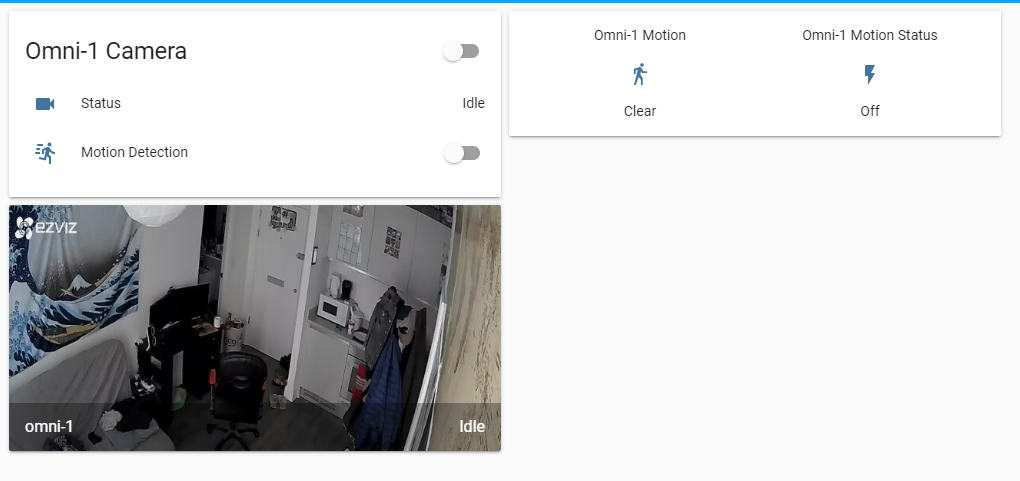
The camera component is used to display the camera output in my home assistant interface.
The binary sensor shows me when motionEye detects movement, the command send from motionEye triggers the binary sensor to show "Detected" or "Cleared".
The switch allows me to turn on/off the motion detection function of motionEye.
The reason for my setup is.
I want my camera to record whenever it detects movement and save to a file. However I do not want the camera to record when I am at home. So when I arrive home I press a button which turns my lights on and then should pause motioneye detection.
MotionEye is required for motion detection and recording.
Harpwn
on 11 Mar 2020
Ahhh. I was missing the turn light on to pause motionEye piece.
'Normal': Recording motion from Omni-1
Arrive home, turn on light, pause motionEye
(does the light stay on the whole time you are home?)
Leave, turn off light, resume recording
On Wed, Mar 11, 2020 at 1:33 PM Harpwn notifications@github.com wrote:
The camera component is used to display the camera output in my home
assistant interface.
The binary sensor shows me when motionEye detects movement, the command
send from motionEye triggers the binary sensor to show "Detected" or
"Cleared".
The switch allows me to turn on/off the motion detection function of
motionEye.The reason for my setup is.
I want my camera to record whenever it detects movement and save to a
file. However I do not want the camera to record when I am at home. So when
I arrive home I press a button which turns my lights on and then should
pause motioneye detection.MotionEye is required for motion detection and recording.
—
You are receiving this because you were mentioned.
Reply to this email directly, view it on GitHub
https://github.com/ccrisan/motioneyeos/issues/1778#issuecomment-597767840,
or unsubscribe
https://github.com/notifications/unsubscribe-auth/AEZTUHJUJ7RNGILJKGZCKWTRG7DM3ANCNFSM4GP774FQ
.
--
Thanks
Kevin Shumaker
Personal Tech Support https://kevinshumaker.wixsite.com/thethirdlevel
N38° 19' 56.52"
W85° 45' 8.56"
Semper Gumby
“Don't tell people how to do things. Tell them what to do and let them
surprise you with their results.” - G.S. Patton, Gen. USA
Ethics are what we do when no one else is looking.
Quis custodiet ipsos custodes?
“There is no end to the good you can do if you don’t care who
gets the credit.” - C Powell
You know we're sitting on four million pounds of fuel, one nuclear weapon
and a thing that has 270,000 moving parts built by the lowest bidder. Makes
you feel good, doesn't it?
starbasessd
on 11 Mar 2020
The lights are a separate component which I didn't include in my setup stuff as it shouldn't affect motionEye.
This will not be helpful for solving the issue but for your curiosity.
Essentially my home has 2 modes.
Home mode: Lights on, Camera detection paused.
Away mode (also used for sleep): Lights off, Camera detection active.
All that really matters is that when I turn on/off the motion detection switch it remains turned on/off.
Currently the switch will revert to whatever is saved in motionEye after a few minutes.
I.e. If i have the motion detection toggled on in motionEye the switch will never stay off, it will always return to on after a few minutes.
If i have the motion detection toggled off in motionEye the switch will never stay on, it will always return to off after a few minutes.
Harpwn
on 11 Mar 2020
OK. Lots of digging.
It doesn't look like motion is listening for traffic on 7999 (it does the
actual motion detection)
netstat -apt
[image: image.png]
Looked for the motion & motionEye config files, not fount
You may want to check with FRENCK to see if he can enable the feature, or
where the config files are to enable it yourself.
It may be he's not using motion as the backend, I don't know.
I know I don't want to dig through a Docker setup to find them.
On Wed, Mar 11, 2020 at 1:57 PM Kevin Shumaker kevin.shumaker@gmail.com
wrote:
Ahhh. I was missing the turn light on to pause motionEye piece.
'Normal': Recording motion from Omni-1
Arrive home, turn on light, pause motionEye
(does the light stay on the whole time you are home?)
Leave, turn off light, resume recordingOn Wed, Mar 11, 2020 at 1:33 PM Harpwn notifications@github.com wrote:
The camera component is used to display the camera output in my home
assistant interface.
The binary sensor shows me when motionEye detects movement, the command
send from motionEye triggers the binary sensor to show "Detected" or
"Cleared".
The switch allows me to turn on/off the motion detection function of
motionEye.The reason for my setup is.
I want my camera to record whenever it detects movement and save to a
file. However I do not want the camera to record when I am at home. So when
I arrive home I press a button which turns my lights on and then should
pause motioneye detection.MotionEye is required for motion detection and recording.
—
You are receiving this because you were mentioned.
Reply to this email directly, view it on GitHub
https://github.com/ccrisan/motioneyeos/issues/1778#issuecomment-597767840,
or unsubscribe
https://github.com/notifications/unsubscribe-auth/AEZTUHJUJ7RNGILJKGZCKWTRG7DM3ANCNFSM4GP774FQ
.--
ThanksKevin Shumaker
Personal Tech Support https://kevinshumaker.wixsite.com/thethirdlevel
N38° 19' 56.52"
W85° 45' 8.56"Semper Gumby
“Don't tell people how to do things. Tell them what to do and let them
surprise you with their results.” - G.S. Patton, Gen. USA
Ethics are what we do when no one else is looking.
Quis custodiet ipsos custodes?
“There is no end to the good you can do if you don’t care who
gets the credit.” - C Powell
You know we're sitting on four million pounds of fuel, one nuclear weapon
and a thing that has 270,000 moving parts built by the lowest bidder. Makes
you feel good, doesn't it?
--
Thanks
Kevin Shumaker
Personal Tech Support https://kevinshumaker.wixsite.com/thethirdlevel
N38° 19' 56.52"
W85° 45' 8.56"
Semper Gumby
“Don't tell people how to do things. Tell them what to do and let them
surprise you with their results.” - G.S. Patton, Gen. USA
Ethics are what we do when no one else is looking.
Quis custodiet ipsos custodes?
“There is no end to the good you can do if you don’t care who
gets the credit.” - C Powell
You know we're sitting on four million pounds of fuel, one nuclear weapon
and a thing that has 270,000 moving parts built by the lowest bidder. Makes
you feel good, doesn't it?
starbasessd
on 11 Mar 2020
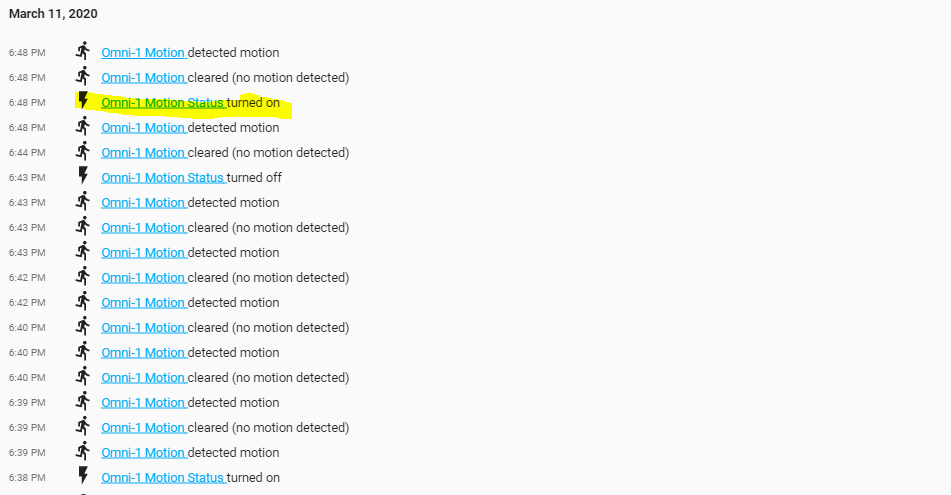
The switch is definitely turning on/off motion detection in motionEye.
When the switch is turned off the motion binary sensor stops detecting motion and always displays clear.
The problem is that after a period of time the switch just turns itself back on.
In the below you can see, the yellow is the one that I did not do. My binary sensor correctly reports back when motion is detected (me moving in-front of the camera). When I turn off the switch you can see no motion is detected until 4 minutes later, and then suddenly the switch turns itself back on (because the status reported from motionEye has changed from paused to active). I can repeat this over and over with the same result. I turn the switch off and it turns itself back on a few minutes later.
Harpwn
on 11 Mar 2020
Hi again, our timezones seems not to be the same ;-)
Not to correct @starbasessd, but to assure a common understanding on my setup/testing:
In the 'problem setup' I had connected only one cam, but the switch for the second cam was in status ON, which came from an earlier testing (weeks ago).
During the test, together with @starbasessd, I again connected the second cam and the problem disappeared.
I then again disconnected the second cam, and this time additionally switched the button in the frontend to OFF.
Since then everything is working propperly. My wife today 2 times used the PAUSE functionallity each for 1 hour and all went right.
Regards
Peter :-)
Pedder007
on 11 Mar 2020
Does anyone know how to get this to work with the motioneye add-on for homeassistant?
I do not get any response with http://192.168.1.43:7999/1/detection/status
ID I changed for my camera.
The addon has the config as:
motion_webcontrol: false
ssl: false
certfile: fullchain.pem
keyfile: privkey.pem
action_buttons: []
 Yonny24
on 2 Aug 2020
Yonny24
on 2 Aug 2020
Their add-on has some mods made, you should try to contact the person
supporting it. He is listed in the plug-in from HA.
On Sat, Aug 1, 2020 at 7:23 PM Yonny24 notifications@github.com wrote:
Does anyone know how to get this to work with the motioneye add-on for
homeassistant?I do not get any response with http://192.168.1.43:7999/1/detection/status
ID I changed for my camera.The addon has the config as:
motion_webcontrol: false
ssl: false
certfile: fullchain.pem
keyfile: privkey.pem
action_buttons: []—
You are receiving this because you were mentioned.
Reply to this email directly, view it on GitHub
https://github.com/ccrisan/motioneyeos/issues/1778#issuecomment-667599433,
or unsubscribe
https://github.com/notifications/unsubscribe-auth/AEZTUHOE5BHF2IRREINXKS3R6SPYRANCNFSM4GP774FQ
.
--
Thanks
Kevin Shumaker
Personal Tech Support https://kevinshumaker.wixsite.com/thethirdlevel
N38° 19' 56.52"
W85° 45' 8.56"
Semper Gumby
“Don't tell people how to do things. Tell them what to do and let them
surprise you with their results.” - G.S. Patton, Gen. USA
Ethics are what we do when no one else is looking.
Quis custodiet ipsos custodes?
“There is no end to the good you can do if you don’t care who
gets the credit.” - C Powell
You know we're sitting on four million pounds of fuel, one nuclear weapon
and a thing that has 270,000 moving parts built by the lowest bidder. Makes
you feel good, doesn't it?
starbasessd
on 2 Aug 2020
Made some progress using Harpwn's set up. mqtt addon. Managed to view each camera now with a different port specified in the config file and can add them as an entity. Just figuring out how to toggle to motion detection on and off.
Yonny24
on 2 Aug 2020
I have the detection status appearing on my homeassistant page now 'clear' or 'detected'. Great! With the small circles of the video streams also.
Just missing getting the toggle to switch off the detection working.
Yonny24
on 2 Aug 2020
I have the detection status appearing on my homeassistant page now 'clear' or 'detected'. Great! With the small circles of the video streams also.
Just missing getting the toggle to switch off the detection working.
hi @Yonny24, see my comment above. if you want to have this toggle available, you need to change motion's config [not motionEye's - that's important]. and to do that, you'll need to have access to the filesystem motion is installed on. in other words - to achieve that on HA's addon, probably you'll need to contact addons's author and suggest him the change I've mentioned in my comment. alternatively - IF there's an option to have motion's config file somewhere outside the addon's docker* - you'd have to change the config by yourself, according to my comment.
*AFAIR addons in home assistant are "just dockers" run on the HA's supervisor system
pejotigrek
on 2 Aug 2020
Success! Got the toggle switches working, status and thumbnails working.
Set up a nodered flow using the newly created objects in HA - detects a change in state from Clear to Detected and sends a notification to my telegram bot.
Had to tweak the config settings within the section of the motioneye add-on. Took a bit of experimenting.
config in ha setting also.
Only thing that was odd the camera ID's on motionteye didn't always coincide. ID 7 on motioneye was actually 5 for example.
Each camera had a port so could bring these in on my main dash.
- platform: mjpeg
    mjpeg_url: http://192.168.1.43:8081/
    name: Kitchen
`binary_sensor:
- platform: mqtt
state_topic: "cameras/motion/kitchen"
payload_on: "ON"
payload_off: "OFF"
name: Kitchen Motion
device_class: motion `
- platform: command_line
     scan_interval: 5
     switches:
        motion_detection_kitchen:
            command_on: 'curl -k "http://192.168.1.43:7999/5/detection/start" >/dev/null'
            command_off: 'curl -k "http://192.168.1.43:7999/5/detection/pause" >/dev/null'
            command_state: 'curl -s "http://192.168.1.43:7999/5/detection/status" | grep -q ACTIVE'
            friendly_name: Kitchen Motion Status
Yonny24
on 2 Aug 2020
Nope still not working properly oddly.
http://192.168.1.43:7999/5/detection/status
Camera 5 Detection status PAUSE
This stll triggered 'Detected' when moved in front of the camera.
Yonny24
on 2 Aug 2020
Related issues
 careyer
·
3Comments
careyer
·
3Comments
 jangix
·
5Comments
jangix
·
5Comments
 tehXor
·
3Comments
tehXor
·
3Comments
 SuneBielefeldt
·
4Comments
SuneBielefeldt
·
4Comments
 dimgod59
·
4Comments
dimgod59
·
4Comments
Most helpful comment
@feueru you mean turn motion detection on and off? I'm gonna resurrect this issue for a moment ;)
I was searching the same thing for my RPi0 which I use as an entrance door camera and I want it to record motion only at night or when I'm not at home. this is the solution that I came up with:
logged in via ssh to RPi0 with motionEyeOS installed,
find the line that starts with
webcontrol_localhostand make sure it is set tofalseand not toon.press ctrl-x, y, enter [this exits editor, confirms save, confirms file name].
now you have unlocked getting into your motionEyeOS installation via http from other devices in your LAN! to try it out, enter this into your web browser [when connected to local network via ethernet or wifi; if you have only one camera configured, enter 1 as _camera_number_]:
that should show you status of motion detection [active or paused].
if you want to pause enter: _pause_ instead of _status_; and to start enter _start_ :)
if you want to have a switch in HomeAssistant [to use it in dashboard or in automations] just configure it like this:
now you can use
switch.motion_detect_togglein dashboard or in automations, scripts etc. :)