Motioneyeos: Call discord webhook?
I wonder how one would call a Discord webhook with motionEyeOS. I have set up the webhook as

and took https://discordapp.com/developers/docs/resources/webhook#execute-webhook as query parameters as explained in

so in the end i have
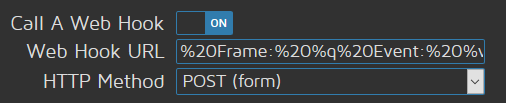
https://discordapp.com/api/webhooks/458659855943598110/qQaJ54FfeZ77cKfdxbmm8cmUec_cXfmHZkKyCBb9hrNiqUIKyXiUSmxo1FnNFRptPaXO?content=Motion%20detected!%20Frame:%20%q%20Event:%20%v
 Bluscream
All 109 comments
I'm confused... are you stating what you've done, or are you asking a question?
Are you saying you tried this webhook but it didn't work?
 IAmOrion
on 22 Jun 2018
IAmOrion
on 22 Jun 2018
Are you saying you tried this webhook but it didn't work?
Exactly and i have no idea why, except that i might have not understood how this setting works in meOS
Bluscream
on 22 Jun 2018
Gotchya, ok, tell me the expected results, and what you setup in Discord and I'll try and replicate it and see if I can make it work
IAmOrion
on 22 Jun 2018
and what you setup in Discord
That's visible on the screenshots in post 1, it's not more than that.
tell me the expected results
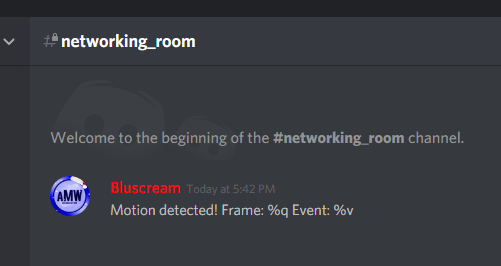
Bluscream
on 22 Jun 2018
Have you checked this: https://support.discordapp.com/hc/en-us/articles/228383668
[edit, I mis-read something and just realised, it's something else... I'll keep looking]
Note: Have you tried sending using Post Json ?
IAmOrion
on 22 Jun 2018
Thanks, i wonder why such a small amount of people here use Discord
Bluscream
on 22 Jun 2018
If it helps, you could use the "Run An End Command" to run a python script that posts to discord using your webhook.
I tested that already and it worked :)
You could include the date and time of sending in the message, and potentially (depending on your setup) include the last captured still image.
Would you be interested in that?
IAmOrion
on 22 Jun 2018
Of course but im not sure if motioneyeos supports python
Bluscream
on 22 Jun 2018
Also i hopy python is not too resource intensive for the pie
Bluscream
on 22 Jun 2018
MotionEye is pretty much BUILT on python lol. Almost everything it does is based on a python script! MotionEyeOS just encapsulates MotionEye really.
Look here: https://github.com/ccrisan/motioneye/tree/master/motioneye
Everything is a python script - albeit in the compiled release, the python scripts are compiled (eg .pyc instead of .py)
It's not intensive at all - I currently use a python script I wrote, that takes the still image, submits it to openalpr to see if there's a car in the photo, if there is, it gets the plate via OCR, returns the vehicle details, then sends all the data, -- eg, time, date, photo, message via pushover so I get a push notification on my iPhone :)
IAmOrion
on 22 Jun 2018
@Bluscream - I've done some playing...
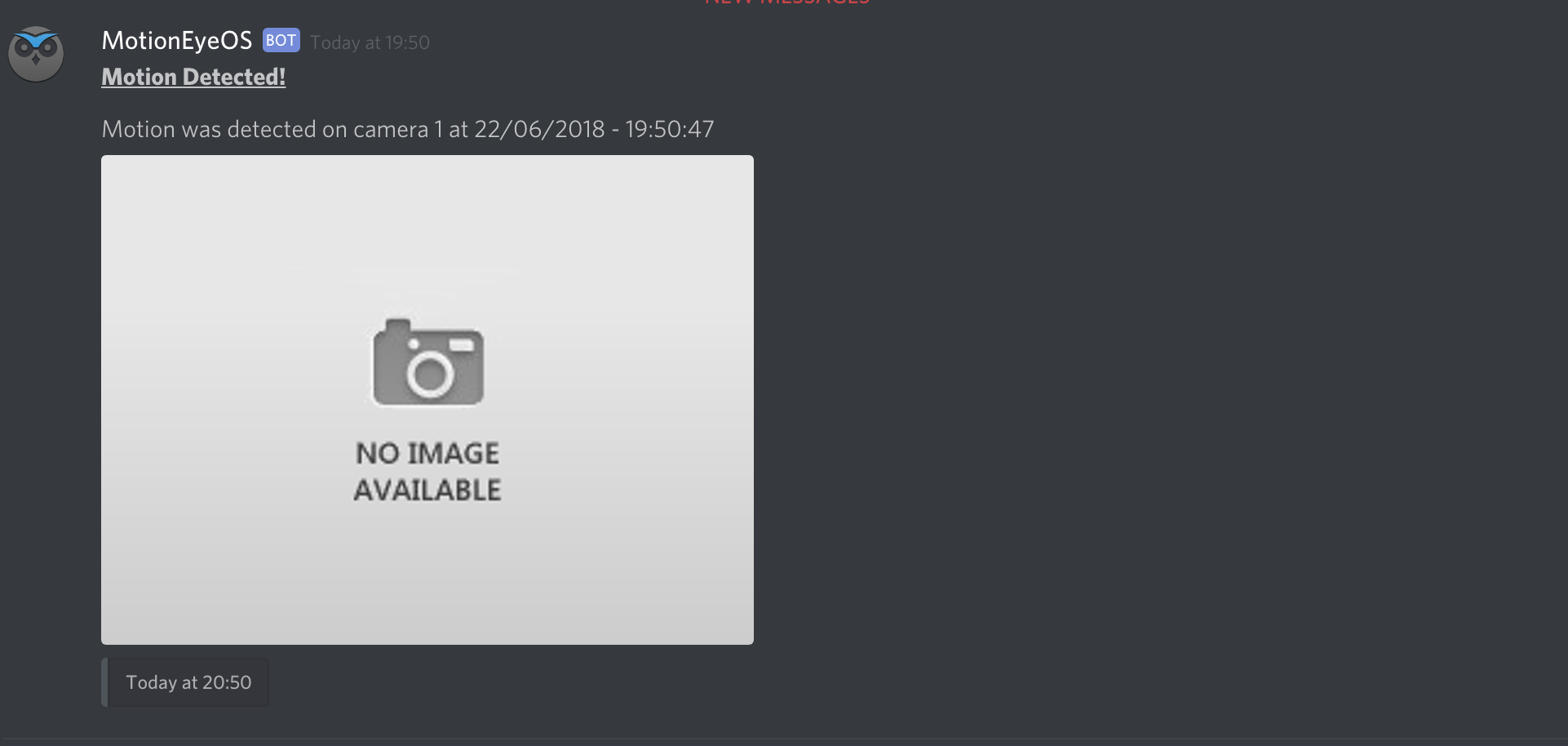
Actioned via a python script :)
FYI: The "No Image Available" image IS an image uploaded from my MotionEyeOS, but I used that static image so that when I took screenshots, there was no real photo use ... but it will work!
I'm going to work on the script more a bit later, so that's easier for people to use and edit for their needs.
I will keep you posted
IAmOrion
on 22 Jun 2018
@Bluscream
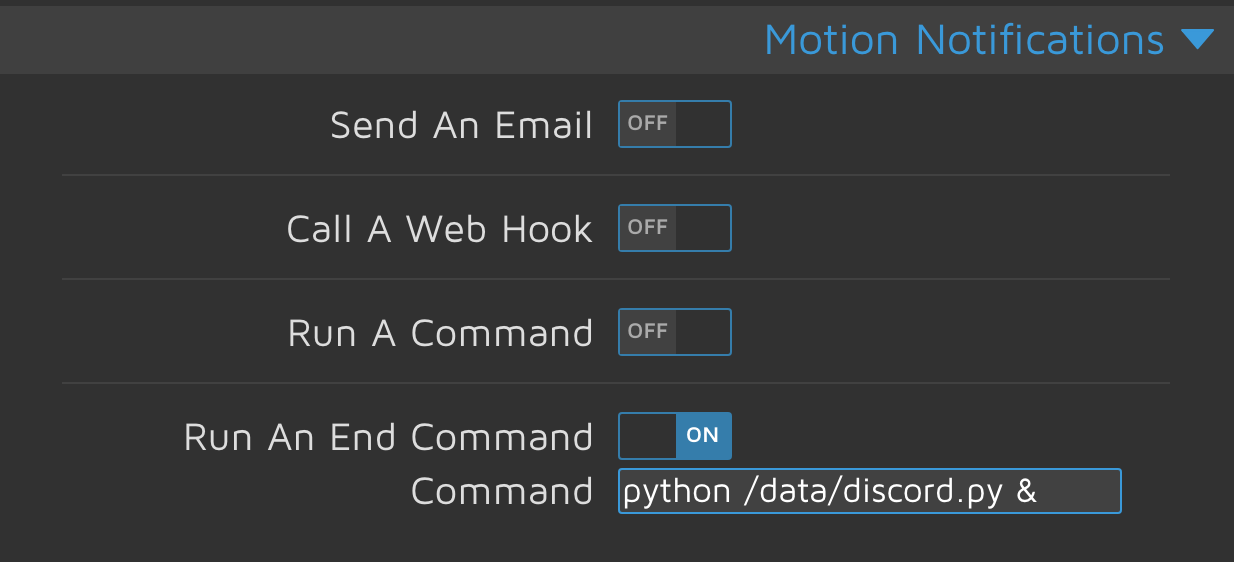
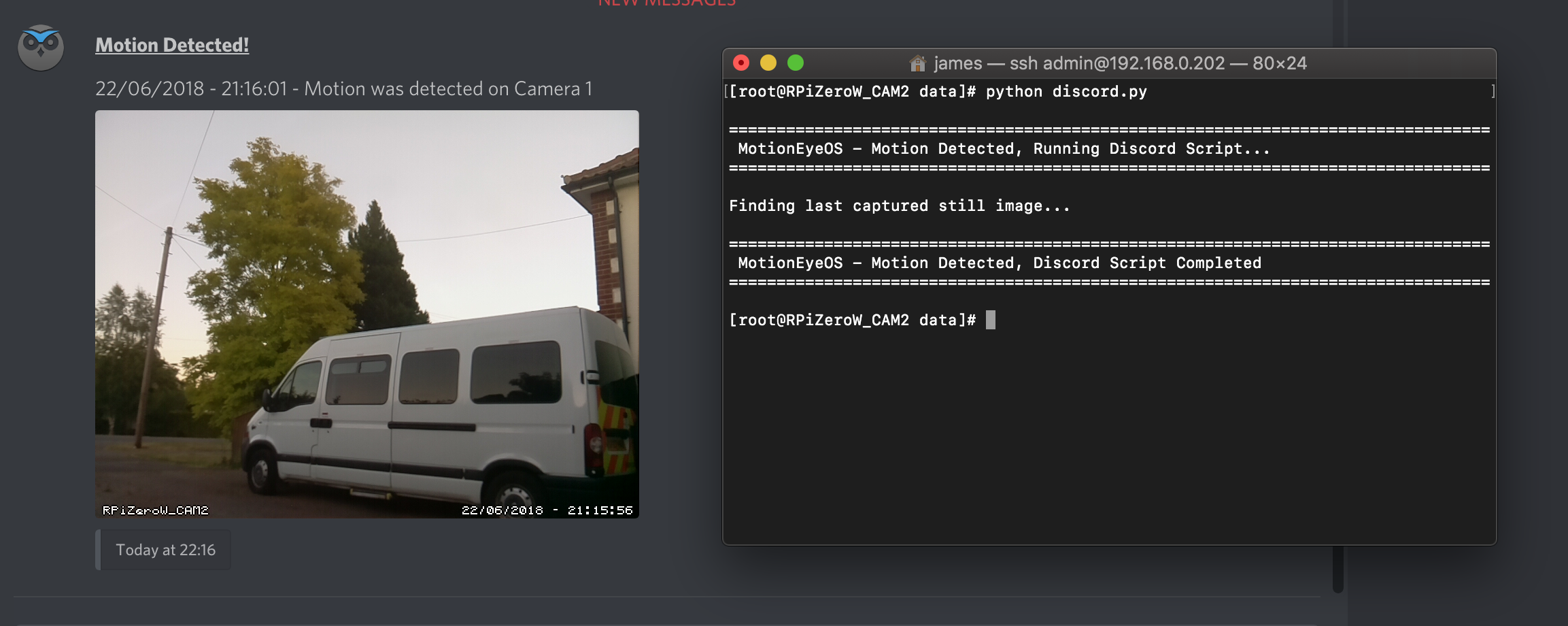
You can download my script here: https://github.com/IAmOrion/MotionEyeOS_Add-On_Scripts/blob/master/discord.py
Place in /data/
Please do report back
IAmOrion
on 22 Jun 2018
How do i get that onto the pi? Just use WinSCP?
Bluscream
on 22 Jun 2018
@Bluscream yes, WinSCP should do it. I personally have a mac so I used Transmit but any SFTP client will do it.... in your case, yes WinSCP should be fine :)
Make sure you edit the settings etc to suit your needs, and add your webhook url into the code
IAmOrion
on 22 Jun 2018
Do i only need the discordpy file and whats the ssh password ^=^
Bluscream
on 22 Jun 2018
You only need the discord.py file yes.
The password is whatever you set as your username and password for admin of motioneyeos
IAmOrion
on 22 Jun 2018
THere is no /data sadly
[root@CCTV data]# ls
2018-06-21/ lastsnap.jpg@ lost+found/ output/
etc/ log/ media/ varlib/
[root@CCTV data]# wget https://raw.githubusercontent.com/IAmOrion/MotionEyeOS_Add-On_Scripts/master/discord.py
Also do i not need to add it to https://github.com/ccrisan/motioneyeos/wiki/Tweaks#adding-custom-startup-commands ?
EDIT: Got it to work, but it exits when it made 1 post.
Also why are there 3 different times, thats confusing :D

btw for my second cam i get
[root@CCTV data]# python discord_main.py
================================================================================
MotionEyeOS - Motion Detected, Running Discord Script...
================================================================================
Traceback (most recent call last):
File "discord_main.py", line 112, in <module>
send_to_discord()
File "discord_main.py", line 91, in send_to_discord
c.perform()
pycurl.error: (26, '')
Hi @Bluscream
1) Firstly, you were already in your /data folder

You only had to type "cd /data/" and it would also have taken you into your data folder.
2) No - this has nothing to do with startup commands!? I don't mean to sound disrespectful now, BUT, I already told you with a screenshot where you need to add the command to run this script. If you run it directly from terminal it WILL only run once. You need to add the script to either "Run A Command" OR "Run An End Command". Then, whenever your camera detects motion, it will run that script.
Here is the screenshot again...
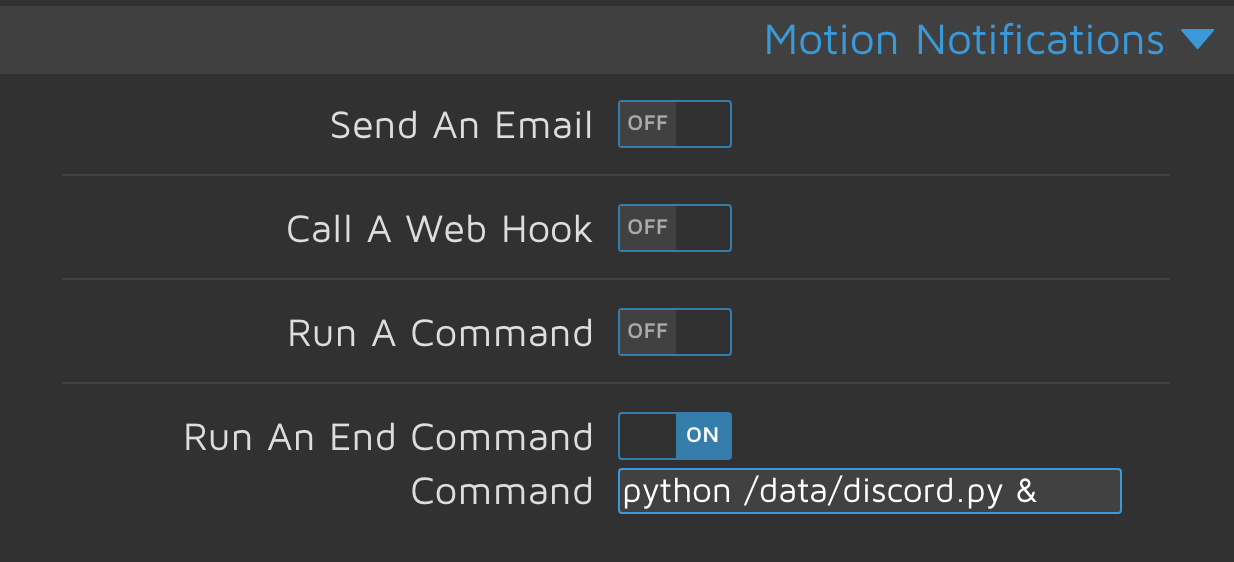
With your opening question being about webhooks, I presumed you had at least some mediocre knowledge in stuff like this... But then you didn't even realise you were already in your /data folder so I'm guessing you've NEVER really used terminal, or done anything like this?
3) Times are a little odd in Discord, if you do a google search you will see hundreds of posts of people complaining times are off...
That being said, did you check the script and set your timezone? By default it's "Europe/London" because I'm in the UK. You may need to change this.
Check Line 16 ... TIMEZONE = "Europe/London"
Also, this script doesn't make motioneye take a photo, it simply uses the last photo taken. So if you ran this from terminal as a test, it will just use the last taken photo - so if your last motion event was 3 hours ago, then the last picture is 3 hours. So if you run this script from terminal, the picture it sends will be 3 hours old hence the reason your picture timestamp is different to the time the notification was sent.
It's worth noting too, that the script is actioned would be triggered when a motion event happens... So it's normal to see anywhere from a few seconds difference to a minute maybe, depending on your config
4) That means there's no picture to send on the second camera. Make sure it has taken at least one picture - you can manually take a picture within motion eye if needed. Then test again.
It could also be due to the Camera Name... check the file path and edit Line 29:
FILENAME = '/data/output/Camera1/lastsnap.jpg'
If you're unsure of the path - you can use WinSCP to browse the /data/output/ folder
5) I'm going to repeat this -- You MUST add this script to the "Run A Command" OR "Run An End Command" (NOT BOTH!!!) found under "Motion Notifications". That way, it will push the message to Discord everytime there is a motion event.
IAmOrion
on 23 Jun 2018
1) and 2) Already got all of that set up. I wonder how the POST and JSON webhooks would work at all if they don't work as described in the info toolbutton.
With your opening question being about webhooks, I presumed you had at least some mediocre knowledge in stuff like this... But then you didn't even realise you were already in your /data folder so I'm guessing you've NEVER really used terminal, or done anything like this?
I am just used to the way the normal ubuntu/debian shells show paths etc.
4) There definitly is atleast 1 image manually taken with that camera
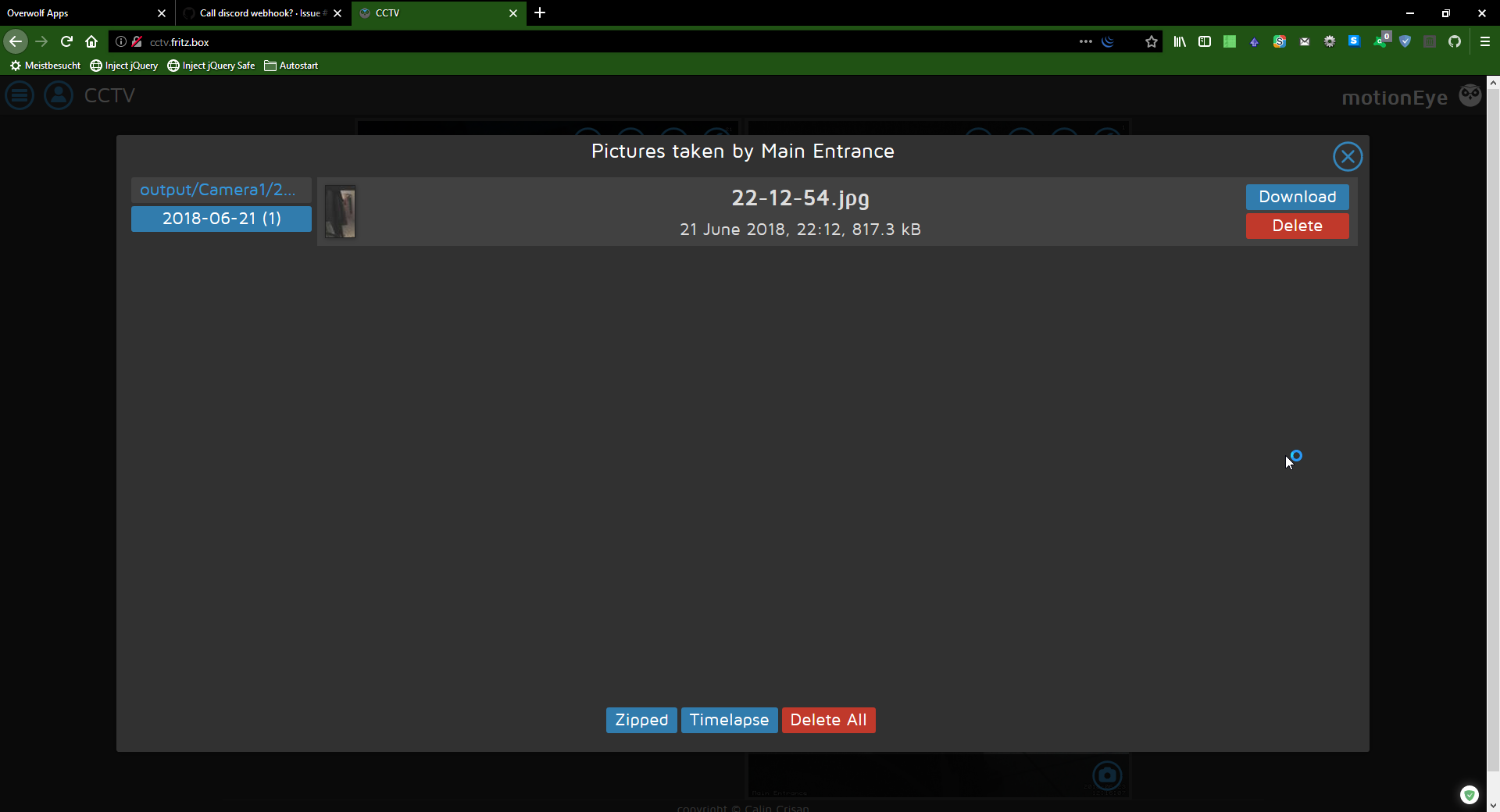
P.S. Why read the timezone from the python script? The timezone is already set in the meOS config
Bluscream
on 23 Jun 2018
Interesting...
Can you use WinSCP and screenshot the Camera1 folder. I wonder if the "lastsnap.jpg" alias is missing
IAmOrion
on 23 Jun 2018
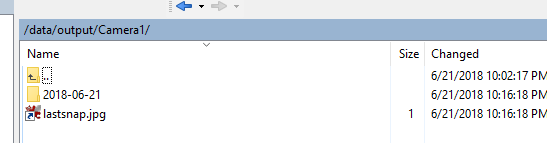
P.S. i updated post 399661930
Bluscream
on 23 Jun 2018
Hmmmmm........ It should be working then.
Can you paste the .py file here using inside a code ( <> ) tag so I can double check any changes you made
IAmOrion
on 23 Jun 2018
discord_net.py
# ================================================================================
# Discord webhook script for MotionEyeOS - James Tanner aka IAmOrion
# ================================================================================
global MESSAGE, FILENAME, FILE_FOUND
# ================================================================================
# Script Settings
# ================================================================================
WEBHOOK_URL="https://canary.discordapp.com/api/webhooks/458658245289050112/j-gFfa8x592zzaR4xz0aLl9Ao0y5bIpyosBqMPtf9uIio89xxkpsC5eFoXPvwnN-zzBw"
WEBHOOK_HEADER = "Content-Type: multipart/form-data" # Leave this as is! DO NOT CHANGE THIS!!!!
WEBHOOK_TITLE = "__**Motion Detected!**__\n\n" # Check Discords mark down text to see how to style your content. \n = new lne
WEBHOOK_MESSAGE = " - Motion was detected on net01"
TIMEZONE = "Europe/Berlin"
MESSAGE_DATEFORMAT = "%d/%m/%Y - %H:%M:%S" # Date format used in the message itself
NETWORK_SHARE = 0 # Are you using a network share for storage? 1 = yes, 0 = no
SHARE_FOLDER = '/data/media/motioneye_192_168_0_200_storage_sda1_front_cctv_rpizerow_cam2__admin/' # Only required if NETWORK_SHARE = 1
# You will need to use SFTP or SSH to find the path above.
# Goto /data/media/ and you will see the name of your mapped network folder
if NETWORK_SHARE:
# You will have to build/code this string manually depending on your usage and how you're saving still images.
# Look below to see how this is currently done. The function is find_latest_file():
# This was written to match my setup, eg folder are stored in d-m-y format. Eg: ./22-06-2018/21-00-00.jpg
FIND_LATEST_FILE = 1
else:
#FILENAME = '/data/output/noimage.jpg'
FILENAME = '/data/output/Camera1/lastsnap.jpg'
PYCURL_VERBOSE = False # Can be useful for debugging the http post. True / False
DEBUG = 0 # If set to 1, the response from Discord will be output in terminal. Useful when testing manually
# ================================================================================
# Do not edit below this line unless you know what you're doing!
# ================================================================================
import pycurl, cStringIO, glob, os, json, pytz, datetime, time
utc = pytz.timezone('UTC')
now = utc.localize(datetime.datetime.utcnow())
la = pytz.timezone(TIMEZONE)
local_time = now.astimezone(la)
CURRENT_TIME = local_time.strftime('%Y-%m-%dT%H:%M:%S.000Z') # UTC Formatted for use in Discords timestamp argument
MESSAGE_TIME = local_time.strftime(MESSAGE_DATEFORMAT)
#WEBHOOK_CONTENT = { "content": "__**MotionEyeOS - Motion Detected!**__\n\nMotion was detected on camera 1","embeds": [{"author":{ "name": "MotionEyeOS", "icon_url": "https://raw.githubusercontent.com/IAmOrion/MotionEyeOS_Add-On_Scripts/master/icon.png"},"timestamp": CURRENT_TIME }] }
WEBHOOK_CONTENT = { "content": WEBHOOK_TITLE + MESSAGE_TIME + WEBHOOK_MESSAGE,"embeds": [{"timestamp": CURRENT_TIME }] }
def find_latest_file():
global FILE_FOUND, FILENAME
FILE_FOUND = 0
TODAYS_DATE = datetime.datetime.today().strftime('%d-%m-%Y')
TODAYS_DATE_FOLDER = SHARE_FOLDER + TODAYS_DATE + '/*.jpg'
LIST_OF_FILES = glob.glob(TODAYS_DATE_FOLDER) # * means all, if need specific format then *.jpg (as an example). Just FYI - MotionEye stores still images as jpg
try:
LATEST_FILE = max(LIST_OF_FILES, key=os.path.getctime)
FILE_FOUND = 1
except ValueError:
FILE_FOUND = 0
if FILE_FOUND:
FILENAME = LATEST_FILE
else:
FILENAME = '/data/output/noimage.jpg'
def send_to_discord():
buf = cStringIO.StringIO()
c = pycurl.Curl()
c.setopt(c.URL, WEBHOOK_URL)
c.setopt(c.WRITEFUNCTION, buf.write)
c.setopt(c.HTTPHEADER, [WEBHOOK_HEADER])
c.setopt(c.USERAGENT, "MotionEyeOS")
c.setopt(c.HTTPPOST, [("payload_json", json.dumps(WEBHOOK_CONTENT)),("file", (c.FORM_FILE, FILENAME, )),])
c.setopt(c.VERBOSE, PYCURL_VERBOSE)
c.perform()
c.close()
f = buf.getvalue()
buf.close()
if DEBUG:
print(f)
print("\n================================================================================")
print(" MotionEyeOS - Motion Detected, Running Discord Script... ")
print("================================================================================\n")
if NETWORK_SHARE:
find_latest_file()
print("Finding last captured still image...")
send_to_discord()
print("\n================================================================================")
print(" MotionEyeOS - Motion Detected, Discord Script Completed ")
print("================================================================================\n")
discord_main.py
# ================================================================================
# Discord webhook script for MotionEyeOS - James Tanner aka IAmOrion
# ================================================================================
global MESSAGE, FILENAME, FILE_FOUND
# ================================================================================
# Script Settings
# ================================================================================
WEBHOOK_URL="https://canary.discordapp.com/api/webhooks/458658245289050112/j-gFfa8x592zzaR4xz0aLl9Ao0y5bIpyosBqMPtf9uIio89xxkpsC5eFoXPvwnN-zzBw"
WEBHOOK_HEADER = "Content-Type: multipart/form-data" # Leave this as is! DO NOT CHANGE THIS!!!!
WEBHOOK_TITLE = "__**Motion Detected!**__\n\n" # Check Discords mark down text to see how to style your content. \n = new lne
WEBHOOK_MESSAGE = " - Motion was detected on main01"
TIMEZONE = "Europe/Berlin"
MESSAGE_DATEFORMAT = "%d/%m/%Y - %H:%M:%S" # Date format used in the message itself
NETWORK_SHARE = 0 # Are you using a network share for storage? 1 = yes, 0 = no
SHARE_FOLDER = '/data/media/motioneye_192_168_0_200_storage_sda1_front_cctv_rpizerow_cam2__admin/' # Only required if NETWORK_SHARE = 1
# You will need to use SFTP or SSH to find the path above.
# Goto /data/media/ and you will see the name of your mapped network folder
if NETWORK_SHARE:
# You will have to build/code this string manually depending on your usage and how you're saving still images.
# Look below to see how this is currently done. The function is find_latest_file():
# This was written to match my setup, eg folder are stored in d-m-y format. Eg: ./22-06-2018/21-00-00.jpg
FIND_LATEST_FILE = 1
else:
#FILENAME = '/data/output/noimage.jpg'
FILENAME = '/data/output/Camera2/lastsnap.jpg'
PYCURL_VERBOSE = False # Can be useful for debugging the http post. True / False
DEBUG = 0 # If set to 1, the response from Discord will be output in terminal. Useful when testing manually
# ================================================================================
# Do not edit below this line unless you know what you're doing!
# ================================================================================
import pycurl, cStringIO, glob, os, json, pytz, datetime, time
utc = pytz.timezone('UTC')
now = utc.localize(datetime.datetime.utcnow())
la = pytz.timezone(TIMEZONE)
local_time = now.astimezone(la)
CURRENT_TIME = local_time.strftime('%Y-%m-%dT%H:%M:%S.000Z') # UTC Formatted for use in Discords timestamp argument
MESSAGE_TIME = local_time.strftime(MESSAGE_DATEFORMAT)
#WEBHOOK_CONTENT = { "content": "__**MotionEyeOS - Motion Detected!**__\n\nMotion was detected on camera 1","embeds": [{"author":{ "name": "MotionEyeOS", "icon_url": "https://raw.githubusercontent.com/IAmOrion/MotionEyeOS_Add-On_Scripts/master/icon.png"},"timestamp": CURRENT_TIME }] }
WEBHOOK_CONTENT = { "content": WEBHOOK_TITLE + MESSAGE_TIME + WEBHOOK_MESSAGE,"embeds": [{"timestamp": CURRENT_TIME }] }
def find_latest_file():
global FILE_FOUND, FILENAME
FILE_FOUND = 0
TODAYS_DATE = datetime.datetime.today().strftime('%d-%m-%Y')
TODAYS_DATE_FOLDER = SHARE_FOLDER + TODAYS_DATE + '/*.jpg'
LIST_OF_FILES = glob.glob(TODAYS_DATE_FOLDER) # * means all, if need specific format then *.jpg (as an example). Just FYI - MotionEye stores still images as jpg
try:
LATEST_FILE = max(LIST_OF_FILES, key=os.path.getctime)
FILE_FOUND = 1
except ValueError:
FILE_FOUND = 0
if FILE_FOUND:
FILENAME = LATEST_FILE
else:
FILENAME = '/data/output/noimage.jpg'
def send_to_discord():
buf = cStringIO.StringIO()
c = pycurl.Curl()
c.setopt(c.URL, WEBHOOK_URL)
c.setopt(c.WRITEFUNCTION, buf.write)
c.setopt(c.HTTPHEADER, [WEBHOOK_HEADER])
c.setopt(c.USERAGENT, "MotionEyeOS")
c.setopt(c.HTTPPOST, [("payload_json", json.dumps(WEBHOOK_CONTENT)),("file", (c.FORM_FILE, FILENAME, )),])
c.setopt(c.VERBOSE, PYCURL_VERBOSE)
c.perform()
c.close()
f = buf.getvalue()
buf.close()
if DEBUG:
print(f)
print("\n================================================================================")
print(" MotionEyeOS - Motion Detected, Running Discord Script... ")
print("================================================================================\n")
if NETWORK_SHARE:
find_latest_file()
print("Finding last captured still image...")
send_to_discord()
print("\n================================================================================")
print(" MotionEyeOS - Motion Detected, Discord Script Completed ")
print("================================================================================\n")
Also can't we use a argumentparser together with
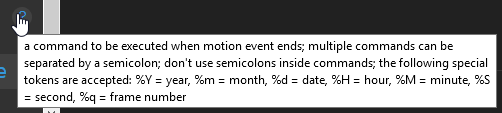
to make sure no image is sent twice?
Also i hate that there's no %c variable with the cam name so i could use the same script for both cams
Bluscream
on 23 Jun 2018
Which one is the camera that's NOT working ??
IAmOrion
on 23 Jun 2018
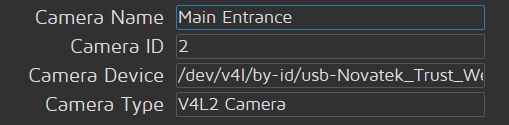
Bluscream
on 23 Jun 2018
Also, you don't need to send arguments?? Time and date is sent from the script, and because you're using On End, it will only trigger once the detected motion ENDs and therefore should only send 1 alert.
Also, the WinSCP screenshot you uploaded says "/data/output/Camera1/" but in your code you changed it to "/data/output/Camera2/" ....
IAmOrion
on 23 Jun 2018
Ohh lol, lemme check the other folder too
Bluscream
on 23 Jun 2018
I have a feeling, that if using local storage like you are... Unless you change the storage path via the settings, I believe it always uses "/data/output/Camera1/" regardless of what you actually name the Camera
IAmOrion
on 23 Jun 2018
@IAmOrion
[root@CCTV data]# find . -print | sort | sed 's;[^/]*/;|---;g;s;---|; |;g'
.
|---.keep
|---2018-06-21
| |---22-10-42.mp4
| |---22-10-42.mp4.thumb
| |---22-12-54.jpg
| |---22-27-26.mp4
| |---22-27-26.mp4.thumb
| |---22-32-01.mp4
| |---22-32-01.mp4.thumb
|---cheat.py
|---discord_main.py
|---discord_net.py
|---etc
| |---2.zip
| |---adjtime
| |---crontabs
| |---date.conf
| |---hostname
| |---localtime
| |---monitor_1
| |---motion.conf
| |---motioneye.conf
| |---ntp.conf
| |---os.conf
| |---prefs.json
| |---proftpd.conf
| |---raspimjpeg.conf
| |---shadow
| |---shadow-
| |---smb.conf
| |---ssh_host_dsa_key
| |---ssh_host_dsa_key.pub
| |---ssh_host_ecdsa_key
| |---ssh_host_ecdsa_key.pub
| |---ssh_host_ed25519_key
| |---ssh_host_ed25519_key.pub
| |---ssh_host_rsa_key
| |---ssh_host_rsa_key.pub
| |---static_ip.conf
| |---streameye.conf
| |---tasks.pickle
| |---thread-1.conf
| |---thread-1.conf.bak
| |---thread-2.conf
| |---thread-2.conf.bak
| |---version
| |---watch.conf
| |---wpa_supplicant.conf
|---lastsnap.jpg
|---log
| |---boot.log
| |---dmesg.log
| |---messages
| |---motion.log
| |---motioneye.log
| |---samba
| | |---cores
| | | |---nmbd
| | | |---smbd
| | |---log.nmbd
| | |---log.smbd
| |---wpa_supplicant.log
| |---wtmp
|---lost+found
|---media
| |---motioneye_192_168_2_1___sysadmin
| |---motioneye_192_168_2_1_jmicron_generic_sysadmin
| |---motioneye_fritz_nas_jmicron_generic
| |---motioneye_fritz_nas_jmicron_generic_sysadmin
|---output
| |---.keep
| |---Camera1
| | |---.keep
| | |---2018-06-21
| | | |---22-16-18.jpg
| | |---lastsnap.jpg
| |---Camera2
|---paths.py
|---varlib
| |---dhcp
| | |---dhclient.leases
| |---logrotate.status
| |---samba
| | |---account_policy.tdb
| | |---group_mapping.tdb
| | |---private
| | | |---msg.sock
| | | | |---1003
| | | | |---1006
| | | | |---1007
| | | | |---1010
| | | | |---1011
| | | | |---1013
| | | | |---1014
| | | | |---1015
| | | | |---1016
| | | | |---1036
| | | | |---1037
| | | | |---1040
| | | |---passdb.tdb
| | | |---secrets.tdb
| | |---registry.tdb
| | |---share_info.tdb
I have a feeling, that if using local storage like you are... Unless you change the storage path via the settings, I believe it always uses "/data/output/Camera1/" regardless of what you actually name the Camera
Isn't that a bug then? :O
Bluscream
on 23 Jun 2018
See.... /data/output/Camera2 is an empty folder. /data/output/Camera1 has the lastsnap.jpg file... so your script needs to be FILENAME = '/data/output/Camera1/lastsnap.jpg' NOT ../Camera2/..
IAmOrion
on 23 Jun 2018
Can you edit the script slightly so it reads the timezone from the meOS config file and says "no image" if the found image is older than 1 minute?
Bluscream
on 23 Jun 2018
Isn't that a bug then? :O
Not necessarily... since by default, when you ADD a camera, it IS "Camera 1". You can then change the name of the camera. I imagine it's not worth the coding to update the storage path along with the camera name, because someone might name their camera "This is my front garden! Using IP Address 192.168.0.1" or something stupid, and the code to ensure a feasible and correct working path would be a pain! Hence why you have Storage Options
IAmOrion
on 23 Jun 2018
Can you edit the script slightly so it reads the timezone from the meOS config file and says "no image" if the found image is older than 1 minute?
Possibly - I tried to keep the scripts as easy as possible but also "stand-alone" to a certain extent. Purely because for most it would be easier to alter settings all in one place instead of some settings being in the script and others coming from elsewhere, or motioneye where they may have set incorrectly, or simply not bothered to set but then don't know where to look.
I'll look into updating it though.
IAmOrion
on 23 Jun 2018
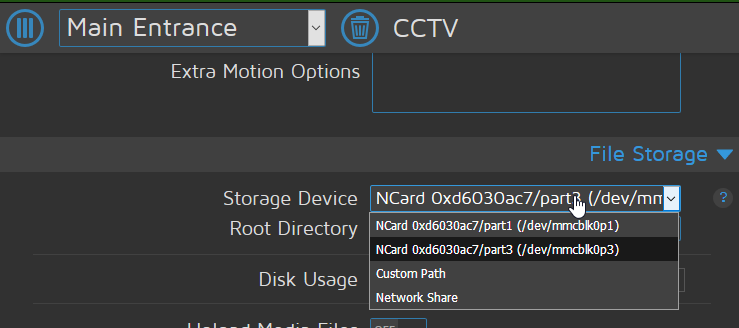
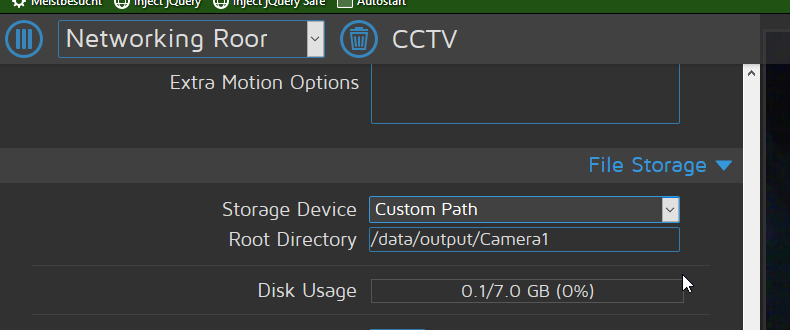
What do these mean and what should i choose to make sure nothing is mixed?
Bluscream
on 23 Jun 2018
What do these mean and what should i choose to make sure nothing is mixed?
Are you using 2 cameras connected to the same Pi ?
IAmOrion
on 23 Jun 2018
Of course. Anything wrong with that? :confused:
Bluscream
on 23 Jun 2018
Of course. Anything wrong with that? 😕
Absolutely not, no problem at all.... I was just asking to confirm the setup. I have my setup as 4 Pi Zero W's, all using storage on a Pi3 hub. So I can view all 4 camera from a central point. Each Pi has it's own camera, but all store their data to a networked drive (attached to the Pi3 hub)...
If you were using 1 camera per Pi, and had 2 Pi's the output folder wouldn't mix anyways as it's local storage...
HOWEVER, since you ARE using 2 cameras on 1 pi, set Storage Device to Custom Path exactly like your second screenshot. But, set 1 to use /data/output/Camera1 and the other to use /data/output/Camera2
IAmOrion
on 23 Jun 2018
Ahh okay, thanks will try! what do these other mean though? The part1 and part3 ?
Each Pi has it's own camera...
Isn't that a bit of a overkill? with 4 pi's you could already do mining
Bluscream
on 23 Jun 2018
Ahh okay, thanks will try! what do these other mean though? The part1 and part3 ?
Make sure to update the script to reflect the folder paths accordingly. Eg, the one I just told you to set to camera1 you will want to change back to camera2 (or whatever path you use) in the pathname lol. - it should work once the storage device path has been updated.
Part 1 & Part 3 are to do with your SDCard and/or an attached USB device perhaps... stick to using Custom Path and set the Root Directory to suit your needs
IAmOrion
on 23 Jun 2018
Make sure to update the script to reflect the folder paths accordingly. Eg, the one I just told you to set to camera1 you will want to change back to camera2 in the pathname lol. - it should work once the storage device path has been updated.
I changed everything thanks. What will happen if still images are set to manual and there's no image available, can it send the webhook with the "no image" image or without any embeds?
Part 1 & Part 3 are to do with your SDCard and/or an attached USB device perhaps
Ahh thanks for the heads-up!
Bluscream
on 23 Jun 2018
Isn't that a bit of a overkill? with 4 pi's you could already do mining
Because I am covering 4 different locations, eg Front Drive way, Rear Drive way, Garden etc. It's far easier to use a single Pi Zero W with a Pi Camera than it would be trying to run 4 100+meter usb cables each place I want a camera lol . WiFi cameras for the win!!
Besides, in order for any real results from Pi mining i'd have to own like 20,000 of them to produce any real earnings :|
I changed everything thanks. What will happen if still images are set to manual and there's no image available, can it send the webhook with the "no image" image or without any embeds?
Well, because the script uses the Alias that motioneye itself created (lastsnap.jpg) it will always send the last photo taken. Of course, there has to be at least 1 photo for the lastsnap.jpg alias to work.
There's no checking to see if a file exists, I made this as SIMPLE script. In order to cover all grounds / all bases as they say it's a fair amount of work.... and since I was only doing this to help and not for the masses (in other words, I'm doing it for free) I didn't bother with additional checks like that. It's assumed that you're using motion events with still images on... otherwise, what's the point of using this to send a picture on motion events, if you're not taking any pictures? lol
EDIT: I say there's no checking, but there is actually file checking if using a network share - I guess I could do the same for the lastsnap.... I was just being time efficient and not bothering with fall backs based on assumptions of the scripts usage
IAmOrion
on 23 Jun 2018
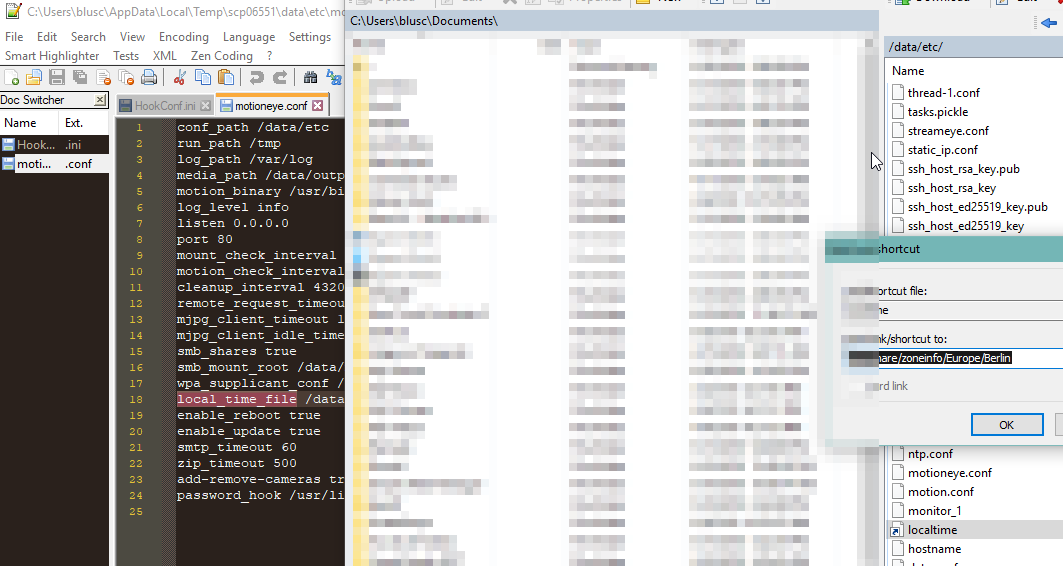
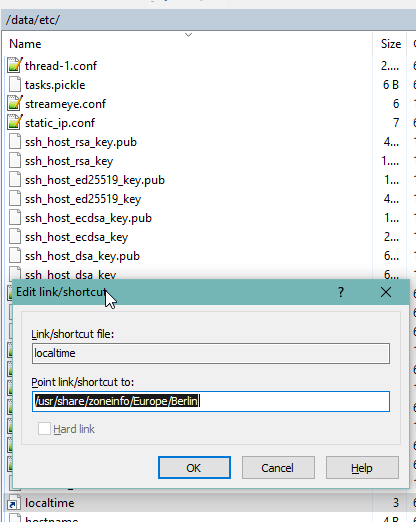
Seems like the timezone is in a directory
Bluscream
on 23 Jun 2018
what's the point of using this to send a picture on motion events, if you're not taking any pictures? lol
To inform me that there was motion and maybe check. I just don't have a lot of space as you saw in the screenshots
Bluscream
on 23 Jun 2018
To inform me that there was motion and maybe check. I just don't have a lot of space as you saw in the screenshots
Well, ok, I mean I could updated the script with an option I guess. eg SEND_PIC = 1 or 0. so if set to 0 it just send a message and not a pic. Is your setup available externally via a web address? You could include a URL in the message instead of a pic perhaps.
IAmOrion
on 23 Jun 2018
I could updated the script with an option I guess
Thanks, i'm already working on the timezone parsing and argument parser
Is your setup available externally via a web address?
Half-half i'm using a VPN to access LAN from WAN
Bluscream
on 23 Jun 2018
Thanks, i'm already working on the timezone parsing and argument parser
Please make sure you share any alteration / updates here for me to see so at a later date I can perhaps incorporate them into a more robust complete script.
Not sure if you looked at my github repo where you downloaded this script, but I've been working on a few add-on scripts for MotionEyeOS.
IAmOrion
on 23 Jun 2018
Can you send me your noimage.jpg ?
Bluscream
on 23 Jun 2018
Please make sure you share any alteration
The timezone part is done although very crappy but i'm sure that stuff won't change anytime soon in meOS
TIMEZONE = os.path.realpath('/data/etc/localtime').replace('/usr/share/zoneinfo/posix/','')
The timezone part is done although very crappy but i'm sure that stuff won't change anytime soon in meOS
Interesting! I'm looking at this myself, but I was going to simply tap into motioneyeos's settings and pull it from there lol
IAmOrion
on 23 Jun 2018
Interesting! I'm looking at this myself, but I was going to simply tap into motioneyeos's settings and pull it from there lol
That was my way too, or do you mean the settings on the webinterface? Look at the motioneye.conf file
local_time_file /data/etc/localtime
Bluscream
on 23 Jun 2018
That was my way too, or do you mean the settings on the webinterface? Look at the motioneye.conf file
I was going to look into grabbing the same way the sendmail script does or something similar (from the motioneye code) however, that's not actually going to work, so I think the way you're doing it is actually going to be the way to go
IAmOrion
on 23 Jun 2018
i could have done some path.join but as the OS is unix only it won't matter
Bluscream
on 23 Jun 2018
Nah, the way you've done it is the same thing I was going to do. I wanted to use the same method as the motioneye scripts do, but it's far easier to do what you've done
IAmOrion
on 23 Jun 2018
if os.path.isfile(FILENAME):
c.setopt(c.HTTPPOST, [("payload_json", json.dumps(WEBHOOK_CONTENT)),("file", (c.FORM_FILE, FILENAME, )),])
else:
c.setopt(c.HTTPPOST, [("payload_json", json.dumps(WEBHOOK_CONTENT)),])
That will check if a file exists and if not, won't try and send
But I'll post an updated script later
IAmOrion
on 23 Jun 2018
Thanks :)
Bluscream
on 23 Jun 2018
Sorry for removing all your comments but it was a bit bulky to work with (just for me others will probably appreciate it)
import pycurl, cStringIO, glob, os, json, pytz, datetime, time, argparse
class motionEyeDiscordWebHook(object):
WEBHOOK_URL="https://canary.discordapp.com/api/webhooks/458658245289050112/j-gFfa8x592zzaR4xz0aLl9Ao0y5bIpyosBqMPtf9uIio89xxkpsC5eFoXPvwnN-zzBw"
WEBHOOK_TITLE = "__**Motion Detected!**__\n\n"
WEBHOOK_MESSAGE = " - Motion was detected on main01"
TIMEZONE = os.path.realpath('/data/etc/localtime').replace('/usr/share/zoneinfo/posix/','')
MESSAGE_DATEFORMAT = "%d/%m/%Y - %H:%M:%S"
SHARE_FOLDER = '/data/output/Camera2/'
DEBUG = True
utc = pytz.timezone('UTC')
now = utc.localize(datetime.datetime.utcnow())
la = pytz.timezone(TIMEZONE)
local_time = now.astimezone(la)
CURRENT_TIME = local_time.strftime('%Y-%m-%dT%H:%M:%S.000Z')
MESSAGE_TIME = local_time.strftime(MESSAGE_DATEFORMAT)
WEBHOOK_CONTENT = { "content": WEBHOOK_TITLE + MESSAGE_TIME + WEBHOOK_MESSAGE,"embeds": [{"timestamp": CURRENT_TIME }] }
def get_latest_file(self):
TODAYS_DATE = datetime.datetime.today().strftime('%d-%m-%Y')
TODAYS_DATE_FOLDER = self.SHARE_FOLDER + TODAYS_DATE + '/*.jpg'
LIST_OF_FILES = glob.glob(TODAYS_DATE_FOLDER)
try:
return max(LIST_OF_FILES, key=os.path.getctime)
except ValueError:
return '/data/output/noimage.jpg'
def send_to_discord(self, FILENAME=None):
buf = cStringIO.StringIO()
c = pycurl.Curl()
c.setopt(c.URL, self.WEBHOOK_URL)
c.setopt(c.WRITEFUNCTION, buf.write)
c.setopt(c.HTTPHEADER, ["Content-Type: multipart/form-data"])
c.setopt(c.USERAGENT, "MotionEyeOS")
if os.path.isfile(FILENAME):
c.setopt(c.HTTPPOST, [("payload_json", json.dumps(self.WEBHOOK_CONTENT)), ("file", (c.FORM_FILE, FILENAME,))])
else:
c.setopt(c.HTTPPOST, [("payload_json", json.dumps(self.WEBHOOK_CONTENT))])
c.setopt(c.VERBOSE, self.DEBUG)
c.perform()
c.close()
f = buf.getvalue()
buf.close()
if self.DEBUG: print(f)
if __name__ == '__main__':
wh = motionEyeDiscordWebHook()
wh.send_to_discord(wh.get_latest_file())
now let's visit the configparser
Bluscream
on 23 Jun 2018
Sorry for removing all your comments but it was a bit bulky to work with (just for me others will probably appreciate it)
No problem - I designed my script to be as user friendly as possible for newbies too - you've "complicated" things there making this less user friendly so to speak from a "newbie needs to edit" point of view. But is perfect & much neater / efficient for your own usage of course
now let's visit the configparser
What do you want to parse so to speak? The only thing thing motion eye gives that you can't already do really is frame number.... and that's kind of pointless and not needed really. (IMO)
IAmOrion
on 23 Jun 2018
class motionEyeDiscordWebHook(object):
parser = argparse.ArgumentParser()
parser.add_argument("url", help="Discord Webhook URL", type=str)
parser.add_argument("-n", "--name", help="Name of the camera", type=str, default="Camera")
parser.add_argument("-p", "--path", help="Path of the camera output", type=str, default="/data/output/Camera1/")
parser.add_argument("--debug", help="Prints debug infos to console", type=bool, default=False)
parser.add_argument("-y", "--year", help="motionEyeOS's %Y", type=int)
parser.add_argument("-m", "--month", help="motionEyeOS's %m", type=int)
parser.add_argument("-d", "--date", help="motionEyeOS's %d", type=int)
parser.add_argument("-h", "--hour", help="motionEyeOS's %H", type=int)
parser.add_argument("-m", "--minute", help="motionEyeOS's %M", type=int)
parser.add_argument("-s", "--second", help="motionEyeOS's %S", type=int)
parser.add_argument("-q", "--frame", help="motionEyeOS's %q", type=int)
args = parser.parse_args()
MESSAGE = " - Motion was detected on %s" % args.name
What do you want to parse so to speak? The only thing thing motion eye gives that you can't already do really is frame number.... and that's kind of pointless and not needed really. (IMO)
but you can set some stuff in the commandline that's not a variable
Bluscream
on 23 Jun 2018
I see! I avoided for that for one reason.... the text box where you enter the chosen command to run is tiny, so some people may struggle so to speak figuring out all the correct command line arguments to parse, hence why I built this as a self contained script. However, doing what you're doing is obviously far better and a "more professional" singular script as you obv wouldn't need multiple copies of the same script, you just use different arguments :)
IAmOrion
on 23 Jun 2018
You're making me want to alter my github repo, so that I have "basic" scripts and "advanced" scripts ha. Basic would be all self contained, advanced would use arguments.
It's just about trying to make something that everyone can use without too much of a headache, and I know from experience scripts that require arguments are often harder for novices to get to grips with lol
IAmOrion
on 23 Jun 2018
import pycurl, cStringIO, glob, os, json, pytz, datetime, time, argparse

class motionEyeDiscordWebHook(object):
    parser = argparse.ArgumentParser()
    parser.add_argument("url", help="Discord Webhook URL", type=str)
    parser.add_argument("-n", "--name", help="Name of the camera", type=str, default="Camera")
    parser.add_argument("-p", "--path", help="Path of the camera output", type=str, default="/data/output/Camera1/")
    parser.add_argument("--debug", help="Prints debug infos to console", type=bool, default=False)
    parser.add_argument("-t", "--time", help="%d/%m/%Y - %H:%M:%S from motionEyeOS".replace("%","percent_"), type=str)
    parser.add_argument("-q", "--frame", help="%q from motionEyeOS".replace("%","percent_"), type=int)
    args = parser.parse_args()
    MESSAGE = " - Motion was detected on %s" % args.name

    def get_latest_file(self):
        TODAYS_DATE = datetime.datetime.today().strftime('%d-%m-%Y')
        TODAYS_DATE_FOLDER = self.args.path + TODAYS_DATE + '/*.jpg'
        LIST_OF_FILES = glob.glob(TODAYS_DATE_FOLDER)
        try:
            return max(LIST_OF_FILES, key=os.path.getctime)
        except ValueError:
            return ""# '/data/output/noimage.jpg'

    def send_to_discord(self, FILENAME=""):
        buf = cStringIO.StringIO()
        c = pycurl.Curl()
        c.setopt(c.URL, self.args.url)
        c.setopt(c.WRITEFUNCTION, buf.write)
        c.setopt(c.HTTPHEADER, ["Content-Type: multipart/form-data"])
        c.setopt(c.USERAGENT, "MotionEyeOS")
        utc = pytz.timezone('UTC')
        now = utc.localize(datetime.datetime.utcnow())
        la = pytz.timezone(os.path.realpath('/data/etc/localtime').replace('/usr/share/zoneinfo/posix/',''))
        local_time = now.astimezone(la)
        CURRENT_TIME = local_time.strftime('%Y-%m-%dT%H:%M:%S.000Z')
        MESSAGE_TIME = local_time.strftime("%d/%m/%Y - %H:%M:%S")
        if self.args.time: MESSAGE_TIME += " (meOS time: %s)"%self.args.time
        if self.args.frame: MESSAGE_TIME += " [Frame: %s]"%self.args.frame
        if os.path.isfile(FILENAME):
            c.setopt(c.HTTPPOST, [("payload_json", json.dumps({ "content": MESSAGE_TIME + self.MESSAGE,"embeds": [{"timestamp": CURRENT_TIME }] })), ("file", (c.FORM_FILE, FILENAME,))])
        else:
            c.setopt(c.HTTPPOST, [("payload_json", json.dumps({ "content": MESSAGE_TIME + self.MESSAGE }))])
        c.setopt(c.VERBOSE, self.args.debug)
        c.perform()
        c.close()
        f = buf.getvalue()
        buf.close()
        if self.args.debug: print(f)

if __name__ == '__main__':
    wh = motionEyeDiscordWebHook()
    wh.send_to_discord(wh.get_latest_file())
It's just about trying to make something that everyone can use without too much of a headache, and I know from experience scripts that require arguments are often harder for novices to get to grips with lol
You are true about that hehe, but i find it more convinient to have one script for both cams instead having one for each
Bluscream
on 23 Jun 2018
This will be the finished command
python /data/discord_net.py https://canary.discordapp.com/api/webhooks/458658245289050112/j-gFfa8x592zzaR4xz0aLl9Ao0y5bIpyosBqMPtf9uIio89xxkpsC5eFoXPvwnN-zzBw -n "Main" -p /data/output/Camera1/ -q %q -t "%d/%m/%Y - %H:%M:%S" &
You are true about that hehe, but i find it more convinient to have one script for both cams instead having one for each
Absolutely, you're 100% right, and an all encompassing singular script is far better, but as mentioned novices (from years of experience) really struggle with having to parse arguments, and prefer to easily edit in script.
With that said, I'm going to make "advanced" versions of my scripts on my repo to support args. Not because I need to, but because really I shouldn't be so lazy haha
IAmOrion
on 23 Jun 2018
Of course everything but the url is optional
Bluscream
on 23 Jun 2018
Of course everything but the url is optional
Obviously lol
PS: Really nice work
IAmOrion
on 23 Jun 2018
Thanks for your help with this :)
Bluscream
on 23 Jun 2018
No problem, happy to have helped. Plus you've prompted me to update my other scripts so that I have 2 versions - 1 for the "novices" and 1 for the more comfortable who are happy using command line args :)
I was lazy because I didn't need command line args as I use 1 camera per Pi, but the command line version will obviously support multiple cameras per Pi
IAmOrion
on 23 Jun 2018
First you overestimated my skills then you undererstimated them :D
Bluscream
on 23 Jun 2018
First you overestimated my skills then you undererstimated them :D
Guilty, my apologies lol But in my defence, you threw me off by not knowing if motioneye supported python or if it was resource intensive and not checking /data existed by doing a simple cd /data haha
IAmOrion
on 23 Jun 2018
@Bluscream
By the way - why did you use .replace("%","percent_") instead of simply escaping the % by using the double percent (%%)
So instead of:
parser.add_argument("-t", "--time", help="%d/%m/%Y - %H:%M:%S from motionEyeOS".replace("%","percent_"), type=str)
You would have had:
parser.add_argument("-t", "--time", help="%%d/%%m/%%Y - %%H:%%M:%%S from motionEyeOS", type=str)
IAmOrion
on 23 Jun 2018
Thanks for the tip. At the time i was way too lazy to look up the proper escaping =)
Bluscream
on 23 Jun 2018
Ahhh - just as lazy as me then after-all! haha
IAmOrion
on 23 Jun 2018
btw why didn't you use the "lastsnap.jpg" in the first place? :D
Bluscream
on 23 Jun 2018
btw why didn't you use the "lastsnap.jpg" in the first place? :D
Because in my usage case my RPi Zeros are using Network Storage - in which case lastsnap.jpg is NOT created and therefore wouldn't work. From testing, that alias is only created by motioneye if using local storage... Hence why I only bothered checking a file exists when using a network share folder and the reason behind my slightly convoluted code to find the latest file
IAmOrion
on 23 Jun 2018
import pycurl, cStringIO, glob, os, json, pytz, datetime, time, argparse
class motionEyeDiscordWebHook(object):
    parser = argparse.ArgumentParser()
    parser.add_argument("url", help="Discord Webhook URL", type=str)
    parser.add_argument("-n", "--name", help="Name of the camera", type=str, default="Camera")
    parser.add_argument("-p", "--path", help="Path of the camera output or direct path to image", type=str, default="/data/output/Camera1/")
    parser.add_argument("--debug", help="Prints debug infos to console", type=bool, default=False)
    parser.add_argument("-t", "--time", help="%%d/%%m/%%Y - %%H:%%M:%%S from motionEyeOS", type=str)
    parser.add_argument("-q", "--frame", help="%%q from motionEyeOS", type=int)
    parser.add_argument("-v", "--eventid", help="%%v from motionEyeOS", type=int)
    args = parser.parse_args()
    MESSAGE = " - Motion was detected on %s" % args.name

    def get_latest_file(self):
        if os.path.isfile(self.args.path) and not os.path.isdir(self.args.path):
            return self.args.path
        TODAYS_DATE = datetime.datetime.today().strftime('%d-%m-%Y')
        TODAYS_DATE_FOLDER = self.args.path + TODAYS_DATE + '/*.jpg'
        LIST_OF_FILES = glob.glob(TODAYS_DATE_FOLDER)
        try:
            return max(LIST_OF_FILES, key=os.path.getctime)
        except ValueError:
            return "" # '/data/output/noimage.jpg'

    def send_to_discord(self, FILENAME=""):
        buf = cStringIO.StringIO()
        c = pycurl.Curl()
        c.setopt(c.URL, self.args.url)
        c.setopt(c.WRITEFUNCTION, buf.write)
        c.setopt(c.HTTPHEADER, ["Content-Type: multipart/form-data"])
        c.setopt(c.USERAGENT, "MotionEyeOS")
        utc = pytz.timezone('UTC')
        now = utc.localize(datetime.datetime.utcnow())
        la = pytz.timezone(os.path.realpath('/data/etc/localtime').replace('/usr/share/zoneinfo/posix/',''))
        local_time = now.astimezone(la)
        CURRENT_TIME = local_time.strftime('%Y-%m-%dT%H:%M:%S.000Z')
        if self.args.time:
            MESSAGE_TIME = self.args.time
        else:
            MESSAGE_TIME = local_time.strftime("%d/%m/%Y - %H:%M:%S")
        if self.args.frame: MESSAGE_TIME += " [Frame: %s]"%self.args.frame
        if os.path.isfile(FILENAME):
            c.setopt(c.HTTPPOST, [("payload_json", json.dumps({ "content": MESSAGE_TIME + self.MESSAGE,"embeds": [{"timestamp": CURRENT_TIME }] })), ("file", (c.FORM_FILE, FILENAME,))])
        else:
            c.setopt(c.HTTPPOST, [("payload_json", json.dumps({ "content": MESSAGE_TIME + self.MESSAGE }))])
        c.setopt(c.VERBOSE, self.args.debug)
        c.perform()
        c.close()
        f = buf.getvalue()
        buf.close()
        if self.args.debug: print(f)
        _path = self.args.path
        if os.path.isfile(_path) and not os.path.isdir(_path):
            os.remove(_path)
        thumbnail = "%s.thumb"%_path
        if os.path.isfile(thumbnail): os.remove(thumbnail)

if __name__ == '__main__':
    wh = motionEyeDiscordWebHook()
    wh.send_to_discord(wh.get_latest_file())
# python /data/discord.py https://discordapp.com/api/webhooks/458659855943598110/qQaJ54FfeZ77cKfdxbmm8cmUec_cXfmHZkKyCBb9hrNiqUIKyXiUSmxo1FnNFRptPaXO -n "Main" -p %f -q %q -t "%d/%m/%Y - %H:%M:%S" -v %v &
# python /data/discord.py https://discordapp.com/api/webhooks/458659855943598110/qQaJ54FfeZ77cKfdxbmm8cmUec_cXfmHZkKyCBb9hrNiqUIKyXiUSmxo1FnNFRptPaXO -n "Main" -p /data/output/Camera2/2018-06-23/16-27-12m.mp4 -q 1 -t "11/11/1111 - 11:11:11" -v 1 &

# python /data/discord.py https://discordapp.com/api/webhooks/458658245289050112/j-gFfa8x592zzaR4xz0aLl9Ao0y5bIpyosBqMPtf9uIio89xxkpsC5eFoXPvwnN-zzBw -n "Networking Room" -p %f -q %q -t "%d/%m/%Y - %H:%M:%S" -v %v &
# python /data/discord.py https://discordapp.com/api/webhooks/458658245289050112/j-gFfa8x592zzaR4xz0aLl9Ao0y5bIpyosBqMPtf9uIio89xxkpsC5eFoXPvwnN-zzBw -n "Networking Room" -p /data/output/Camera1/ -q %q -t "%d/%m/%Y - %H:%M:%S" &
final thingy for me i get pics from cam 1 and vids from cam 2
Bluscream
on 23 Jun 2018
If you barely have the storage for pics, surely using videos too is not the way to go!? lol
I don't think you can directly attach videos to discord like you can with an image... you can only give it a url.
https://discordapp.com/developers/docs/resources/webhook#execute-webhook
https://discordapp.com/developers/docs/resources/channel#embed-object-embed-video-structure
https://birdie0.github.io/discord-webhooks-guide/structure/file.html
Although don't hold me to that!
Even so - depending on your config, I wouldn't advise trying to upload a video. It has potential to be huge
IAmOrion
on 23 Jun 2018
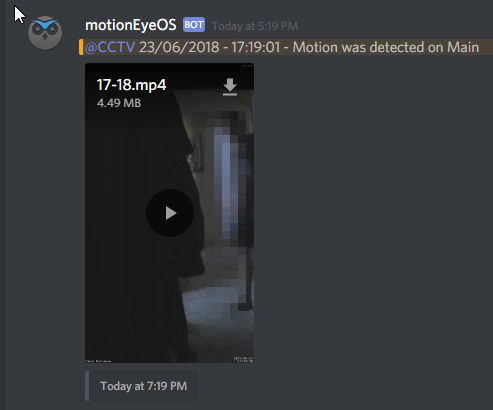
works just fine, gotta make sure it's not over 8mb tho
Bluscream
on 23 Jun 2018
Also take a look at this bit
        _path = self.args.path
        if os.path.isfile(_path) and not os.path.isdir(_path):
            os.remove(_path)
        thumbnail = "%s.thumb"%_path
        if os.path.isfile(thumbnail): os.remove(thumbnail)
that means i'm using discord for notifications AND for storage
Bluscream
on 23 Jun 2018
PS: For security reasons, you REALLY should go over all your posts and remove your webhook url, otherwise ANYONE could post to it and you'd get spammed to shit lol
works just fine, gotta make sure it's not over 8mb tho
Nice! I didn't realise you could upload videos to Discord. I just assumed they wouldn't allow it for storage size reasons (imagine the millions of users uploading 8mb vids, and it's not youtube :O )
IAmOrion
on 23 Jun 2018
that means i'm using discord for notifications AND for storage
Semantics I know, BUT, you're simply deleting the file after sending, so I guess technically you are using it for storage, but in a somewhat workaround-ish manor - eg just a server room full of messages with pics / vids ha
Do message attachments expire in Discord? I don't really use it much
IAmOrion
on 23 Jun 2018
PS: For security reasons, you REALLY should go over all your posts and remove your webhook url, otherwise ANYONE could post to it and you'd get spammed to shit lol
i just invalidated the old one
Bluscream
on 23 Jun 2018
I'm going to pinch this for my own updated script
_path = self.args.path
        if os.path.isfile(_path) and not os.path.isdir(_path):
            os.remove(_path)
        thumbnail = "%s.thumb"%_path
        if os.path.isfile(thumbnail): os.remove(thumbnail)
IAmOrion
on 23 Jun 2018
I don't use discord often, but how did you get '@CCTV' to work and coloured?
EDIT: I don't why, but @everyone works, but using @IAmOrion (my username) doesn't - odd
EDIT AGAIN: Nevermind.... I figured it out. I had to use '<@190586099821838336>'
IAmOrion
on 23 Jun 2018
@Bluscream
import pycurl, cStringIO, glob, os, json, pytz, datetime, time, argparse
from argparse import RawDescriptionHelpFormatter

class motionEyeDiscordWebHook(object):
    parser = argparse.ArgumentParser(description="Discord Webhook Script for MotionEye.\nYou can use this script as a Motion Event Notification",epilog="Written by James Tanner aka IAmOrion.\nhttps://github.com/IAmOrion/MotionEyeOS_Add-On_Scripts\n ", formatter_class=RawDescriptionHelpFormatter)
    parser.add_argument("url", help="Discord Webhook URL", type=str)
    parser.add_argument("-n", "--name", help="Camera name", type=str, default="Camera")
    parser.add_argument("-p", "--path", help="Camera folder path", type=str, default="/data/output/Camera1/")
    parser.add_argument("--usetitle", help="Adds a message title.  Use with --title 'Your Title' ", action='store_true')
    parser.add_argument("--title", help="Message Title", type=str, default = "__**Motion Detected!**__\n\n")
    parser.add_argument("-m", "--mention", help="Mention User(s)", type=str)
    parser.add_argument("-f", "--folder", help="Still Image -> Image File Name - eg if Image File Name is set to %%d-%%m-%%Y/%%H-%%M-%%S we want the folder, in this case it would be %%d-%%m-%%Y", type=str, default="%d-%m-%Y")
    parser.add_argument("-l", "--lastsnap", help="Uses MotionEye's lastsnap.jpg alias - only valid when using LOCAL Storage.  Won't work with Network Shared Storage", action='store_true')
    parser.add_argument("-t", "--time", help="%%d/%%m/%%Y - %%H:%%M:%%S from motionEyeOS", type=str)
    parser.add_argument("--datetimeformat", help="For example: %%d/%%m/%%Y - %%H:%%M:%%S", type=str, default="%d/%m/%Y - %H:%M:%S")
    parser.add_argument("-q", "--frame", help="%%q option from motionEyeOS (Frame number)", type=int)
    parser.add_argument("--noimage", help="If no picture found, sends a 'noimage' placeholder instead of sending no image at all. Image used must exist at: /data/output/noimage.jpg", action='store_true')
    parser.add_argument("--delete", help="Will delete file(s) after sending", action='store_true')
    parser.add_argument("--debug", help="Prints debug information to console", action='store_true')
    args = parser.parse_args(); MESSAGE = ""

    if args.usetitle:
        MESSAGE += "%s" % args.title

    if args.mention:
        MESSAGE += "%s " % args.mention

    def get_latest_file(self):
        if os.path.isfile(self.args.path) and not os.path.isdir(self.args.path):
            return self.args.path

        TODAYS_DATE = datetime.datetime.today().strftime(self.args.folder)
        TODAYS_DATE_FOLDER = self.args.path + TODAYS_DATE + '/*.jpg'
        LIST_OF_FILES = glob.glob(TODAYS_DATE_FOLDER)
        try:
            return max(LIST_OF_FILES, key=os.path.getctime)
        except ValueError:
            if self.args.lastsnap and os.path.isfile(self.args.path + "lastsnap.jpg") and not os.path.isdir(self.args.path + "lastsnap.jpg"):
                    return self.args.path + "lastsnap.jpg"
            else:
                if self.args.noimage:
                    return "/data/output/noimage.jpg"
                else:
                    return ""

    def send_to_discord(self, FILENAME=""):
        buf = cStringIO.StringIO()
        c = pycurl.Curl()
        c.setopt(c.URL, self.args.url)
        c.setopt(c.WRITEFUNCTION, buf.write)
        c.setopt(c.HTTPHEADER, ["Content-Type: multipart/form-data"])
        c.setopt(c.USERAGENT, "MotionEyeOS")
        utc = pytz.timezone('UTC')
        now = utc.localize(datetime.datetime.utcnow())
        la = pytz.timezone(os.path.realpath('/data/etc/localtime').replace('/usr/share/zoneinfo/posix/',''))
        local_time = now.astimezone(la)

        UTC_TIMESTAMP = local_time.strftime('%Y-%m-%dT%H:%M:%S.000Z')
        MESSAGE_TIME = local_time.strftime(self.args.datetimeformat)

        if self.args.time: MESSAGE_TIME += " (MEOS Time: %s)" % self.args.time
        if self.args.frame: MESSAGE_TIME += " [Frame: %s]" % self.args.frame

        self.MESSAGE += MESSAGE_TIME + " | Motion was detected on %s" % self.args.name

        if os.path.isfile(FILENAME):
            c.setopt(c.HTTPPOST, [("payload_json", json.dumps({ "content": self.MESSAGE })), ("file", (c.FORM_FILE, FILENAME,))])
        else:
            c.setopt(c.HTTPPOST, [("payload_json", json.dumps({ "content": self.MESSAGE }))])

        c.setopt(c.VERBOSE, self.args.debug)
        c.perform()
        c.close()
        f = buf.getvalue()
        buf.close()

        if self.args.delete:
            _path = self.args.path

            if os.path.isfile(_path) and not os.path.isdir(_path):
                os.remove(_path)
                thumbnail = "%s.thumb" % _path

                if os.path.isfile(thumbnail): os.remove(thumbnail)

        if self.args.debug: print(f)

if __name__ == '__main__':
    wh = motionEyeDiscordWebHook()
    wh.send_to_discord(wh.get_latest_file())
For what it's worth, I'll never use Videos and I'm not sure where you're getting the eventid from (is it a "hidden" flag so to speak)
Also, check my booleans: parser.add_argument("--usetitle", help="Adds a message title. Use with --title 'Your Title' ", action='store_true') - Doing it that way means simply adding --usetitle or --debug results in true. Leaving those flags off does nothing.
Your current way requires a True or False to parsed with it. So by omission it's false because of the default, but it's easier to just use --debug instead or --debug True for example :)
IAmOrion
on 23 Jun 2018
I'm not sure where you're getting the eventid from (is it a "hidden" flag so to speak)

Bluscream
on 23 Jun 2018
Well I'll be damned! I was looking at the option in Motion Notification options... I didn't pay enough attention to realise you could action a script upon media creation. That's really handy!! Thanks
IAmOrion
on 23 Jun 2018
No problem mate, you might want to add me to the credits tho c:
Bluscream
on 23 Jun 2018
No problem mate, you might want to add me to the credits tho c:
I'll give you 5% credit for converting it to a class lol
(I will genuinely give credit when I upload the final v to my github)
IAmOrion
on 23 Jun 2018
okay :D
Bluscream
on 23 Jun 2018
Hey there,
I've been trying to make this work and have had no luck. I've used IAmOrion's pushover script and it still doesn't work.
I'm not that good at this stuff, would appreciate the help :)
 marshman24
on 11 Jul 2018
marshman24
on 11 Jul 2018
@marshman24 what are you trying to do? what have you done so far?
Can you paste your code here please.
IAmOrion
on 12 Jul 2018
Sorry, I just decided to use Pushover's email service, which send email notifications to the app.
marshman24
on 12 Jul 2018
If you check the webhook.py source of motioneyepi, it only sends to the webhook the querystring key-values pairs (as added to the webhook URL) as json
 elif options.method == 'POSTj':  # json
        headers['Content-Type'] = 'application/json'
        data = urlparse.parse_qs(parts.query)
        data = {k: v[0] for (k, v) in data.iteritems()}
        data = json.dumps(data)
        url = options.url.split('?')[0]
so i hardly see how the original implementation could allow for such detailed sending as implemented nicely by @Bluscream and @IAmOrion . Just my 2 cents... Maybe the scripts above should be added to the motioneyepi codebase...
 mclerteusq
on 29 Sep 2018
mclerteusq
on 29 Sep 2018
Hey @IAmOrion and @Bluscream,
Wanted to say thanks for your efforts on this. I took what you guys did, made some minor tweaks and added some basic documentation to make it easier for anyone else to achieve the same.
Feedback welcomed :-)
https://github.com/kabadisha/motioneyeos-discord-notifier
 kabadisha
on 2 Feb 2019
kabadisha
on 2 Feb 2019
Nice ^^
Bluscream
on 2 Feb 2019
Will throw my script for Slack into the mix, if anyone is interested. One script for multiple cameras thanks to @kabadisha. Again, built on the great work from @IAmOrion. I included a config file to keep the file and calls a little cleaner (also helps to ensure that I don't check-in my Bearer Token ;). Feedback welcome!
 mhaddy
on 25 Feb 2019
mhaddy
on 25 Feb 2019
@mhaddy love your work - I may steal borrow the config file idea and implement it on my discord flavour also :-)
FYI if you trigger the script from Settings > File Storage > Run A Command then it will get triggered for both images and video. This is how I use my script and it results in two messages to Discord for each motion event. One with the still image and one with the video attached.
kabadisha
on 21 May 2019
Thanks @kabadisha!
Have you experimented with training an external ML model like GCP AutoML, and using that to alert Discord/Slack? I'm trying Motion's determination of what's motion I'd care about and what's a tree swaying or a shadow on a sunny day are... Less than desirable, regardless of my configuration. I'm wondering now that I have thousands of images and video, whether I could train my own model...
mhaddy
on 22 May 2019
I haven't yet, but have it on my to-do list - I just haven't been able to make the time.
I actually found an article by someone else who has beaten us to it and was going to try and replicate their work:
Their approach is to use pre-trained AI to recognise humans, which seems sensible. They even followed up with a version that uses usb hardware acceleration to run locally.
kabadisha
on 22 May 2019
https://www.bouvet.no/bouvet-deler/adding-ai-to-edge-devices-with-the-movidius-neural-compute-stick
Damn the new one is even better, i'm really struggling to stay with meOS :(
Bluscream
on 22 May 2019
Been reading through this and it looks like it is exactly what im looking for to get notifications from my cameras > discord. I am getting an error when running the script manually and wondered if anyone is still available to help.
error:
Traceback (most recent call last):
  File "notify-discord.py", line 105, in <module>
    wh.send_to_discord(wh.get_latest_file())
  File "notify-discord.py", line 64, in send_to_discord
    c.setopt(c.URL, "https://discordapp.com/api/webhooks/" + self.args.hookid + "/" + self.args.hooktoken)
TypeError: cannot concatenate 'str' and 'NoneType' objects
i have also changed my storage directory to 'home/tralph/CCTV' and i'm not sure where to update this. Any ideas?
 0tralpn
on 24 Sep 2019
0tralpn
on 24 Sep 2019
Related issues
 darrenc90
·
3Comments
darrenc90
·
3Comments
 dimgod59
·
4Comments
dimgod59
·
4Comments
 zorrotenai
·
3Comments
zorrotenai
·
3Comments
 Mikiya83
·
6Comments
Mikiya83
·
6Comments
 tehXor
·
3Comments
tehXor
·
3Comments
Most helpful comment