Motioneyeos: RPi Zero W - Configuring in AP mode
i think i found a bug in the configuration...
i need to create a cam with raspi zero w, if i connect directly with wifi it's ok.
i found in wiki to configure with hostapd to create an access point, i need that function because the cam is far away from internet!
but if i configure a clean image with only hostapd.conf,dnsmasq.conf but it always reboot because it can't find wired network...OF COURCE IT CAN'T!
i try to put os.conf in boot partition with os_networkless="false" but it can't stop.
any idea????
 intel2004
All 16 comments
if i configure first wpa_supplicant before and next hostapd it always connect to configuration of wpa_supplicant and not create the AP if i already remove the file from boot directory...
intel2004
on 25 Mar 2018
OK i found a way, i have to disable my home wifi network already saved with wpa_supplicant and now create the accesspoint
intel2004
on 25 Mar 2018
@intel2004 the boot file is used only once, at first boot. Either remove the /etc/wpa_supplicant.conf from your data partition or reflash your setup from scratch without it.
 ccrisan
on 25 Mar 2018
ccrisan
on 25 Mar 2018
if i flash a new image, put the hostapd and dnsresolve configuration file and bootup...
searching for wired lan, then rebooting in loop.
on raccomandation for raspberrypi zero says to use image for first raspberry, i don't know if that is useful.
i already configure that now, but in strange way.
on SSH access if i try to edit or remove some file they say that i don't have permission even in root mode.
i have to mount ext2 partition on another system to do that?
intel2004
on 25 Mar 2018
Set os_networkless="false" in your /data/etc/os.conf. You'll need a Linux PC for that. Otherwise, you could provide an os.conf file on your boot partition, but you'll need to provide the entire file. You can use this as an example.
ccrisan
on 25 Mar 2018
Same issue, haven't found a solution. Took fresh copies of latest images, and added the hostapd and dnsmasq config files to boot directory. I added os_networkless="true" to os config file in etc folder. First boot goes in endless reboot cycle.
 LordFinland
on 20 May 2018
LordFinland
on 20 May 2018
@LordFinland please attach your boot.log and messages.log files.
ccrisan
on 20 May 2018
I will asap (At school currently). I got around the issue by creating the WiFi AP in Raspbian lite according to the official documentation. I then installed Motioneye as a package separately. I will retry my earlier method and upload the log files this evening.
LordFinland
on 21 May 2018
So, having followed instructions found here Since there is no /data/etc/os.conf file, or directory, I changed the file /etc/os.conf and added [os_networkless="true"] to the end. I also added the two configs as per your instructions all before first-boot.
Fortunately however, I didn't encounter the same problem as yesterday. The system boots up just fine, but hostapd encountered errors with each entry in its configuration file. Maybe the indentation? So adding os_networkless to the os.conf file works just fine.
boot.log
hostapd.log
motioneye.log
messages.log
LordFinland
on 21 May 2018
Indentation is not to blame it seems... I tried it (The hostapd configuration changed) again, this time with a completely different result.
hostapd.log
LordFinland
on 21 May 2018
@LordFinland if you could show us your hostapd.conf file, we could point out possible problems inside it :)
ccrisan
on 21 May 2018
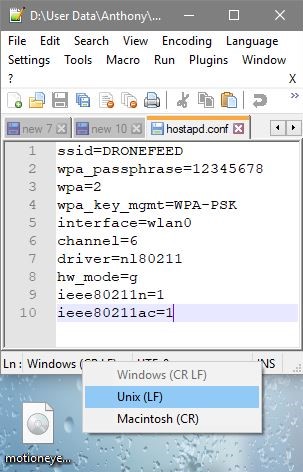
My assumption is that there's a problem with newline characters (which could be Windows-style instead of Unix-style).
ccrisan
on 21 May 2018
Yes, probably. I created the .conf file on windows using notepad++.
ssid=DRONEFEED
 wpa_passphrase=12345678
 wpa=2
 wpa_key_mgmt=WPA-PSK
 interface=wlan0
 channel=1
 driver=nl80211
 hw_mode=g
 ieee80211n=1
 ieee80211ac=1
That's pasted from the conf file. GitHub doesn't support the file type it seems. Ill re-write the conf files and do the process solely on my parrot sec computer tonight. Maybe changing the format type in the editor to UNIX might have helped :-)
LordFinland
on 22 May 2018
I changed to UNIX encoding as from above screenshot. Everything works great now. AP runs fine and motioneyeos is natively installed. Yay. I would have never guessed what the issue was.... Sounds like my grade wont be a zero after all :-)
And as for @intel2004 you said you set "os_networkless" option in os.conf to false? If you want the OS to be networkless, it should be true, not false right? At least I set it as true and it works. Secondly, with the latest motioneyeos build (Pi 0 W [raspberry pi] build 20180401) you need to change the default os.conf file in the data partition under /etc/os.conf not /data/etc/os.conf (which doesn't exist). Lastly, changing hostapd configuration to use "n" network mode doesn't seem to work either, so stick with g.
Thanks ccrisan for the help. And the amazing project. Currently still my favorite pi project done out there :-)
LordFinland
on 23 May 2018
os_networkless should be set to true, as its name suggests. The file that should be edited is /boot/os.conf, before the first boot, or /data/etc/os.conf, if the system has been booted at least once.
ccrisan
on 28 May 2018
I looked for an os.conf file in /boot but it seemed to be non-existent. I could only find it in the data partition under etc. I tried creating a copy of the os.conf in the boot partition before first boot but it didn't help, the system seemed to apply the file from the data partition instead during first-boot.
LordFinland
on 29 May 2018
Related issues
 kmckmc01
·
7Comments
kmckmc01
·
7Comments
 dimgod59
·
4Comments
dimgod59
·
4Comments
 andrei-volkau
·
3Comments
andrei-volkau
·
3Comments
 tehXor
·
3Comments
tehXor
·
3Comments
 wolfi74
·
5Comments
wolfi74
·
5Comments
Most helpful comment
I changed to UNIX encoding as from above screenshot. Everything works great now. AP runs fine and motioneyeos is natively installed. Yay. I would have never guessed what the issue was.... Sounds like my grade wont be a zero after all :-)
And as for @intel2004 you said you set "os_networkless" option in os.conf to false? If you want the OS to be networkless, it should be true, not false right? At least I set it as true and it works. Secondly, with the latest motioneyeos build (Pi 0 W [raspberry pi] build 20180401) you need to change the default os.conf file in the data partition under /etc/os.conf not /data/etc/os.conf (which doesn't exist). Lastly, changing hostapd configuration to use "n" network mode doesn't seem to work either, so stick with g.
Thanks ccrisan for the help. And the amazing project. Currently still my favorite pi project done out there :-)