Hello
I have 4 cameras connected to my raspberry and I would like to change camera order (camer id 1 to become cameraid 4)
Is that possible? From the GUI camera id is not editable
thanks
 sorriso93
All 17 comments
Not yet possible, but planned.
 ccrisan
on 26 Oct 2017
ccrisan
on 26 Oct 2017
Any idea when this is planned?
 Darthmonkey
on 6 May 2018
Darthmonkey
on 6 May 2018
+1 on this. I have 4 RPi Zero's, and using a RPi 3 with 1TB HDD as a "hub" .... but as someone with OCD it really bugs me that I can't order the cameras. I've named them incrementally and their IP's are also incremental. Despite adding Camera 1 first, then Camera 2, Camera 2 still shows first. I tried deleting them all, then added added them in reverse order... but Camera 2 is still showing as the 1st camera.
 IAmOrion
on 19 Jun 2018
IAmOrion
on 19 Jun 2018
Well... it depends how brave you are... it looks as though you could simply edit the /data/etc/thread-n files, then reboot. It could work, although if your R Pi 3 bursts into flames, it is all your fault 😄
 Chiny91
on 20 Jun 2018
Chiny91
on 20 Jun 2018
@Chiny91 - Funny you should say that..... I literally just renamed them to the order I wanted. It wasn't working at first, so went to get some food... just come back and saw your reply, then smacked my self in the head for not rebooting!! haha - just rebooted and all are in the order I wanted now :)
IAmOrion
on 20 Jun 2018
@Chiny91 - Can you advise on which ID to change to do this ? I'm more than willing to give it a go, but when I switch the ID Tags around - I get duplicate cameras :\
Would appreciate advice as I'd love to switch mine around a bit !
 McMoobud
on 19 Jul 2018
McMoobud
on 19 Jul 2018
@McMoobud
The files are here: /data/etc/thread-n.conf where n is a number.
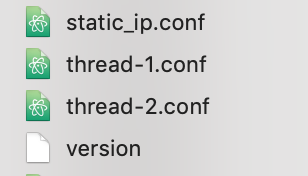
So for example, using my screenshot for reference, if you wanted to swap the camera order, rename thread-1.conf to thread-1_.conf, rename thread-2.conf to thread-1.conf, then rename (again) the newly renamed thread-1_.conf to thread-2.conf
Then reboot
IAmOrion
on 19 Jul 2018
Thanks @IAmOrion !
I've done that, but it would appear it's not done anything which is odd.
Might be how I've got mine configured or setup. I'll detail :
Camera 1 - Garden View
Raspi2 with Logitech Webcam
Setup as the main MotionEye instance with the second camera attached as a MotionEye Remote Camera:
Camera 2 - Front Door
Raspi Zero W with 5mp Raspi Camera module
Added remotely to the first camera.
Maybe because I'm looking at Camera 1's interface directly, I could just switch and add Camera 1 to Camera 2's interface?
I'll try that now :D
Thanks again for your help, much appreciated!
McMoobud
on 19 Jul 2018
Sorted it 👍
Figured it would be best to setup a hub as per the instructions from @ccrisan so have done that and added the camera in the order I wanted them.
:D
McMoobud
on 19 Jul 2018
This worked for me on motionEyeOS 20180627. For example:
ssh [email protected]
cd /data/etc
ls -la thread-*
mv thread-2.conf thread-10.conf
mv thread-1.conf thread-2.conf
mv thread-10.conf thread-1.conf
reboot
 jsglazer
on 30 Sep 2018
jsglazer
on 30 Sep 2018
This worked for me on motionEyeOS 20180627. For example:
ssh [email protected]
cd /data/etc
ls -la thread-*
mv thread-2.conf thread-10.conf
mv thread-1.conf thread-2.conf
mv thread-10.conf thread-1.conf
reboot
Thanks, worked for me perfectly, once rebooted I did have to turn "Video Device" On for all the cameras that I'd moved.
 Johnny-McCode
on 5 Mar 2019
Johnny-McCode
on 5 Mar 2019
Would be nice to have as I'm always moving cameras around
 RichardRadford
on 22 Sep 2019
RichardRadford
on 22 Sep 2019
+1
 hspaay
on 2 Feb 2020
hspaay
on 2 Feb 2020
looking for a solution as well.. /data/etc doesnt exist on my setup.
 ctrl50
on 10 Mar 2020
ctrl50
on 10 Mar 2020
In newer versions the file names changed from 'thread-X.conf to camera-X.conf.
If you don't have /data/etc, try looking in /etc/motioneye (assuming you are only using motionEye, and not motionEyeOS)
 starbasessd
on 10 Mar 2020
starbasessd
on 10 Mar 2020
Any updates on configuring this in the UI?
 PProvost
on 5 Aug 2020
PProvost
on 5 Aug 2020
On a RPi4 I simply swapped the USB cables for my two camera around(!) Both cameras into the USB 2.0 ports so just flip-flopped. Yes, shocked me was that simple! Hope this trick works for others.
 Barry-IA
on 2 Oct 2020
Barry-IA
on 2 Oct 2020
Related issues
 JasonMorris1
·
5Comments
JasonMorris1
·
5Comments
 wolfi74
·
5Comments
wolfi74
·
5Comments
 andrei-volkau
·
3Comments
andrei-volkau
·
3Comments
 manianac
·
5Comments
manianac
·
5Comments
 dimgod59
·
4Comments
dimgod59
·
4Comments
Most helpful comment
This worked for me on motionEyeOS 20180627. For example:
ssh [email protected]cd /data/etcls -la thread-*mv thread-2.conf thread-10.confmv thread-1.conf thread-2.confmv thread-10.conf thread-1.confreboot