Motioneye: MotionEye - does it run on Chrome 76.0.3809.100?
Hi, can you please check if MotionEye does work on Chrome 76.0.3809.100 64bit slovak language? I have no stream from cameras. It works normally on Edge. Cache was cleared. Thank you
 potto
potto
All 21 comments
I was just in the process of posting about this. I'm on Google Chrome for Android 76.0.3809.89 and it stopped working. I disabled it to revert to an older version and it worked. As soon as it updates it breaks the stream view. Another family members phone was working till I updated it to the newest chrome and broke theirs. They aren't happy with me.
So, @ccrisan do you have any wisdom to share with is since it appears that Google changed/broke something in the latest versions of Chrome? It's also affecting the desktop version of Chrome now that I went to check my version and it updated to 76.0.3809.100 (Official Build) (64-bit).
FireFox works fine.
Thanks
 AZRadiohead
on 7 Aug 2019
AZRadiohead
on 7 Aug 2019
Chiming in as well, observed as an update from Chrome 75 to 76 reproduced this behavior. I'm seeing a spinning indicator with no errors in Chrome's console. Other browsers work fine, as reported.
I only use a single webcam, so I spent a while checking the cam and nginx reverse proxy config before checking Github for issues and confirming Chrome as the common factor.
Motioneye's logs don't show any errors, while Nginx's error logs show this interesting snippet, minus identifying info (I use motioneye under https://host/cam/). Let me know if there's any other logs we can gather to identify what might be cutting the stream up.
2019/08/07 14:48:49 [error] 16619#16619: *9205 upstream prematurely closed connection while reading response header from upstream, client: 192.168.1.1, server: redacted, request: "GET /cam/picture/1/current/?_=1
565207319188&_username=&_signature= HTTP/1.1", upstream: "http://internalIP:8765/picture/1/current/?_=1565207319188&_username=&_signature=", host: "redacted", referrer: "https://redacted/cam/"
 breakingspell
on 8 Aug 2019
breakingspell
on 8 Aug 2019
The fix for this issue is already on motionEye dev branch: https://github.com/ccrisan/motioneye/commit/b22ef62dfa02dc5b09c84fca557f561043eb6f78.
The build server is temporarily down, but I'll try to put together a new nightly build throughout this week.
 ccrisan
on 8 Aug 2019
ccrisan
on 8 Aug 2019
Confirmed that the changes in the commit did the trick. Thanks!
breakingspell
on 8 Aug 2019
@ccrisan any progress in the hotfix? (as I understand after the hotfix we can update automatically the os and web interface using Software Update Check, am I right?)
 woznyp
on 8 Aug 2019
woznyp
on 8 Aug 2019
I'm not sure if that's all we have to do.
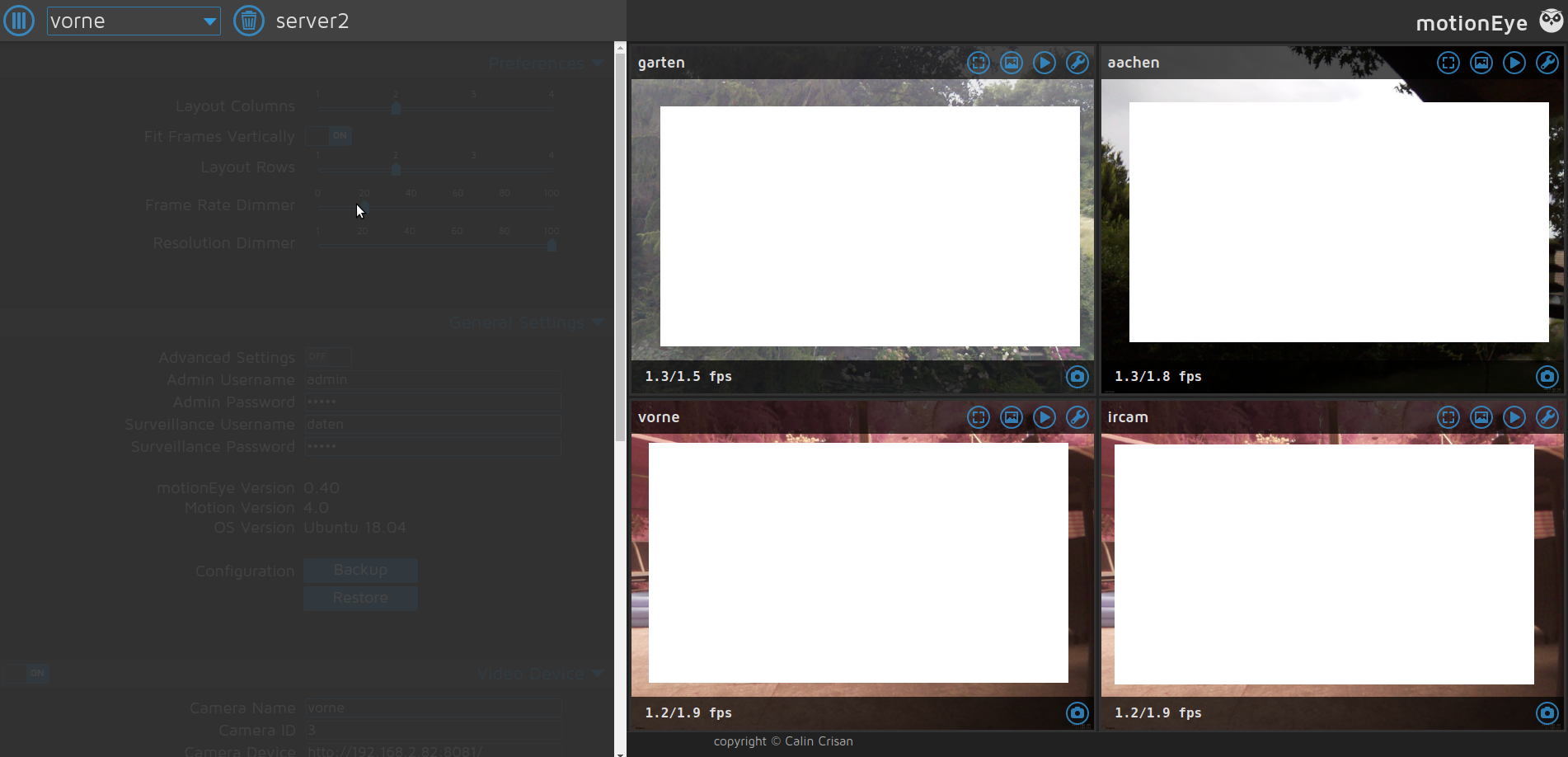
I now see my previews again, but a lot of things are broken.
- Fullscreen doesn't work
- The configuration pane on the left is completely grayed out
- 2 of 4 cameras show the same preview picture but the picture browser for them works
 grhangelone
on 8 Aug 2019
grhangelone
on 8 Aug 2019
@grhangelone did you reboot Raspberry after changing JavaScript files? Also clear browser cache and history.
This is what I did and now I see streams and I can configure any of mine cameras (native and usb)
woznyp
on 8 Aug 2019
I did clear the cache and also tried another browser.
Opera does the same.
So i might have another problem here.
Also I'm on ubuntu and restarted server and service several times now.
Motion itself works perfect.
I get periodic screenshots for all 4 cameras.
/edit
ok, my bad.
i added the 4th camery by copying the 3rd conf.
but i forgot to change the stream port.
if you have two threads with the same stream port, everything works, except the live previews :)
but i still cannot use fullscreen or go to the settings.
the fullscreen button does nothing and the settings are grayed out
grhangelone
on 8 Aug 2019
After looking at what was fixed in the dev branch I found a temporary solution to fix it in Chrome on the Desktop (PC in my case) and on my Android Chrome.
In your Chrome browser you can go to chrome://flags/#enable-lazy-image-loading and change the option from Default to Disable and reload Chrome. The cameras worked again after I disabled 'Lazy Frame Image Loading'. There is also another flag, chrome://flags/#enable-lazy-frame-loading but I did not need to change it for mine to work.
Not knowing all the ramification of this it's probably best to reset these once you have the latest fix for Motioneye. I'm sure the developer will chime in if there's anything additional we should be aware of.
AZRadiohead
on 8 Aug 2019
Can be worked around for now by disabling chrome://flags/#enable-lazy-image-loading
 ryanhz
on 10 Aug 2019
ryanhz
on 10 Aug 2019
@ccrisan still have those code changes (b22ef62) on my rpi zero w and can confirm that they work ok with default flag on:
- Chrome 76 Windows 64
- IE11 Windows 64
- Chrome 76 on ios
- Safari on ios
 bob-lee
on 10 Aug 2019
bob-lee
on 10 Aug 2019
I'll make sure to issue a new release today. I'll have to take care of motionEyeOS as well.
ccrisan
on 11 Aug 2019
Version 0.41rc1 has now been published. Please install it, test it and let us know if anything should be adjusted or fixed before 0.41 stable.
ccrisan
on 11 Aug 2019
0.41rc1 fixes the issue for me. Thanks.
 smokeybandit
on 13 Aug 2019
smokeybandit
on 13 Aug 2019
Same here running Motion 4.2.2 and Motioneye 0.41rc1 on Ubuntu with the rc1 update all loading issues fixed.
 Prutsium
on 19 Aug 2019
Prutsium
on 19 Aug 2019
Hello, I've been having this problem as well. Can anyone point me in the correct direction for upgrading motioneye? Thank you!
 jonney2069
on 21 Aug 2019
jonney2069
on 21 Aug 2019
@jonney2069 You can enable prereleases from your Settings menu (Expert Settings). Then update as usual.
potto
on 21 Aug 2019
Post update to pre-release version, wpa_supplicant fails and keeps rebooting on raspberry pi 3 B+. Anyone else facing the issue.?
 transmitamit
on 24 Aug 2019
transmitamit
on 24 Aug 2019
Glad I came across this. Had me scratching my head for a while. Given chrome must of auto updated it self...
 2E0PGS
on 29 Aug 2019
2E0PGS
on 29 Aug 2019
Hi, I have just found out today, 10-04-20, that my motioneye viewing on raspian stretch was not working on two camera I use it on, when I tried to view the stream on Firefox. Thinking something had changed I updated raspian and updated motioneye to latest version. It made no difference. I then decided to use my phone. It worked ok on both cameras. One uses a webcam and other uses the raspberrypi camera. So I then realised it was probably firefox. I then used a laptop I hadn't used for a while and firefox worked ok. It was version 74.01. I let it update to version 75 and tried again. It then did not see the stream from motion eye. So latest firefox has broken the viewing capablity from moitoneye. I noticed a workaround for chrome and tried similar with firefox. That is: about:config and change the lazy-image flag to false. Guess what... it worked. So for now this workaround works.
 glyderman8
on 10 Apr 2020
glyderman8
on 10 Apr 2020
Mine works fine now after updating motion-eye.
2E0PGS
on 13 Apr 2020
Related issues
 ghubjules
·
4Comments
ghubjules
·
4Comments
 jkaberg
·
4Comments
jkaberg
·
4Comments
 anon-tigress
·
3Comments
anon-tigress
·
3Comments
 chrivosie
·
5Comments
chrivosie
·
5Comments
 yanoschik
·
6Comments
yanoschik
·
6Comments
Most helpful comment
After looking at what was fixed in the dev branch I found a temporary solution to fix it in Chrome on the Desktop (PC in my case) and on my Android Chrome.
In your Chrome browser you can go to chrome://flags/#enable-lazy-image-loading and change the option from Default to Disable and reload Chrome. The cameras worked again after I disabled 'Lazy Frame Image Loading'. There is also another flag, chrome://flags/#enable-lazy-frame-loading but I did not need to change it for mine to work.
Not knowing all the ramification of this it's probably best to reset these once you have the latest fix for Motioneye. I'm sure the developer will chime in if there's anything additional we should be aware of.